

2K Games has just released the latest part in the Borderlands series on the PC. Borderlands 3 is a title that a lot of PC gamers have been looking forward to. The game uses Unreal Engine 4 so it’s time to benchmark it and see how it performs on the PC platform.
For this PC Performance Analysis, we used an Intel i9 9900K with 16GB of DDR4 at 3600Mhz, AMD’s Radeon RX580 and RX Vega 64, NVIDIA’s RTX 2080Ti, GTX980Ti and GTX690. We also used Windows 10 64-bit, the GeForce driver 436.30 and the Radeon Software Adrenalin 2019 Edition 19.9.2 drivers. NVIDIA has not included any SLI profile for this title, meaning that our GTX690 performed similarly to a single GTX680.

Gearbox has added a respectable amount of graphics settings to tweak. PC gamers can adjust the quality of Anti-Aliasing, Texture Streaming, Anisotropic Filtering, Material Complexity, Shadows and Draw Distance. There are also options for Environmental Detail, Terrain, Foliage, Characters, Ambient Occlusion, Volumetric Fog and Screen Space Reflections. Players can also enable or disable FidelityFX Sharpening and Camera Motion Blur, and choose between DX11 and DX12. DirectX 12 is currently in beta phase and has long loading times, so we highly recommend using DirectX 11 for now.
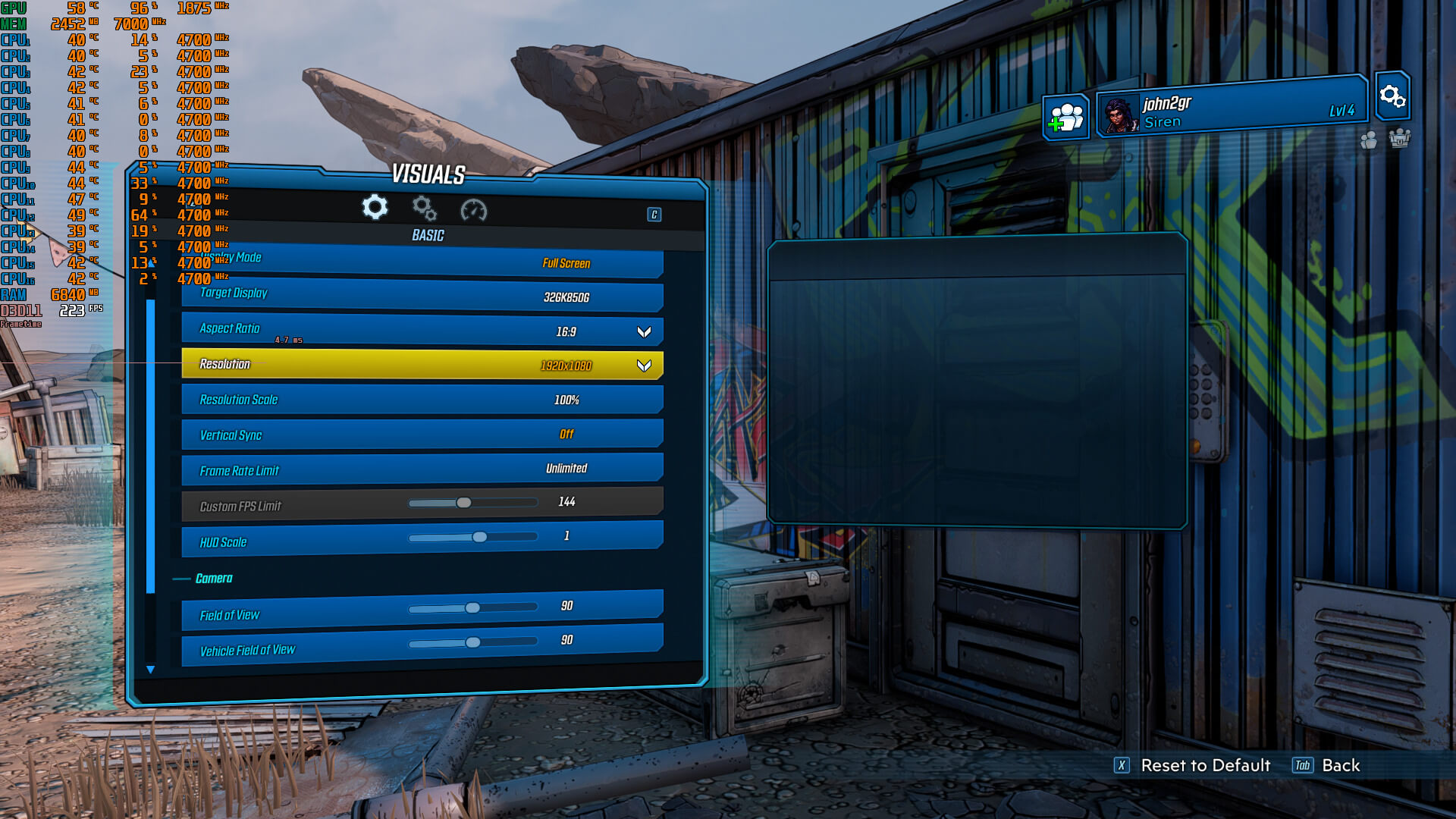
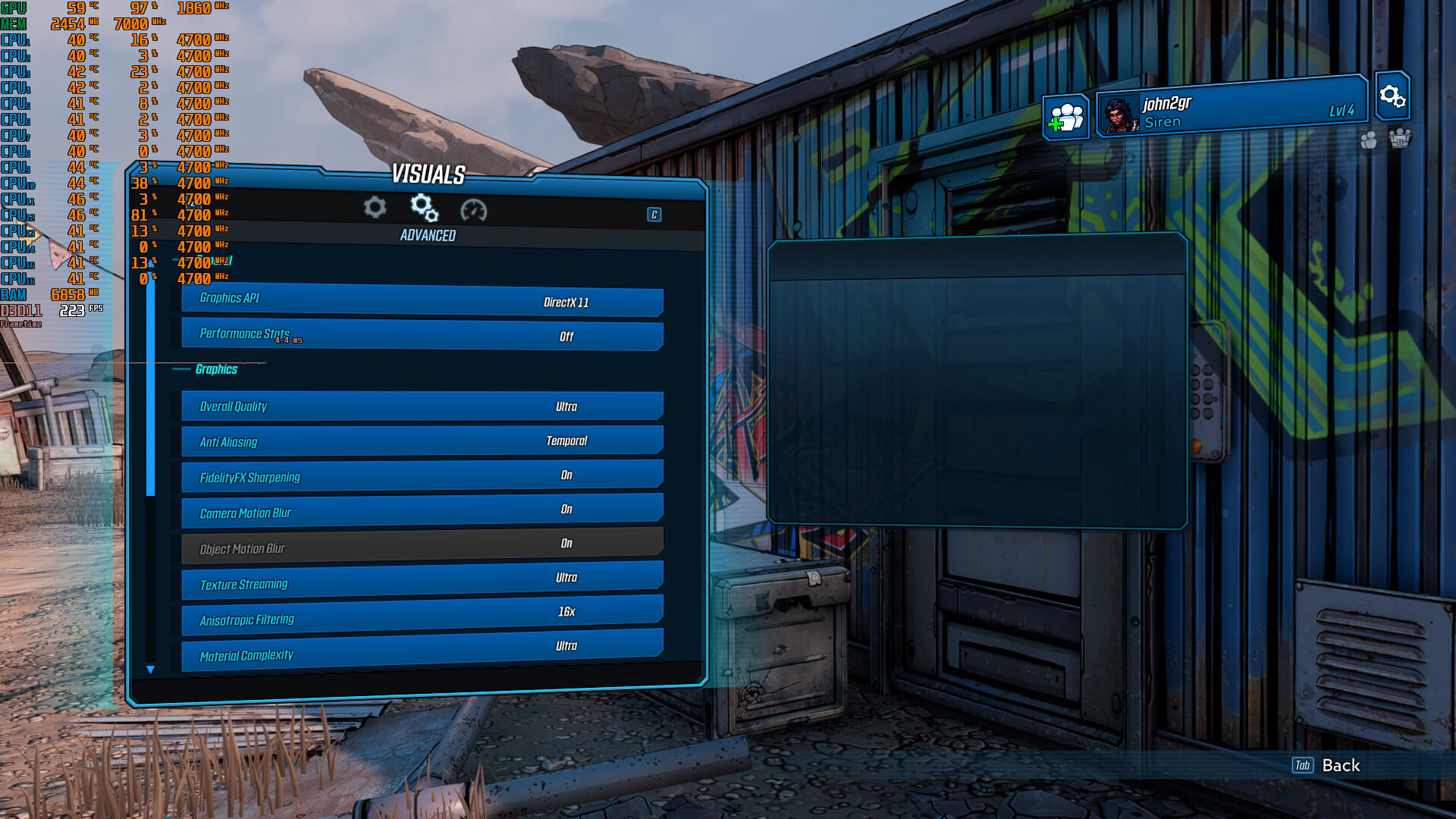
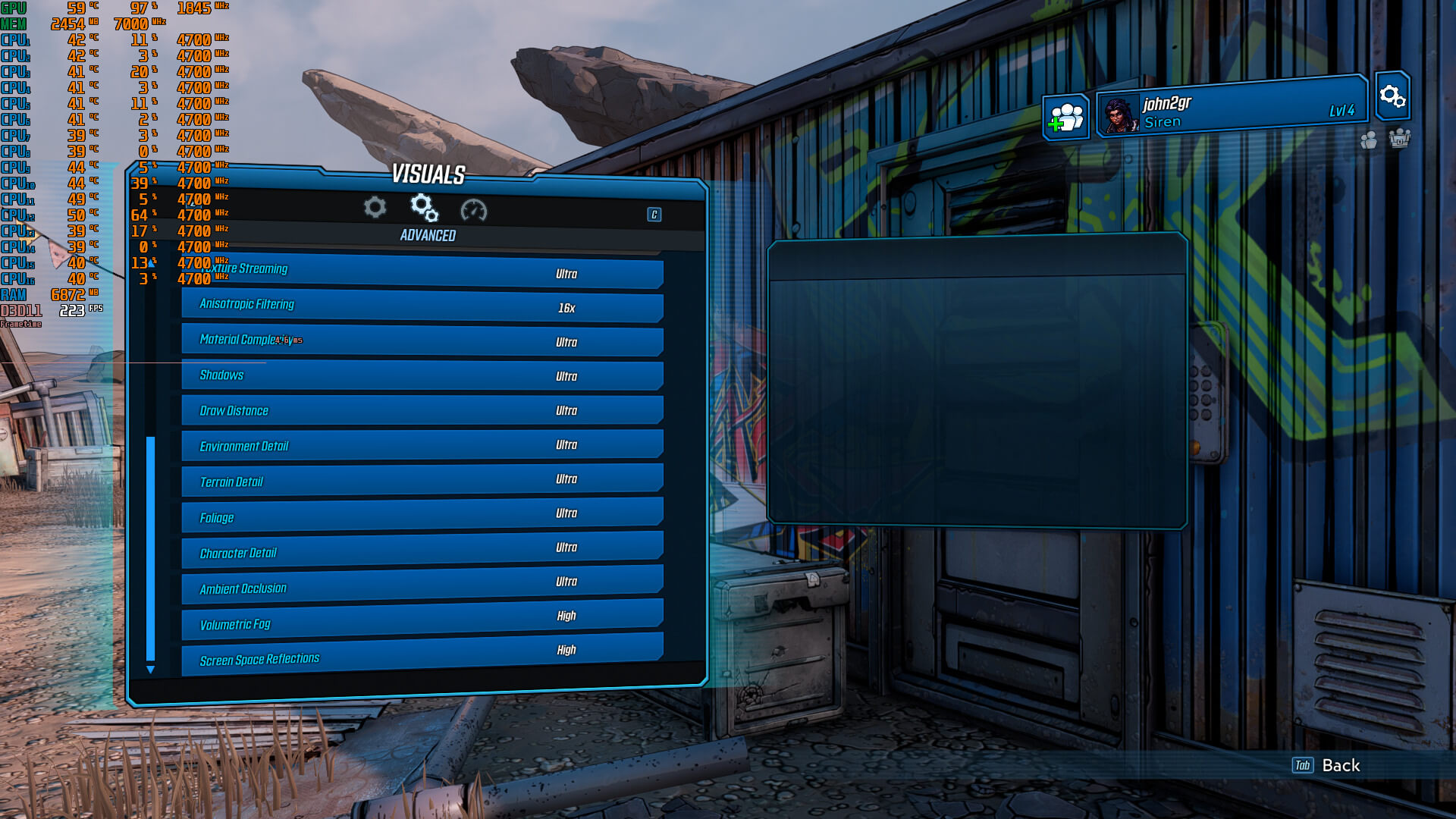
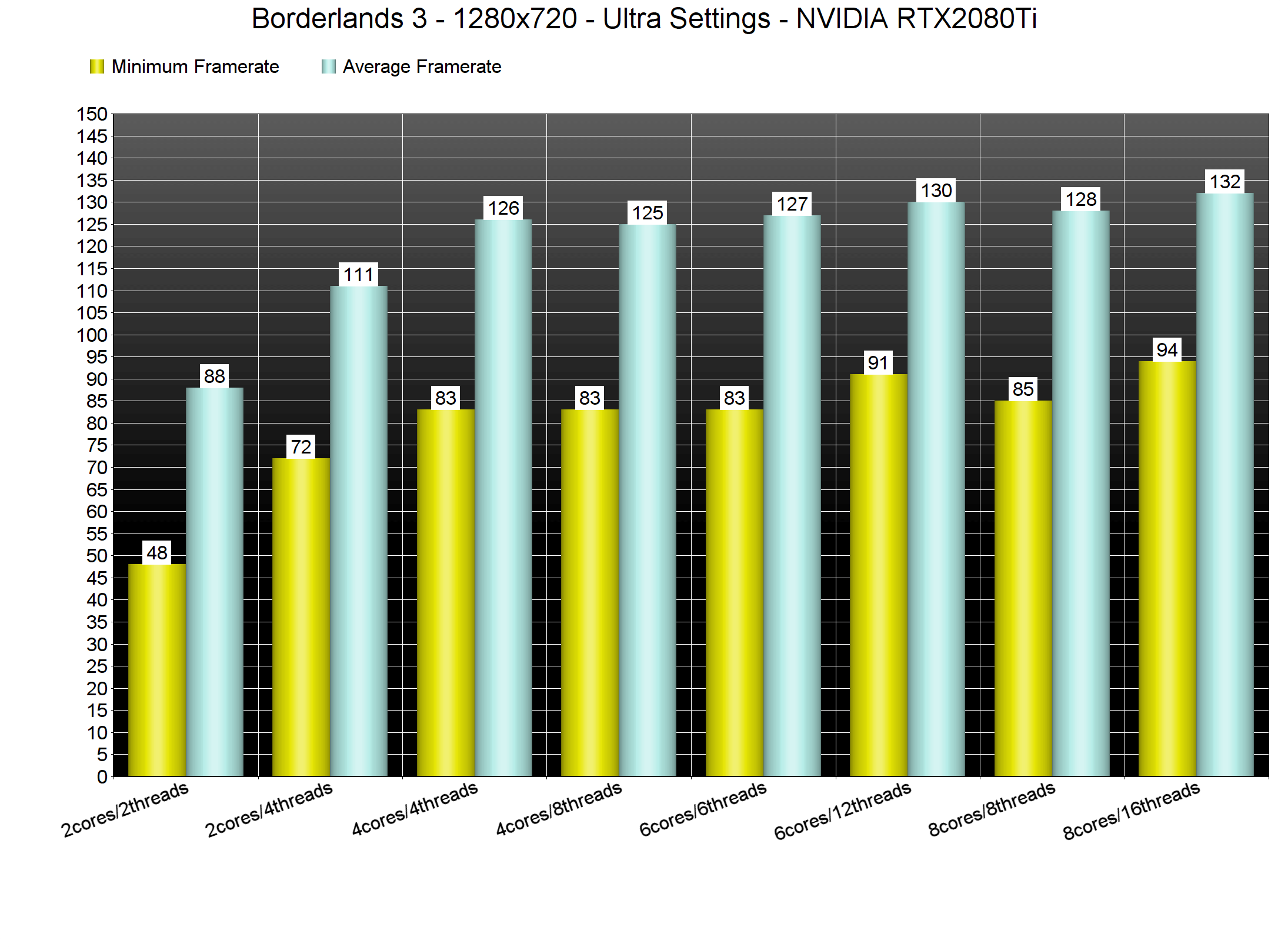
In order to find out how the game scales on multiple CPU threads, we simulated a dual-core, a quad-core and a hexa-core CPU. Since the game comes with a built-in benchmark, you used that for our tests. This benchmark scene is representative of the in-game performance. Moreover, we reduced our resolution to 720p for our CPUs benchmarks so we could avoid any GPU bottleneck.
Borderlands 3 does not require a high-end CPU. Surprisingly enough, even our simulated dual-core system was able to provide a 60fps experience. However, we did experience major stutters on that particular system. These stutters were minimized when we moved to our quad-core and hexa-core systems. Furthermore, and even though Borderlands 3 could not stress our i9 9900K, we noticed major stuttering reduction when we enabled Hyper Threading. Without Hyper Threading, there were stutters when loading new areas in the benchmark scene (especially at the end of the test). When we enabled Hyper Threading, those stutters were almost gone. We experienced the exact same thing on our simulated hexa-core system. As such, we strongly suggest enabling Hyper Threading for this particular title.
Now while the game does not require a high-end CPU, we did notice some performance differences between our Intel i7 4930K and our i9 9900K. At 1080p, there were some drops below 50fps (mainly due to stutters). Ironically, these performance drops on older hardware could have been easily avoided. That’s of course if the game was working properly with DX12. Therefore, owners of older CPUs will have to either experience the long loading times of DX12, or have to face the limitations of DX11.
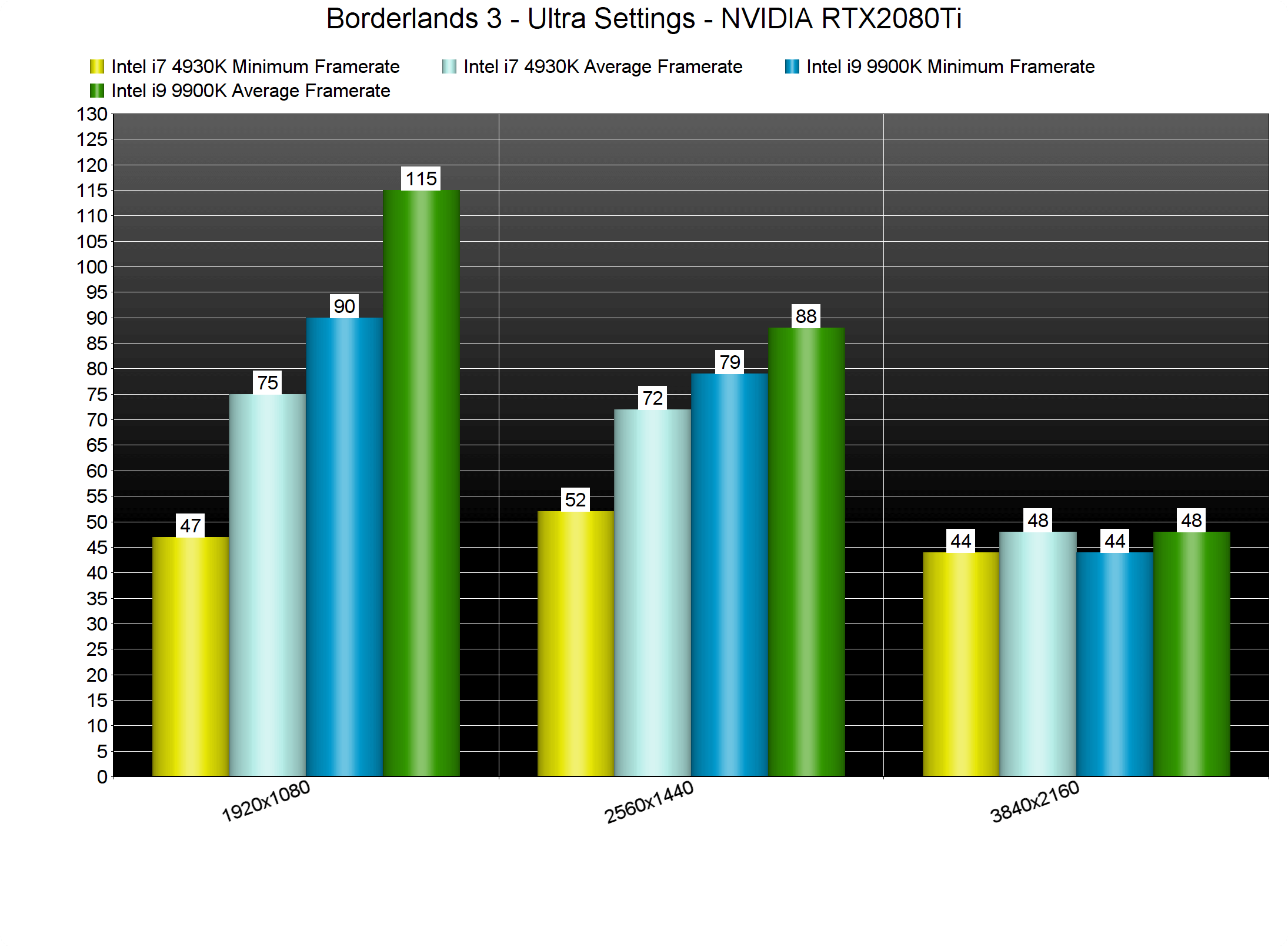
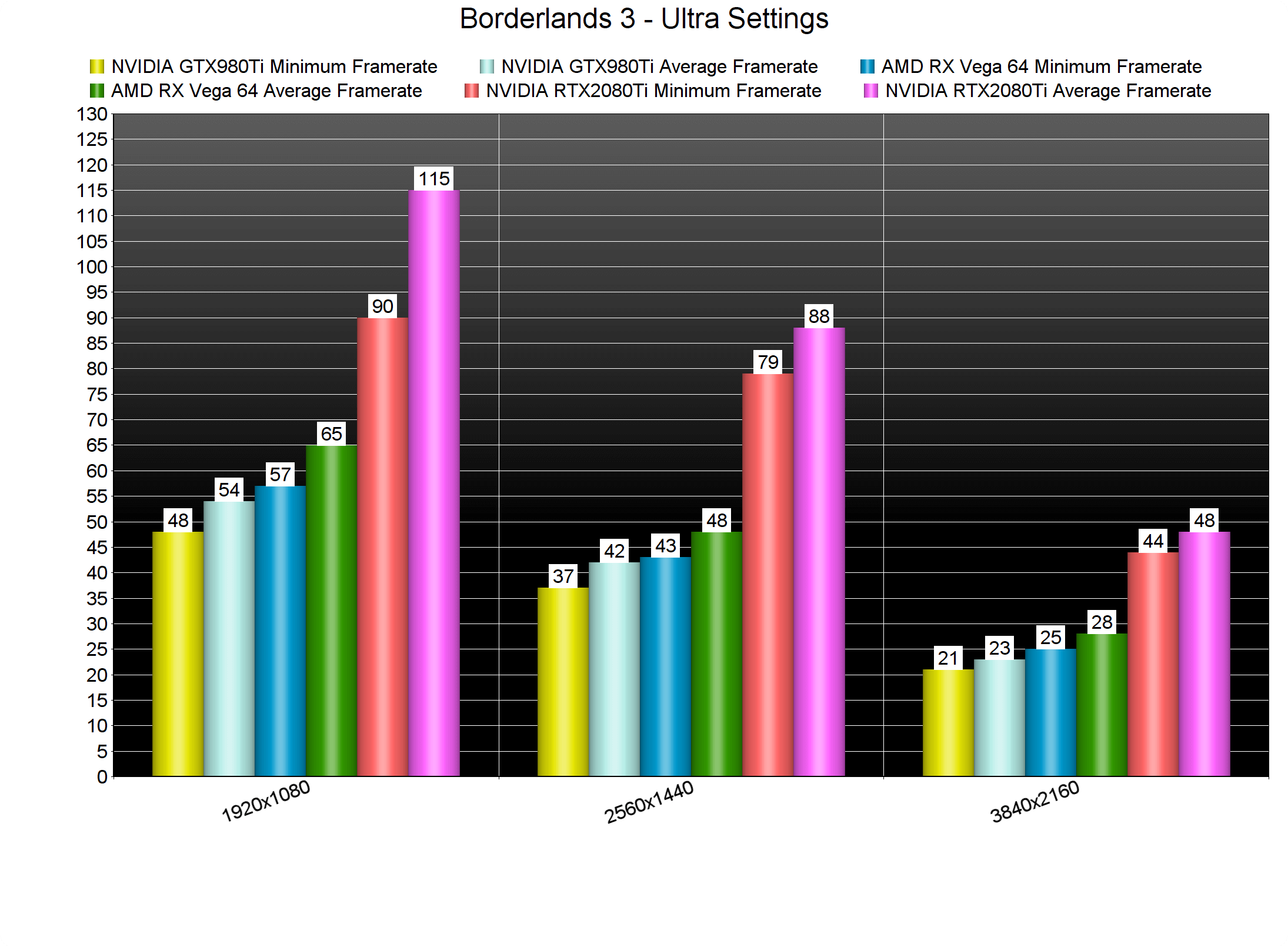
Despite its CPU/memory optimization issues due to DX11, Borderlands 3 is mainly a GPU-bound title. At 1080p/Ultra settings, only our AMD Radeon RX Vega 64 and our NVIDIA RTX2080Ti were able to offer a 60fps experience.
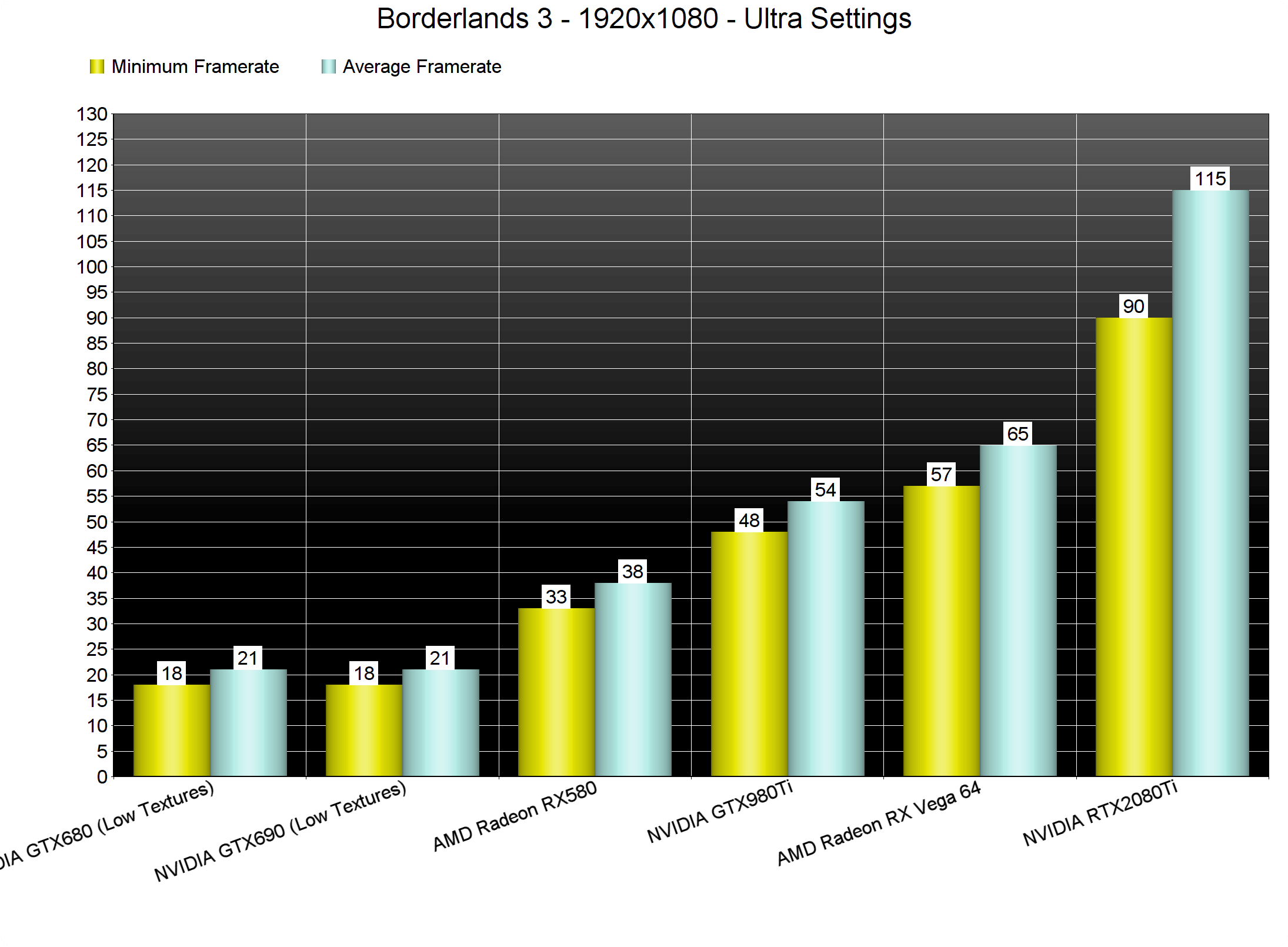
At 2560×1440, only our NVIDIA RTX2080Ti was able to offer a smooth gaming experience. As for 4K, NVIDIA’s most powerful graphics card was unable to offer a 60fps experience.
Thankfully, the game is scalable on older GPUs by lowering its graphics settings. For instance, we were able to play Borderlands 3 with High/1080p and 60fps on our AMD Radeon RX580. So yeah, if you have performance issues on Ultra, reduce some settings (like Volumetric Fog) to High. Lastly, there is another preset above Ultra, Badass, for high-end GPUs. Basically, this setting sets Volumetric Fog and Screen Space Reflections to Ultra. By enabling them, we lost 6fps on our RTX2080Ti. Since most gamers won’t be able to tell the difference between Ultra and Badass, we suggest using Ultra settings.
As said, Hyper Threading did wonders to our in-game experience. Thanks to it, we did not experience any stuttering issues and the game was really smooth on our G-Sync monitor. Furthermore, we did not experience any stutters while using ADS. Again, the combination of Hyper Threading and G-Sync appears to be crucial in this particular game.
Graphics wise, I wasn’t really impressed by what Borderlands 3 is offering. Don’t get me wrong; the game looks great. However, I don’t really see how a game like this is more demanding than Gears 5. Yes, they have a completely different art style, however, both of them are using the same engine. Again, you will be able to play it on older hardware by reducing some graphics settings. However, its Ultra settings do not justify their huge GPU requirements.
All in all, Borderlands 3 currently has some optimization issues on the PC. The game suffers from stuttering issues on systems with less than eight CPU cores, and under performs on older CPUs due to DX11. DirectX 12 is also in beta phase so we suggest avoiding it (at least for now). Thankfully, the game is scalable via its graphics settings, and does not require a high-end CPU for achieving a 60fps experience. We also did not notice any mouse acceleration or smoothing issues. Let’s hope that Gearbox will further optimize the game via post-launch patches.
Enjoy!



John is the founder and Editor in Chief at DSOGaming. He is a PC gaming fan and highly supports the modding and indie communities. Before creating DSOGaming, John worked on numerous gaming websites. While he is a die-hard PC gamer, his gaming roots can be found on consoles. John loved – and still does – the 16-bit consoles, and considers SNES to be one of the best consoles. Still, the PC platform won him over consoles. That was mainly due to 3DFX and its iconic dedicated 3D accelerator graphics card, Voodoo 2. John has also written a higher degree thesis on the “The Evolution of PC graphics cards.”
Contact: Email