Starfield feature-4

AMD Radeon RX 7900XTX is 16% FASTER than the NVIDIA RTX 4090 in Starfield at 1080p/Ultra

Now here is something that shocked me while benchmarking Starfield. According to our benchmarks, the AMD Radeon RX 7900XTX is noticeably faster than NVIDIA’s flagship GPU, the GeForce RTX 4090, in Starfield.

For our benchmarks, we used an AMD Ryzen 9 7950X3D, 32GB of DDR5 at 6000Mhz, NVIDIA’s RTX 4090, and AMD’s Radeon RX 7900XTX. We also used Windows 10 64-bit, the GeForce 537.13 and the AMD Adrenalin 23.8.2 drivers. Furthermore, we’ve disabled the second CCD on our 7950X3D.

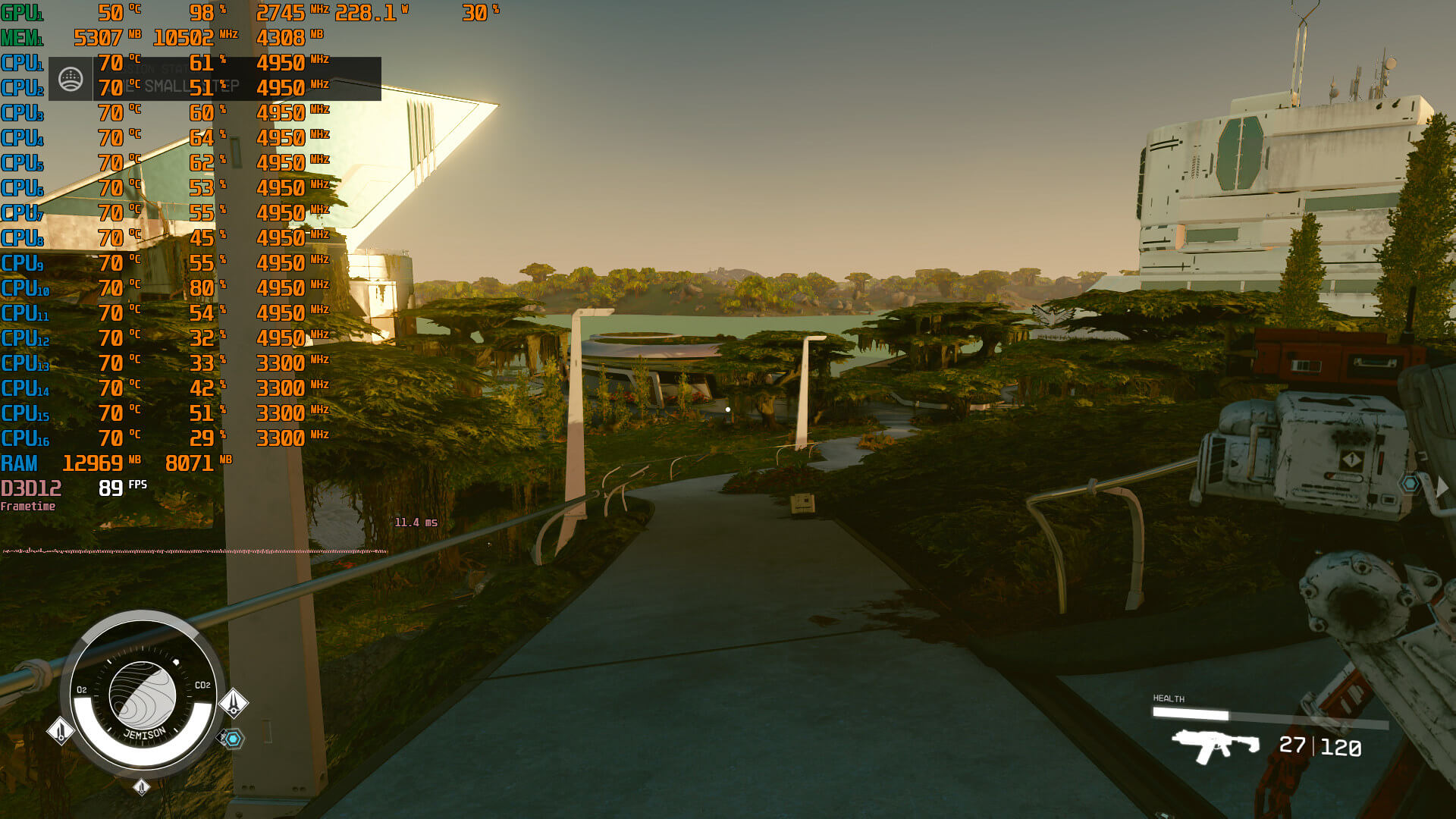
Starfield does not feature any built-in benchmark tool. As such, we’ve decided to benchmark the New Atlantis city. This is the biggest city of the game, featuring a lot of NPCs. Thus, it can give us a pretty good idea of how the rest of the game will run. The area we chose to benchmark is this one. From what we could tell, this was the most demanding scene in New Atlantis.

Can the NVIDIA RTX4090 run Starfield at Native 4K/Max Settings with 60fps?

Before continuing, we should note a really bizarre behavior. Bethesda has tied FSR 2.0 and Render Resolution with the in-game graphics presets. When you select the Ultra preset, Starfield automatically enables FSR 2.0 and sets Render Resolution at 75%. When you select the High preset, the game will automatically reduce the Render Resolution to 62%. At Medium Settings, it automatically goes all the way down to 50%. This is something you should pay attention to, otherwise, the game will run at noticeably lower internal resolutions.

So, with this out of the way, at Native 1080/Ultra Settings, the AMD Radeon RX 7900XTX is 16% faster than the NVIDIA RTX 4090. Then, at Native 1440p/Ultra, the performance gap between these two GPUs drops to 11%. And finally, at native 4K/Ultra, the RTX 4090 manages to catch up to the RX 7900XTX.
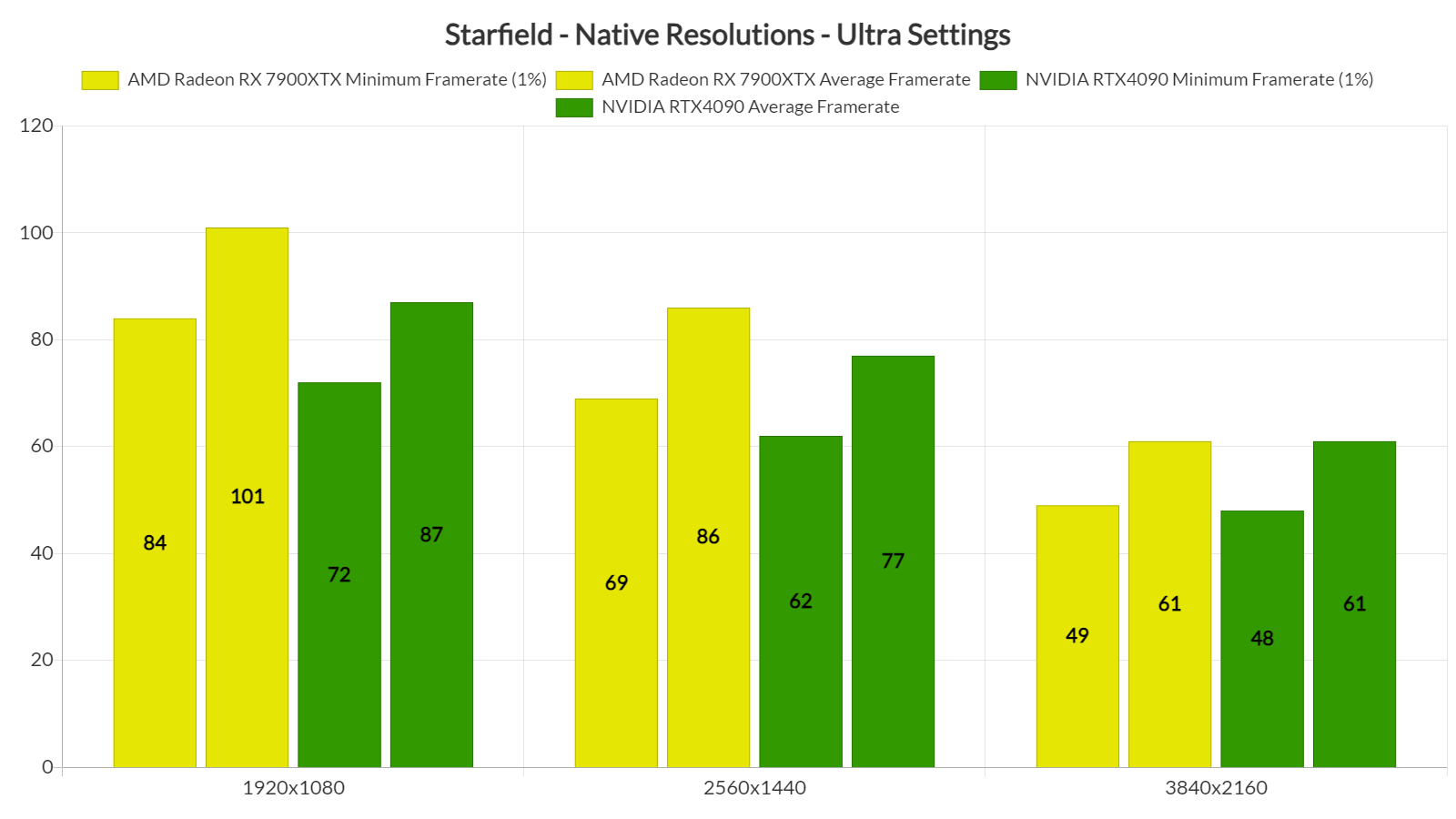
AMD RX 7900XTX vs NVIDIA RTX4090 benchmarks

At first, I couldn’t believe my eyes (and my notes). So I went ahead and uninstalled the NVIDIA drivers, removed the RTX 4090 from our PC system, re-installed the AMD Radeon RX 7900XTX, re-installed the AMD drivers, and re-tested the game. And behold the performance difference between these two GPUs. The screenshots on the left are on the RX 7900XTX and the screenshots on the right are on the RTX 4090. Just wow.
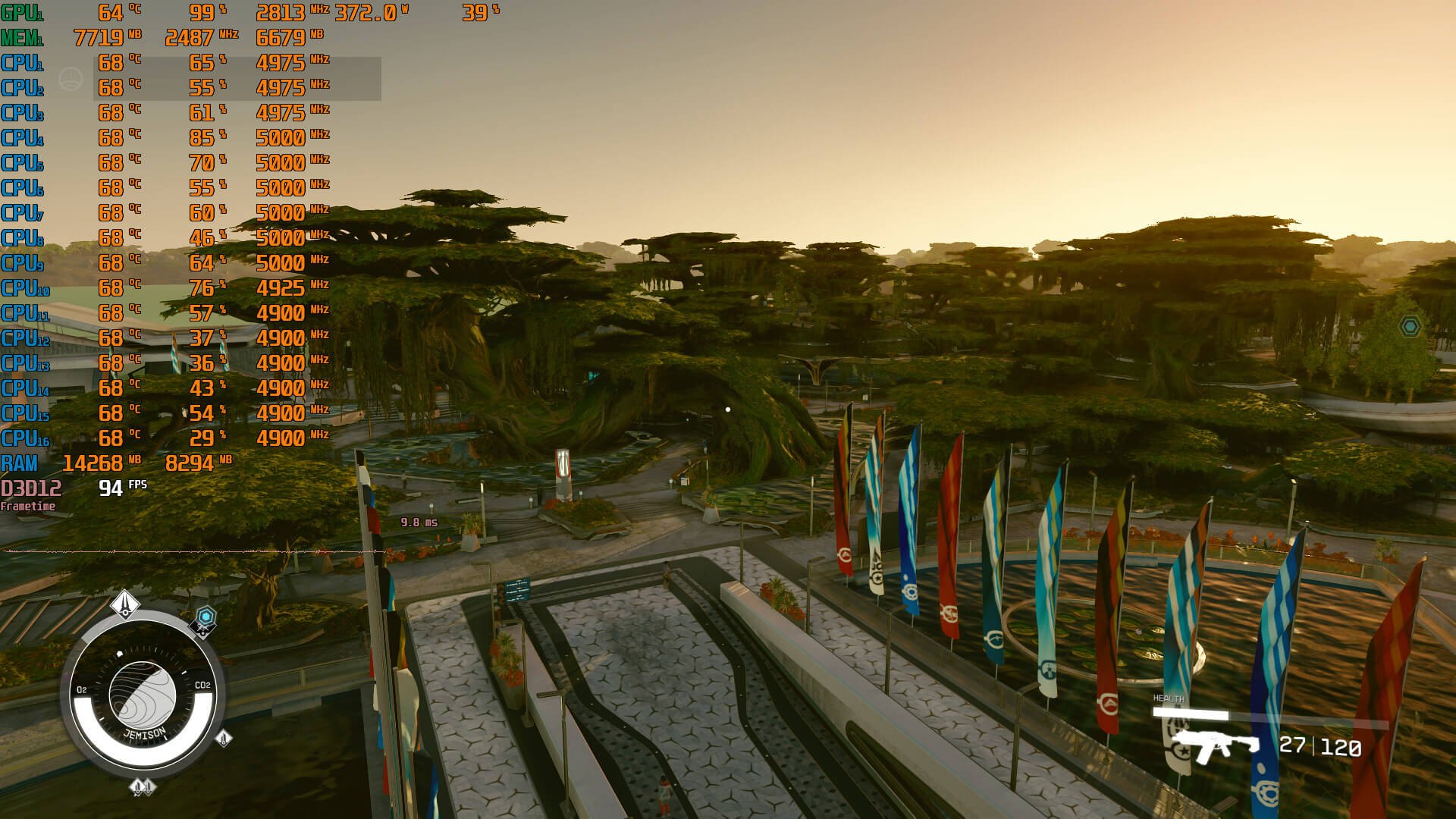
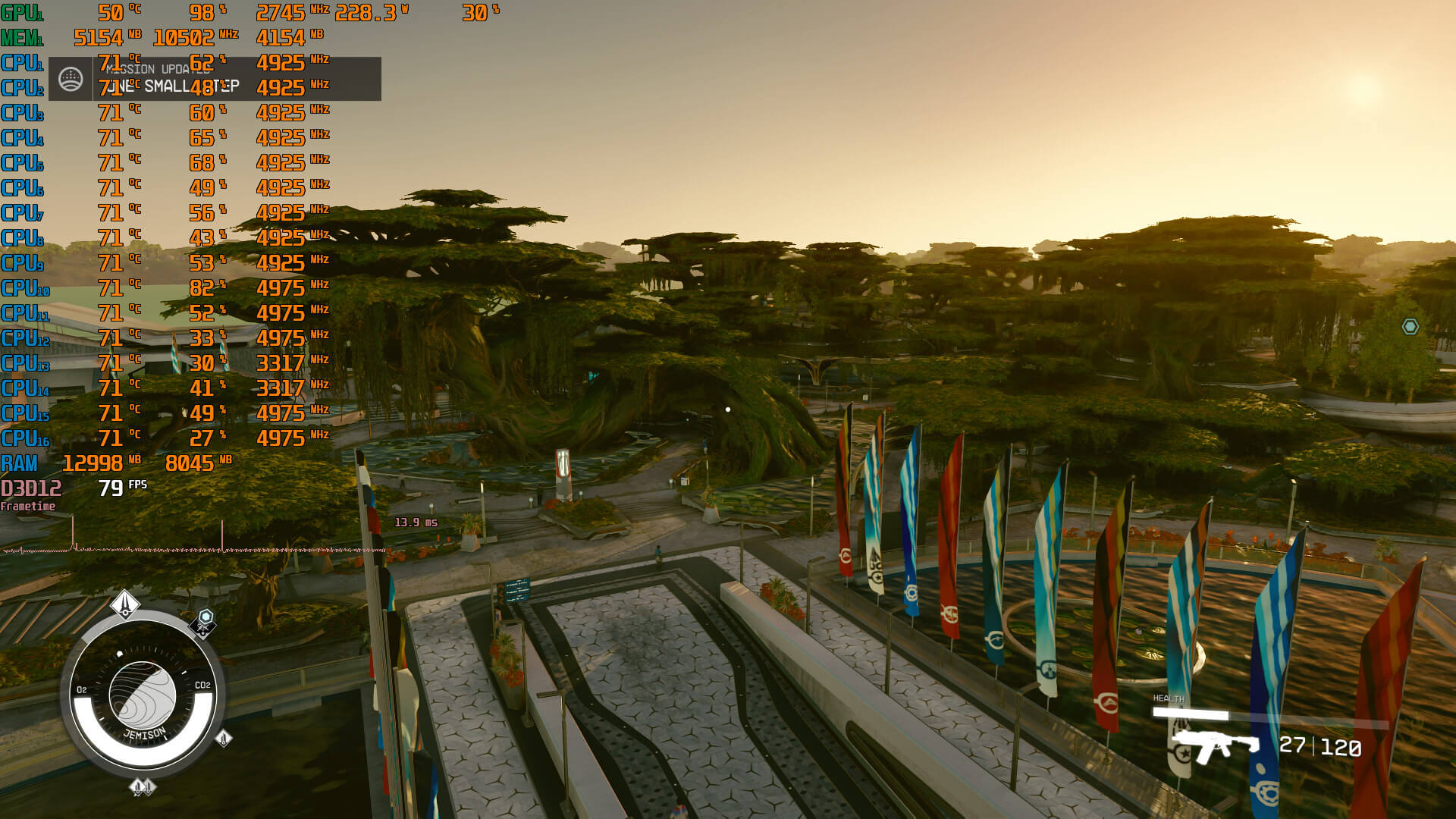
AMD 7900XTX 4K Ultra benchmarks-1NVIDIA RTX 4090 4K Ultra benchmarks-1 AMD 7900XTX 4K Ultra benchmarks-2NVIDIA RTX 4090 4K Ultra benchmarks-2

I seriously don’t know what is going on here. However, you can clearly see that the RTX 4090 is used to its fullest (so no, we aren’t CPU bottlenecked on NVIDIA’s GPU in any way). We all assumed that Starfield would work best on AMD’s hardware but these performance differences are insane.

Stay tuned for our PC Performance Analysis!

56 thoughts on “AMD Radeon RX 7900XTX is 16% FASTER than the NVIDIA RTX 4090 in Starfield at 1080p/Ultra”

  1. This is one of the rare cases where that card looks like a good deal over the 4090. Price wise, there is no question. 7900Xtx is a lot cheaper. To even get close to 4090 is shocking, let alone win…

    1. its cheaper in USA only, where i live 7900xtx is 30% more expensive then most expensive 4090. Generally all AMD products are more expensive outside USA.

    2. Ray tracing aside, 7900xtx was always a deal compared to 4090 and 4080. It’s does well enough for how much less it is compared 4090 and compared 4080 it’s faster and cheaper, ray tracing aside of course.

      Ray tracing isn’t as bad as some make it out to be . It’s behind Nvidia 40 series for sure but usable and comparable to high end Nvidia 30 series

    1. and intentionally NVIDIA bricked. AMD must have been paying a gargantuan amount of sheckels for having corpo codemonkey intentionally buckbreak the 4090

    2. Also another reason is that Xbox
      has Amd chipset,so why bother optimize for green team,when Amd is in both Xbox and Ps5.
      I know Starfield is Xbox/PC exclusive,but PS5 has Amd aswell so..that is why some of the games run bad on Intel/nvidia PC setup,as you say AMD sponsored=Amd optimized and also because big bucks comes from partnership between Amd and Microsoft and again Amd and Sony,thus Amd gpu’s are cheaper,they have comision,while Nvidia relly on hardware sales alone,Amd has comision from this partnership with Sony and Microsoft.

  2. This game is pretty CPU bottlenecked at lower resolutions. PCGH (PC Games Hardware) did a CPU benchmark and the 13900K is like 25% faster than the 7800X3D at 1080p when paired with a 4090. You basically need an OC’d Ryzen 5600 to get 60fps on average, and to maintain 60fps consistently you’ll need an OC’d Ryzen 7700X or a 13600K. Poor optimizations all around.

    1. its outdated engine, it cannot be optimised anymore so its hard to blame them for how it works but its ok to blame them for not changing almost 20years old engine.

          1. Sure. Still would love to see more games use multiple cores well. Even CP2077 is mostly single capped

    2. According to Daniel Owen’s benchmark in New Atlantis area (which seems to be the most CPU demanding one), stock 5600X with stock cooler and 3600MHz/CL18 RAM dips down to lower 50’s, at worst. So 5600(X) with tuned RAM will certainly provide 60+ fps experience.
      Judging by 30 fps lock on consoles, this is an expected behavior.
      Intel CPUs, on the other hand, perform petty well in this game. Tuned 10600 should be good enough for 60+ fps.

  3. I seriously don’t know what is going on here. However, you can clearly
    see that the RTX 4090 is used to its fullest (so no, we aren’t CPU
    bottlenecked on NVIDIA’s GPU in any way). We all assumed that Starfield
    would work best on AMD’s hardware but these performance differences are
    insane.

    What’s there to be shocked about, John?

    We’ve seen this before in games such as Resident Evil 4 Remake, the 2022 remake of COD:MW2 and the Vulkan renderer of DOOM (2016).

    It all comes down to AMD providing the chips for Playstation & Xbox, thus game studios are optimizing their GPU shaders for AMD’s GCN architecture (RDNA is just a refinement of GCN, since it still uses the same ISA internally, as proven by open-source Linux code from AMD themselves).

    In the future, it will be interesting to see what kind of impact the continued use of NVIDIA’s GPU architecture by Nintendo’s upcoming Switch-next will have on the shader optimization front, because I’ve heard the next Switch will feature first-class support for Vulkan, unlike the current one, which is a performance limitation of the old Maxwell generation currently in use.

    We already have a first indication in that direction by the switch [( ͡° ͜ʖ ͡°)] of Ubisoft’s Snowdrop engine from DX12 to Vulkan.

    Interesting times ahead, at least when it comes to the technical side of videogames…

    1. except NV GPUs fully support Vulkan so it makes no difference to NV users. Starfield is AMD sponsored itss obvious it will have some amd only optimalisation to make it run better on amd hardware, amd did in past used same practice for some games and benchmarks. Even someone from AMD talked about it recently, they said its obvious there will be bias towards their products in games they support with money its business practice. At the same time they said they don’t mind if Bethesda adds far superior DLSS later.

    2. There is a bug with “shadow resolution” setting on NV cards. There is a significant difference between “Ultra”, “High” and “Medium”. While there is a small difference in case of AMD GPUs. Hope the devs fix this issue asap.

  4. Gamers nexus just uploaded their benchmarks. They showed cpu bottleneck at 1080p and 1440p but 4090 was beating 7900 xtx at 4k.

    1. GamersNexus used an Intel 12700KF CPU whereas we’re using an AMD Ryzen 9 7950X3D (a more powerful CPU) which is why we’re not CPU-bottlenecked in a lot of areas where the Intel CPUs are having issues.

      Also, different sections of the game can result in different results. We used the area we found to be the most taxing on both CPU and GPU.

      1. I don’t think that’s actually the case. GN was getting higher FPS across the board than you’re reporting. They were getting 101 capped averages with both the 4090 and rx 7900 xtx at 1080p, which went to 100 for 4090 and 98 for 7900 at 1440p and 75 and 74 at 4K. They were neck and neck the whole time but still all ABOVE your results so I really don’t think the Intel CPU was the issue.

        1. My framerates are significantly higher than what is shown here as well with a 4090 and 7800X3D. I never get drops below 60fps at native 4K max settings in New Atlantis. For example at :29 in the video, he’s in the mid 50s. I’m averaging in the mid 60s:

          https://imgur.com/0JOYpBK

          1. You are DEFINITELY using the Ultra preset which by default enables FSR 2.0 with a 75% render resolution. We were able to get the EXACT same framerate as you in that area when using the Ultra preset. That’s not Native 4K.

          2. Ahem… same place with you and, waiiiiiiiiiit for it, same performance.

            News flash. Your framerate will change depending on the area you look at and the place you are in. I know right? Fascinating.

            The big question is why you didn’t go to the top place in which we showcased in the video the framerate dropping to 53fps (once you go there, move really quick the camera and the framerate will drop even more). Are you THAT afraid? It’s right up there. Because you definitely did not showcase the EXACT same scenes we’ve featured in the video (you are looking in the opposite direction and you are at the wrong place).

            We’ve said multiple times that we are using very demanding scenarios for our benchmarks. Whether you like it or not is irrelevant, when we have the exact same performance as showcased here.

            https://i.imgur.com/uISBfeu.jpg

          3. That was the exact same location as your initial video at :29 actually. That screenshot you just posted is not the same area. If you’re going to try and be a condescending child at least be right first lol

          4. The area I ran down in my video is the exact same one you ran down at :29 in your initial video. Your framerate is in the mid 50s in your video. Looks like you’re now lying and posting screenshots from a different run, probably the one you mentioned with FSR on, to try and make it look like you were getting the same performance that I’m getting. You ran down that exact same path in the video in the article and never once went over 60fps.

            From your video around :29, this is where mine starts:
            https://imgur.com/cMG1nmC

            Oh, do you mean this spot where in your video your PC is dropping into the low 50s and never actually hits 60fps and mine is still above 60fps most of the time (never drops below 57fps) at all times despite Shadowplay recording?
            https://youtu.be/vAzHNvKy0gg

            Without Shadowplay the lowest it hits right there is 61

          5. Interesting. Your RTX4090 is also at 2.9Ghz (our Founder’s Edition runs at 2.7Ghz). Both GPUs run at 98% (full usage). Perhaps you hit the lottery with your RTX4090 model or something because a 200Mhz boost shouldn’t be responsible for a 5-7fps difference.

    2. GamersNexus used an Intel 12700KF CPU whereas we’re using an AMD Ryzen 9 7950X3D (a more powerful CPU) which is why we’re not CPU-bottlenecked in a lot of areas where the Intel CPUs are having issues.

      Also, different sections of the game can result in different results. We used the area we found to be the most taxing on both CPU and GPU.

    3. GamersNexus used an Intel 12700KF CPU whereas we’re using an AMD Ryzen 9 7950X3D (a more powerful CPU) which is why we’re not CPU-bottlenecked in a lot of areas where the Intel CPUs are having issues.

      Also, different sections of the game can result in different results. We used the area we found to be the most taxing on both CPU and GPU.

  5. It’s obvious that the 4090 is a good bit faster than a 7900 XTX in general. According to a TPU review they report an average of around 20% faster over a 25 game test suite. It’s also obvious that AMD worked closely with Bethesda to make sure that the game was better optimized for AMD hardware. Not supporting DLSS was pretty much a red flag for even those gamers that don’t pay much attention.

    The cynic in me wonders if AMD might have also paid some cash or given other incentives. Probably never know if that did happen but sleaziness and anti-competitive is no stranger to the gaming industry.

  6. one small win for amd. and then cyberpunk phantom liberty and alan wake releases with full pathtracing and the 7900xtx will be behind a 4060.

        1. When we are talking about frame-rates under 30 (which is what the 4070 gets in “Overdrive” at 1080p), “better” is immaterial.

          1. DLSS 3.5 will still need a base frame rate of 60+ for the controls not to feel like mush…

    1. If you saw the video (which I did), they only played the game until they got to their benchmark area on ONE GPU. Then, when they found the benchmark area, they used the other GPUs. This is completely fine, but it does not suddenly mean they have “more data”. They have different data, that’s the appropriate answer.

      1. Hey John, fair point fella. And your point perfectly points out why we should always look at multiple reviews to get an informed opinion etc.

  7. Hey John, I’ve seen other reviews noticing weird stuff in terms of performance on all Nvidia cards dropping way behind Amd ones on Ultra settings specifically. When they drop the details to high or lower the results are more in order with what would be expected even if this is indeed an amd partnered game. There is something wrong with Ultra settings on Nvidia on this game at the moment.

    1. As I wrote in the article, the in-game presets will automatically adjust FSR 2.0. That’s why most report better performance when using High. Here is a graph that showcases the incorrect data (using presets which automatically enable FSR 2.0) against the real native resolution data. I’m certain A LOT of benchmarkers will fall for this and won’t double check the graphics settings.

      https://uploads.disquscdn.com/images/90be3ff09a0db2f49d5d75d808854d35855c453584e19124b8e9f2f8c783deff.png

      1. Indeed but from what I’ve seen, people who do leave everything maxed as ultra on all settings and then push the res scale to 100% vs all settings on High and res scale to 100% independently, are reporting Nvidia cards having major unusual disparities vs the AMD cards in the same situation. On a side note, for example Gamersnexus have tested most cards on high settings and the 4090 is on par or ahead of the top AMD card in every test. To me it seems like there’s a specific setting that is “bugged” for Nvidia when set to ultra that is not related to the res scale, something like shadows or some such, it just hasnt been figured out it seems. Also saw a youtuber showing the paid DLSS 3.5 mod with frame gen in action and at 4k 67% DLSS res ULTRA its showing 140 – 170 fps on the 4090, pretty cool. Lets see if Bethesda ends up implementing it, but seeing as not only AMD not list starfield as a game for fsr3 but they didnt even list them as a publisher. On the same day AMD threw bathesda under the bus when asked about dlss.

  8. Not sure who would buy such an expensive GPU and then use it for 1080 gaming. At least I would have gone for something way cheaper than my 7900XTX if I wasn’t using a 4k TV for gaming.

    I don’t consider the AMD advantage at 1080 important. The tie in 4k is more noteworthy, but I would still wait for a couple of patches and driver versions before drawing any conclusions.

    1. Agreed. Nvidia have most likely been shut out of properly optimizing their driver as this game is made to prop up AMD GPU’s… Shame. Although in time I’m sure this advantage will drop given how much more powerful the 4090 is then the 7900XTX.

      1. You seriously think Bethesda designed the graphics engine for their largest project of all time specifically to prop up AMD and gimp Nvidia?

        There’s no way they did that, even if AMD asked or paid, sorry.

        The 4090 is only typically 15-20% faster than the XTX. There are other games where it loses as well. This just happens to be one of them.

      2. You seriously think Bethesda designed the graphics engine for their largest project of all time specifically to prop up AMD and gimp Nvidia?

        There’s no way they did that, even if AMD asked or paid, sorry.

        The 4090 is only typically 15-20% faster than the XTX. There are other games where it loses as well. This just happens to be one of them.

    1. Depends on the area you benchmark. Both us and HardwareUnboxed were not CPU-bottlenecked even at New Atlantis (GamersNexus also used a weaker CPU than both us and HU). Additionally, GamersNexus’ graphics settings results are also fishy. Both we and HU saw that when you change the preset, the game automatically adjusts FSR 2.0. We, OC3D and HU saw similar performance increases when lowering the settings (from Ultra to Low you’ll get around a 20fps boost in total). The results that GamersNexus shared with the 10fps boost are the results everyone gets when using the presets and not the native resolution results of Ultra/High/Medium (yet in the video they claim that these results are without FSR 2.0). Steve does a great job but in this case he presents inaccurate data, which is kind of funny when he criticized LinusTechTips for such a thing.

Leave a Reply

Your email address will not be published. Required fields are marked *