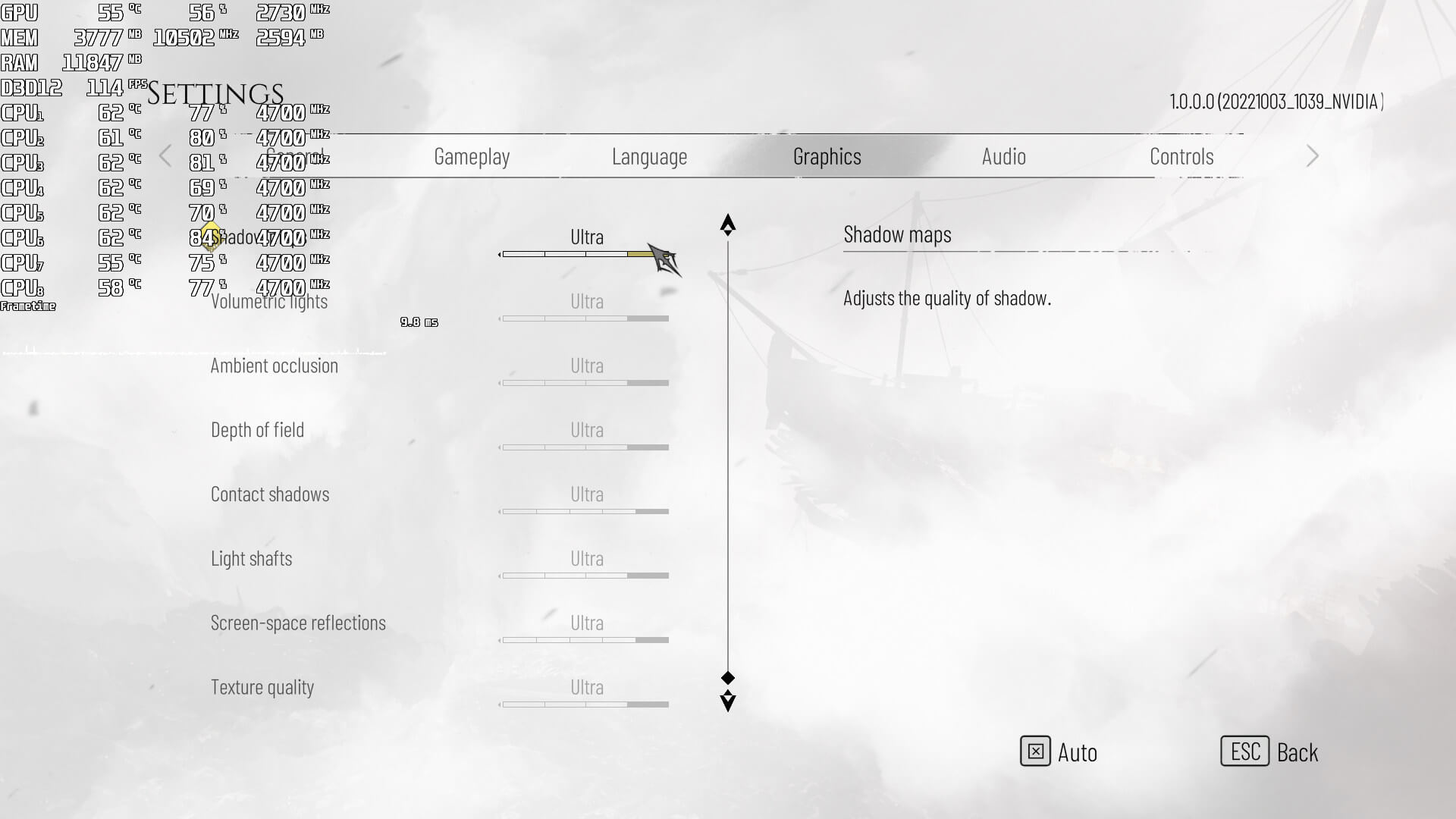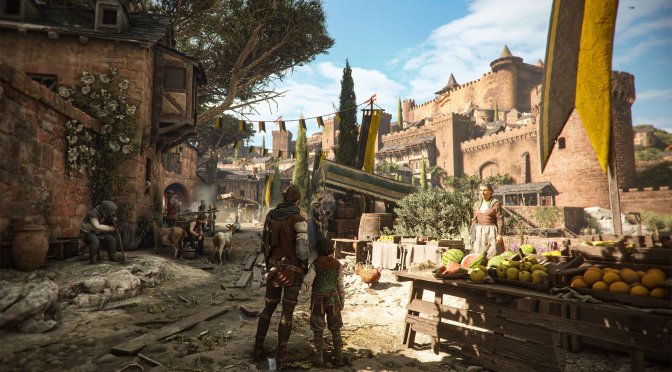
A Plague Tale Requiem screenshots-1

A Plague Tale: Requiem PC Performance Analysis

A Plague Tale: Requiem is a narrative-driven, action-adventure survival horror stealth game that will release tomorrow. Powered by Asobo’s in-house engine, it’s time now to benchmark it and see how it performs on the PC platform.

For this PC Performance Analysis, we used an Intel i9 9900K with 16GB of DDR4 at 3800Mhz, AMD’s Radeon RX580, RX Vega 64,  RX 6900XT, NVIDIA’s GTX980Ti, RTX 2080Ti, RTX 3080 and RTX 4090. We also used Windows 10 64-bit, the GeForce 522.25 and the Radeon Software Adrenalin 2020 Edition 22.10.1 drivers.
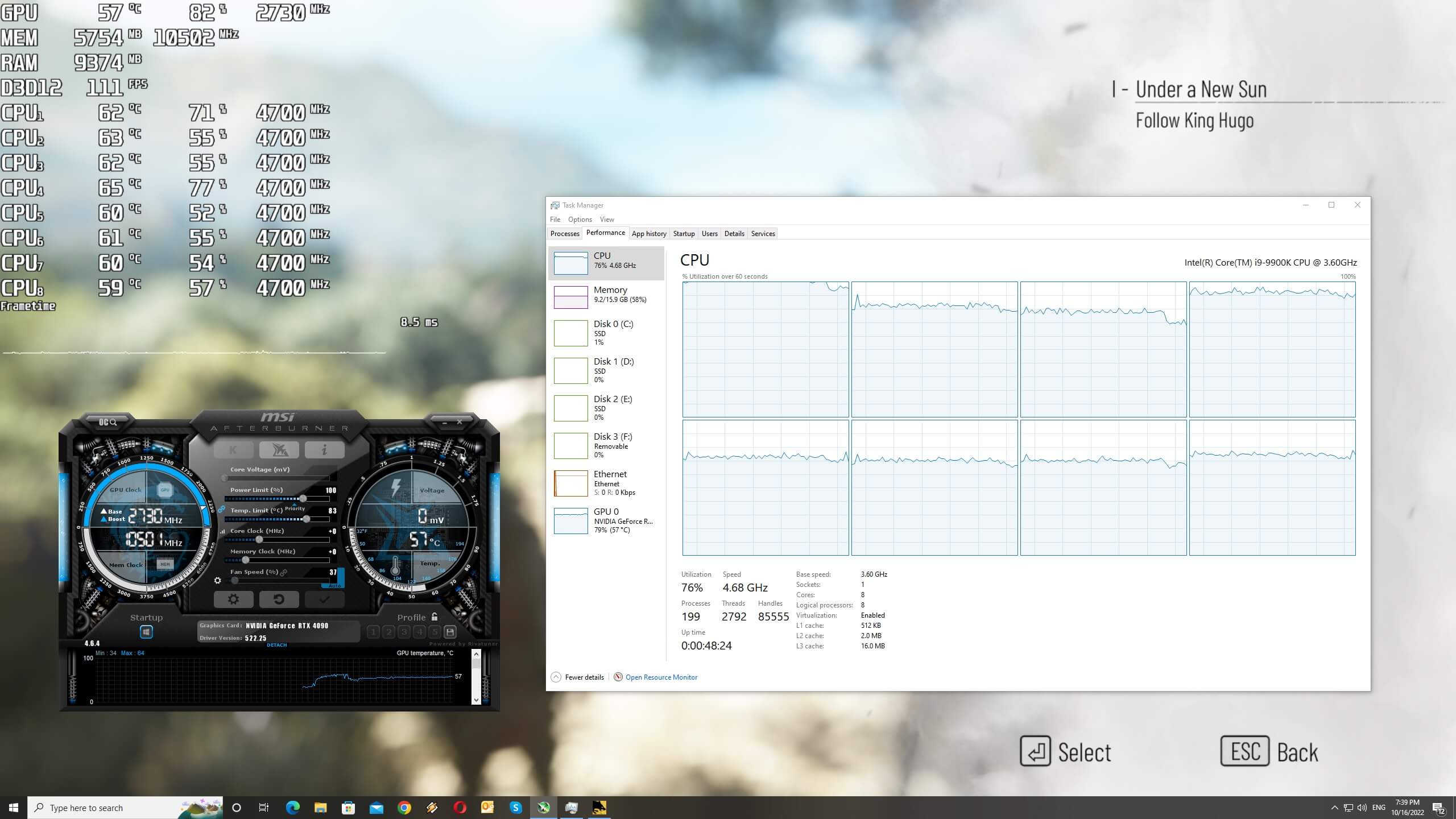
A Plague Tale Requiem CPU scaling

Asobo has added a few graphics settings to tweak. PC gamers can adjust the quality of Draw Distance, Shadow Maps, Textures, Volumetric Lights, Ambient Occlusion, Depth of Field, Contact Shadows, Light Shafts and Screen-Space Reflections. Although NVIDIA has stated that the game will support Ray Tracing, we didn’t find any RT setting in the review code. However, the game does support DLSS 2 and DLSS 3.
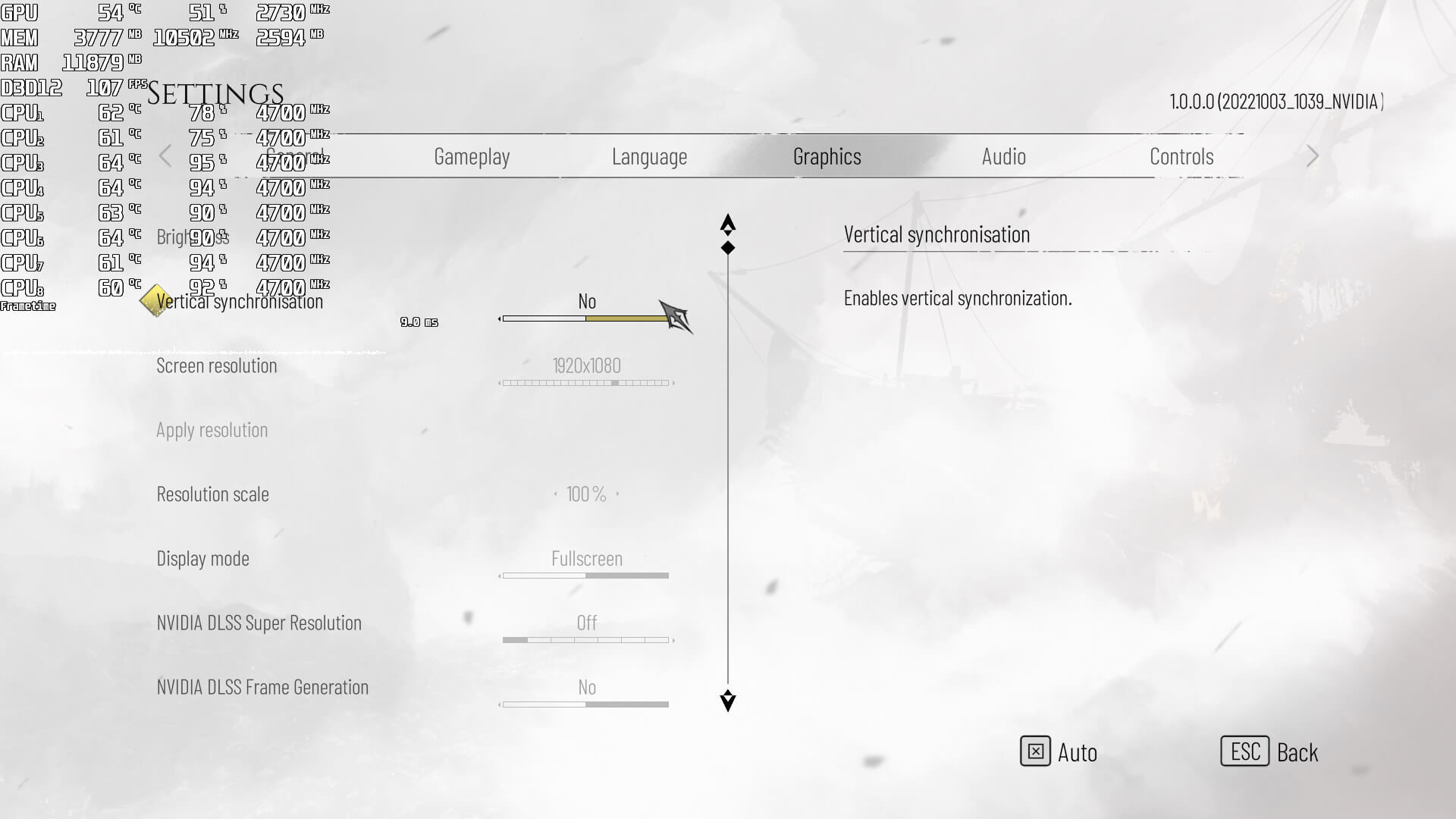
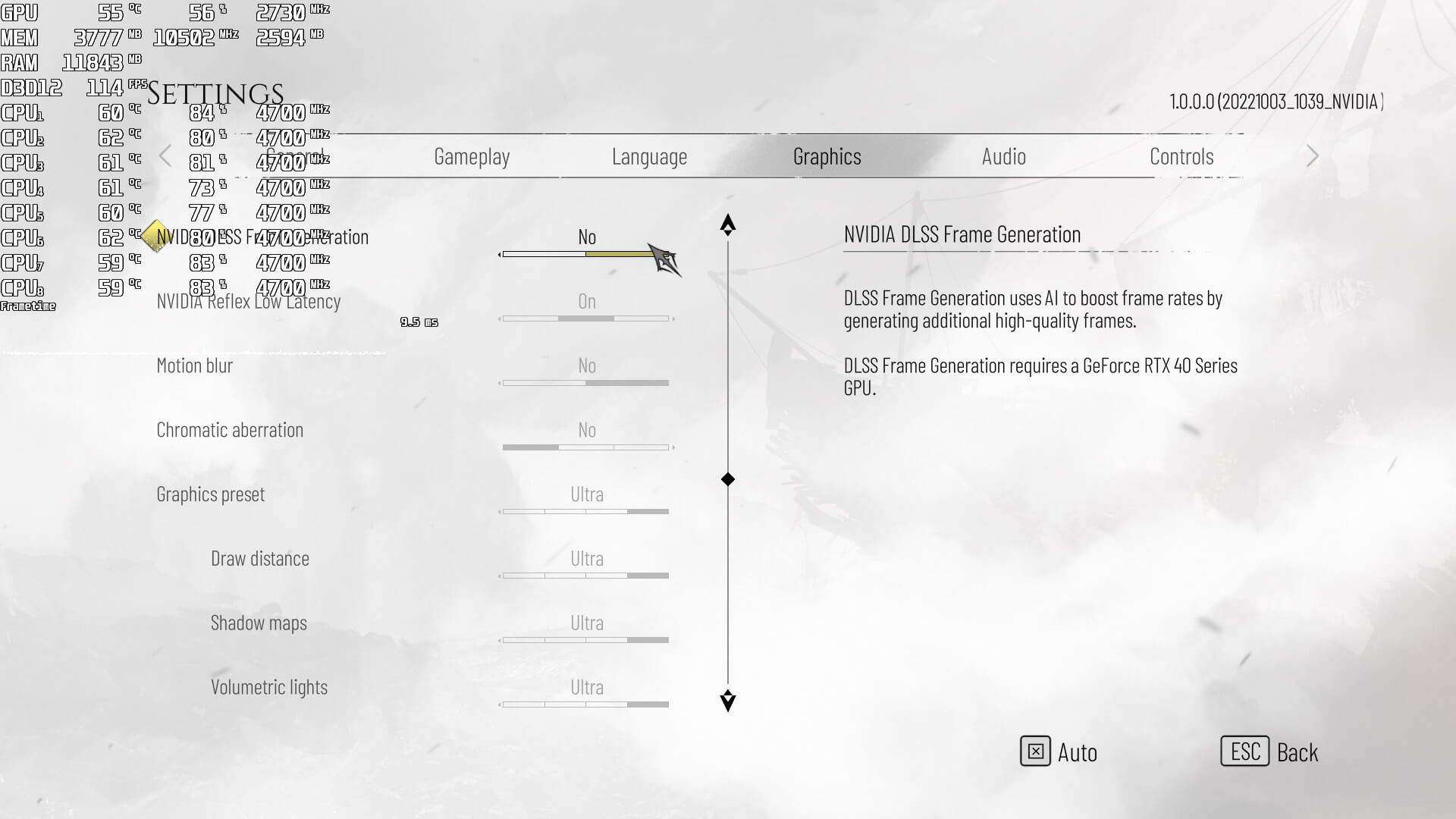
A Plague Tale Requiem PC graphics settings-1A Plague Tale Requiem PC graphics settings-2A Plague Tale Requiem PC graphics settings-3

A Plague Tale: Requiem does not feature any built-in benchmark tool. Thus, and per NVIDIA’s recommendations, we’ve benchmarked its opening area.

In order to find out how the game scales on multiple CPU threads, we simulated a dual-core, a quad-core and a hexa-core CPU. And, to be honest, I was genuinely surprised by the performance of our simulated dual-core system. Without Hyper-Threading, our simulated dual-core was able to push a minimum of 50fps at 1080p/Ultra. Not only that, but the game did not suffer from extreme stuttering issues, and was perfectly playable. With Hyper-Threading, we were able to get a constant 60fps on that system. We should also note that Hyper-Threading had a negative performance hit on both our octa-core and simulated hexa-core systems, so we suggest disabling it on PC systems that have more than six physical CPU cores.
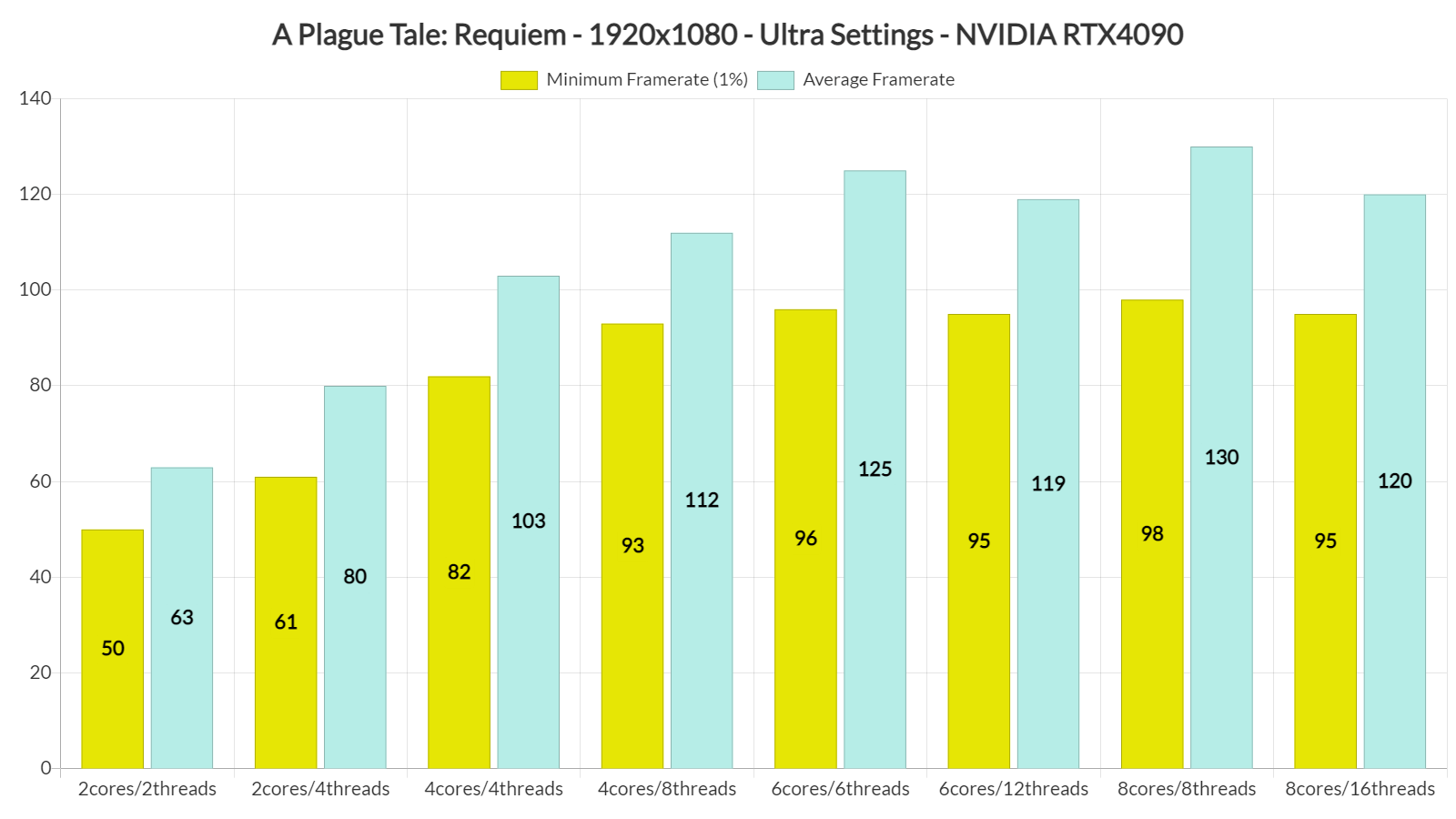
A Plague Tale Requiem CPU benchmarks

A Plague Tale: Requiem can be easily described as a GPU-bound title. At 1080p/Ultra, the only GPUs that were able to provide a constant 60fps experience were the RTX 3080, RTX 4090 and AMD RX 6900XT. The NVIDIA RTX2080Ti was also able to provide a smooth experience, though we did notice some drops to 57fps.
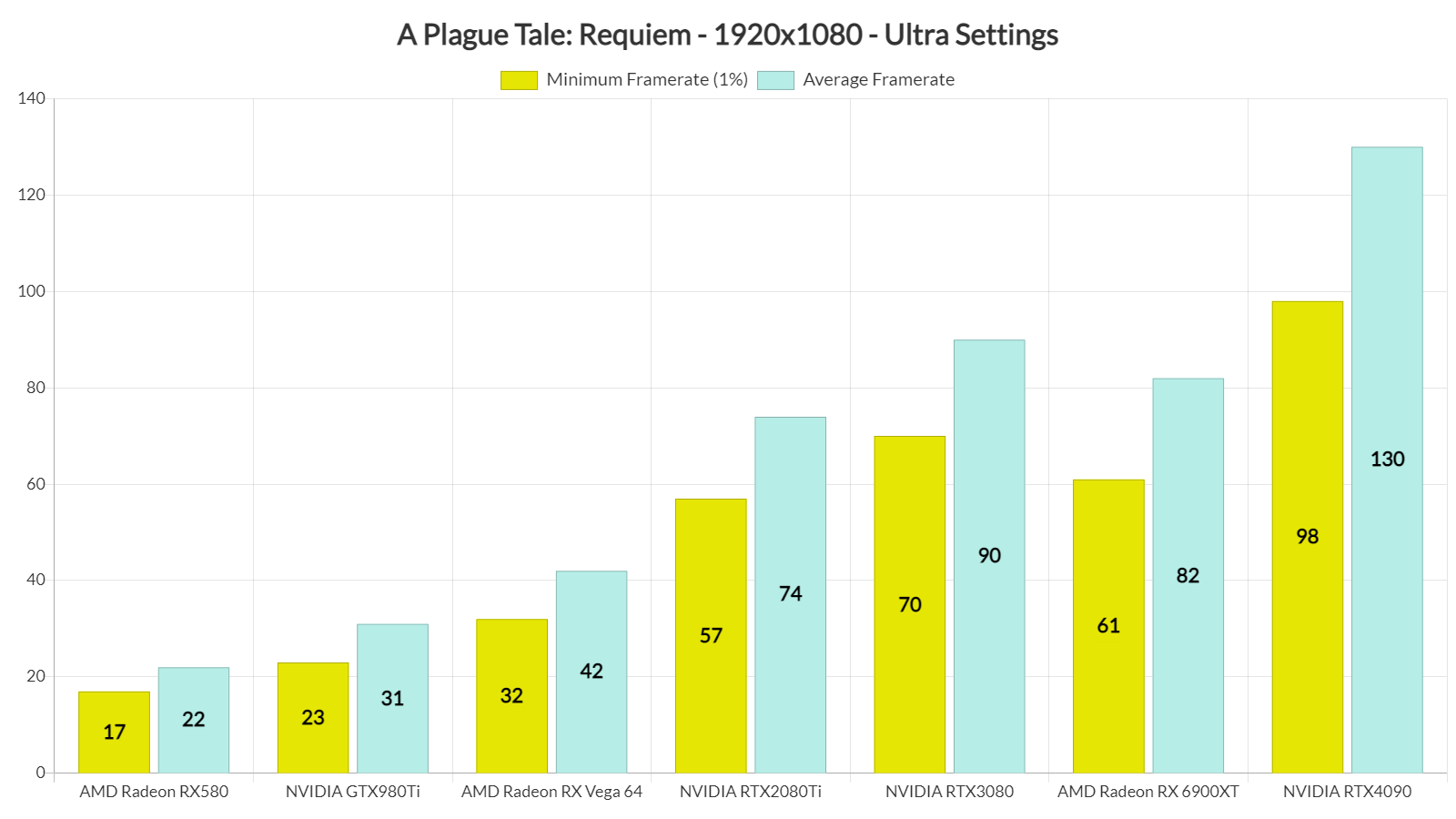
A Plague Tale Requiem GPU benchmarks-1

At 1440p/Ultra, the only GPU that was able to offer a constant 60fps experience was the RTX 4090. The RTX 3080 offered smooth framerates overall, though there were some drops to 55fps. Thus, later – and perhaps more demanding – scenes may drop the framerate even more. It’s also worth noting that AMD’s RX 6900XT did not perform that well in this game. AMD’s RDNA 2 GPU was constantly behind the RTX3080, at both low and high resolutions.
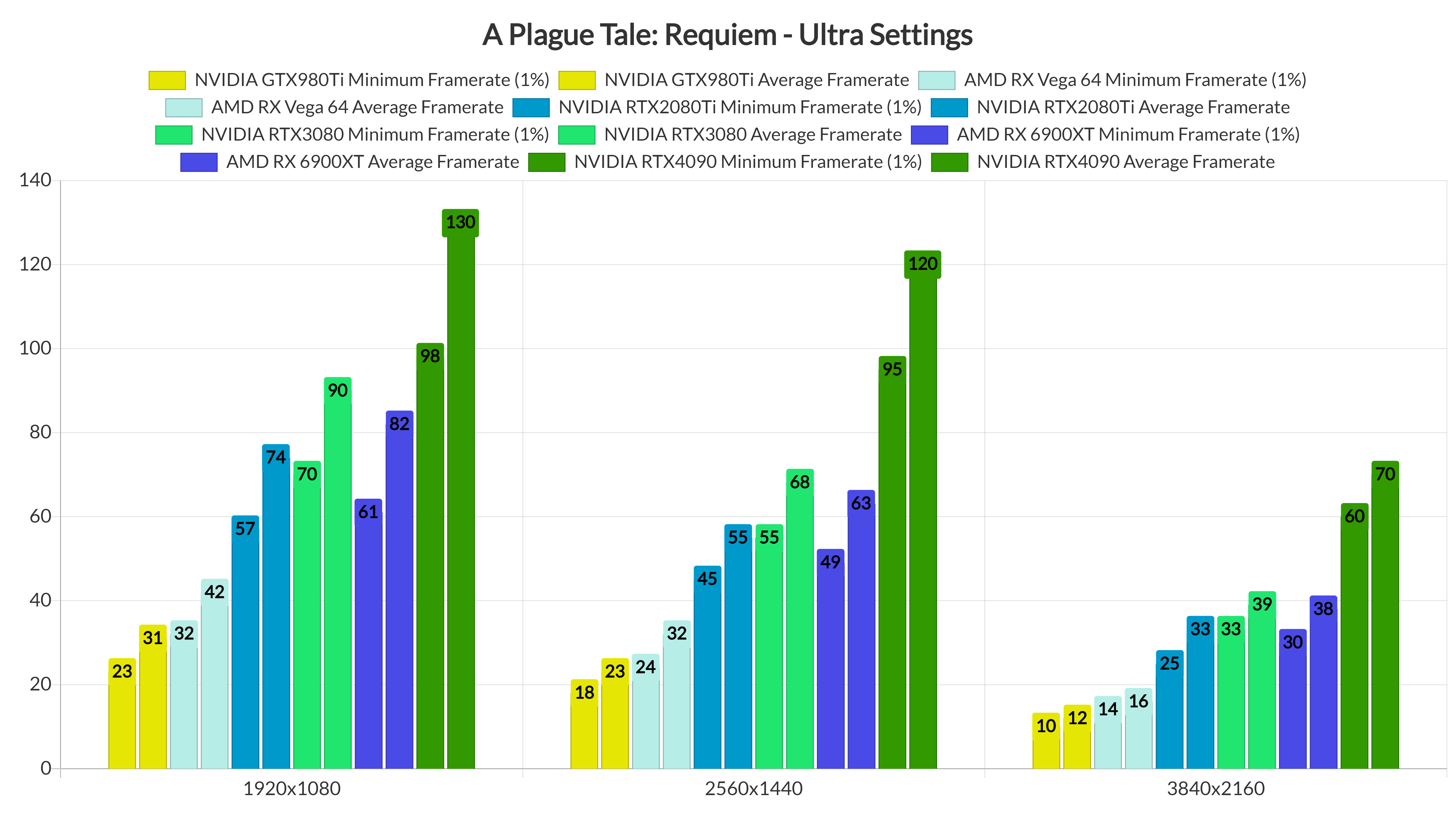
A Plague Tale Requiem GPU benchmarks-2

Graphics-wise, A Plague Tale: Requiem looks absolutely amazing. This is a current-gen only game and it shows. All main characters are highly detailed, though their animations could have been a bit smoother. The game has bendable bushes and grass, and its lighting effects look incredible. It also packs a lot of high-resolution textures. What also impressed me was its draw distance as I could hardly notice the LOD transitions of objects. So yeah, while the game has high GPU requirements, its visuals at least justify them.

For those wondering, the in-game graphics settings cannot improve the game’s performance by a lot. By lowering our settings to Low, we were able to increase our performance by only 28%. Even at Low Settings, though, the game can still look great.
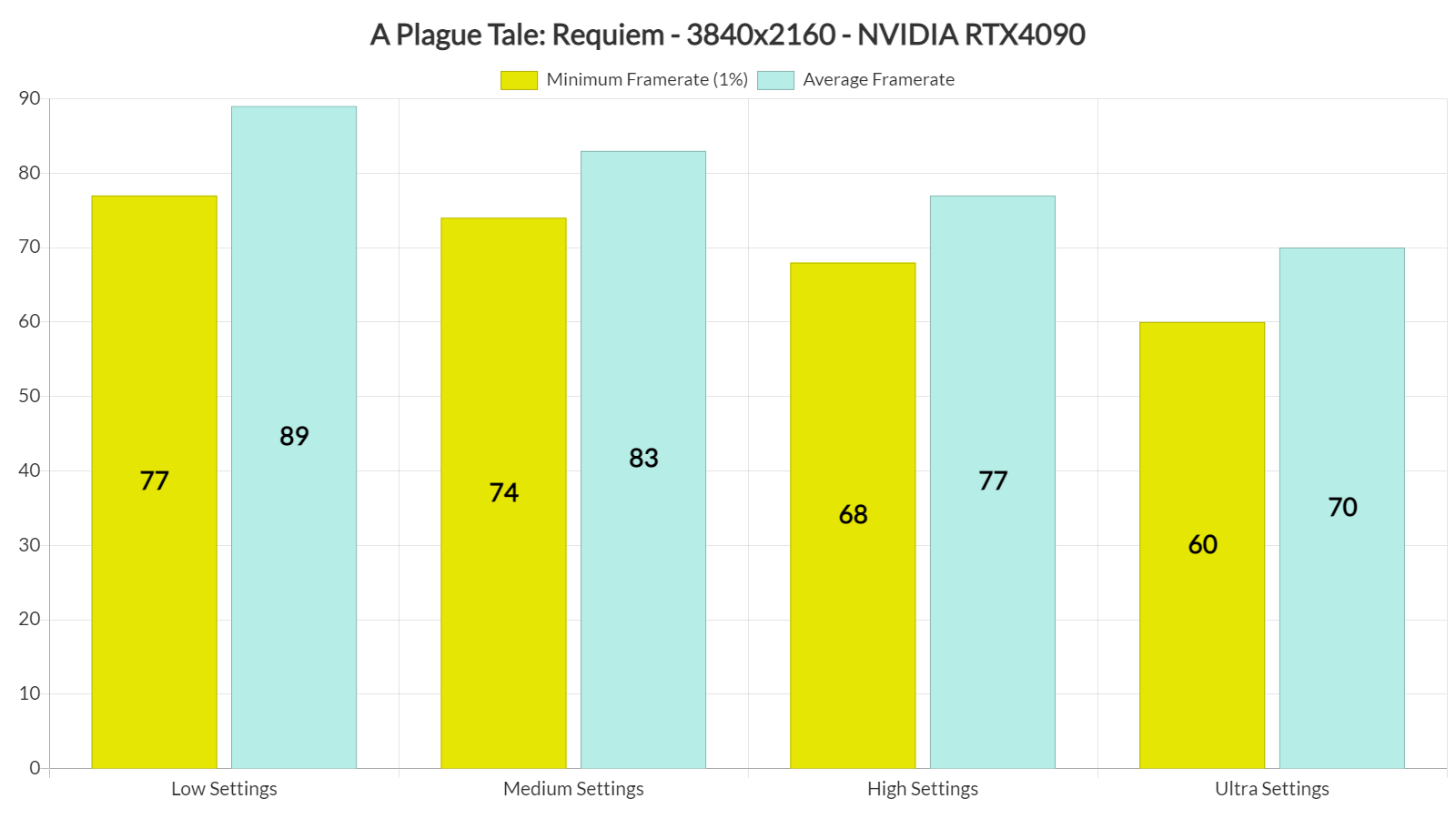
A Plague Tale Requiem CPU benchmarks graphics settings benchmarks

All in all, A Plague Tale: Requiem is one of the most demanding PC games we’ve seen to date. Although it does not require a high-end CPU, it does require a powerful GPU. RTX owners can thankfully improve performance by using DLSS 2 Quality (and we highly recommend it, even at 1440p). Unfortunately for AMD and Intel owners, though, the game does not support FSR 2.0 or XeSS.

As said, the game does look incredible so it at least justifies its high GPU requirements. Nevertheless, we’d like to see a bit better scalability on older GPUs, especially when using the Low settings. We also experienced some minor stutters here and there (don’t worry, they are nowhere close to what you’ve seen in other games).

Lastly, you can find below a video, showcasing the game running in 8K DLSS 2 Quality on the RTX 4090!


A Plague Tale: Requiem - 8K with DLSS 2 Quality - Ultra Settings - NVIDIA GeForce RTX 4090

66 thoughts on “A Plague Tale: Requiem PC Performance Analysis”

  1. It’s quite nice that they included an option to disable chromatic aberration this time. In the last game you had to go into the config files to turn it off. I still don’t understand why this disgusting visual eyesore still gets implemented into so many games even in this day and age, especially for a game like this where it doesn’t belong. FFS, it’s even called ABERRATION!

    1. When I went to play Innocence that was the first thing I disabled but it was available in the menus. I’m glad they added the option, but it’s a bummer you were forced to deal with it if you didn’t know how to edit config files.

    2. Totsly agree. Should be a damn Law for this sh*t – Must allways have options to disable it!
      Most ppl totaly hates that trash, and for good reason!

      Damn does it look Amazing wohoo..so happy to see this. First one looked great so this is all good. Lets hope more will follow!
      Cant wait for UE5 and beyond games..really about time!

      So hey, where is my 4070 😀

      1. I think most people like how games look with everything enabled, it’s just a vocal minority that doesn’t. Motion Blur in this game specifically looks amazing.

    3. yep, chromatic aberrations are a literal optical defect from poor quality lenses in cameras and binoculars

      putting that in your game is like adding bugs to your game’s rendering engine just for the heck of it

    4. I always turn off any features around `chromatic aberration`, `motion blur`, `film grain` stuff, I want to clear as f*k of 4k w/ full antialiasing for CLEAR image.

      1. Turning off motion blur nowadays does more harm than good in many games, object based motion blur is not the same tech as in the unreal engine 3 days anymore. For example, playing Forza Horizon 5 without motion blur just looks bad.

      2. Without motion blur everything looks “gamey” like toy story, also a modern motion blur can smooth stuttering and imitate higher fps than it actually runs on. It’s not 2004 anymore, this stupid meme should die.

      3. Without motion blur everything looks “gamey” like toy story, also a modern motion blur can smooth stuttering and imitate higher fps than it actually runs on. It’s not 2004 anymore, this stupid meme should die.

      4. Artistic direction. Just blinding turning off those settings before seeing how the devs implemented it is stupid.
        I agree though that usually these effects aren’t the best, Motion blur can be pretty important, I like it on low if possible

    5. I played the first game from the epic store when the game was free there and there was an option to turn it off.

    6. I already have the chromatic aberration in hardware (prescription glasses for myopia with not-that-good lenses), no need for it in a game, thankyouverymuch.

    7. I think it’s a cool effect! The issue is, it feels like it effectively lowers the resolution. Even at 4K, heavy aberration makes the picture look way too soft.
      I think it’s fine when it’s used for effect and not on all the time.
      RE7 had a huge issue with this because it’s ingrained in the look of the game. Too heavy when it’s on, but off it doesn’t look quite the same.

    1. Yep, seems like DSO Gaming and many others were given early copies so Nvidia could have coverage for the new DLSS 3. In fact, the cracked version is already available a day before release (the Microsoft Store version got cracked).

        1. Nope, all versions are Denuvo-free, just basic protections that are easily bypassed. Just that Microsoft version got cracked and uploaded online a day before release (not sure if Game Pass owners got access a day earlier or something, could be the reason why). But as mentioned, GOG version is also out now for high seas sailors.

  2. why not test in 2k. I don’t get it. lots of totally cool and awesome chads play on 27″ 1440p. chads like me.

    1. …he did test it at 1440p. Look at the graphs again, particularly the most colourful one. It’s the middle set of bar graphs.

  3. You can enable RayTracing by editing the ENGINESETTINGS file found in My Documents. It only affects Shadows tho and introduces major stuttering… Maybe a later patch make it possible to enable it ingame and reduce the stutter issue!

  4. this is a game for dlss !

    I keep seeing reviews even on youtube where they don’t use dlss and criticize that it only runs at 30fps when reality runs at 70-80fps with dlss
    the nvidia user buys the rtx 3000/4000 precisely because there are technologies such as raytracing and dlss

    1. DLSS clearly looks less detailed than native at 4k based on my experience so this shouldn’t be the crutch people rely on. I’ll add that I play on a 65″ display where this is obvious. Those playing on small monitors maybe can’t easily notice it. That doesn’t change the fact that it is well, a fact, that DLSS is less detailed vs native. Does DLSS look good? Usually and it is often worth using if you can’t hit a desired framerate at native but again, that doesn’t change this fact that it provides inferior image quality, at least at 4k.

      I also think the Nvidia user buys those cards for the overall performance, not because they are expecting to rely on a gimmick that some people try and gaslight looks better and is more detailed than native.

      1. I did buy it for the dlss gimmick. Thought it would add considerable longevity to the hardware. But nah, nvidia is way too garbage for that, and I was too naive. They immediately made the feature artificially obsolete in the 4000 series.

        1. I’m with 4090 and I don’t use DLSS in this game (at 4k). But I think I’ll need DLSS when they enable ray tracing in an upcoming patch. This game is quite demanding and 4090 stays at 60-70 FPS at 4k. The new frame generation tech, which I use, greatly improves this, though.

    2. DLSS gives me a whopping 2 extra frames. Don’t spread misinformation if you haven’t tried it yourself.

  5. On an i5 8400 / RTX 2060, I can achieve 60fps at 1080p with DLSS Quality; Shadows/Draw Distance on “Medium”, everything else on “High” and textures on”Ultra”.

    Motion Blur and Chromatic Aberration enabled, of course, as they make games look better, and in this game specifically the Motion Blur looks *amazing*.

    1. Lol what?! Big disagree. First thing I did was disable CA. Second thing I did after first gaining control was disable motion blur. Unlike most others I like motion blur, but mainly object based motion blur, and maybe a teeny bit of camera blur in some instances. But for this game there is no control of blur intensity, and the default amount is a serious eye sore so I had to turn it off otherwise my eyes would start to water because of how awful it is.

        1. It’s pretty rough. After playing with a bunch of settings and trying out different configurations, I’ve settled for ultra settings at 1440p with DLSS quality and have locked the FPS to 60 via RTSS. There will be some frame drops but I’ll tolerate it. In addition to disabling CA and blur, I’ve also gone into the config file to disable film grain and vignette. Check out the game’s page on PC Gaming Wiki for additional info.

          1. Yeah, it’s running heavily for me too, but I noticed it’s my i5 8400 cpu that’s the limiting factor. Even at 720p with dlss ultra performance i’ll get the same frame drops in the same crowded market area, so that means it’s a CPU usage scenario.

          2. I see. I just upgraded to a 5700X from a 3600X last week so I’m quite happy with CPU performance, especially in this game. Now if I had a more capable GPU I’d be able to hold a steady 120FPS but no way in hell am I going to drop nearly 2500 canuck bucks on a graphics card.

      1. I like it, though I do see what you mean. There is definite “smearing”, if you will, I just think it looks good. I also think it helps low framerate camera panning look ‘better’.

      1. True. My monitor is actually 1440p, so having to play a game at 1080p is a downgrade which means I need to upgrade soon.

  6. It’s one of the prettiest games I’ve ever played, but it’s locked at 30fps, sometimes dipping below that.

  7. I’ll get my GOG version later. Hope it gets to be a little better than the first, which is was an ok-ish game.

  8. It may be a prezent gen only game, but not being able to hit 60fps @ 4k res with an RTX 3080 for example, makes this smell of poor optimisation. The PS5 version is impacted also, running at only 30fps @ 4k…
    Alas, i’ve preordered the game already, and will delve into it later today. Here’s hoping my 2080 Super will be able to sustain 50-60 fps @ 4k with high/med setting and DLSS 2 on quality.

    1. This game is quite demanding regardless of settings. You may be able to hit 50 – 60 fps @ 4k with high/medium settings, however, I think you will have to use DLSS in performance mode, not quality.

    2. This game has NO optimization issues. This is massively GPU demanding game (the first one was as well in its own rights). It simply is the next Crysis. I am quite happy that this game exists. Even if CP2077 is buggy, but that game is still another Crysis.

        1. Looks like your ignorance broke through the roof. You are either clearly missing a pair of observing eyes or, glass. This is one of the those titles (remember Metro Exodus? You don’t actually because that’s how you work) where graphical fidelity & quality is put to the first priority. But no, you are crying here because your precious little hardware is miserably running this title.

    3. If this hits 1440p30 on XSX, you’d achieve at best 1440p60 on equivalent settings on 3080 (not even that), even less so with PC’s higher quality options.

    4. It’s probably more a design issue than optimization issue. By this I mean they probably used excessive resolutions/size for certain things that will tax the hell out of your GPU but in reality would have looked just as good at a lower resolution/size. Shadows are usually an example of this where on ultra they are at a resolution far higher than they need to be to still look good. Then on PC not having a big difference between the different levels by keeping the lower stuff at a higher visual quality than it should be. Perhaps I am wrong though and it is all optimization.

      I don’t have this game so I am only speaking based on videos yet while it does look very impressive, it doesn’t seem to look THAT good to justify the performance vs other solid looking games.

      Looking at the chart here, it’s pretty crazy that I would just get a bit over 40fps at native 4k with my 2080 ti and the game on low when I can get 75 fps using optimized settings in RDR2 at 4k and this game does not look that much better than RDR2, again, based on videos of it.

      This is unfortunately the way the industry is going though where game companies decide they need to try and out-do hardware all the time instead of having their game still look great but also playable at a high framerate. This isn’t to say they should never try and improve the graphics of games vs X years ago but come on…a game doesn’t need to be pushed so much that it can barely break 30-40fps on most higher end hardware even when you lower settings.

  9. I have been playing this via gamepass and loving it, however does anyone know when or if we are getting a Ray Tracing patch?

    I am a graphics wh*re and I am happy to wait to play it if we are getting one in the next 30 days.

  10. I tried the game maxed out at 4k with DLSS quality on my 3090 and at least the beginning was getting around 60fps so it’s not as demanding as I thought.
    I think the ray tracing for this game won’t be much more demanding since I hear it’s only minor things like ray traced shadows.
    Currently ray tracing is not implemented and forcing it causes stuttering according to other sources.

  11. This game has a major issue that could be progression locking,if you lack the required materials or if you don’t follow exactly the way the game follows , you will need to restart the chapter to progress…

  12. Umm… I’m about five hours in on a 6900XT at 1440p/ Ultra and it stays well above 60fps most of the time. The lowest I saw it dip was 55 like twice for a few seconds. Of course, my GPU is also highly overclocked and I’m using SAM with my 5800X (PBO enabled), but I call b.s. on you saying it runs like crap on AMD.

  13. I just played the opening section on my RTX 3060 Ti on 1440p, Ultra settings. DLSS was set to auto. When I was looking at the frame rate counter, I did see a lot of drops into the 50s and the occasional drop into the high 40s. However, when I turned off my frame rate counter and played on a gamepad, I didn’t notice the drops at all. The game has a weight to its movement and is very animation heavy, so it already isn’t the most responsive. I think that makes the drops much easier to tolerate. I’m not going to get too deep into this one until I finish GOW: Ragnarok, but I couldn’t help giving it a look. Good stuff.

  14. I am an investor of gate io, I have consulted a lot of information, I hope to upgrade my investment strategy with a new model. Your article creation ideas have given me a lot of inspiration, but I still have some doubts. I wonder if you can help me? Thanks.

Leave a Reply

Your email address will not be published. Required fields are marked *