
Techland has released a new patch for Dying Light 2: Stay Human that attempts to fix issues and features based on community feedback.
Going into more details, Community Update #1 adds support for AMD’s FSR 2.0 upscaling tech. Moreover, this patch improves GPU memory management on PC in DX12 mode, especially when using Ray Tracing.
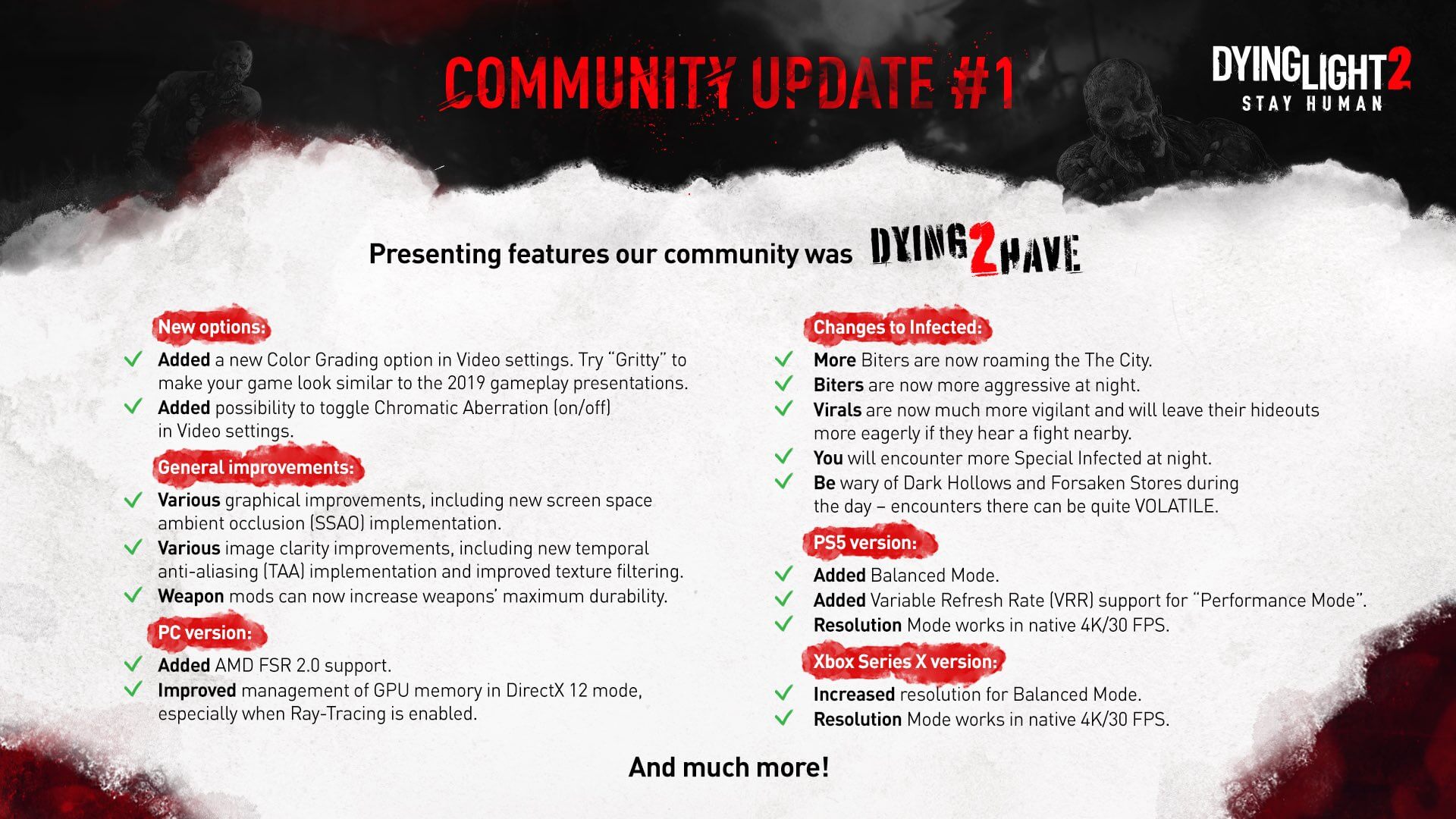
Players can also expect some visual improvements, including a new TAA implementation and improved texture filtering. There is also a new screen space ambient occlusion implementation that aims to further improve graphics.
Techland has also added a color grading option “Gritty” for a game looking akin to the 2019 gameplay presentations. Not only that, but the team has added an option to disable Chromatic Aberration.
As always, Steam will download this patch the next time you launch its client!

John is the founder and Editor in Chief at DSOGaming. He is a PC gaming fan and highly supports the modding and indie communities. Before creating DSOGaming, John worked on numerous gaming websites. While he is a die-hard PC gamer, his gaming roots can be found on consoles. John loved – and still does – the 16-bit consoles, and considers SNES to be one of the best consoles. Still, the PC platform won him over consoles. That was mainly due to 3DFX and its iconic dedicated 3D accelerator graphics card, Voodoo 2. John has also written a higher degree thesis on the “The Evolution of PC graphics cards.”
Contact: Email

Looks like great improvements all around.
Have they fixed the trees in the distance that looked like it was made for fcking snes?
Yeah right, the only way I found to fix the memory leaks is ISLC and set it to free mem lower than 16000. I highly doubt they fixed it after all these months. A real shame cause it looks awesome with RTX.
Debugging an application when you have access to it’s source code within an IDE is leagues apart from a 3rd party tool.
we don’t all code boyo.
I know, but the developers do. The dying light community patch is an official patch made by the developers…
i don’t know what’s your problem but you seem frustrated bud lmao. You’re clearly a sour reddit user.
Lmao what? You said something about a 3rd party debugger, which didn’t make any sense given who made the patch, I then pointed out that the devs can debug things differently. I don’t have any problem with you, just pointing out what actually happened lol.
Oh yeah? Then why you downvoting? That’s passive aggressiveness, bud 🙂 See how I use this smiley? That’s passive aggressive as well.
ISLC works, period. It doesn’t need to have any logic for you to understand. Just know that I spent hours on forums to find a solution and now I’m sharing it with others. So I don’t need your mumbo jumbo.
Jeez talk about issues, I’m downvoting because your replies didn’t make sense.
I’m sorry if that hurt your feelings or bothered you that much, I can remove them if it makes you feel better.
And cool, if you found a work around for an issue that was fixed by the latest patch, great. My only point was that the devs can fix the issue so you saying “yeah right” didn’t make sense. Also, it’s not mumbo jumbo, just basic software knowledge.
I’m gonna sound like a broken record but, for one last time, they didn’t make sense to YOU. It doesn’t even have to, it just works, for thousands of people that were able to play using RTX these past months. Read the forums. jesus
What bothered me is that you wasted my time trolling around.
I wouldn’t know because I don’t buy crappy games, I pirate them, because that’s what half a$$ed devs deserve nowadays. They just rush things and when users are having issues they take their sweet time while they’ve cashed in the earnings. So I have to wait for the cracked update to see if they fixed it. Most of the time they lie.
And technically it’s not a debugger. Because it doesn’t assist in the detection and correction of errors of said, DL2. It just frees up memory.
Dude. I’m not talking about your info on the tool you used to help solve your issue. That part is perfectly reasonable.
I’m talking about you saying “yeah right” as if you didn’t believe that the devs could fix a memory leak. That’s what I was responding to when I pointed out that the devs could easily do that, given they have access to the source code.
This entire convo was a misunderstanding. Wasn’t trying to waste your time.
Ah I see, my bad. Well they’ve been at it for 6 months since it’s release, and people are complaining a lot. So even if they can fix it it took them a very long time. Some devs could easily fix this, true, not these devs tho. Do you have the game? Have you experienced the mem leaks with the RTX? Does this update fix it? Please let me know.
I understand, it’s frustrating when the devs who know the game better than anyone else can’t fix an issue unless notified by the community.
I don’t personally have the game but I can download it and test it for you since I have a RTX 2070.
If you can test the new update that would be awesome. I’m selling tomorrow my 3070ti so i can get a 3080ti to see if I can get more fps. Hopefully it overcomes a lot of areas where the fps drop to 60.
Bad name for a patch. “Community Patch” sounds like something unofficial cooked up by modders.
Memory leaks that need a COMMUNITY patch. Classic 2010+ games industry moment.
The patch is an official patch. A little bit of reading goes a long way.
Excellent patch, no doubt but there isn’t a memory leak in the game. So whatever they “fixed” in regards to a memory leak… Wasnt.
I don’t know what it was but it was an optimization that probably cleared something from memory sooner but not a leak.