
NVIDIA G-Sync feature

NVIDIA G-Sync Pulsar sounds great, but it will NOT fix video-game stutters

At CES 2024, NVIDIA announced G-Sync Pulsar. G-Sync Pulsar is the next evolution of Variable Refresh Rate (VRR). This tech aims to improve visual clarity. In its press release, though, NVIDIA claimed that G-Sync Pulsar will offer a stutter-free experience. And, contrary to what the green team stated, G-Sync Pulsar will NOT fix video-game stutters. What do we mean? Well, keep reading to find out.

Let’s start with the basics. G-Sync and FreeSync are great at getting rid of V-Sync judder, making framerates look super smooth without any weird jumps. Plus, they put an end to screen tearing, which is awesome. I’ve been using a G-Sync monitor for a while now, so I know what I’m talking about. But here’s the thing – they don’t fix the annoying video game stutters.

When playing games, stutters can usually occur because the CPU is calculating new data. It might happen when you’re exploring new areas, hence why we call them traversal stutters. Then we have the shader compilation stutters. These stutters occur when the CPU is compiling shaders while the game is running. The thing is, these stutters have nothing to do with how G-Sync and FreeSync monitors work.

Now what NVIDIA meant with its “stutter-free” comment was that there won’t be any V-Sync judders. Judder is when the FPS doesn’t match the refresh rate evenly and the display time of frames becomes uneven. And again, all G-Sync monitors have already resolved this issue.

The key new feature of G-Sync Pulsar is variable frequency strobing. What does that mean? Well, it will basically make everything look way clearer, especially when things are moving super fast. That’s a big deal, don’t get me wrong. But, it has nothing to do with the traditional stutters.

For those who might not know, back in 2015, NVIDIA implemented Ultra Low Motion Blur (ULMB) to its G-Sync monitors. ULMB aimed to make games look super clear, especially for competitive players. The catch was, it didn’t play nice with Variable Refresh Rate (VRR). And that’s where G-Sync Pulsar comes in. If you have a G-Sync Pulsar monitor, you get the best of both worlds – the sharpness from ULMB and the smoothness from VRR.

Here’s a screenshot that showcases the benefits of G-Sync Pulsar.
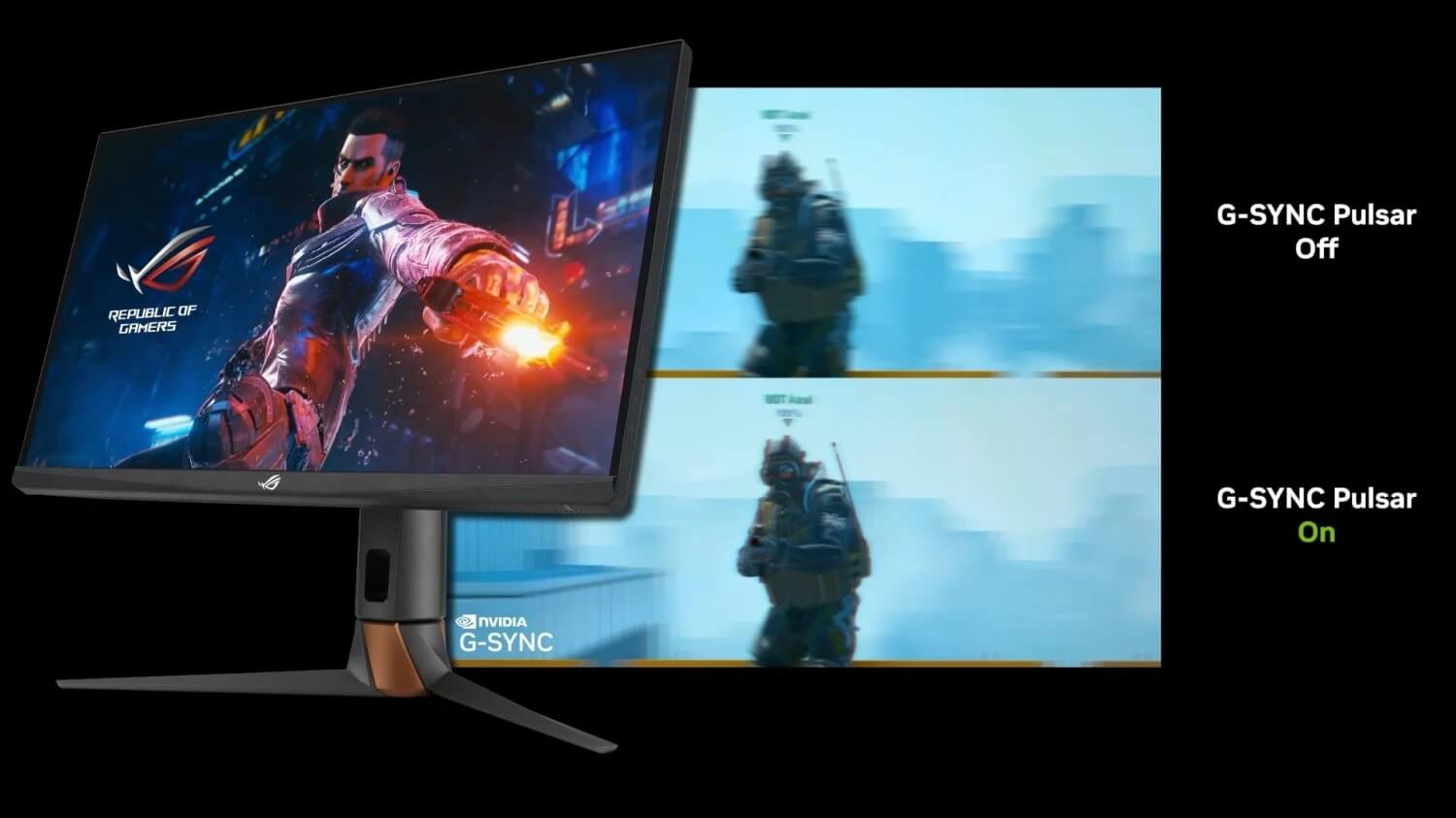
G-Sync Pulsar Demo

In conclusion, G-Sync Pulsar is a big deal. But, it will not resolve video-game stutters. Its main purpose is to improve image quality. I’m saying this because a lot of people will be misled by that statement. I know, I know. Some of you will be like “DUH”. Keep in mind though that a lot of people lack the technical knowledge. So, when they hear they’ll get a stutter-free experience, they expect exactly that. But no. Dead Space Remake, Star Wars Jedi: Survivor and all the games that suffer from stutters won’t magically run smoothly on these new monitors.

25 thoughts on “NVIDIA G-Sync Pulsar sounds great, but it will NOT fix video-game stutters”

  1. I have a monitor with GSYNC, and I hate it. I turned it off because it caused videos to look really choppy, but I wish the monitor didn’t have it at all. Did you know that you can’t update the firmware on a monitor that has GSYNC? That means I always have to have the same firmware, and if there’s a bug that’s causing an issue I have to send the monitor back to the manufacturer to get the firmware updated.

    1. You might want to give the video-player named “mpv” a shot –> you can find it on mpv[dot]io.

      It has a really neat video smoothing algorithm, among many other great features.

      To activate those, you will need to create a mpv.conf file; please look up the correct location on Windows.

      Then, copy & paste these into it via a text editor:

      deband=yes
      video-sync=display-resample
      interpolation=yes
      tscale=sphinx
      tscale-blur=0.6

      If done correctly, that will fix video judder.

      1. I use SMPlayer, which is a GUI front-end for MPlayer and mpv. Obviously I prefer mpv as it’s still maintained and is a fairly good video player.

        Also I also don’t experience “video judder” when I have GSYNC disabled and leave my monitor at full refresh rate all the time.

    1. We know everything about the SUPER GPUs but we haven’t requested a GPU because a) we only use one high-end model per gen for our PC Performance Analysis articles, b) we aren’t a GPU/CPU benchmark site.

      Some of my friends were asking for recommendations and I was telling them that an RTX4080 at 1000e is a great deal, and if they could find one at that price, they should get it immediately. Ironically, that’s what NVIDIA is trying to do with the SUPER model. So, it remains to be seen whether the “real” price will be 999e (my gut says that it will be around 1199e. All stores will up the price, especially if there is high demand for them).

      1. I’m expecting real-world prices to be higher than MSRP as well. MSRP became irrelevant during the mining craze and also the really high demand for hardware during the Pandemic.

        I’m ready to give some newer games a try this year and my 2070 Super won’t be enough at 1440p/144 Hz so I’m hoping the prices will be something close to MSRP for an upgrade. I’m not going to wait for 50xx GPUs. That’s probably a year away.

        1. The thing is the Manufacturer’s Suggested Retail Price varies from manufacturer to manufacturer. The Nvidia number is just a base point unless they are the manufacturer then it’s actually a MSRP

          I was able to get a 4070 Ti below the $799.00 mark set by Nvidia ($770) but with my 5% cach back from Amazon Prime it lowered the end cost to $731.50. The 3070 Ti I got two years earlier direct from EVGA (by their waiting list) cost me $660 and when you include the 13% inflation over the two years it would be the equivalent of $746 (High inflation is a b*tch) so technically my 4070 Ti cost less than the 3070 Ti when figured for inflation.
          Everyone wants to pretend there was no inflation in 2021 and 2022 but that’s just delusional thinking. It’s a fact and it raises the costs of everything and to make things worse it’s compounded annually like Interest. The only way the costs of inflation over the last 2-3 years ever goes away is through deflation and you definitely don’t want that to happen because that’s means you are in a recession or a depression.

          You can wish all you want to that GPU (and other) prices will drop but they aren’t going to drop significantly unless there is a recession. Or like my dad used to tell me when I would say “I wish that ….” …. Wish is one hand and and sh*t in the other and tell me which one fills up the fastest …..

      2. yeah that’s kind of the M.O. usually. Still haven’t seen a high end gpu go for 1k in years if not a decade.

  2. It’s not made to fix stutters. It’s made to fix motion blur. It’s incredible tech. What we need is better engines and cpu’s designed with more cache or latency to prevent these stutters.

  3. helloI really like your writing so a lot share we keep up a correspondence extra approximately your post on AOL I need an expert in this house to unravel my problem May be that is you Taking a look ahead to see you

  4. This is a Revolution and nVidia Allwyas makes em 👑
    Been waiting Forever, just for this – VRR + Strobing = damn Finaly about bloody time!

    This will be another nail in AMdead POS garbage coffin, trust me!

    And im so frikking happy I havent bought a new gaming monitor for years, as all gaming goes on my CX55. Been waiting for OLED monitors to catch up, and this year the bloody will, with a Bang – 4K 144hz+ and 32 and up etc. But I will never buy anything without this badboy. It will use a total new g-sync module!

    2024 are starting so great 😁

  5. Actually there still is judder with both G-sync and Free-Sync because both are actually still V-sync just done in a different manner than traditional V-sync Anything that syncs up the vertical scan rate in a display is V-sync and there is no way around that hardware based fact. It’s just not as bad as fixed frequency V-sync because v-sync has to buffer the frame for a longer time which is where the judder comes from. The judder is not as bad because G-sync doesn’t buffer a frame for nearly as long. It’s also why ALL graphics are rasterized even Ray Tracing because all monitors are vertically raster scanned. All video is rasterized too

    Raster –
    1. A scanning pattern of parallel lines that form the image projected on a cathode-ray tube of a television set or display screen.

    2. A scanning pattern of parallel lines that form the display of an image projected on a cathode-ray tube of a television set or display screen

    This can be easily proven with the right software looking at frame times and graphing them out. However you are correct that it won’t help with some kinds of stuttering but those kinds of of stuttering get compounded by the judder inherent in G-Sync and Free-Sync because it makes it harder to track the frame times and sync them to the raster since they are all over the place. It won’t completely eliminate judder but it can make it better by not compounding the judder even more which is what happens currently. The blurriness you see is from that sync judder (Not the game judder) because vertical scan is not perfectly synced because of the inherent judder with all types of vertical scan sync. Basically you have two sources of judder, judder from the game itself and judder in the vertical sync process. This eliminates (actually minimizes) the vertical sync judder portion and should help in situations where the game judder isn’t real bad making it even less noticeable compared to the game judder compounded with the vertical sync judder

  6. Hi my family member! I want to say that this post is awesome, nice written and come with approximately all significant infos. I would like to peer extra posts like this.

  7. Thank you, I have just been searching for information approximately this topic for a while and yours is the best I have found out so far. However, what in regards to the bottom line? Are you certain concerning the supply?

  8. I loved as much as you will receive carried out right here. The sketch is attractive, your authored material stylish. nonetheless, you command get got an impatience over that you wish be delivering the following. unwell unquestionably come more formerly again since exactly the same nearly a lot often inside case you shield this hike.

  9. Thanks I have just been looking for information about this subject for a long time and yours is the best Ive discovered till now However what in regards to the bottom line Are you certain in regards to the supply

  10. I do not even know how I ended up here but I thought this post was great I do not know who you are but certainly youre going to a famous blogger if you are not already Cheers

Leave a Reply

Your email address will not be published. Required fields are marked *