
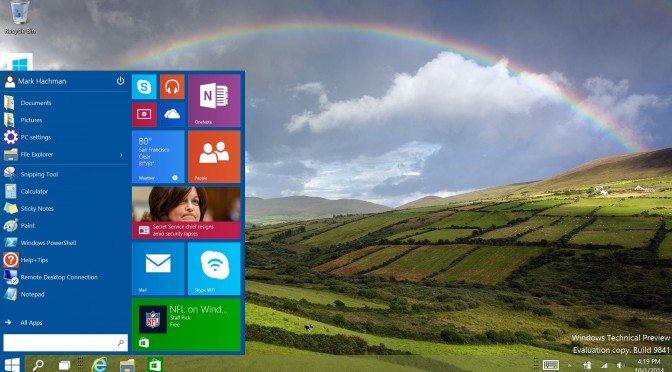
Microsoft announced today that its new OS, Windows 10, will be launched on July 29th. Windows 10 brings back the Start menu and aims to be faster than ever before, with quick startup and resume. In addition, Windows 10 promises to be the most secure platform ever, including Windows Defender for free anti-malware protection.
Here are some of Windows 10’s key features:
- Cortana, the world’s first truly personal digital assistant helps you get things done. Cortana learns your preferences to provide relevant recommendations, fast access to information, and important reminders. Interaction is natural and easy via talking or typing. And the Cortana experience works not just on your PC, but can notify and help you on your smartphone too.
- Microsoft Edge, is an all-new browser designed to get things done online in new ways, with built-in commenting on the web – via typing or inking — sharing comments, and a reading view that makes reading web sites much faster and easier. With Cortana integrated, Microsoft Edge offers quick results and content based on your interests and preferences. Fast, streamlined and personal, you can focus on just the content that matters to you and actively engage with the web.
- Office on Windows: In addition to the Office 2016 full featured desktop suite, Windows 10 users will be able to experience new universal Windows applications for Word, Excel, and PowerPoint, all available separately. These offer a consistent, touch-first experience across a range of devices to increase you productivity. Designed from the ground up to run on Windows 10, you can easily create and edit Word documents, and deliver PowerPoint presentations while annotating on the fly. With new touch-first controls in Excel you can create or update spreadsheets without a keyboard or mouse. You will also be able to enjoy new versions of OneNote and Outlook, which are included with Windows 10 at no additional cost.
- Xbox Live and the integrated Xbox App bring new game experiences to Windows 10. Xbox on Windows 10 brings the expansive Xbox Live gaming network to both Windows 10 PCs and tablets. Communicate with your friends on Windows 10 PCs and Xbox One – while playing any PC game. You can capture, edit and share your greatest gaming moments with Game DVR, and play new games with friends across devices. You can play games on your PC, streamed directly from your Xbox One console to your Windows 10 tablets or PCs, within your home. Games developed for DirectX 12 in Windows 10 will see improvements in speed, efficiency and graphics capability.
- New Photos, Videos, Music, Maps, People, Mail & Calendar apps have updated designs that look and feel familiar from app to app and device to device. You can start something on one device and continue it on another since your content is stored on and synched through OneDrive.
- Windows Continuum enables today’s best laptops and 2-in-1 devices to elegantly transform from one form factor to the other, enabling smooth transitions of your tablet into a PC, and back. And new Windows phones with Continuum can be connected to a monitor, mouse and physical keyboard to make your phone work like a PC.
- Windows Hello, greets you by name and with a smile, letting you log in without a password and providing instant, more secure access to your Windows 10 devices. With Windows Hello, biometric authentication is easy with your face, iris, or finger, providing instant recognition.
- Windows Store, with easy install and uninstall of trusted applications, supported by the broadest range of global payment methods.
Enjoy!


John is the founder and Editor in Chief at DSOGaming. He is a PC gaming fan and highly supports the modding and indie communities. Before creating DSOGaming, John worked on numerous gaming websites. While he is a die-hard PC gamer, his gaming roots can be found on consoles. John loved – and still does – the 16-bit consoles, and considers SNES to be one of the best consoles. Still, the PC platform won him over consoles. That was mainly due to 3DFX and its iconic dedicated 3D accelerator graphics card, Voodoo 2. John has also written a higher degree thesis on the “The Evolution of PC graphics cards.”
Contact: Email