
Intel header image 3

Intel issues official statement about the stability issues of its 13th and 14th generation CPUs

Intel has issued an official statement about the stability issues of its 13th and 14th generation CPUs. The blue team says it’s important to use certain settings for stability. These settings are completely different from those that some motherboard companies have added. And, as you may have guessed, this can make it hard for regular users to set up their CPUs.

In case you didn’t know, some of Intel’s newest CPUs had problems staying stable while playing games. These issues popped up especially in Unreal Engine games, during the shader compilation procedure. During that state, a game uses all the cores of your CPU. Thus, Intel’s CPUs were crashing a lot during this because some motherboard makers had set really high settings by default.

To fix those stability issues, motherboard manufacturers released new BIOSes that had a new profile, called “Intel Baseline Profile”. However, according to Intel, this profile is not the one they recommend. Instead, Intel suggests using the following settings for its CPUs.

As Intel stated:

“Several motherboard manufacturers have released BIOS profiles labeled ‘Intel Baseline Profile’. However, these BIOS profiles are not the same as the ‘Intel Default Settings’ recommendations that Intel has recently shared with its partners regarding the instability issues reported on 13th and 14th gen K SKU processors.

These ‘Intel Baseline Profile’ BIOS settings appear to be based on power delivery guidance previously provided by Intel to manufacturers describing the various power delivery options for 13th and 14th Generation K SKU processors based on motherboard capabilities.

Intel is not recommending motherboard manufacturers to use ‘baseline’ power delivery settings on boards capable of higher values.

Intel’s recommended ‘Intel Default Settings’ are a combination of thermal and power delivery features along with a selection of possible power delivery profiles based on motherboard capabilities.

Intel recommends customers to implement the highest power delivery profile compatible with each individual motherboard design as noted in the table below.”

As you will see, you’ll have to set a lot of settings manually in order to be in the safe zone. Seriously, this is hilarious. Imagine an average customer buying an Intel CPU, experiencing crashes, and having to manually set all those settings. This right here is reason enough to not recommend any Intel CPU for the average Joe. Not only that, but AMD’s latest CPUs provide similar performance to Intel’s offerings, without having these stability issues.

It’s really ironic how Intel has fallen. These stability issues are really inexcusable. Both Intel and the motherboard manufacturers are to be blamed for these issues. Intel was desperate to be the BEST choice for PC gamers. And, in order to achieve this, it pushed its CPUs to the extreme with its power limits. And… well… that backfired.

So, if you have a 13th or 14th generation Intel CPU, you can use the following settings.

Kudos to HardwareLuxx for sharing the graph!
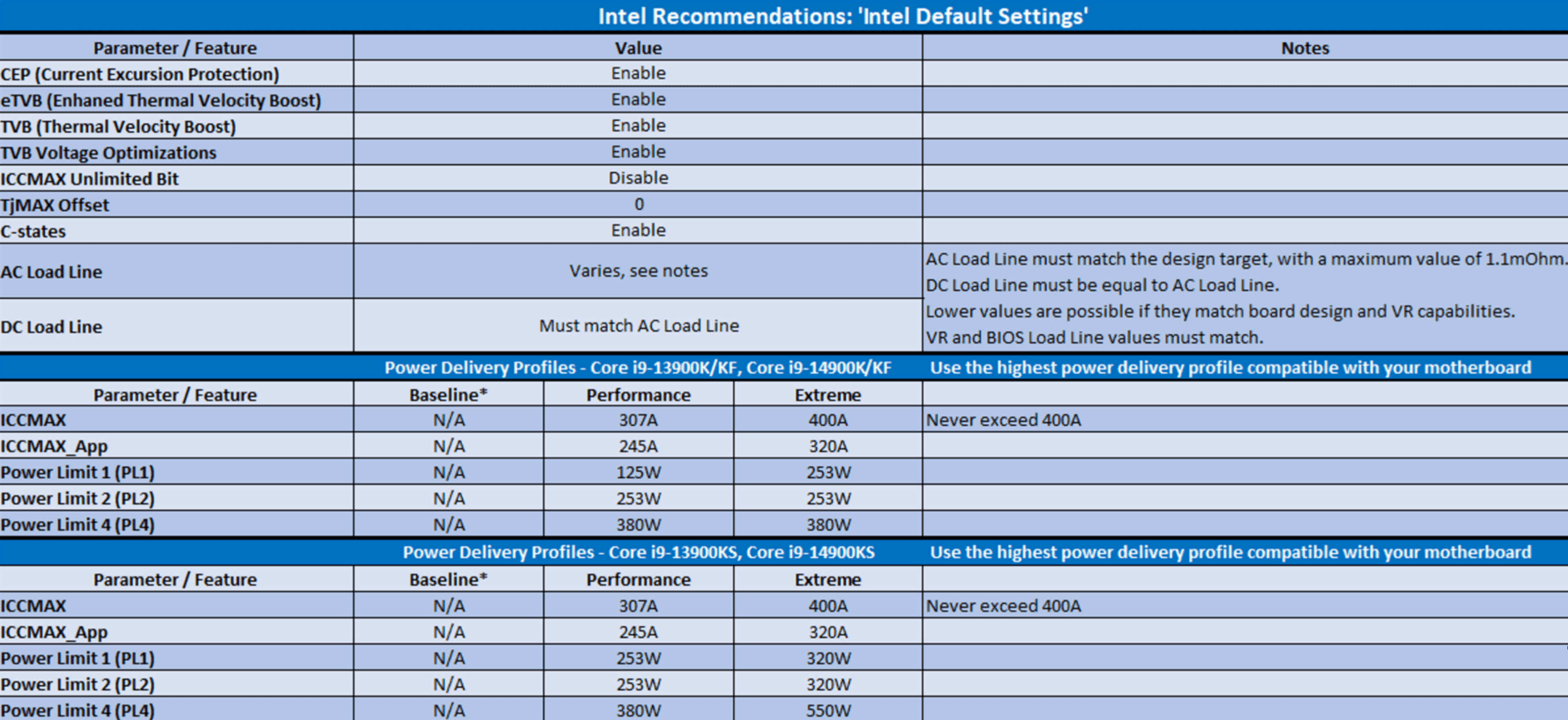
Intel default CPU settings

13 thoughts on “Intel issues official statement about the stability issues of its 13th and 14th generation CPUs”

    1. No ….. Each CPU is going to be different so you need to find the Recommended Power Delivery Profiles for the 13700K from Intel

      The 13700K and 14700K don’t seem to be as much of a problem but I did see some people having problems with them in Horizon Forbidden West when pre-compiling shaders or compiling shaders “on the fly”

      Personally on an AMD 5800X I was 101.3 hours into the game before I had a soft crash (CTD) going to look at the map and haven’t had any of the stuttering problems or framerate dips during cutscenes like Intel users seem to be having across several generations of Intel CPUs

  1. It should also be noted that the baseline profile not only reduces performance, it manages to do so by increasing the power consumption and thus the temperatures, too:

    https://uploads.disquscdn.com/images/a7eba20bbac61d49c73dfe3fc4b4c6840a90c2f73190a815892d5fe1ea38249c.png

    https://uploads.disquscdn.com/images/524165ab0ae8764f57c5e11ad6a55cbbf5479ad67ce01d0501ebc22574e1f032.png

    https://uploads.disquscdn.com/images/580338486a4e35bb56c452a2a8e7835b0f753b6147678e8dcb618be3b832791a.png

    That’s an awe-inspiring achievement, Intel!

    Seriously, both the CPU & GPU division at Intel has serious trouble keeping up with the competition.

    Just look at those 1% & 0.1% framerates of the MSI Claw, which is powered by Intel’s latest & greatest “Core Ultra” chips, against the Steam Deck using an old-gen AMD APU (Zen2 + RDNA2):

    https://uploads.disquscdn.com/images/0aafd67353d6a60105cb2b3a5daf3a3665448380004f9a44fc3f3a6a9c56030a.jpg

  2. Biggest reason I still recommend my friends and family who choose intel to get a 12th gen there’s just no point in paying more for the instability especially if you don’t need the power. I’m more of the mind that you should get the best value products for whatever you want to do regardless of any “team affiliation.” People are familiar with the brand and that is understandable but this cycle they’ve been playing the weirdest version of value catch up with Ryzen by forcing themselves to stay on the same mobo and strangling whatever increases they can get out of the node instead of moving on.

  3. “This right here is reason enough to not recommend any Intel CPU for the average Joe.”

    Just for the high end stuff. The mid-range parts could still be worth a look if the prices are competitive.

  4. My take, They fell behind on garbage nodes, Had to introduce crappy e-cores because they couldn’t fit more power cores on and then were forced to overclock just to compete with AMD.
    Wish they would offer a cpu without e-cores, My 12700k e cores are sitting there doing stuff all.

    1. Well, then I got same bad news for you, because Intel is doubling down on their E-cores strategy, since it’s the only way for them to stay competitive with AMD’s ever increasing high-core count CPUs in multi-threaded workloads.

      AFAIK, they only offer an all P-cores CPU in their Xeon lineup, which is targeted towards the professional markets and therefore much more expensive than their consumer-tier “Core Ultra” chips.

  5. I wonder if this is limited to K SKU CPUs, or if there are examples of 13th/14th gen locked CPUs also having similar problems.

    1. As far as I know there is no problem with locked CPUs because they are essentially locked to the Baseline profile and can’t be changed. It’s just the top end K SKUs that are a problem.

      There are also Loadline settings hardly anyone is talking about that can also make a stability difference. Actually Hardcore Overrlocking is a good channel if you want an in depth discussion. Also a great channel for in depth memory settings and overclocks. Also good for GPU VRM power delivery discussions, fixes and mods

  6. “Seriously, this is hilarious. Imagine an average customer buying an
    Intel CPU, experiencing crashes, and having to manually set all those
    settings. This right here is reason enough to not recommend any Intel
    CPU for the average Joe.”
    Regulatory bodies should be investigating Intel over this, its misrepresentation bording on fraud.

    “Not only that, but AMD’s latest CPUs provide
    similar performance to Intel’s offerings, without having these stability
    issues.”
    Indeed, but arent some motherboard/Ram combinations still providing to be unstable, as in user cant enable Expo or boot times are insanley long…

Leave a Reply

Your email address will not be published. Required fields are marked *
