
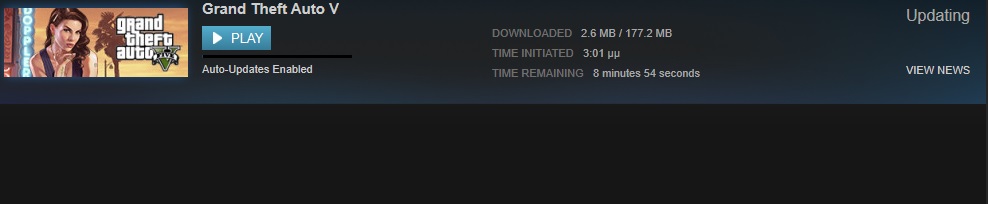
Rockstar has just released a new update for the PC version of Grand Theft Auto V. While the company did not reveal yet its changelog, we can confirm that this new patch is 177MB in size (on Steam) and 375MB in size (on Rockstar Games Social Club). This patch will update your game’s version to v335.1.
We’ll be sure to update this story once the changelog is out!
UPDATE:
Rockstar has revealed the changelog for this update that can be viewed below:
- Players can no longer purchase more vehicles than their properties can store.
- Players can now launch a video card benchmark test from the main menu.
- Fixed an issue where facial features would not save correctly when transferring a character from Xbox 360 or PS3 and changing genders while editing the character’s appearance.
- Fixed an issue where players could become stuck in the clouds when voting to quick restart the Humane Labs Heist.
- Fixed an issue where markers in the Rockstar Editor could not be deleted with the mouse.
- Fixed various audio recording issues with Rockstar Editor clips.
- Fixed an issue where the Yacht would not appear in some recorded Rockstar Editor clips.
- Fixed a rare issue where some Rockstar Editor clips could not be opened for editing.
- Fixed an issue where the GTAV Launcher would not display the correct amount of time remaining for file downloads.
- The Steam overlay has been moved to prevent it from covering up Launcher buttons.
- Fixed an issue where the game would not save your settings when restarting in some instances.
- Fixed a rare issue where the Steam version of the game would crash right after launching.
- Windows Media Player is no longer required to install GTAV. Instead, Windows Media Foundation will be required.
- Fixed an issue where the game would show the pause menu without player input.
- Fixed an issue where the max frame rate would be incorrectly low in rare cases.
Those interested can purchase this game from GreenManGaming!


John is the founder and Editor in Chief at DSOGaming. He is a PC gaming fan and highly supports the modding and indie communities. Before creating DSOGaming, John worked on numerous gaming websites. While he is a die-hard PC gamer, his gaming roots can be found on consoles. John loved – and still does – the 16-bit consoles, and considers SNES to be one of the best consoles. Still, the PC platform won him over consoles. That was mainly due to 3DFX and its iconic dedicated 3D accelerator graphics card, Voodoo 2. John has also written a higher degree thesis on the “The Evolution of PC graphics cards.”
Contact: Email


Can someone tell me why the social club version of GTA has a bigger update? On a 2 meg line, even the small updates are irritating.
Because the compression of files on Steam is the best…
I suppose I should just be grateful they are updating the game.
Some patch notes would be nice, sometimes Rockstar* can be so up their own a*s.
The same thing I was thinking. I’m hoping they fix the 59Hz issue. The game runs at 59fps and this causes stutter.
http://www.gamersnexus.net/game-bench/1909-gta-v-graphics-optimization-guide
Check this out, it helped me with my settings.
True but the game rounds it off to 59 for some reason. The fps counter always shows 59fps instead of 60.
For everyone wondering what the patch actually does… “This patch will update your game’s version to v335.1.”
It just changes the number of the version of the game to 335.1.
XDDDDD u fkn rtrd
Changelog: https://support.rockstargames.com/hc/en-us/articles/204909368–4-21-15-GTAV-PC-Patch-335-1-Notes
From their website. [4/21/15] GTAV PC Patch 335.1 Notes
Rockstar Games
Today at 12:01
Players can no longer purchase more vehicles than their properties can store.
Players can now launch a video card benchmark test from the main menu.
Fixed an issue where facial features would not save correctly when transferring a character from Xbox 360 or PS3 and changing genders while editing the character’s appearance.
Fixed an issue where players could become stuck in the clouds when voting to quick restart the Humane Labs Heist.
Fixed an issue where markers in the Rockstar Editor could not be deleted with the mouse.
Fixed various audio recording issues with Rockstar Editor clips.
Fixed an issue where the Yacht would not appear in some recorded Rockstar Editor clips.
Fixed a rare issue where some Rockstar Editor clips could not be opened for editing.
Fixed an issue where the GTAV Launcher would not display the correct amount of time remaining for file downloads.
The Steam overlay has been moved to prevent it from covering up Launcher buttons.
Fixed an issue where the game would not save your settings when restarting in some instances.
Fixed a rare issue where the Steam version of the game would crash right after launching.
Windows Media Player is no longer required to install GTAV. Instead, Windows Media Foundation will be required.
Fixed an issue where the game would show the pause menu without player input.
Fixed an issue where the max frame rate would be incorrectly low in rare cases.
ok then I dont need to update
Did they fix the f*&king self radio stuttering yet???
Strange im playing GTA 5 and music from two separate HDD’s and get no stuttering on self radio.
Nice, was wondering what that update was 9 hours ago.
If I would get my cars from my ps3 character I would be soooo happy..