

Even though Epic Games store has been giving away free PC games for this Holiday season, some gamers have been experiencing issues with the Epic Games Launcher client. There have been several reports that the Epic Games Launcher has been found to increase the temperature of some AMD Ryzen and Intel processors.
This is making some CPUs to run hotter even without any game running, as reported by multiple users on Reddit, and also tested and verified by Hot Hardware as well. The Epic Games Launcher appears to be continuously running some sort of relatively demanding process in the background, when the spike in CPU temp occurs.
One Reddit user @Neoncarbon noticed that his AMD Ryzen 7 5800X CPU idle temps dropped from 50C to 37C when he closed the Epic Games Store’s app/client. The EGL application appears to be using some CPU resources even when it is running in the background. At least that’s what is being reported right now.
Though, it should be noted that not all AMD Ryzen owners have been experiencing this issue, so it may not be widespread as reported on Reddit. But some INTEL CPU owners have also observed a similar behavior with the EGL app.
Some Ryzen CPUs may run up to 20C hotter with the EGL client, and that’s without any game running. As mentioned before, the launcher appears to increase the CPU usage on certain threads which in turn is affecting the temperature of the whole processor package.
As reported by Hot Hardware, “Anyone that has the Epic Games launcher running in the background has higher CPU temps and usage, even while idle on the desktop”.
As you can see from the screenshots posted by Hot Hardware’s testing, the AMD Ryzen 9 5950X CPU shows 34.28C temp value when the EGL app is not running (shown on left side), and the temp shoots to 56.78C value when the app is running (on right).
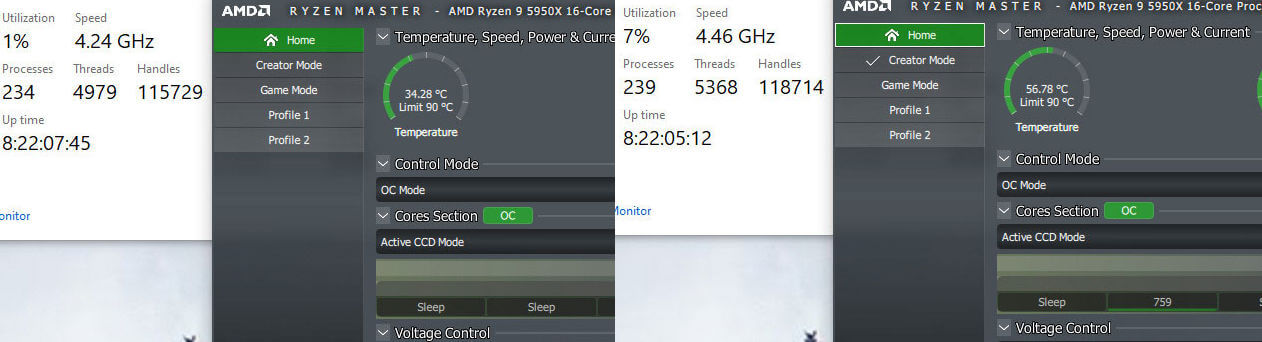
For what it’s worth, Hot Hardware was running a liquid-cooled AMD Ryzen 9 5950X CPU. Even in the idle desktop mode, Hot hardware noticed that CPU temps were around 53C when the Epic Games launcher was running, and there was 2% CPU utilization from the app itself on this 16-core AMD Zen 3 processor.
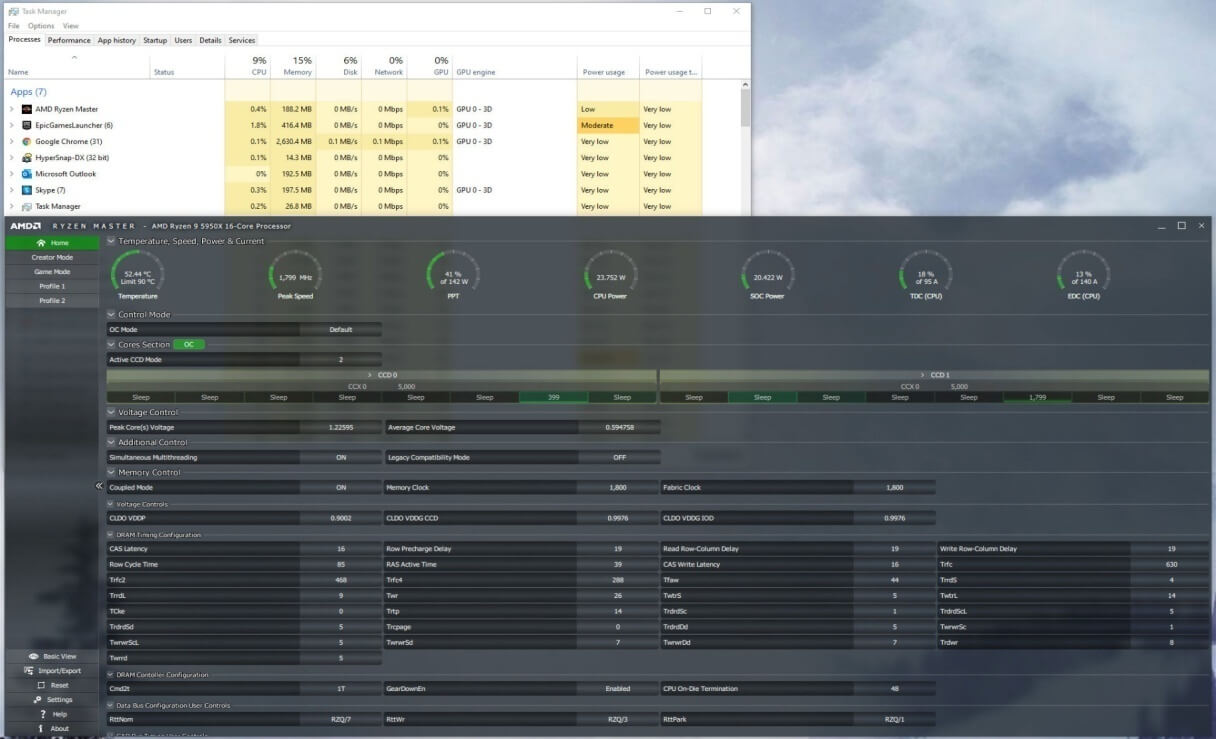
Other game clients like GOG or STEAM do not seem to exhibit this same behavior, since these CPU temperature and usage spikes are not usually typical of game launchers. So what exactly is happening with the Epic Games Launcher you may ask?
As Hot Hardware reports:
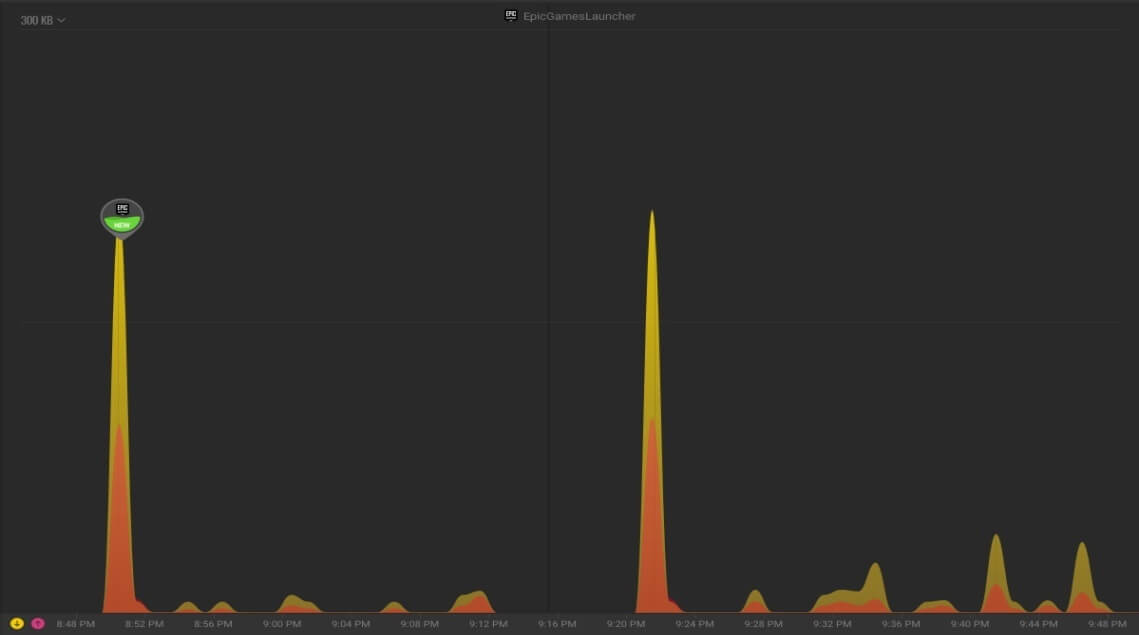
“Doing some testing on another personal machine, we noticed that the Epic Games Launcher has five different processes open at one time. Out of curiosity, we opened up Glasswire, which is a free network traffic monitor. We could see that the Epic Games Launcher and associated processes were firing off data at regular intervals to over 22 different servers.
This was happening whether we had the launcher open, minimized, or in the background. The larger spikes shown in the Glasswire graph below are from when we reopened the Epic Games launcher after closing it.”
Currently there is no fix for this issue, but there is one workaround. You can try to link Epic Games Launcher to the GOG Galaxy client, which has a built-in feature to automatically close ‘original’ launchers after the game is shut down, as pointed out by Videocardz.
It has also been reported that the Epic Games Launcher/EGL is sending 14x more as much data as Steam and NVIDIA Geforce Experience, while working in the background during the same timeframe.
It has been discovered that the “EpicWebHelper” seems to send some data to the following URL/server, though it remains to be seen whether this data collection behavior is indeed the cause of the high CPU usage/temp issue which is being reported:
“tracking-website-prod07-epic-961842049.us-east-1.elb.amazonaws.com”
If you are also experiencing a similar high CPU usage/temp behavior with the EGL app, then kindly leave your findings in the comment section below.
Stay tuned for more tech news!
UPDATE:
Epic Games has admitted that this was indeed a bug with the launcher, and a fix is coming soon. The EGL/EPIC games Launcher app patch notes will be updated when this fix gets implemented.

Hello, my name is NICK Richardson. I’m an avid PC and tech fan since the good old days of RIVA TNT2, and 3DFX interactive “Voodoo” gaming cards. I love playing mostly First-person shooters, and I’m a die-hard fan of this FPS genre, since the good ‘old Doom and Wolfenstein days.
MUSIC has always been my passion/roots, but I started gaming “casually” when I was young on Nvidia’s GeForce3 series of cards. I’m by no means an avid or a hardcore gamer though, but I just love stuff related to the PC, Games, and technology in general. I’ve been involved with many indie Metal bands worldwide, and have helped them promote their albums in record labels. I’m a very broad-minded down to earth guy. MUSIC is my inner expression, and soul.
Contact: Email