
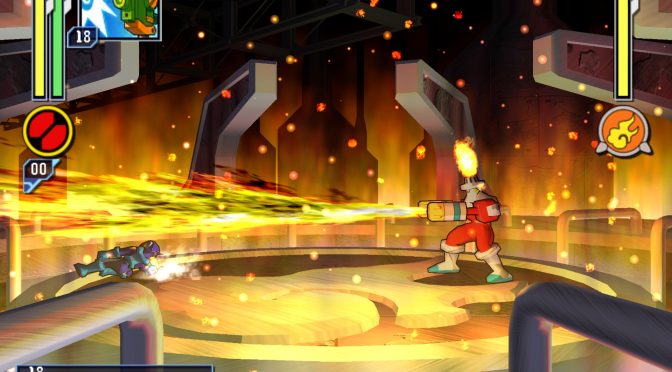
The Dolphin Emulator development team announced today the release of Dolphin 5.0 (GameCube & Wii emulator). According to the team, this new version comes with over 10000 changes and improvements from its previous build, and is available for Windows (x64) and Mac OS X.
According to the team, this new version of Dolphin offers better and faster CPU emulation, Texture EnVironment fixes, support for zFreeze and exclusive full-screen, revamped netplay, and the ability to override the emulated CPU Clock.
Those interested can download Dolphin 5.0 from its official website (you can find it via Google, we won’t be linking to it).
And here are some of the key features of Dolphin 5.0:
Texture EnVironment Fixes
Texture EnVironment Fixes (TEV Fixes) is a fundamental change to how Dolphin handles the graphics pipeline in the GameCube and Wii. Rather than attempting to emulate integer math using floating point math, Dolphin abandons that by taking advantage of the D3D11 and OpenGL 3 (or newer) APIs that allow for the use of integer math unlike older APIs. Back when Dolphin was first introduced, this wasn’t even an option outside of a software renderer as those APIs didn’t exist yet! Despite integer math being supported since OpenGL 3, many graphics cards and drivers still struggle to handle integer math correctly. This could cause some loss in performance in specific situations, but, the huge increase in accuracy solving thousands of graphical issues across hundreds of games would simply not be possible without the switch.zFreeze Support
zFreeze is one of those features that we never thought would be implemented. Developers have been aware of the feature for quite some time, but no one could quite get a handle on how to implement it. It took three developers working upon years of research to finally crack the code, and now every known situation of zFreeze works properly in Dolphin! As we proudly stated once zFreeze emulation was defeated yes, you can finally play Rogue Squadron II in Dolphin. Due to how demanding it is and all the crazy hardware tricks it uses, it may not be perfect yet, but zFreeze will not be causing any more headaches.Better and Faster CPU Emulation
Much like Dolphin’s GPU emulation, Dolphin’s CPU emulation has seen many accuracy improvements over the past two and half years. And it’s sacrificed compatibility, too. While D3D9 was sacrificed for integers, the x86_32 JIT was sacrificed for a whole slew of improvements. We promised users that dropping the 32-bit JIT would open up many options for improvements, but, even we didn’t expect nearly a 100% improvement in performance in the JIT!Dropping the 32-bit JIT was hugely instrumental in many of these changes; it meant a lot less work to implement new features (no longer have to implement it twice, once for each architecture), along with the lifting of some restraints that heldback various optimization ideas. The result of the added ease is that many instructions that previously had to fall back onto the costly interpreter have now been implemented into the JIT. Any game that uses said instructions will see a performance boost. Even better, by using a super-accurate software interpreter backed up by hardware tests as a guideline, many instructions were made more accurate over the course of the 4.0 era. It was very easy to simply fall through walls not too long ago.
One of our touted features that show just how much more accurate Dolphin has become is that hardware recorded replays in games like Mario Kart: Double Dash!!, F-Zero GX, Mario Kart Wii, and every other game we’ve tested with replay support now can be correctly replayed between Dolphin and console without issues.
Revamped Netplay
Thanks to an active netplay community, we try our best to keep things up to date and working. Back in Dolphin 4.0, netplay was quite a thing to setup. Users would have to port-forward, sync all settings manually, and even if they did all that, there would be no warning if they did desync. Thanks to a very active community at smashladder for assisting in high volume testing, we’ve managed to pack in a ton of new features for netplay in Dolphin 5.0!
- Dualcore Netplay: A new form of Dualcore called “fake-completion” was added. While it has lower compatability than single-core on netplay, it brings most of the speed of dualcore mode in a deterministic way.
- Blank NAND Netplay: Without Wiimotes and saves on Wii netplay, it’s left as a mostly useless feature. By disabling the NAND, users can at least use Wii Netplay with Wii games when they don’t need to save or use Wiimotes. Enterprising users onsmashladder have taken to playing Project M competitively on netplay, simply because it’s lower latency than Nintendo WFC!
- STUN Server: We realized that many users couldn’t forward ports in order to play netplay, so, we now have an alternative. Dolphin’s STUN server allows many users who either lack the ability to configure their router or the knowledge to forward ports to still host and play netplay sessions! While gaining 100% compatibility across all routers and networks is impossible, this should still work with most setups.
- Settings Sync: Dolphin now syncs many settings that could commonly cause desyncs if they were different. They are only set during the netplay session, and will not permanently change any settings beyond that.
- Desync Detection: If something is wrong and you do manage to desync, Netplay will now warn you that it has detected a possible desync. If users are using cheat-codes or any kind of modification to the game, this could be set off erroneously. But in most situations, the desync checker will detect if you’ve desynced before you even notice! This usually will show up very early on if something is setup wrong.
Override Emulated CPU Clock
One of the most versatile features of Dolphin 5.0 is the ability to override the CPU clock of the GameCube/Wii CPU. If you’re lagging in a game due to a weak CPU, you can lower the emulated CPU Clock to trade emulator lag (and issues like audio lag), for full-speed with a lower framerate. Have a powerful computer? Raise the clockrate to remove emulated lag. In some games, this can turn a dynamic frame-rate game into a 60 FPS game. This feature is also a cornerstone of various 60 FPS patches available for users on the wiki and forums. This can also be used to get around various hangs in games like True Crime: New York City by adjusting things that would otherwise require (closer to) cycle accurate behavior in the CPU core for a particular scene.Exclusive Fullscreen Support
Exclusive Fullscreen mode allows Dolphin more complete control over pushing frames to the monitor. This gives Dolphin much lower latency (up to 2 frames depending on window manager), and more consistent frametimings for games that require it. The best way to compare is to a lagging video where frametimings are inconsistent.


John is the founder and Editor in Chief at DSOGaming. He is a PC gaming fan and highly supports the modding and indie communities. Before creating DSOGaming, John worked on numerous gaming websites. While he is a die-hard PC gamer, his gaming roots can be found on consoles. John loved – and still does – the 16-bit consoles, and considers SNES to be one of the best consoles. Still, the PC platform won him over consoles. That was mainly due to 3DFX and its iconic dedicated 3D accelerator graphics card, Voodoo 2. John has also written a higher degree thesis on the “The Evolution of PC graphics cards.”
Contact: Email