

Ubisoft has just released a new patch for Assassin’s Creed Origins, claiming that it improves overall stability and performance. And we are happy to report that Ubisoft has delivered. This latest patch has improved the game’s performance by up to 16% on our Intel hexa-core CPU, and resolved all of our stuttering issues.
Moreover, the game still stressed our CPU. Ubisoft claimed that this has nothing to do with its protection system (VMProtect over Denuvo). Still, and while this seems a bit fishy, Ubisoft has been able to improve overall performance, so kudos to them.
We re-tested the game on our PC system which consists of an Intel Core i7 4930K (overclocked at 4.2Ghz) with 8GB of RAM and an NVIDIA GTX980Ti. As we can see below, our GTX980Ti was used to its fullest during the built-in benchmark tool, even in cities.
In order to find out whether there are further CPU improvements, we’ve dropped our resolution to 720p. We also set the Resolution Scaler to 50% so we could avoid any GPU bottleneck. Our hexa-core was able to push a minimum of 63fps and an average of 72fps. Regarding minimum framerates, that’s a 16% boost.
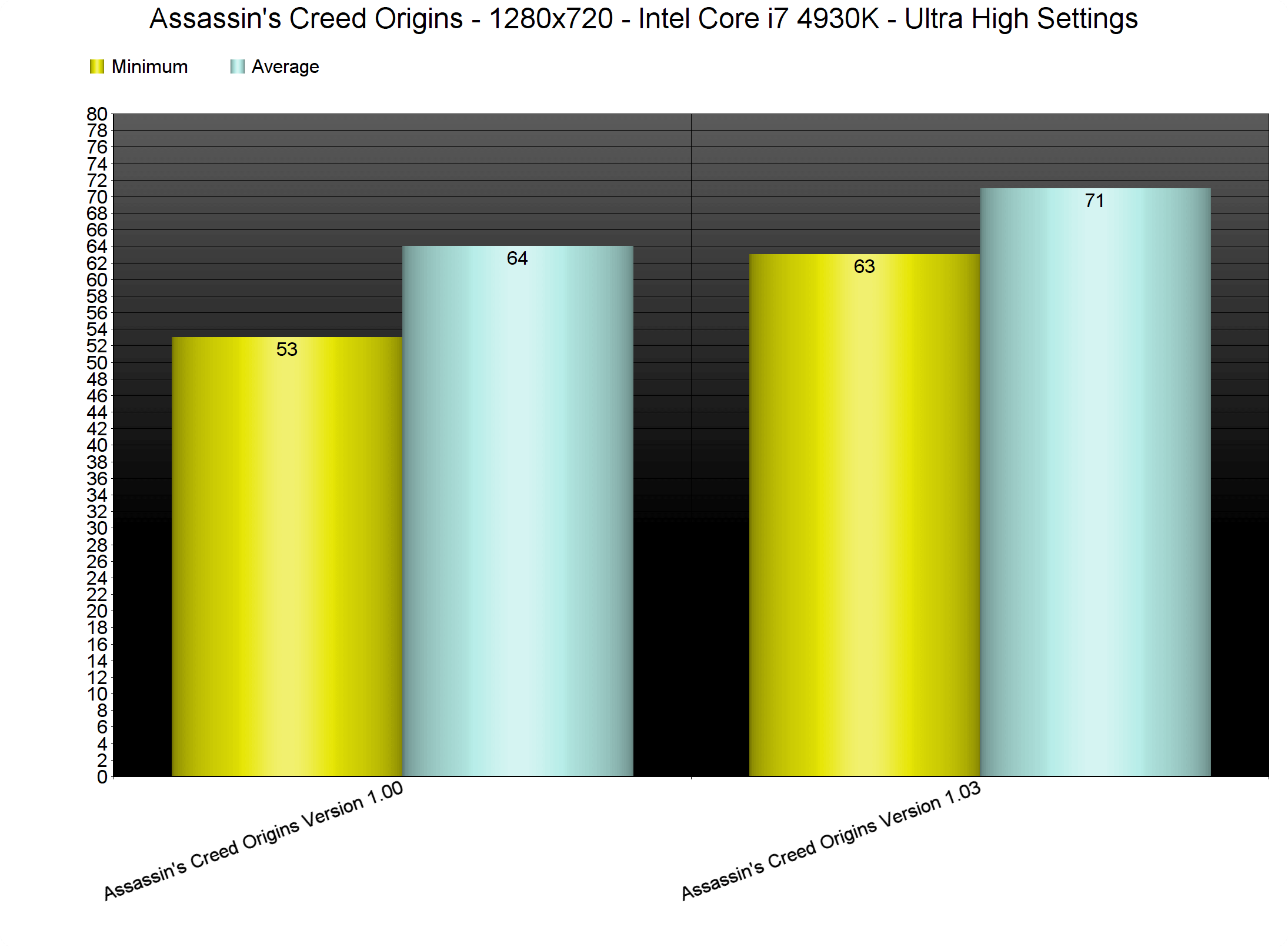
At 1080p, the benchmark never dropped below 58fps, making the whole experience better than before. For comparison purposes, our pre-patch minimum framerate at 1080p was 51fps. Furthermore, Ubisoft has addressed the micro-stuttering and stuttering issues that were present in it. As such, the game now feels smoother than before.
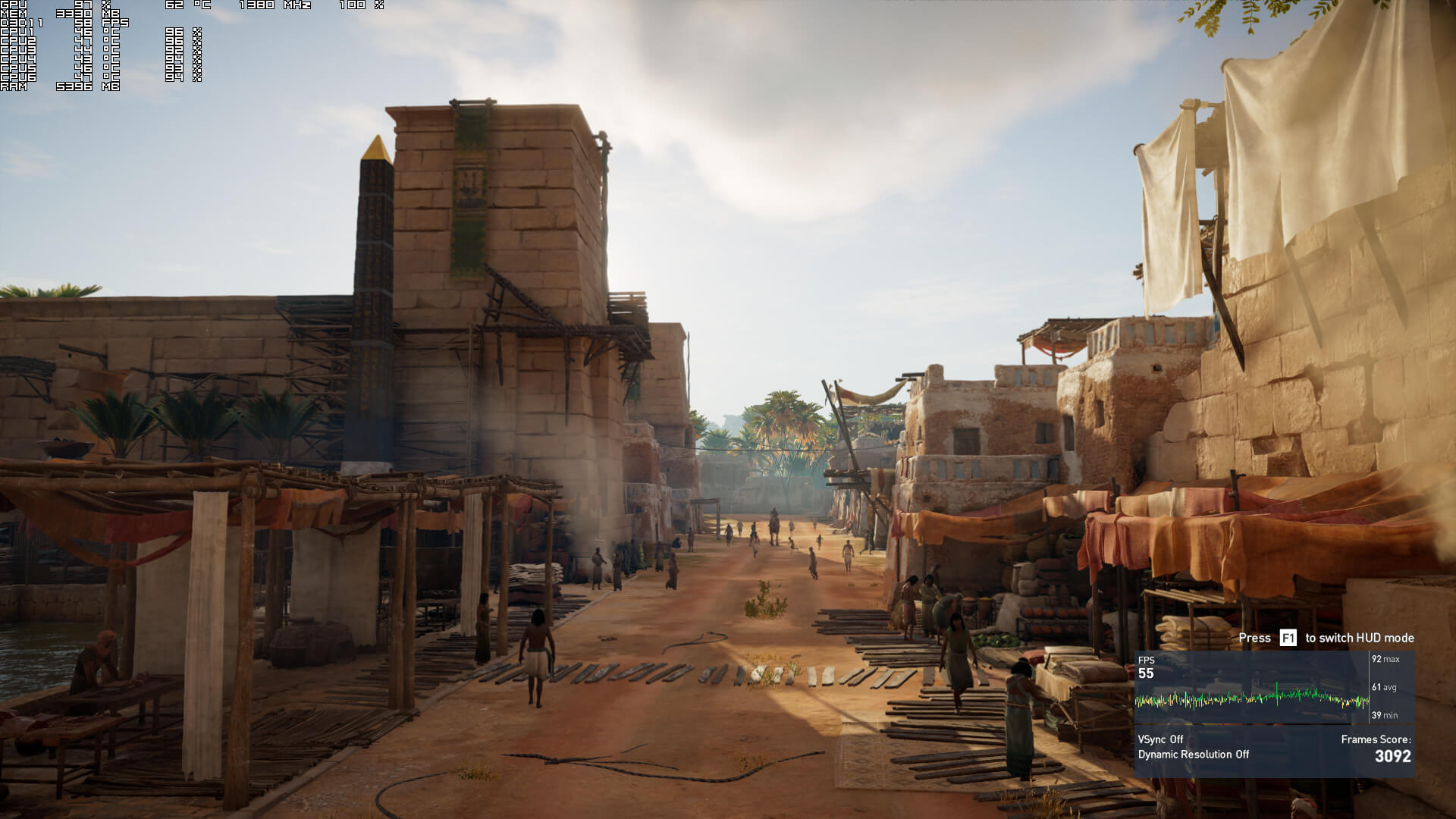
We should note that the TOD for the benchmark has been changed. This results in a different lighting situation, so we don’t know whether this TOD is less demanding than the previous one (perhaps there are less shadows on some scenes). Still, the CPU improvements are irrelevant of this change, so there is definitely a performance boost here.
In conclusion, Ubisoft has managed to improve overall performance, and has resolved the game’s stuttering issues. While the game still needs a powerful CPU, it does run better than its launch version, so kudos to them for at least improving things!

John is the founder and Editor in Chief at DSOGaming. He is a PC gaming fan and highly supports the modding and indie communities. Before creating DSOGaming, John worked on numerous gaming websites. While he is a die-hard PC gamer, his gaming roots can be found on consoles. John loved – and still does – the 16-bit consoles, and considers SNES to be one of the best consoles. Still, the PC platform won him over consoles. That was mainly due to 3DFX and its iconic dedicated 3D accelerator graphics card, Voodoo 2. John has also written a higher degree thesis on the “The Evolution of PC graphics cards.”
Contact: Email


Improvements alson on 4 cores 8 threads cpu’s?
Remind me of watch dogs 2 when patch 1.03 and patch 1.09 improved cpu performances…
Why their games cant perform perfectly at launch???
Never preorder and never buy ubisoft games on day one
Yea i learned that. Now i for single player games i just hold’on for 6months until it gets in rebate and probably much more optimized and stable.
Yeah, that’s a wise move. Buy on release only if you want an unpolished and unfinished product.
I really don’t understand why people are so impatient these days. There’s always something in the backlog waiting to be finished.
The game was completly playable at launch, same goes for Watch Dogs 2.
Playable as of 20 fps during cutscenes on PS4 Pro? Or what are your definitions of playable?
Shill somewhere else, doesn’t work here.
Cutscenes are not any definition of playable so I don’t know why you even brought that up.
I still don’t understand.. Why do you set the resolution to 720p but keep the settings to Ultra? It seems kind of an oxymoron tbh. You wanna test the CPU performance on the specific title? Drop everything. Put graphics to low so you avoid even the slightest GPU interference while dropping the resolution to 720p.
That way you are 100% sure that there won’t be any strain to the GPU…
In many games some of the ultra settings are stressing the CPU more than the GPU. If you drop these, then the CPU test is misleading.
Dropping the resolution down to 720p means that the GPU utilization will most likely be sitting far bellow 100%, that way you can see how many frames the CPU can output.
Then you can choose the settings carefully and leave the ones that stress the GPU out. It’s easy as that.
😉
That takes a lot more time and it’s not needed IMO. If your GPU utilization is far below 100% then you are almost sure that the limiting factor is the CPU.
Or bad ultilization, in case both the CPU and GPU are sitting below 100%
GPU utilization is something generic and not really representative of the workloads it’s working with. You can have low GPU utilization and have the GPU struggle if it’s trying to produce graphics effects that are either not optimize for the architecture or plain difficult for it to reproduce.
i.e. have a card work with Async Compute workloads at a lower resolution. The card (whichever that may be, i’m not talking about specific GPUs here) will struggle equally or almost equally if it’s not performing good at those workloads.
Same happens with this one. Have the GPU generate shadows, extreme quality textures and AA which put stress to the GPU.
My point is, yeah, take some more time to create some good quality benchmark numbers. People visiting the website won’t start screaming “you’re late with your numbers”
😉
What Thanos said. Some settings also stress the CPU. Since you brought up shadows, in older HITMAN titles, for example, the Shadows and Reflections affected the CPU. In Origins, Environment Detail is one of them. However, and when there are lots of settings, it’s difficult determining which one affects what, especially when games require a restart (imagine each and every time restarting and testing for 20-30 settings). The point for the CPU tests is to remove any GPU bottleneck. As such, the most convenient way is to have Ultra settings at low resolutions. Individually dropping settings would make a sense if the GPU was still fully used at 720p.
Thanos & John, These guys get it.
Thank you for doing this test 🙂
Will you retest with simulated dual/quad cores?
Awesome! Thanks for the article, I am downloading the patch now!
A DRM that steals 30-40 pecent peformance gets multithreaded to only steal half that IF you have a CPU that has three times the cores that a DX 11 game can even use well.
*slowclap*
DX 11 games are not lock to two cores.
Plenty of DX11 games can max out all 4 cores or use them well, DX11 MTR(multithreaded rendering) is there for a reason, it’s just took devs along time to make their DX11 engine code work well. As you can see with Ubisoft, they’re not dumping their DX11 code yet either for DX12.
Spreading mainly two cores of work to other cores is not all cores working together. Nvidia has a half a%% implementation of multithreading in DX 11. One reason AMD GPU’s are horrible in this DRM crippled game and PC Gamer showed a 1060 beating a Vega 64 at 1080p. In fact they just posted an article saying this patch doesn’t help AMD at all. Performance actually went slightly down. Nvidia is just doing Ubisoft’s work for them, with some of the best driver people in the world, that will literally fly out and hang out with the devs to optimize their GPU’s and trying to help out the crippled game that is still crippled due to VRM on top of VRM. If Ubisoft was doing anything worth a darn as far as multithreading or removing basically emulation, you wouldn’t see AMD crippled. Witcher 3 was an Nvidia title and the game ran great on AMD cards outside gameworks (who cares) and Novigrad makes Origins look like child’s play as far as CPU.
lets not forget the kill packets they send us, they take the cake imo.
i dont care about the fps increase. Fix the cpu overhaul or its an uninstall
lol where are the delusion pirates now
facepalm did you even read the article moron?
I better wait for ultimate/gold edition…
That’s why I like this site :), you test everything John.
Its only by then that you and I can play it right?