
World War Z has just been released on the Epic Games Store. The game is powered by the Swarm Engine and since it supports both the Vulkan and DirectX 11 APIs, we’ve decided to put them to the test on both NVIDIA’s and AMD’s hardware.
For this benchmark test between Vulkan and DX11, we used our Intel i7 4930K (overclocked at 4.2Ghz) with 16GB of DDR3 RAM at 2133Mhz, NVIDIA’s RTX 2080Ti, AMD’s Radeon RX580 and Radeon RX Vega 64, Windows 10 64-bit and the GeForce 425.31 and AMD Radeon Software Adrenalin 2019 Edition 19.4.2 drivers.
Saber Interactive has included a built-in benchmark tool, however we’ve discovered that the Tokyo mission was more demanding than it. As such, we’ll be testing that area for our benchmarks.
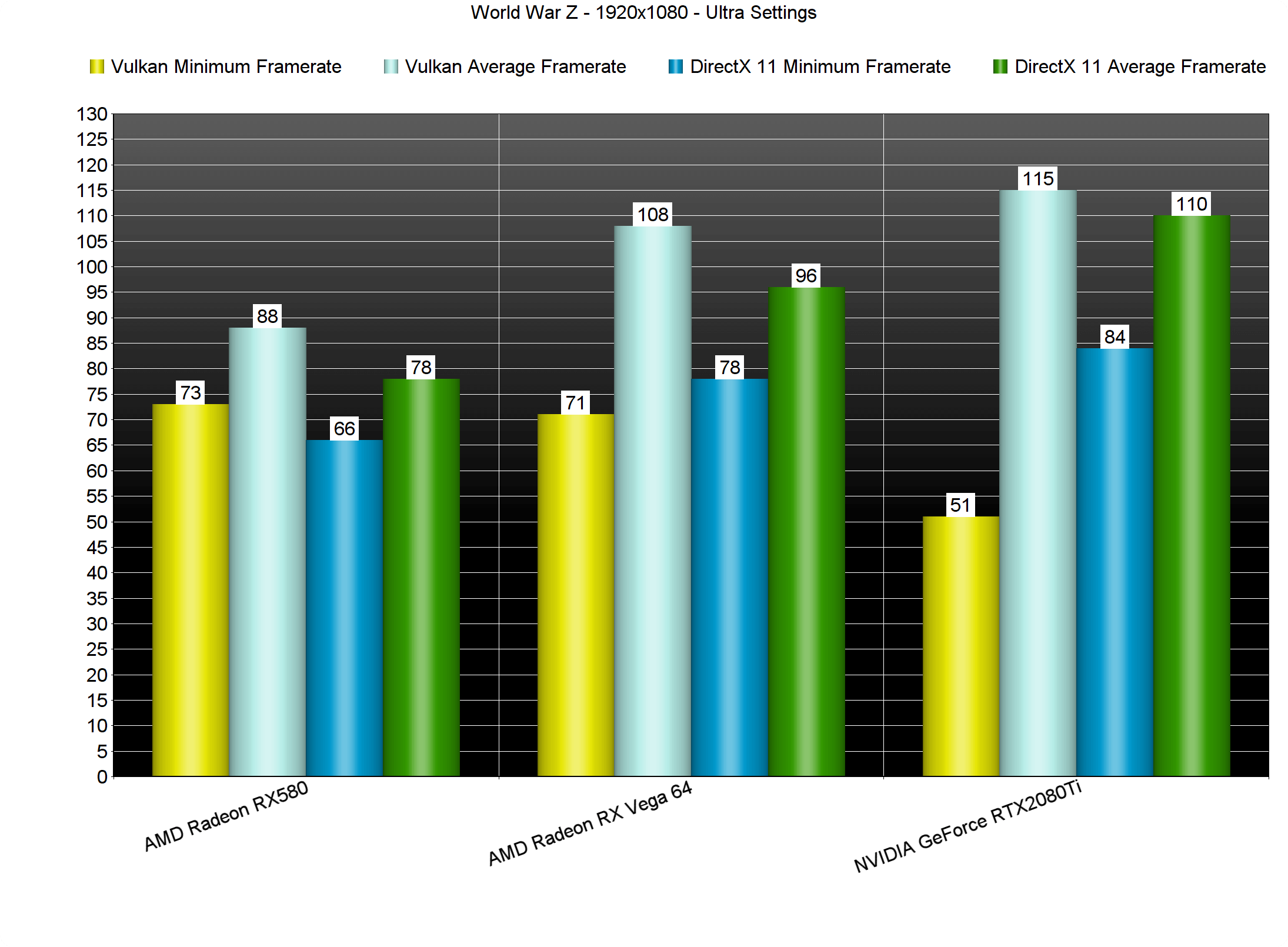
Let’s start with the good news; Vulkan was offering higher framerates on both AMD’s and NVIDIA’s GPUs. At 1080p and Ultra settings, we noticed a 10fps performance boost on all of our graphics cards.
However, Vulkan currently suffers from some major stuttering issues on both AMD’s and NVIDIA’s hardware. To be honest, the game, especially on the NVIDIA GeForce RTX2080Ti, was almost unplayable due to these stutters. As such, we strongly suggest avoiding the Vulkan API until Saber addresses these stuttering issues.
Stay tuned for our PC Performance Analysis article that will go live in the next couple of days!

John is the founder and Editor in Chief at DSOGaming. He is a PC gaming fan and highly supports the modding and indie communities. Before creating DSOGaming, John worked on numerous gaming websites. While he is a die-hard PC gamer, his gaming roots can be found on consoles. John loved – and still does – the 16-bit consoles, and considers SNES to be one of the best consoles. Still, the PC platform won him over consoles. That was mainly due to 3DFX and its iconic dedicated 3D accelerator graphics card, Voodoo 2. John has also written a higher degree thesis on the “The Evolution of PC graphics cards.”
Contact: Email