

Nixxes and FYQD-Studio have released new patches for Marvel’s Spider-Man Remastered and Bright Memory Infinite that add support for DLSS 3. As such, we’ve decided to benchmark and test DLSS 3 against DLSS 2 and native 4K.
For our benchmarks, we used an Intel i9 9900K with 16GB of DDR4 at 3800Mhz and NVIDIA’s RTX 4090 Founders Edition. We also used Windows 10 64-bit, and the GeForce 522.25 driver. As always, we’ll be also using the Quality Mode for both DLSS 2 and DLSS 3.
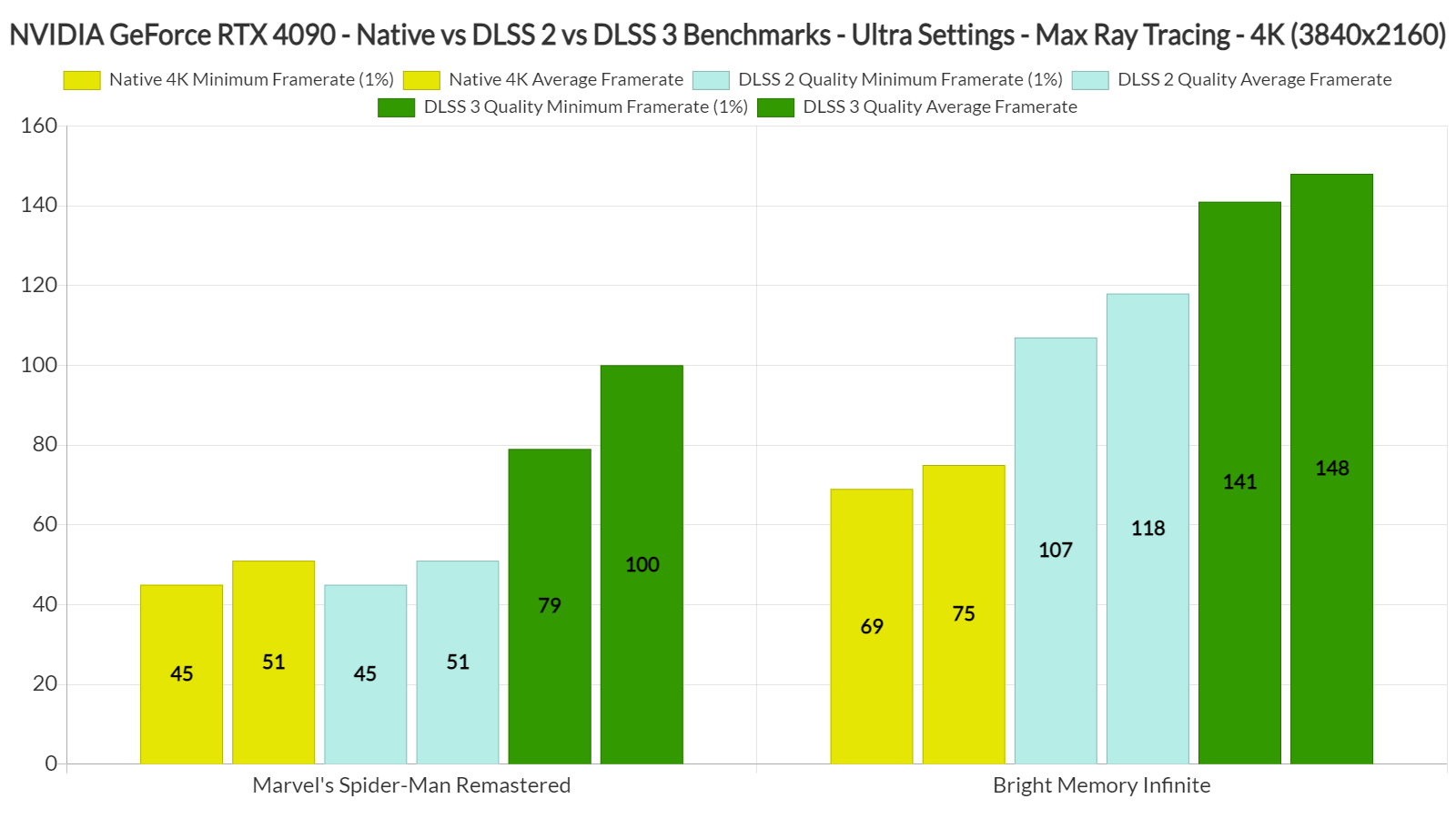
Let’s start with Marvel’s Spider-Man Remastered. This game is very CPU-heavy when you max it out, even at 4K. On Ultra settings and with maximum Ray Tracing, we were getting a minimum of 45fps and an average of 51fps. The game was simply unplayable (regarding both input latency and smoothness). DLSS 2 Quality did not bring any performance improvements.
By enabling DLSS 3 Quality, we were able to get a minimum of 79fps and an average of 100fps. This made the game enjoyable on our PC system as it was buttery smooth. The game was also really responsive while playing, and felt MUCH BETTER than what we were getting at 50fps. This is another case of a CPU-bound game in which DLSS 3 does wonders. As for visual artifacts, we did not spot anything game-breaking. If you pause and examine individual frames, you may find some artifacts. While playing, though, we could not spot any.
Bright Memory Infinite, on the other hand, was a mixed bag. While DLSS 3 Quality improves overall performance, it introduces extra latency that you can immediately feel. It’s not game-breaking (as I’ve demonstrated in the following video, I was able to headshot my enemies and parry enemy attacks). However, and since DLSS 2 Quality offers framerates higher than 100fps, I suggest using that over DLSS 3 Quality. By using DLSS 2 Quality, you’ll have the best of both worlds (a smooth gaming experience with really low latency).


John is the founder and Editor in Chief at DSOGaming. He is a PC gaming fan and highly supports the modding and indie communities. Before creating DSOGaming, John worked on numerous gaming websites. While he is a die-hard PC gamer, his gaming roots can be found on consoles. John loved – and still does – the 16-bit consoles, and considers SNES to be one of the best consoles. Still, the PC platform won him over consoles. That was mainly due to 3DFX and its iconic dedicated 3D accelerator graphics card, Voodoo 2. John has also written a higher degree thesis on the “The Evolution of PC graphics cards.”
Contact: Email

I count 21 articles about this game on here since it came out in the last few months. Hmm.
Probably just likes the game or has seen more info on it than usual? Try pee see gaymer.
John if you’re running the latest Nvidia Drivers along with the latest patch for the game, then you’re not gonna get the optimal performance.
The latest drivers and update to the game are known for causing stuttering and controller input response issues.
You mean for Spiderman specifically? The latest Nvidia driver f*ked up Cyberpunk for me, it wouldn’t use GPU at max clocks and the map was f*ked up, I had to go back to the previous one.
So far I’ve only experienced this specifically for Spider-Man. I’ve experienced that on both driver version 517.48 and 522.25 and with game version 1.1011.1.0. Had to go back as far as version 516.94 and game version 1.1006.0.0 to stop those issues or at least reduce them.
And even then it can still happen, but far less frequently. So I don’t know anymore.
Thank you!! DSO gaming for giving these Benchmarks with REAL 4k
personally i don’t like dlss, dlss is fake 4k rt you’re playing 1080 instead ,like console create this garbage cause console player is easy to scam, obviously dlss is way better than fake console resolution but dlss still being fake
they invest money and time creating fake quality game, instead of improving the graphic card itself.
guys for you to know if you don’t understand , look at this example : nvidia spend 60 dollars to give native quality game 90 fps but instead spend 20 dollars on dlss that give us 120 fps but a fake 4k and rt and basically all the game is fake quality.
Results are pointless as the cpu is a huge bottleneck.
What pills are you on bro? Who gives a f*k if the resolution is fake if it provides better visuals and performance which DLSS does very often, at least at 4k. Since games absolutely need TAA and have since like 2016, DLSS and DLAA are a godsend for reconstructing the image in with less blurring and often with more detail. There are still some drawbacks like moire artifacts and some shimmering if the implementation isn’t as good, but it’s usually a net positive over TAA. If you’re one of those “f*kTAA” lunatics who plays modern games with no AA, then you need stronger pills.
but why buy fake when you can buy real ?
you’re the kind of people that someone could show you a rtx 3070 gameplay and sell it to you saying is a 3080
NVidia is a monopoly in Hight end graphics cards that’s why they don’t want to invest , they could sell real quality but for them is way cheaper made dlss since as i said they are a monopoly so..
if you want to use dlss go ahead but having a real one quality its always better
Has anyone made a mod to remove the BLM flags yet?
Incredibly cpu bottlenecked with Spider-Man here. Should be getting over 100 fps with dlss quality and maybe even native. Thanks for not doing dlss performance instead though as other sites seem keen on doing. It has totally unacceptable iq compared to 4K as anyone with two eyes can see and I can’t believe other sites are using it when doing benchmarks.
What a joke your cpu is a massive bottleneck. Until you have a 12900k and ddr5 or better these results are a joke.
that’s the marketing strategy that made the woke left companies
Not a joke at all. Plenty of people (myself included) are still on that gen of CPU. It’s still a pretty powerful platform and not everyone wants to upgrade their ENTIRE system. every time a new CPU platform releases. This is valuable information because I have no intention of upgrading my 9900K. If you want to see numbers of the 4090 paired with the latest and greatest CPU you can literally look at any of the other umpteen reviews out there. And, btw, the “bottleneck” caused by the 9900K I suspect isn’t even very large. The bigger numbers from other reviews have more to do with them using lower quality DLSS settings. With all settings equal, 9900K would probably be looking at a small single digit percentage performance deficit.
B4BPCG 4090 is doing much better. 80 fps average at 4K native without DLSS, and around 160 fps with DLSSx3.
https://youtu.be/2PrwChz1XeA
What a joke your cpu is a massive bottleneck. Until you have a 12900k and ddr5 or better these results are a joke.