
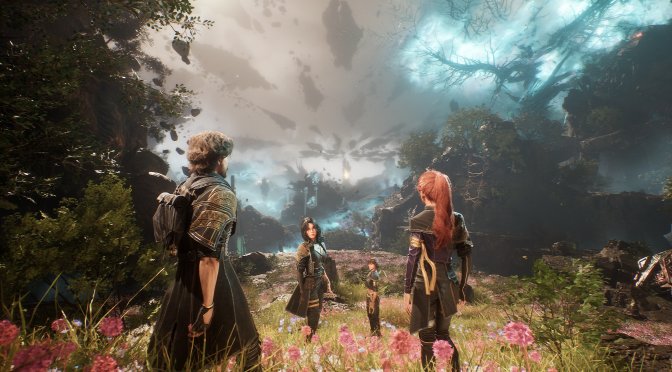
Clair Obscur Expedition 33 feature

How does Clair Obscur: Expedition 33 run at 4K/Epic Settings?

Kepler Interactive has just released Clair Obscur: Expedition 33 on PC. The game uses Unreal Engine 5, so I’ve decided to test it at 4K. How does the game run at Native 4K with Epic Settings on the NVIDIA RTX 5090? Well, time to find out.

For these initial 4K benchmarks, I used an AMD Ryzen 9 7950X3D with 32GB of DDR5 at 6000Mhz and an NVIDIA GeForce RTX 5090 Founder’s Edition. I also used Windows 10 64-bit and the NVIDIA GeForce 576.15 WHQL driver.

Let’s start with the good news. At Native 4K/Epic Settings, the game can run with 70-90FPS on the NVIDIA RTX 5090. This means that it can run smoothly on a wide range of GPUs (at lower resolutions, obviously). We’ll test numerous AMD and NVIDIA GPUs. However, my first impression is quite positive. After all, it’s been a while since a UE5 game ran with 60FPS at Native 4K/Max Settings on the NVIDIA RTX 5090.

The game also supports NVIDIA DLSS Super Resolution, and Intel XeSS. Sadly, there is no support for AMD FSR. There is also no support for Frame Gen.

Now, while Clair Obscur: Expedition 33 can run with over 60FPS at Native 4K, the image quality is not that great. It appears that the devs have used a filter that will oversharpen the graphics. Not only that, but the game feels like it’s running at a lower resolution. It’s really weird. It feels like there is sharpening on an image that renders at a lower resolution (even when running at native res without any upscalers). Even with TSR at 100%, the game looks weird.

We are not the only ones who feel this way. Numerous users on Steam have reported the exact same thing. So, I don’t know what’s going on here.

Another thing to note is that the cut-scenes are locked at 30FPS. I don’t know why the devs have decided to do such a thing on PC. Plus, there are some framepacing issues due to that 30FPS lock.

I’m right now uploading a video on YT which showcases the first ten minutes. Once it’s uploaded, I’ll be sure to update the story with it. Until then, you can take a look at the following screenshots.

Our PC Performance Analysis will go live later this week. So, stay tuned for more!

Clair Obscur: Expedition 33 - Native 4K/Epic Settings - NVIDIA RTX 5090

Clair Obscur: Expedition 33 4K screenshots-1Clair Obscur: Expedition 33 4K screenshots-2Clair Obscur: Expedition 33 4K screenshots-3 Clair Obscur: Expedition 33 4K screenshots-4Clair Obscur: Expedition 33 4K screenshots-5Clair Obscur: Expedition 33 4K screenshots-6

24 thoughts on “How does Clair Obscur: Expedition 33 run at 4K/Epic Settings?”

  1. Gameplay reveal for PB's new game
    The title is in English in incognito mode for me so it's probably intended for international audience as well :
    youtu()be/RLg6RMr20ik

  2. Have you tested with dlss quality? One guy on the steam forums is claiming that DLAA is actually upscaling from 1771p while DLSS quality is doing 4k to 4k.

    1. I've tried TSR 100% and it still looks like it's being rendered at a lower resolution with a sharpening filter.

          1. The comparison is with the CNN model. NVIDIA App does not let you change the DLSS model (you have to use other third-party tools, which I don't currently use).

          2. In general there is no way through the engine.ini to improve on overall detail? I have noticed many times how unreal ini contains hidden upper detail level settings, for example the ini is for certain items set on “ 3 “ but the user could change it up to 4

          3. In general there is no way through the engine.ini to improve on overall detail? I have noticed many times how unreal ini contains hidden upper detail level settings, for example the ini is for certain items set on “ 3 “ but the user could change it up to 4

  3. Thanks for pointing out the weird thing with the graphics.
    It's really weird and unfortunately I didn't hear other reviewers mentioning any of this.

    So I appreciate you mention it in addition to the fps cap in cutscenes which is also a no go. I have no clue why so many devs these days still think it's a good idea to lock fps in cutscenes which are mostly not even running stable and therefore look even more jarring.

  4. It looks like they went ham on the chromatic aberration as well adding to this blurred effect.. probably going to need a Ultra+ mod to get rid of that, assuming there's no in-game toggle for this.

      1. There is, even for Motion Blur, Vignete and Film Grain.

        I was very pleased to see it but after starting the game I was first thinking it somehow didn't apply the options as it still looks super weird.

        Checking and turned it on again made it actually looking worse, so the toggles do work but there seem to be other issues. Maybe some sort of aggressive Anti Aliasing or an internal upscaling..no idea but it looks super weird.

        1. after a negative initial impression this game has shown a lot of potential…graphics are not up to ue5 standard but ok, when the story is fascinating artistic presentation excellent, turn based combat is challenging
          The only thing is the protagonist looks robert pattinson s double but uncredited

        2. after a negative initial impression this game has shown a lot of potential…graphics are not up to ue5 standard but ok, when the story is fascinating artistic presentation excellent, turn based combat is challenging
          The only thing is the protagonist looks a robert pattinson s double but the actor is uncredited…

Leave a Reply

Your email address will not be published. Required fields are marked *
