
Ghostrunner is a first-person fast-paced action melee game with violent combat mechanics that has just been released on the PC. The game uses Unreal Engine 4, and supports both DLSS 2.0 and real-time Ray Tracing effects. As such, we’ve decided to benchmark this game and – at least for now – focus on these two technologies.
In order to test the game’s DLSS 2.0 and Ray Tracing effects, we used an Intel i9 9900K with 16GB of DDR4 at 3600Mhz. We’ve paired this machine with an NVIDIA RTX 2080Ti, and used Windows 10 64-bit, as well as the latest version of the GeForce drivers.
Ghostrunner uses real-time ray tracing in order to enhance its shadows and reflections. Thanks to RTX, the reflections are more natural and do not suffer from any artifacts. Similarly, the shadows are now more natural. Shadows can look softer or sharper thanks to real-time ray tracing. Moreover, additional light sources can now cast shadows.
Unfortunately, there is only one global setting for Ray Tracing. What this means is that you can choose between ray-traced shadows or ray-traced reflections (at least via the in-game settings).
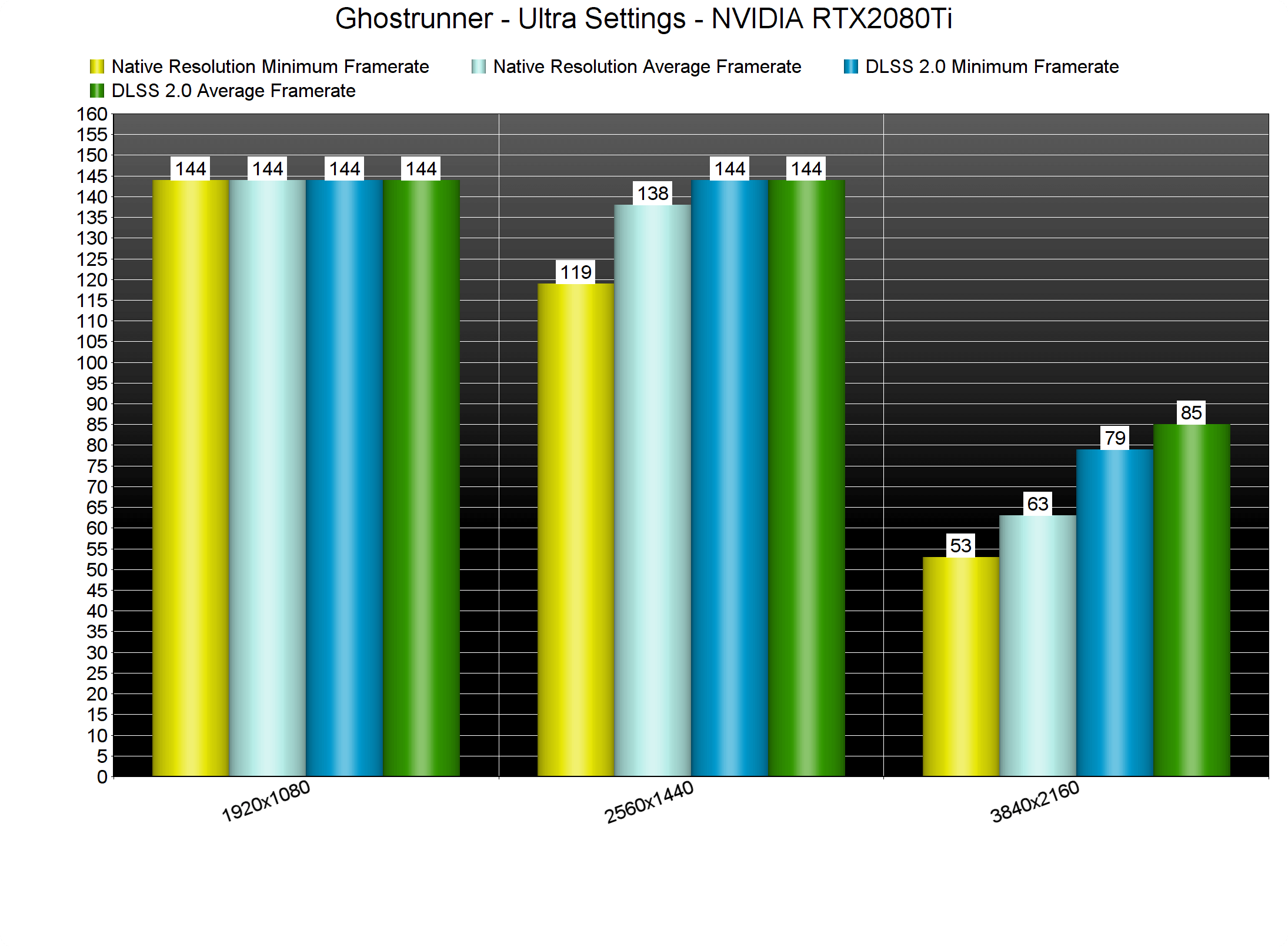
Let’s start with some DLSS 2.0 benchmarks. Similarly to Xuan-Yuan Sword VII, Ghostrunner packs an amazing DLSS implementation. Thanks to DLSS 2.0, we were able to run the game in 4K with more than 75fps. For comparison purposes, our RTX2080Ti was running the game in native 4K with a minimum of 53fps and an average of 63fps.
Below you can also find some comparison screenshots between native 4K and DLSS Quality 4K. As you can see, some metallic surfaces are more reflective when using DLSS 2.0. Apart from that, DLSS 2.0 Quality is almost identical to the native resolution. Therefore, we strongly suggest enabling DLSS in this game.
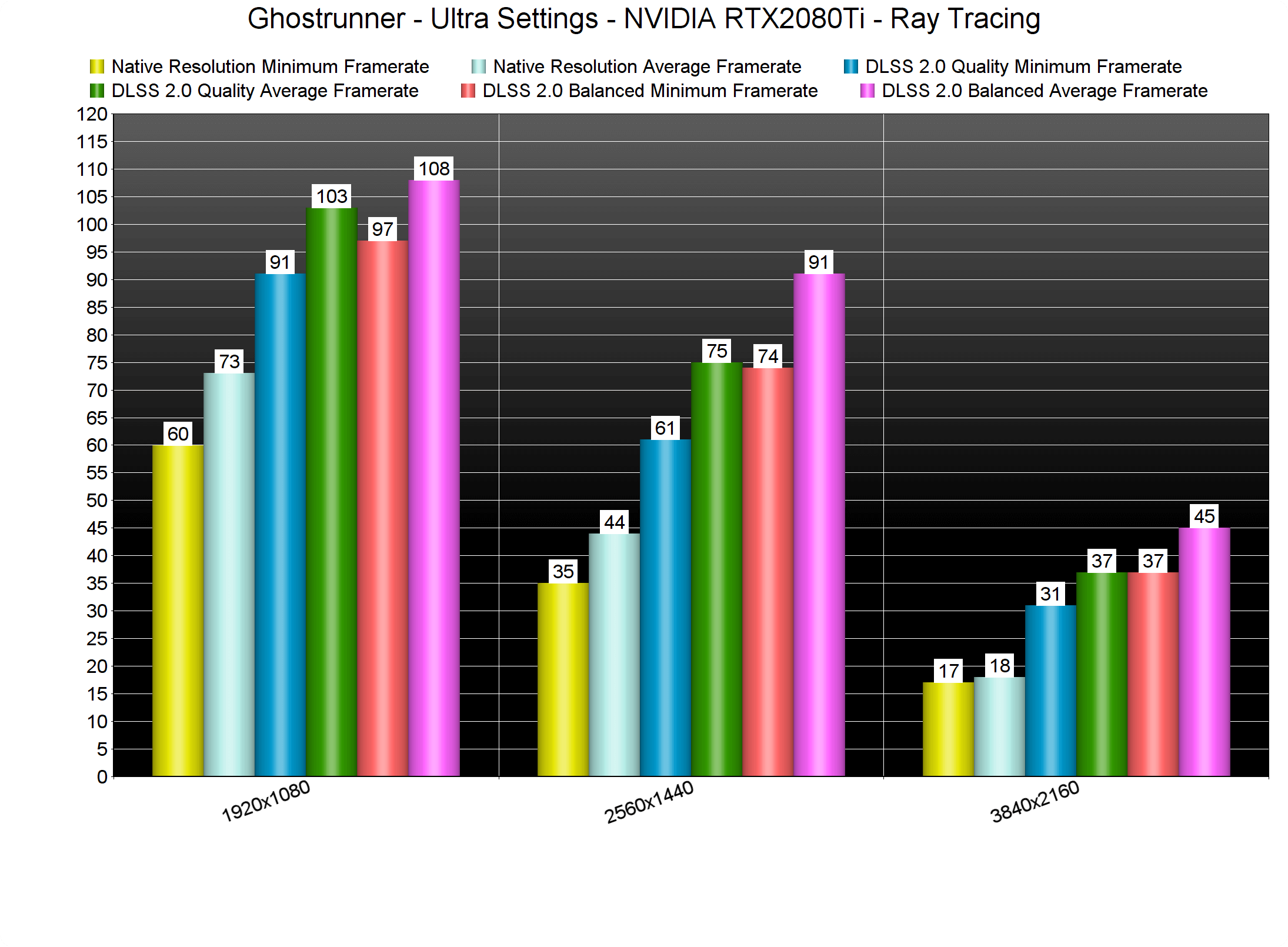
The NVIDIA GeForce RTX2080Ti is able to run Ghostrunner with its Ray Tracing effects in native 1080p. At 1080p/Ultra and Ray Tracing, the RTX2080Ti can push a minimum of 60fps and an average of 73fps. Performance goes downhill once we increase our resolution to 1440p and 4K.
By enabling DLSS Quality, you can get a smooth gaming experience at 1440p/Ultra and with Ray Tracing. Those seeking some extra performance can lower DLSS to Balanced and get a 14fps boost. However, we suggest using the Quality Mode instead of the Balanced Mode. Lastly, in 4K/Ultra and with Ray Tracing the RTX2080Ti was able to provide more than 30fps at all times.
Our PC Performance Analysis for Ghostrunner (in which we’ll benchmark both AMD’s and NVIDIA’s GPUs) will go live later this week, so stay tuned for more!

John is the founder and Editor in Chief at DSOGaming. He is a PC gaming fan and highly supports the modding and indie communities. Before creating DSOGaming, John worked on numerous gaming websites. While he is a die-hard PC gamer, his gaming roots can be found on consoles. John loved – and still does – the 16-bit consoles, and considers SNES to be one of the best consoles. Still, the PC platform won him over consoles. That was mainly due to 3DFX and its iconic dedicated 3D accelerator graphics card, Voodoo 2. John has also written a higher degree thesis on the “The Evolution of PC graphics cards.”
Contact: Email