
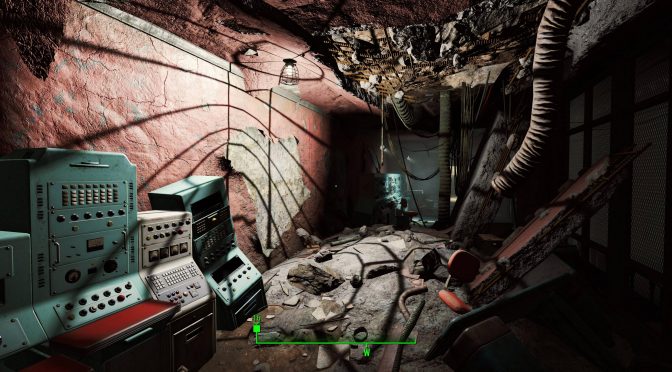
Here is your first look at Fallout 4’s official HD Texture Pack that is 58GB in size

Bethesda has officially released its high-resolution texture pack for the PC version of Fallout 4. This pack is 58GB in size and you can find below some screenshots, showcasing the improved textures that have been included in it.

Bethesda recommends an NVIDIA GTX1080 in order to run this texture pack. According to Reddit’s member ‘kami77‘ who captured the screenshots, though, GPU memory usage was about 5.5GB using these textures in 4K. This basically means that owners with GPUs that are equipped with 6GB of VRAM will actually be able to enjoy it.

Do note that kami77 did not use any mods. This is vanilla Fallout 4 with only the official HD Texture Pack. Mods may increase VRAM usage, meaning that PC gamers may need more than 6GB of VRAM in order to enjoy this HD Texture Pack with mods in 4K resolutions.

So, what do you think? Do these images justify the enormous size of this official Texture Pack?

UPDATE:

Our reader ‘Martin2603’ has shared the following comparison screenshots between Fallout 4’s original (left) and high-resolution textures (right).

 has also shared some before/after comparison screenshots. Fallout 4 vanilla is on the left whereas Fallout 4 with the official HD texture pack is on the right.


59 thoughts on “Here is your first look at Fallout 4’s official HD Texture Pack that is 58GB in size”

    1. True, the only thing this game is good for is to try it weapon mods since all you do is clear dungeons of enemies.

    2. I hate it when developers neglect character animations. Contrary to what ENB afficionados seem to think, they are as important as beautiful textures and lighting, if not more so.

  1. Good lord 58gb. Original half life was what 700mo ? Bottom line, can’t save this game with 1346tb of texture files.

  2. are they 4k textures? It must look amazing on my 1440p monitor if the textures are 4k but i have deleted the game and dont plan to redownload it any time soon again. at least not now.

    1. Is it that bad? I was planning to buy it, but only after I finish New Vegas (my backlog is getting out of control!).

      1. Playable shooter, absolutely dreadful RPG (arguably not even one).
        Awful writing too, but good soundtrack. Hit and miss quests (more miss than hits but that’s my opinion, played a few hours on my friend demo machine PS4).

    1. I wonder if many people would be able to visually differentiate between the use of compressed and uncompressed textures in this particular game. I ‘get’ that uncompressed are better quality but the difference isn’t hugely noticeable in a game like this even when viewed on a 4K display panel.

      For that reason it’d have been ideal, in my opinion, if Bethesda had provided the option to download a compressed textures version of the same content so to save users’ SSD space.

        1. Hopefully so. I’m still waiting for the 57.4GB to complete downloading so haven’t seen it in action yet. That said, I’m already running 87.6GB of mods from the Fallout 4 Nexus so this is going to be a headache to work out which of those mods, if any, this official textures pack improves on.

  3. Think I’ll stick to fluid 60 fps with a bunch of mods and everything at max @1440p, on my “oh so old, last gen” 980….

    1. I love how they pitched our 980’s as if they were something big, then they toss out the 1080 and the price skyrockets, yet it doesn’t even do all that well in the end result.

  4. lol at the spec list. We’ll need two 1080ti’s with their next game and way more CPU power to boot, knowing Bethesda.

  5. One query that hopefully somebody here will be able to answer:

    Wiil installing this official textures pack conflict with any of the many textures mods available for the game at the Nexus/wherever else?

    By ‘conflict’ I mean that will it overwrite existing textures mods or does it simply replace the standard textures and thus will still be overwritten by existing mods. I’m guessing it’ll be the latter because that’s what happened with the optional textures pack with Skyrim whereby mods automatically took precedence over the game’s textures whether they were the standard of high-res ones.

    1. Same thing here (I assume), the higher res textures would be as part of the “normal” game files and since the mods purpose is to modify the “normal” game files safe to assume they take precedence.

      1. Yep, let’s hope Bethesda have followed the example of Skyrim’s official textures pack in that respect. I’m downloading the F04 pack now but it’s going to take a while at 54.7GB!

        I wish they’d have used compressed textures like most textures mods do because these uncompressed textures take up a ridiculous amount of storage space and the extra quality isn’t really discernible unless examined with a magnifying glass! I’m sure glad that my graphics card has 8GB VRAM!

    2. These are going to be B2A archives, with an ESM/ESP to load them, so that depends on your mod load order.
      Typically Vanilla files are loaded first, and mods overwrite them.
      Loose files are loaded after B2A archives, whatever the load order is set to.
      Typical setup (32-bit uses BSA)
      ESM and matching B2A by Load Order
      ESP and matching B2A by Load Order
      Loose files

  6. Well its pretty hd, i cant deny that. Improve the lighting somehow and we got a great looking game. But the question is can the engine take this? Because using HD textures on new vegas proved to be a stuttery mess with insanely long loading times.

  7. I can confirm the texture pack works with 6GB of VRAM on my 980ti, in heavily populated areas I am seeing 5.5GB~ of VRAM usage at 1080p/ultra settings with no other mods. If you want to play at 4K you will definitely need an 8GB card or higher.

  8. I wonder if they’ll make a real difference in 1080p with sweetfx (lumasharpen). Also the impact in loading times.

  9. lol! Bethesda at it again, modders gonna have to go through all that, get the same results with half the size! thats awesome

      1. I am downloading the pack now.
        I have some mods saved that improved the games textures.
        I can try to see if there’s a huge difference between them.
        Let you know when I do.

  10. The official higher res’ textures pack has introduced stuttering in the game on my PC. MSI Afterburner shows VRAM usage hitting 8.4GB during certain outdoor gameplay scenes while my graphics card has only 8GB VRAM.

    While that’s not altogether a huge surprise given that I’m also running +87GB of mods from the Fallout 4 Nexus that are mostly all 4K textures I’m only doing so when playing the game at 1080p!

    So now I have the dilemma of which mods to unistall or to unistall this huge official textures pack or maybe using the 2K versions of all those mods from the Nexus. Choices!

      1. DSOG is still awsome but Disqus users from god only knows where, suck.

        They attacked John (Papadopoulos) for not having before and after as soon as the article posted.

        But this guy John has been having meltdowns lately. We know we can mod FO without needing 50gb of textures. At least they released it. All this rage and anger from all the FO aka Bethesda haters aka fans in denial is going to make more and more companies give up on giving us stuff and just charge for everything. I don’t blame them, lucky me, I can afford to just keep buying and be the opposite kind of dbag and promote them robbing us because no one ever said “THANKS GAME DEVS/PUBLISHERS FOR GIVING US GAMES WE CAN’T AFFORD TO MAKE OURSELVES.”

        1. “They attacked John (Papadopoulos) for not having before and after as soon as the article posted.”

          Attacked is merely stating an opinion you dont like in your view.

    1. This was quick and just about 30minutes and it looks on par or even better than this joke of a “gift” from bethesda.

      980ti@1475/4790k@4.7/32gb ram 1440p ultra settings. I have rivatuner cap my fps in fo4 to 70 since i have a 144hz display and the game acts weird with it. at 70 i experience no speedup or glitches at all and it runs like butter.

Leave a Reply

Your email address will not be published. Required fields are marked *
