
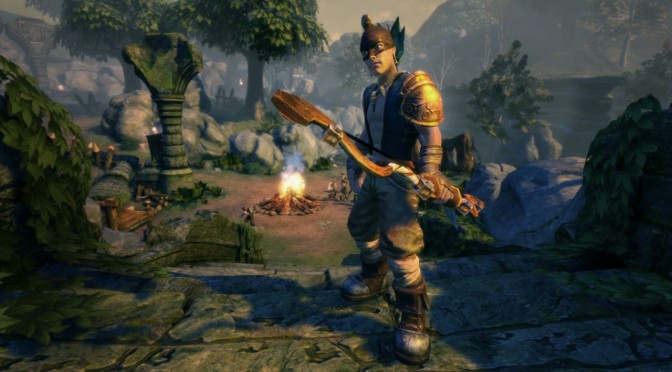
Microsoft has just released Fable Anniversary on the PC, and oh boy does this port sounds… awful. According to various reports, there are no mouse controls in menus, there is no key rebinding (at least via the main menu), disappointing visuals and the internal resolution seems to be locked at 720p (though that has not been confirmed yet).
We have not tested Fable Anniversary yet so we cannot confirm – or deny – those aforementioned issues. From the looks of it, however, Fable Anniversary’s PC version is not up to what you’d expect from a company that wants to win back the PC crowd.
Still, those interested in it will be happy to know that there are mod tools for it (though you can only edit all of the existing art and animation in the game. You won’t be able to create new content).
In addition, Dirty Dan has released a guide via which you can improve the game’s graphics. Dirty Dan’s custom .ini file improves texture clarity, image quality, greatly improves shadows, improves lighting, LOD and particles. So be sure to visit Dirty Dan’s topic on the game’s Steam forums.
Microsoft has also released a launch trailer for Fable Anniversary that can be viewed below. We’ve also included TotalBiscuit’s First Impressions!

John is the founder and Editor in Chief at DSOGaming. He is a PC gaming fan and highly supports the modding and indie communities. Before creating DSOGaming, John worked on numerous gaming websites. While he is a die-hard PC gamer, his gaming roots can be found on consoles. John loved – and still does – the 16-bit consoles, and considers SNES to be one of the best consoles. Still, the PC platform won him over consoles. That was mainly due to 3DFX and its iconic dedicated 3D accelerator graphics card, Voodoo 2. John has also written a higher degree thesis on the “The Evolution of PC graphics cards.”
Contact: Email
this piece of shit port is almost as bad as dark souls
almost
I don’t get why people still complain about the dark souls port lol, dsfix pretty much sorted it. I am sick of it taking 20 mins to get an invasion though, that shit is a drag.
“dsfix pretty much sorted it”
That’s the thing. Try and play without dsfix and dsmfix and tell me it’s a good port. Just because fan patches fix most of the problems doesn’t mean that people should be satisfied with the quality of the port.
” I am sick of it taking 20 mins to get an invasion though”
See? Even after patches and fixes it has its problems.
I can’t play it without dsfix, it’s horrific you’re right but they had no idea what they were doing pc wise and said so many times. I’m just glad the game came to pc at all and the fact i can play it at 1440p. 60fps on a 770 shows it doesn’t run all that bad either. In regards to invasions I think the level ranges are maybe a bit strict and we most likely just don’t have anywhere near the population of the console versions unfortunately.
Yes, they said in advance what it will be like. And I thank them for their honesty. I’m also glad that it was released on PC at all. I would play it even without fix. That’s what I did for a couple of days. This is one of my favorite games ever and the only one that I didn’t regret preordering. I can express my love for this game whole day.
But all of this doesn’t change the fact that the port is bad. It’s playable, even without fix. But playable doesn’t mean good. DMC 3, RE 4 were playable. And people regard them as two of the worst examples of PC ports.
And about multiplayer. I don’t know if it’s population or bad netcode, but people generally agreed from day one, that you should go play a PS3 version if you want best multiplayer.
also if you read why they didnt add mouse support in menus, youll fucking lol all day
from dev
We would have loved to add mouse support to the menu but we reached a point in the project where it was either going to be modding support or adding features such as mouse support in the menus. We chose modding.
Never could like this game. If possible, I like it less now.
And also the Dev quote about the mouse support in the menus it’s the most stupid thing I’ve ever heard about a game. Seriously, the guy should win a f’ing medal.
Star Citizen , Arena Commander 0.9 released , with stunning new trailer .
https://www.youtube.com/watch?feature=player_embedded&v=_SpsjUHj_II
I’m afraid if I do the “My PC is melting” joke comment again, it will get overused…
??? ??’? ???????
Thanks to AMD I got this free with my R9 280, looking forward to it.
by the way Sean, congrats on the new card. i forgot to tell you sooner bro 😀
Thanks, great card, great performance as well, no complains so far. 🙂
Edit: Nevermind I’m blind this morning
I just watched TotalBiscuit “review” and his worst complain was that Anniversary is build for gamepad. I always play games like fable with gamepad, so it wasnt big problem for me (I even play fable TLCH on pc with xbox gamepad, thanks to xpadder aplication)
Whats funny, I just run this game once, and I already spend 4 hours playing this anniversary edition, I almost forgot how fun fable was, and now everything looks better compared to the (IMHO still nice looking) original. Although I need to say, they changed colors a lot, and I needed to get used to this new look. In original fable everything was vibrant and colorful but in FableAnniversary colors looks very different (more natural). First I was disapointed because I thought “I’ts not like fable should look like” but after some time I get used to them, they look really nice in the long run.
But there’s one thing I dont like… guys how to turn off AA in this game ? It looks horrible ,
everything is blured to the max and I ended up downsampling this game
from much higer resolution (in order to offset this blur)
I actually barely played Fable TLC because of the lack of controller support, and I never get Xpadder and similar stuff to work correctly for some reason, so this version of the game is great for me and I’ve spent 12 hours in it till now.
I’m using SweetFX to make it more vibrant combined with a few settings in Nvidia Inspector to make it look very nice.
The settings I’m currently running in Nvidia Inspector are these: http://img.techpowerup.org/140913/nvidia_20140913_104815.png
They remove the annoying blur effect in the game from something that would seem to be a terrible form of FXAA.
If you have AMD, I can’t help you, as I have no idea what application you’d have to use instead of Nvidia Inspector.
I’m using Nvinspector in order to cap fps in games. I tried your settings and it looks similar to what I was seeing after downsampling 🙂
https://lh3.googleusercontent.com/295BnwzyKQ7myn4-uwRrS_CUbKjkUNbNPpYYrcDX_0B383j8xaFt2KlD-GmBC4LMATd08EdkV9M=w1646-h771
https://lh5.googleusercontent.com/rkZidTMeAz2gV_l6Swjc_vYhKCaZ0lFQll9ASZ7U1EnlsDKUxYr5A_TMIOWPhmZF7mXhoRVShy8=w1646-h771
vanilla vs gedosato downsampling (it downsamples + use lanczos filter, unsharp mask, and tweaks contrast)
