

Build A Rocket Boy has finally released the third update for the PC version of MindsEye. This patch is 11GB in size, and it most likely includes all the tweaks and fixes that were available in the console patch.
So, the big question is: does this third patch bring any major performance improvements to the game? Well, I tried it – and here’s what I found.
For my tests, I used an AMD Ryzen 9 7950X3D, 32GB of DDR5 at 6000Mhz and an NVIDIA GeForce RTX 5090 Founder’s Edition. I also used Windows 10 64-bit and the NVIDIA GeForce 576.88 driver. I also tested the exact same locations I used for my previous articles. So, this is an accurate comparison.
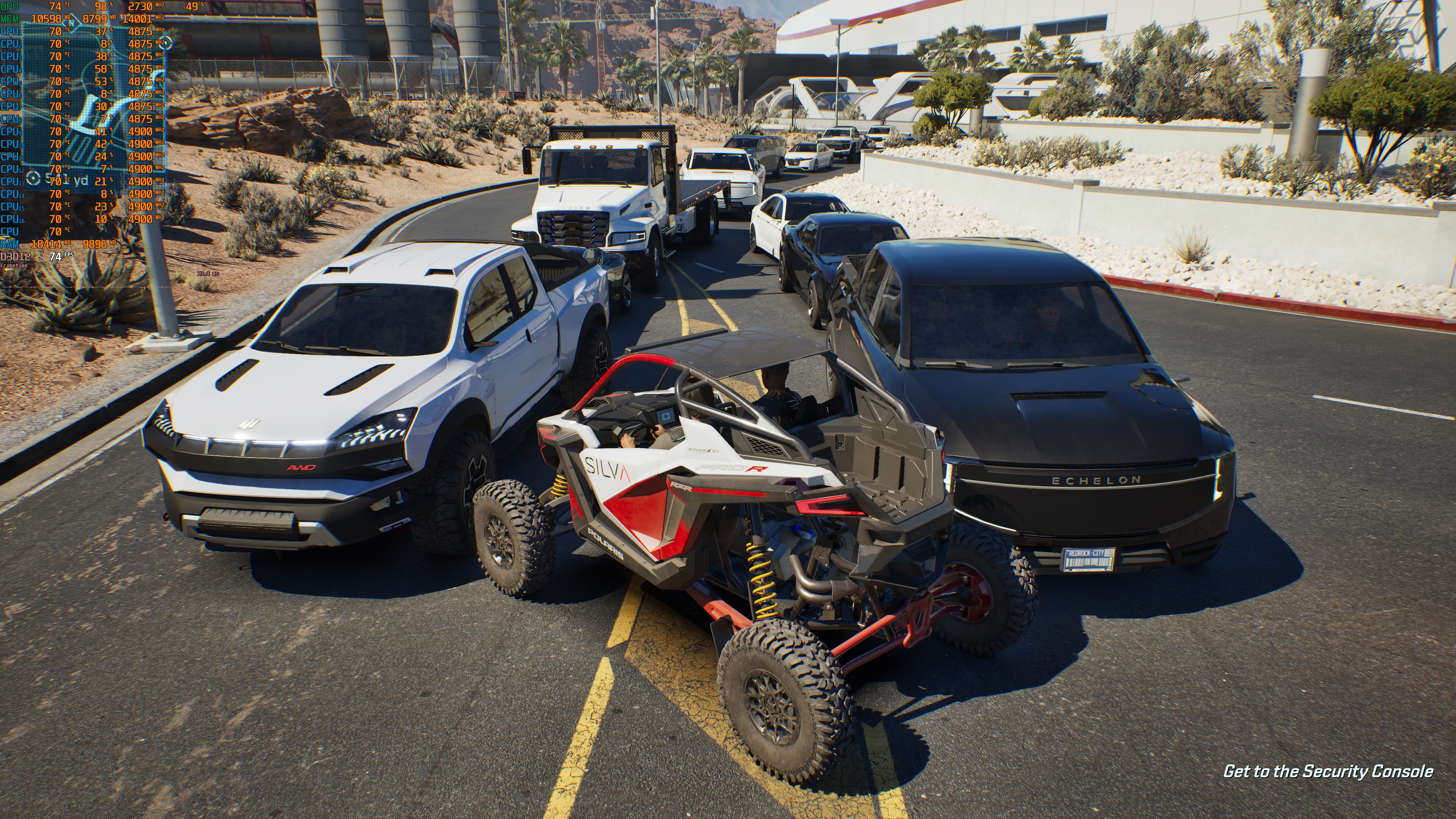
My biggest issues with MindsEye were the low framerate at native resolutions and the awful stuttering issues. The average framerate seems a bit higher now. At 4K with DLSS Quality, I was getting a minimum of 61FPS (instead of 53FPS). However, there is a big BUT here.
It appears that the devs have dialed back the game’s traffic. Here is a comparison between the latest and the previous versions. Patch 2 is on the left, whereas Patch 3 is on the right. To capture these shots, I’ve waited ten minutes (on both versions). As you can see, there were more vehicles in the previous version. Right now, the starting area feels a bit empty.


As for the stuttering issues, it appears that the game has fewer of them now. Previously, MindsEye was not that enjoyable on the NVIDIA RTX 5090, even with DLSS Frame Gen. But now? The game feels smooth most of the time at 4K with DLSS Quality Mode with Frame Gen. It’s actually enjoyable.
So, overall, the patch has improved the game’s performance on PC. At the same time, it has dialed back its traffic. So, I don’t know if that was the main culprit behind the awful stutters. It’s a bummer that the traffic has been reduced. But hey, at least the game can now be enjoyed. So, that’s at least a positive thing.
Like always, Steam will download this update the next time you launch its client. Below, you can also find its complete changelog. So, make sure to read it.
UPDATE:
I was finally able to replicate the same traffic scenario as that of Patch 2. At 4K with DLSS Quality, the RTX 5090 was always above 60FPS. This wasn’t possible before. So, this update did bring a performance boost.
MindsEye Patch 3 Release Notes
- Stability
- Improved stability to reduce crashes, especially on extended play sessions
- Fixed AI-related crashes that could occur during complex combat scenarios
- Gameplay – Difficulty Rebalance
- Increased AI accuracy across all difficulty levels for a greater challenge and more consistent encounters
- Adjusted Medium difficulty by reducing damage filtering, resulting in slightly more challenging combat
- Character Control
- Improved cover entry behaviour, making transitions into cover feel smoother
- Improved stair locomotion, ensuring the player exits stair animations at the correct time and aligns properly with the steps
- Refined weapon handling during cover entry/exit transitions
- Animation
- Life scene animations have been improved, with smoother transitions
- Vehicles
- Improved vehicle behaviour on slopes, making stops feel more stable and predictable
- AI
- Fixed various bugs causing erratic AI behaviour
- Environment
- Improved martial law scenes with better behaviour and staging
- Audio
- Improved in-game vehicle audio for a more immersive soundscape
- Improved vehicle destruction audio, with a focus on window break sounds
- General audio data clean up and optimization
- Tweaked pedestrian dialogue for more natural reactions
- Cinematics
- Addressed LOD issues in multiple scenes
- Optimizations to certain cinematics
- Localisation
- Corrected various localisation errors across multiple languages
- Bug Fixes
- Fixed an issue where graphics settings would reset after restarting the game. Settings now persist correctly
- Fixed a known issue where players could get stuck walking in a loop when interacting with specific objects
- Fixed characters stretching in certain cinematics and gameplay sequences
- Corrected texture issue with the Deluxe Edition vest
- Resolved flickering VFX in select areas
- Various bug fixes across menus and HUD elements
- Fixed visual bugs in multiple environments
- Resolved abrupt weather changes during the final mission
- Enhanced ambient pedestrian movement and facial reactions
- Addressed several mission flow bugs that could block progression or disrupt scripted events
- Fixed an issue where AI would exit vehicles and immediately die under certain conditions
- Fixed an issue that caused AI to shoot while facing the wrong direction
- Adjusted cover logic to prevent AI from clustering too closely
- Fixed instances where AI would turn their backs on the player during combat
- Fixed an issue where AI hit reactions wouldn’t trigger when shot
- Fixed an issue where enemies sticking out of vehicle roof windows weren’t affected by headshots
- Resolved an issue where Jacob could turn invisible when exiting a vehicle with the driver’s side blocked
- Fixed floating occupants when driving Skycar in first-person view
- Fixed an issue where shooting the tires of an enemy jeep could launch it unexpectedly toward Jacob
- Resolved a traversal issue where the player could get stuck behind unclimbable debris bags
- Fixed various issues affecting main campaign open-world encounters
- Updated third-person animations for Play.MindsEye content
- Fixed an issue where the drone UI marker would not correctly update when transitioning in or out of Play.MindsEye content during the campaign
- Fixed multiple issues with certain in-game screen objects appearing blank during cinematic sequences
- Prevented players from exiting the Hades vehicle mid-flight, avoiding unintended behaviour
- Fixed an issue where dying outside the hangar could cause the player to respawn at an earlier checkpoint, resulting in lost progress in the “Clash of the Egos” mission
- Fixed an issue where Jacob could become stuck inside the jeep if shot during the dismount animation in the “In Pursuit of the Orb” mission
- Adjusted fail conditions to be more forgiving and better reflect player behaviour in the “This Means War” mission
- Adjusted fail conditions during the CCTV section in the “Industrial Espionage” mission to prevent failure when the player’s camera is aimed at Conti
- Fixed an issue where failing to get to Silva’s home in time would cause the player to respawn at an incorrect checkpoint in the “Meeting Marco Silva” mission
- Adjusted Claudia’s vehicle AI to reduce corner-cutting behaviour, resulting in a smoother driving path in “The Mole” mission
- Tweaked the Digging minigame in “The Wrong Move” mission to provide earlier UI prompts and improve timing before input is required
- Fixed a known issue where the HUD might incorrectly display previous keybindings, when changing key bindings during a mission
- Fixed an issue where resolution and window mode in the settings menu did not match the applied settings after using ALT + Enter
BUILD MINDSEYE – PC ONLY
Improvements
- Asset Catalogue
- Added a set of Rock & Foliage Objects to Build MindsEye’s Assets Catalogue
- Various Fixes & QoL Improvements to the set of Featured Stamps available in Build MindsEye’s Assets Catalogue
- Removed empty stamp sub-folders and updated thumbnails across key stamps
- Added missing Icons and fixed issues with some missing thumbnails
- Disabled the Mission Failure UI Node to undergo rework
- Improved performance impact score of AI NPC instances
- Editor UX & Camera
- Increased Creator Camera location save frequency
- Build collision toolbar tooltip now displays correct Keybinding (B)
- Fixed minor issues with Versioning in Build MindsEye around correctly detecting when changes have been made
- Localisation
- Build.MindsEye Logger and Settings Dropdowns now support special characters; fixing an issue where some dropdown elements ended up showing as empty rows
Bug Fixes
- Creator Camera
- Improved Camera behaviour when exiting ARCs and Camera’s position regeneration behaviour, fixing the problem when a builder was returning to an incorrect location when going back to Building mode
- Logic Nodes
- Fixed various issues with the Vehicle Selection UI Node
- Corrected ArcRC Spawn Vehicle Logic Node to properly interpret list of vehicles, enabling the logic node to spawn more vehicles
- Fixed various incorrect behaviours around the Physics Force and Gravity Nodes that would lead to detaching the player from Vehicles
- UI
- Fixed incorrect scrolling behaviour when hovering over various UI elements – The camera will no longer zoom forwards/backwards when scrolling while hovering over an Asset Catalogue
- Ungroup Button should now correctly display in the Attributes Menu
- Catalogue & Asset Search
- Particles folder now correctly indexed. Missing particle effects will now appear correctly in search
- Adjusted DLC weapon visibility to only appear when users own the related content
- Player Respawn
- Resolved an issue where player respawn triggers would not re-bind actor correctly
- Fixed an issue with respawn time setting sometimes not having any effect
- Stamps & Versioning
- Fixed issues with Stamps incorrectly flagging unsaved pending changes
- Stamp Credits should now properly display the Author of the Stamp in the Stamps Landing page & Credits tile when inspecting a Stamp from the Public Stamps category
- Stability
- Patched more edge cases where UGC content might have contributed to the game client running out of memory

John is the founder and Editor in Chief at DSOGaming. He is a PC gaming fan and highly supports the modding and indie communities. Before creating DSOGaming, John worked on numerous gaming websites. While he is a die-hard PC gamer, his gaming roots can be found on consoles. John loved – and still does – the 16-bit consoles, and considers SNES to be one of the best consoles. Still, the PC platform won him over consoles. That was mainly due to 3DFX and its iconic dedicated 3D accelerator graphics card, Voodoo 2. John has also written a higher degree thesis on the “The Evolution of PC graphics cards.”
Contact: Email