
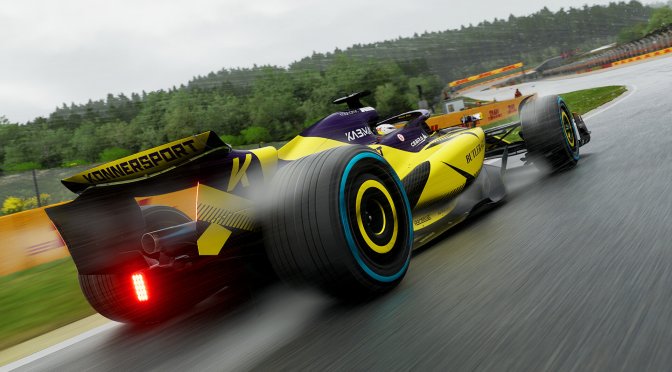
EA has just made F1 25 available to those who have pre-ordered its Iconic Version. Powered by the EGO Engine, the game supports both Ray Tracing and Path Tracing. So, in this article, we’ll be focusing on them, and we’ll benchmark them on an NVIDIA RTX 5090.
For these benchmarks, I used an AMD Ryzen 9 7950X3D, 32GB of DDR5 at 6000Mhz and an NVIDIA GeForce RTX 5090 Founder’s Edition. I also used Windows 10 64-bit and the NVIDIA GeForce 576.40 WHQL driver.
Codemasters has added a lot of graphics settings to tweak. As said, the game supports Ray Tracing and Path Tracing. Regarding RT, the devs have used it to enhance Shadows, Reflections, AO and GI. There is also support for AMD FSR 3.1, NVIDIA DLSS 4 and Intel XeSS.

For our benchmarks, we used the Singapore track during rain. This is a nightly track that has a lot of buildings and lights that can cast shadows. From what we’ve seen, this is one of the most demanding tracks in the game. So, consider this a stress test. Other tracks can run better than it (for instance, the Qatar track, which is also at night, runs WAY better than the Singapore track).
Without Ray Tracing, F1 25 can run with a minimum of 173FPS and an average of 189FPS at Native 4K with Ultra Settings on the NVIDIA RTX 5090. Given these numbers, we can safely say that without Ray Tracing or Path Tracing, a lot of PC gamers will be able to run it.
What’s interesting here is that the NVIDIA RTX 5090 can run the game with over 70FPS at Native 4K with all its Ray Tracing effects enabled. This is the only modern-day RT title that can run with over 60FPS at all times at Native 4K on the NVIDIA RTX 5090. And, as I said, it has numerous RT effects. We’re not talking just about RT Reflections or Shadows.

By enabling DLSS 4 Quality Mode, we were able to get to 90-100FPS. Then, with MFG X4, we were able to get to 300FPS. Yes yes, this isn’t “real” 300FPS. However, given the healthy framerate we had before enabling MFG, it’s a viable solution for getting a smoother gaming experience.
Path Tracing is obviously more demanding than Ray Tracing. At Native 4K, we were getting a minimum of 29FPS and an average of 35FPS. Then, with DLSS 4 Quality Mode, we were able to get a smooth gaming experience on our G-Sync Monitor. To get framerates over 70FPS at all times, you can use DLSS 4 Performance Mode. And get this. This is WITHOUT using Frame Gen, at all.

MFG X2, X3 and X4 can significantly improve performance when using Path Tracing. And while with DLSS 4 Quality you get 60FPS, I recommend using DLSS 4 Performance Mode.
Now, the good news for those who want to use Multi-Frame Gen is that it does not suffer from any major visual artifacts. This was my biggest issue with MFG X3 and X4 in previous games. Lately, though, it appears that MFG has been overhauled. In F1 25 and Doom: The Dark Ages, MFG X3 and X4 look amazing.
But what about the visual differences between Ray Tracing and Path Tracing? Well, Compusemble has shared a detailed video in which it highlights them. There is no doubt that F1 25 looks dated without RT or PT. In this title, the difference between No RT and RT is quite big. As for Ray Tracing vs Path Tracing, there are places in which the difference can be easily noticed. However, most of you will still need a side-by-side comparison.

Before closing, I should mention two major visual issues from which the game suffers. NVIDIA Ray Reconstruction is currently busted. At least in this game. For whatever reason, it makes the rain look painted/oily/smeary when there are no lights. Here is an example. As you can see in the dark area, the raindrops are completely messed up with Ray Reconstruction.

Path Tracing also introduces a weird visual issue with raindrops. For whatever reason, the raindrops do not look right with Path Tracing. Some of them are exaggerated, some of them are not affected by lights, some of them flicker, and everything is a mess in motion. You can clearly see this in my video at 09:34.

And what happens when you combine RR with Path Tracing? Well, you get something like this. Just look at the rain. It looks ugly and completely messed up.

Codemasters will have to fix these visual issues as soon as possible. Until then, I cannot recommend the game’s Path Tracing. Yes, it can run with great performance on a high-end GPU like the NVIDIA RTX 5090. However, these visual issues are a big turn-off. At least for me.
Right now, the best way to play F1 25 is with its Ray Tracing effects without Ray Reconstruction. This will give you the best experience, at least for now. Ray Tracing brings a huge visual improvement to the game. And yes, Path Tracing can look better and more refined. However, those rain issues are a big deal-breaker. So, let’s hope that the devs will fix them sooner rather than later.
Enjoy and stay tuned for more!

John is the founder and Editor in Chief at DSOGaming. He is a PC gaming fan and highly supports the modding and indie communities. Before creating DSOGaming, John worked on numerous gaming websites. While he is a die-hard PC gamer, his gaming roots can be found on consoles. John loved – and still does – the 16-bit consoles, and considers SNES to be one of the best consoles. Still, the PC platform won him over consoles. That was mainly due to 3DFX and its iconic dedicated 3D accelerator graphics card, Voodoo 2. John has also written a higher degree thesis on the “The Evolution of PC graphics cards.”
Contact: Email