Monster Hunter Wilds temp

Monster Hunter Wilds Benchmarks & PC Performance Analysis

Monster Hunter Wilds will be officially released tomorrow. Powered by the RE Engine, it’s time now to benchmark it and examine its performance on PC.

For our benchmarks, we used an AMD Ryzen 9 7950X3D, 32GB of DDR5 at 6000Mhz, AMD’s Radeon RX 6900XT, RX 7900XTX, as well as NVIDIA’s RTX 2080Ti, RTX 3080, RTX 4090, RTX 5080 and RTX 5090. We also used Windows 10 64-bit, the GeForce 572.47, and the Radeon Adrenalin Edition 25.2.1 drivers.

MHW-CPU-scaling

Capcom has released an official PC benchmark tool for this game. From what we could see, this benchmark represents the performance you’ll get while playing it. So, make sure to download it in order to test your PC.
Monster Hunter Wilds PC graphics settings-1Monster Hunter Wilds PC graphics settings-2Monster Hunter Wilds PC graphics settings-3

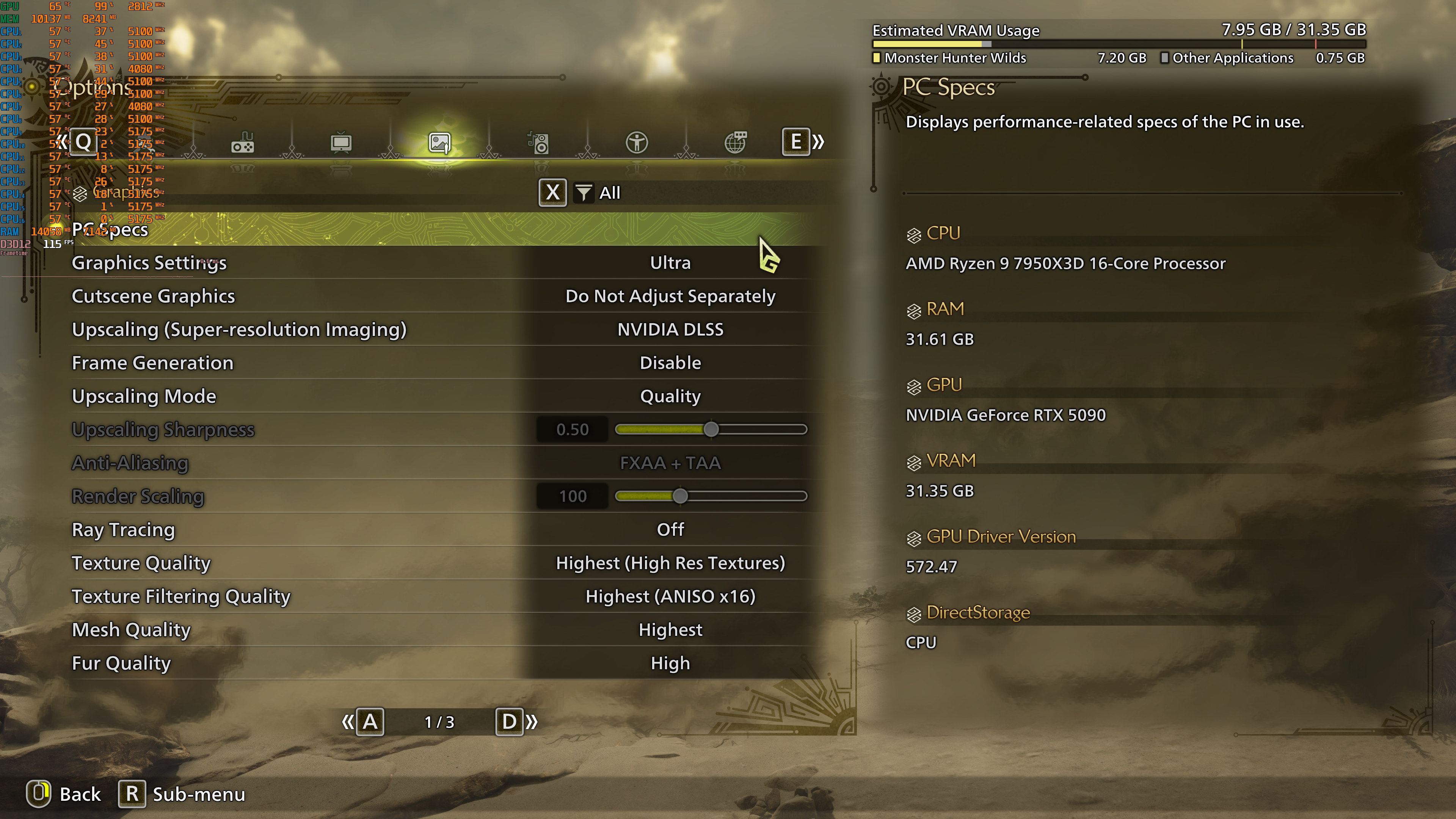
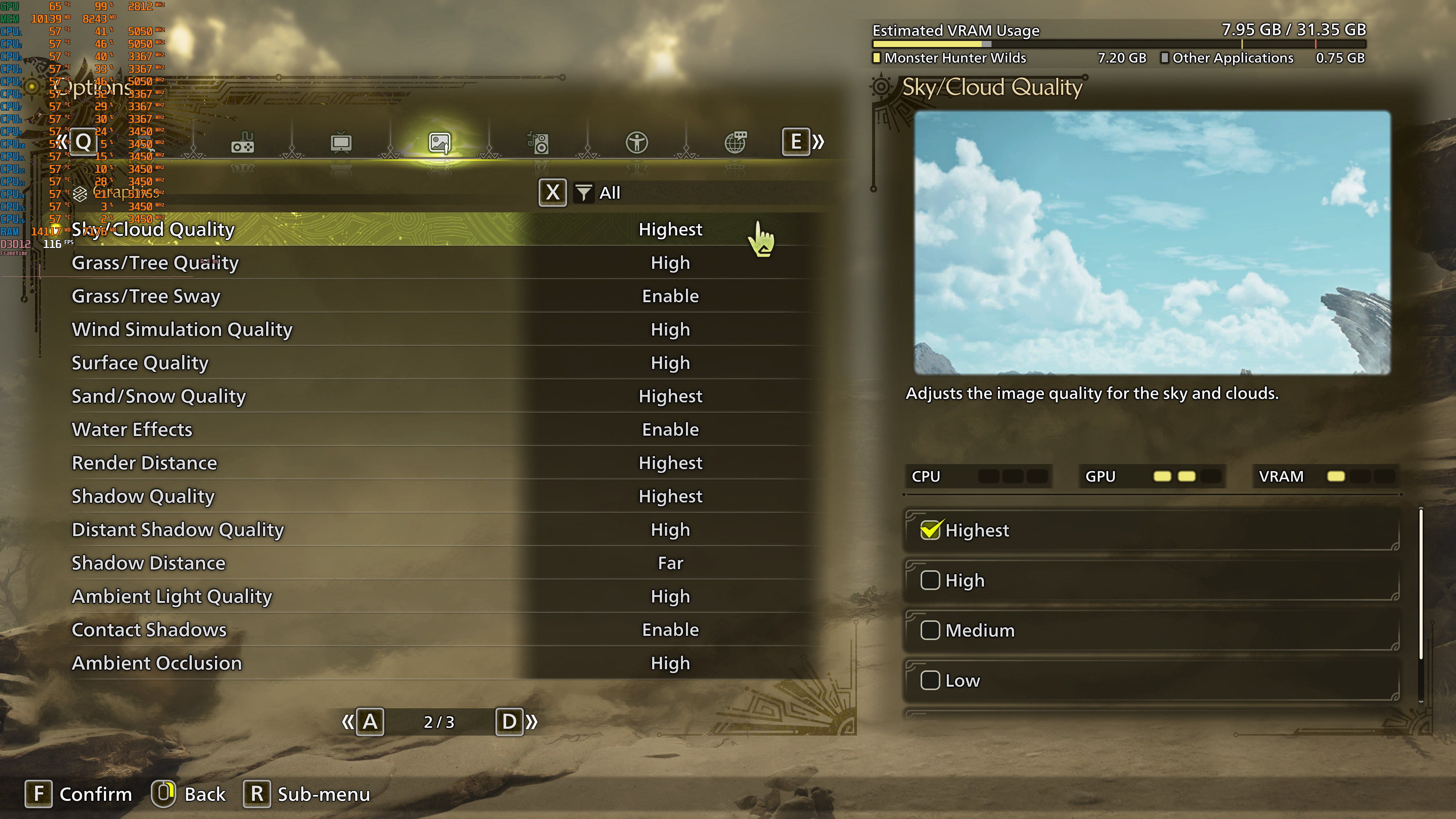
Monster Hunter Wilds has a respectable amount of PC graphics settings to tweak. PC gamers can adjust the quality of Textures, Grass, Trees, Shadows, Water and more. The game also supports Ray Tracing for reflections. Plus, there is support for NVIDIA DLSS 3, AMD FSR 3.1 and Intel XeSS.

As I’ve already said, MHW is one of the few games that can use 12 CPU cores on PC. In order to run the game smoothly, you’ll need a modern-day CPU with 6 CPU threads. Now as you will see, our average framerate was similar in most of our different CPU configs. That’s because the benchmark is mostly GPU-bound. The minimum framerates, which occurred in the town area, are the one you should be focusing as they show how the game scales on different CPUs.

Monster Hunter Wilds benchmarks-1

At 1080p/Ultra Settings/No RT, you’ll need a high-end GPU in order to get over 60FPS at all times. The NVIDIA RTX 3080 and the AMD Radeon RX 6900XT were unable to accomplish something like that.
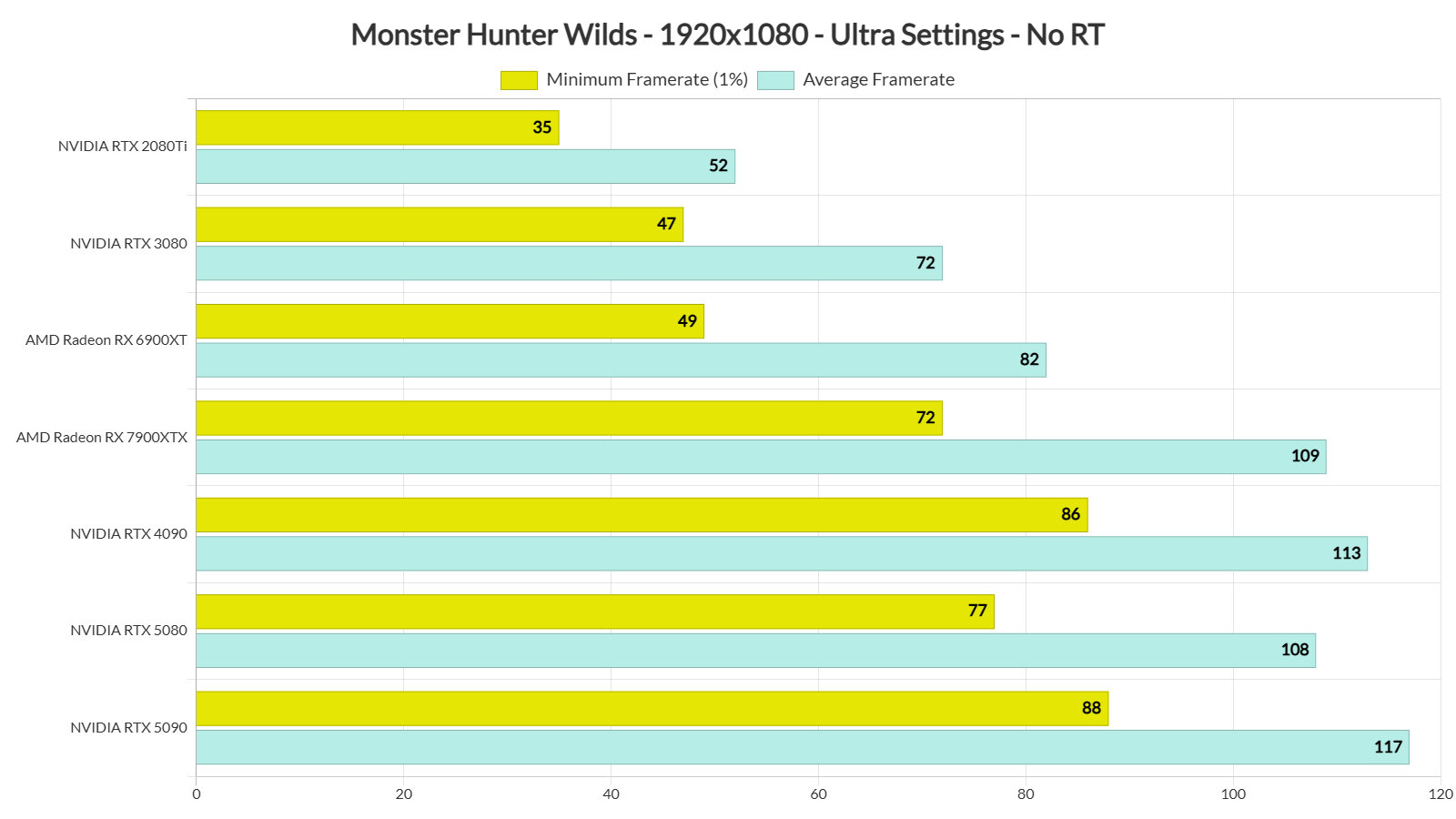
Monster Hunter Wilds benchmarks-2

At 1440p/Ultra Settings/No RT, our top four GPUs were able to push framerates over 60FPS at all times. As for Native 4K/Ultra/No RT, the only GPU that was able to maintain 60FPS at all times was the NVIDIA RTX 5090.

Monster Hunter Wilds benchmarks-3Monster Hunter Wilds benchmarks-4

Now although MHW comes with a wide range of graphics settings, it cannot scale well. On our NVIDIA RTX 5090, the difference between the Ultra and Medium settings was only 6%. I don’t know what the hell is going on here. And yes, Capcom needs to bring major optimization tweaks to it. To get a respectable performance boost, you’ll have to lower your settings to Low.

Monster Hunter Wilds benchmarks-5

Graphics-wise, Monster Hunter Wilds does not justify its enormous GPU requirements. It’s not a bad looking game. For instance, it has some really cool fur effects. The environments can also look great at times. Plus, the 3D models for all characters and monsters are quite detailed. However, its lighting system is pure garbage. The lighting in this game is so old-gen-ish that it can make it look like an early PS4 title. Especially in towns or areas without direct sunlight, the game looks ugly. Not only that but you can easily find a lot of low-res textures. It’s a shame really because the game would greatly benefit from RTGI (or even Path Tracing).

All in all, Monster Hunter Wilds does not require a high-end CPU for gaming at 60FPS. For targeting higher framerates, yes, you’ll need a top of the line CPU. The game can also effectively use 12 CPU cores/threads on PC. So, it’s quite refreshing to witness such a good CPU scaling on a modern-day game. However, MHW’s graphics do not justify its enormous GPU requirements. At times, the game can look awful. Not only that but performance is almost the same on Ultra, High and Medium settings.

Monster Hunter Wilds and Dragon’s Dogma 2 have proven that the RE Engine is not suited for open-world games. That, or Capcom will have to significantly overhaul the engine. And you know what? MWH looks two or three generations behind Deep Down. Remember that PS4 Capcom game (that was eventually canceled)? Well, it’s ironic that in 2025 Capcom cannot come anywhere close to those “PS4 graphics“!


Monster Hunter Wilds - NVIDIA RTX 5090 - 1440p/4K/8K Benchmarks - Max Settings with Ray Tracing

29 thoughts on “Monster Hunter Wilds Benchmarks & PC Performance Analysis”

      1. But the XT model… With FSR4 based on ML, which looks drastically better…

        I really think you should to present more complete benchmarks and comparisons on the technicals; performance and image quality.

        AND you'll get a more tangible perspective on the competition in perf/cost, for better editorial articles on the ongoing state of the industry.

        It's just one more card.

        (unless you raise the argument of market share 😅)

    1. Would've been okay if it had amazing visuals, but it barely looks any better than MH World, which was a last gen game (also was pretty decently optimized, unlike Wilds). Capcom has been really dropping the ball lately. It doesn't bode well for the PC ports of the new Onimusha and Okami 2.

      1. It has nothing to do with the PC ports actually, the console versions run – and look – even worse (that goes for both Dragon's Dogma 2 and Monster Hunter Wilds).

  1. Could've just used MT framework just like MH World but then again, there's a mod that tremendously improves its performance by optimized code rewrite. So I can imagine how haphazardly MH Wilds is handled now. Shame as it actually has some good monster designs and combat with a story. Guess I'd just take Onimusha than this

  2. 8 cores practically at 100%. What the f*** is this game doing? Calculating pi?

    It's friggen Monster Hunter, not Sim City 25000. What in the hell could this game be doing, to require a 7950X3D, to have its tongue hanging out like that?

    1. Developers added hundreds of Anti-Tamper checks, seems they didn't learn their lesson from Resident Evil Village.

          1. Nope. I have a high-end CPU & those anti-tamper cycles on the CPU cores messed up the experience. If you are trying to play at uncapped frame rates, your 1% lows would make a pregnant woman miscarry. That is why Capcom later removed Denuvo & updated their in-house DRM.

          2. Your childish remarks and lack of arguments are noted, my PC is probably 5x better than yours, enough said.

  3. I managed to (just barely) achieve a 60fps average on the benchmark using my 7900XTX with the same CPU. The only differences were that I have 64GB of 6000MHz DDR5 RAM and I am running on Arch Linux rather than Windows. I wonder if the extra RAM helps in some way, as I would be a little surprised that I would get better results through the Proton emulation layer than I would running on Windows directly.

    1. The fact you are seeing better results on Linux is not too surprising on AMDGPUs, because you are making use of MESA's open-source RADV Vulkan driver, which is mostly developed by Valve.

      Also, if you are running the stock Arch Linux kernel, then I would recommend to alternatively try out Bazzite's kernel build, which you can find on GitHub (sorry, posting links flags the comment):

      https://uploads.disquscdn.com/images/9852fb5f225afa4cecc8ce5ea3e7070556a782e04bd8c6798b95c8b47d7415cd.png
      Unless you are rolling your own custom Linux kernel, the one provided by Bazzite should help you to achieve lower latencies than the stock Arch one.

      Feel free to give it a shot!

      1. Mate, when will be the day when I no longer have to install Windows on my PCs anymore? Any good news for me? Any update on that SteamOS? Tired of these POS windows background bloat processes.

        1. I would recommend to wait until Windows 10 reaches end-of-life this year and then proceed to setup a dual-boot of both Windows 11 & Bazzite, which is like SteamOS but uses newer software underneath.

          Note that with an AMDGPU you will have a pretty solid experience already, however with NVIDIA you will have worse performance in newer DX12 games.

          NVIDIA is aware of the issue and already working on fixing it, but it is unclear when that fix will arrive.

          Just recently they reduced some stuttering issue with their GSP (GPU System Processor), which is responsible for dynamically adjusting the GPU clock speeds, but it's still not flawless.

          Nevertheless, I would still recommend to setup a dual-boot with Bazzite even if you own an NVIDIA GPU, because once installed, it will just keep getting better over the coming years…

          Cheers!

          1. Like I said, on an AMDGPU it can be better, however on NVIDIA you currently get less performance on DX12 games, until NV fixes their driver bottleneck.

          2. Pray for it my friend. I am really looking forward to the ultimate gaming OS!

      2. Interesting. I am currently running the stock Arch Linux kernel, but I am totally swamped at the moment — I'll keep the Bazzite kernel option in mind for when I have a bit more time to play around with my system though. Thank you for the suggestion!

  4. I just ran this benchmark:

    4K NATIVE
    DLSS= OFF
    FG= OFF
    RT= OFF
    COMPLETELY MAXED OUT GRAPHICS.

    Score= 24,902
    Average fps= 72.85
    CPU: Xeon w3175X (28/56) @4.8Ghz
    RAM: 192GB DDR4 3800cl14 (HEXA Channel)
    GPU: RTX 4090 Gaming OC.

    The RTX 4090 does AMAZING. If you turn on DLSS= Quality it becomes 89 FPS Average, and if you turn on Frame Gen, it essentially doubles the fps and becomes 168-170fps! Now, if you enable "Ray Tracing" this drops FPS down to 121fps average. More than enough performance to play this game completely maxed out with an RTX 4090.

    I ran it again just now completely maxed out with ray tracing, frame gen, 4k, ultra graphics.

    4K/RT/DLSS Quality/ Frame Gen= 121.82 fps.

    https://uploads.disquscdn.com/images/743d5859fa81201b32878897a3300859aba11510d330a0f5685fec4d7521d85e.png

  5. How the hell they released RE4R & this game with so much swings on performance numbers? I think it is the open-world streaming where they are getting botched badly. When we talk about NPCs, Hitman games are our easy choices. Even those games didn't tank CPU cores this much with such inefficiency. The NPCs in MHW barely does anything & hammers the CPU cycles. I have no idea why it is that & simply no idea why your geometric culling requires so much of CPUs.

Leave a Reply

Your email address will not be published. Required fields are marked *