

Square Enix has just released Final Fantasy 7 Rebirth on PC. Powered by Unreal Engine 4, it’s time to benchmark it and examine its performance on the PC platform.
For our benchmarks, we used an AMD Ryzen 9 7950X3D, 32GB of DDR5 at 6000Mhz, AMD’s Radeon RX 6900XT, RX 7900XTX, as well as NVIDIA’s RTX 2080Ti, RTX 3080, RTX 4090 and RTX 5090. We also used Windows 10 64-bit, the GeForce 571.86, and the Radeon Adrenalin Edition 25.1.1 drivers. Moreover, we’ve disabled the second CCD on our 7950X3D.
Square Enix has added a few graphics settings to tweak. PC gamers can adjust the quality of Textures, Shadows, Effects, Characters and more. The game supports up to 120FPS, though you can unlock it via its Engine.INI file. Moreover, there is support for TAA, TAAU and DLSS. Sadly, though, there is no support for AMD FSR or Intel XeSS. The game does not also support DLSS 3 Frame Generation.
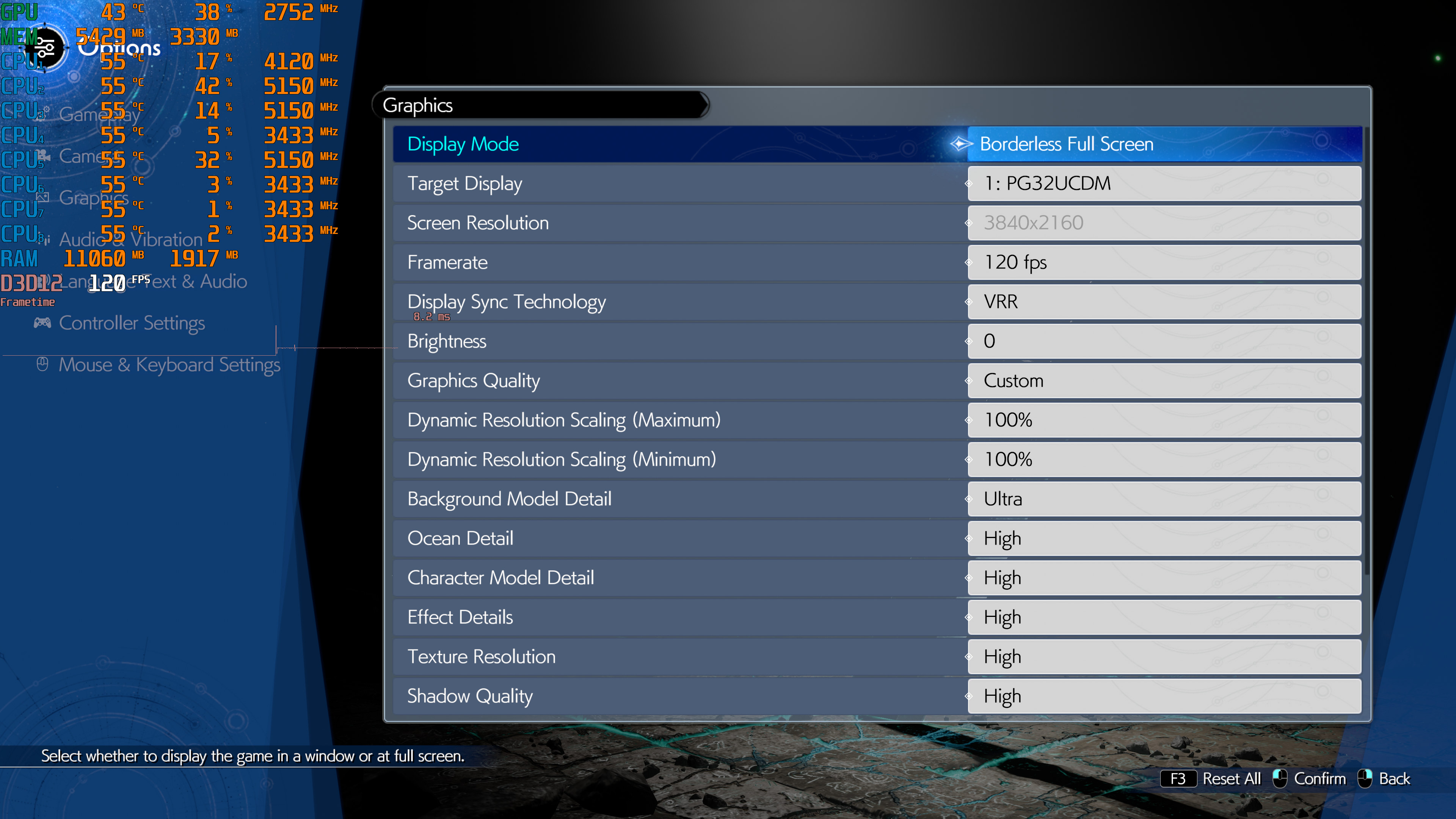
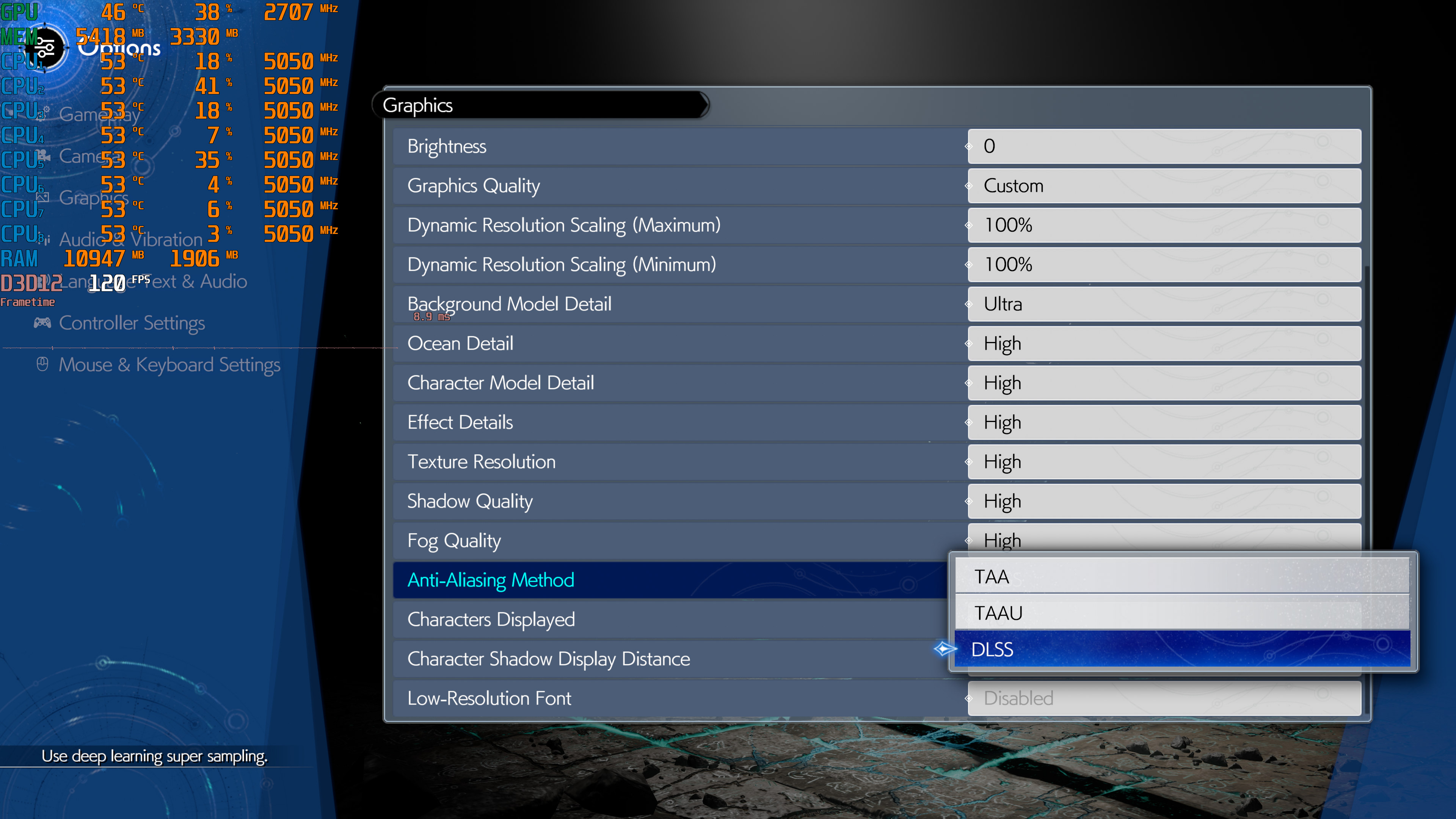
FF7 Rebirth does not have any built-in benchmark tool. So, for our benchmarks, we used the Grasslands open-world area. This appeared to be the most taxing area you will encounter in the first two chapters. As such, it should give us a pretty good idea of how the rest of the game runs.

Final Fantasy 7 Rebirth can be easily described as a GPU-bound title. At 1080p/Max Settings, our AMD Ryzen 9 7950X3D had no trouble at all pushing 120FPS. The NVIDIA GeForce RTX 2080Ti and the AMD Radeon RX 6900XT came close to a 60FPS experience, though they did drop below that target at times.
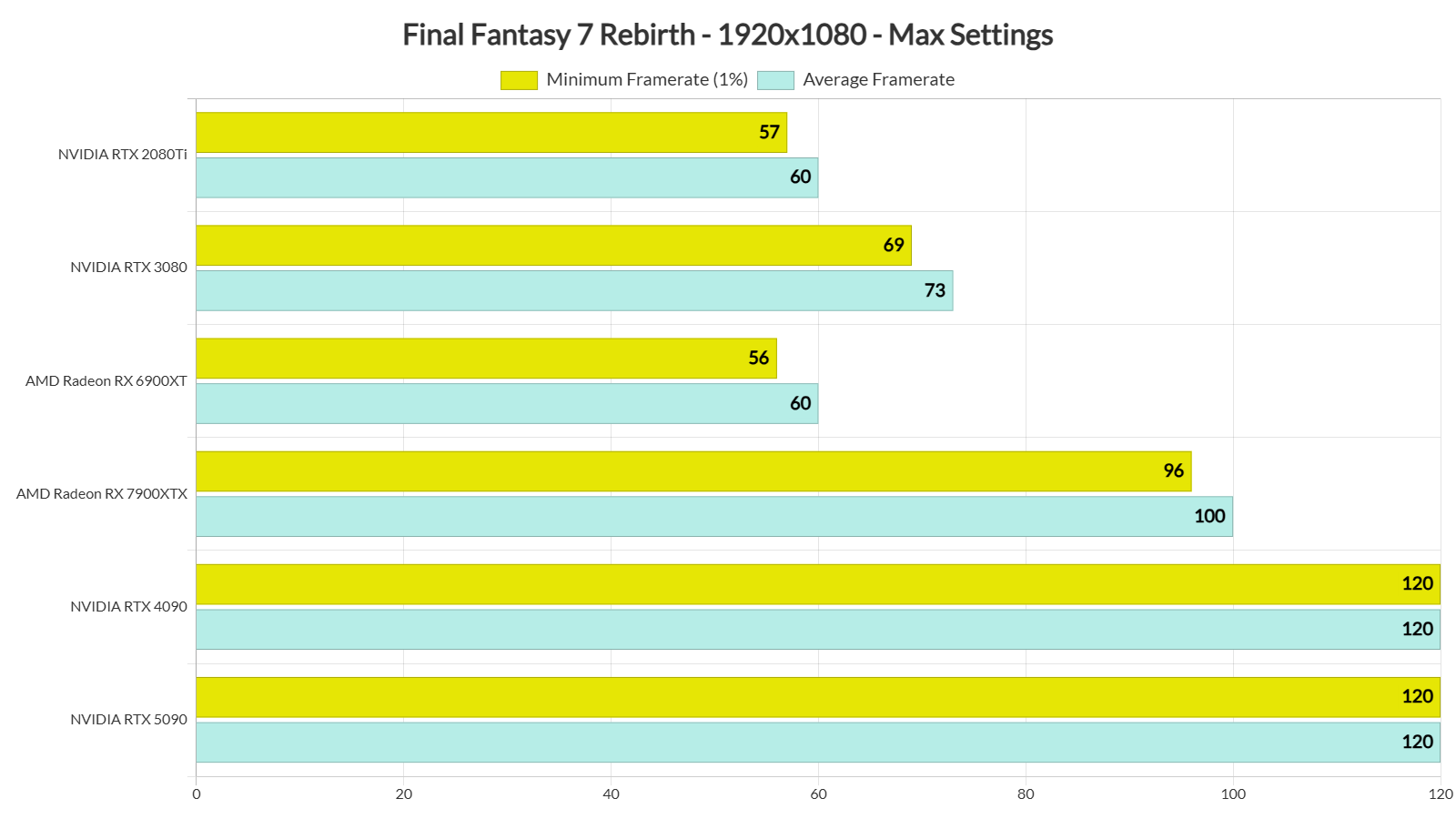
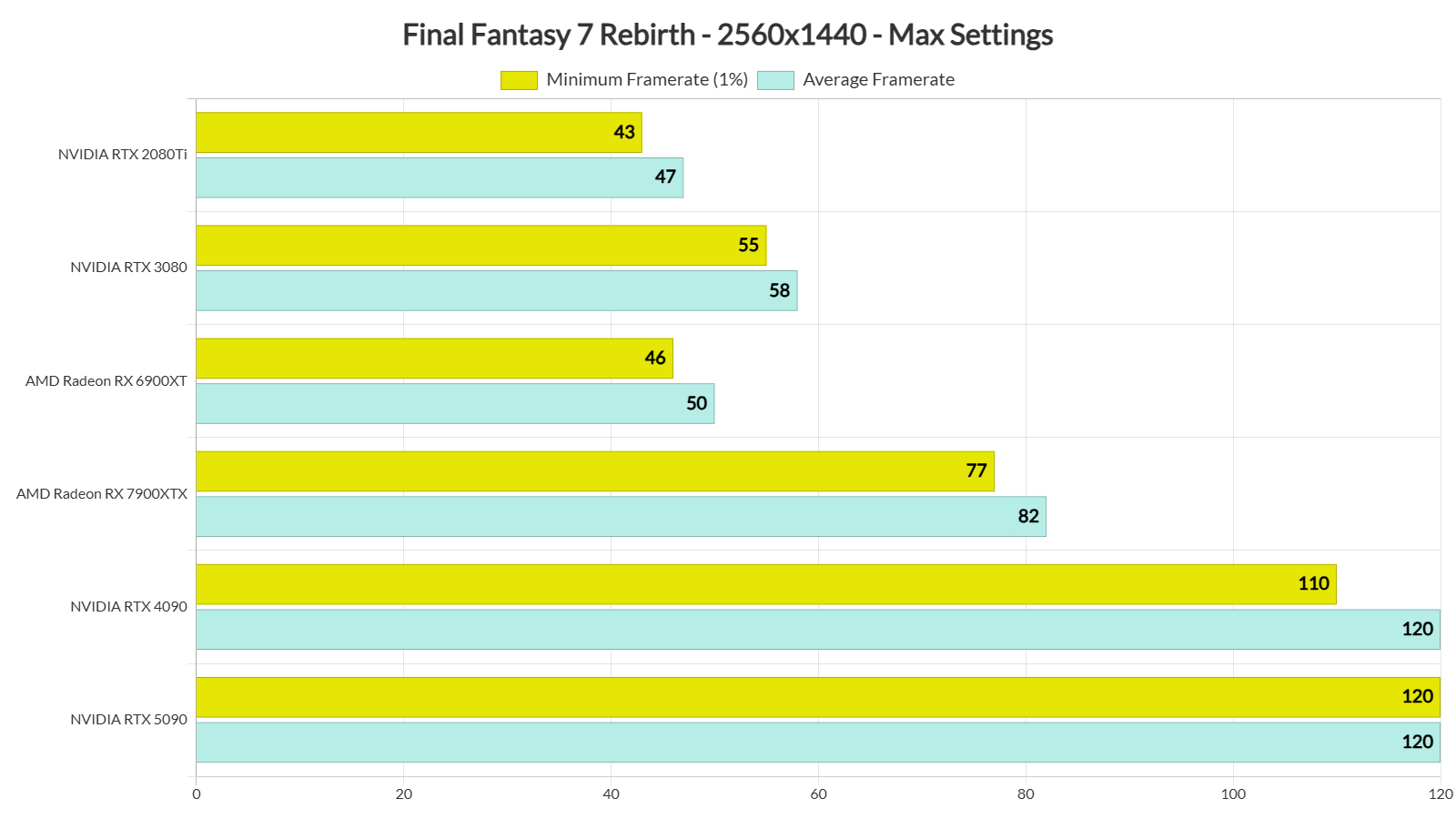
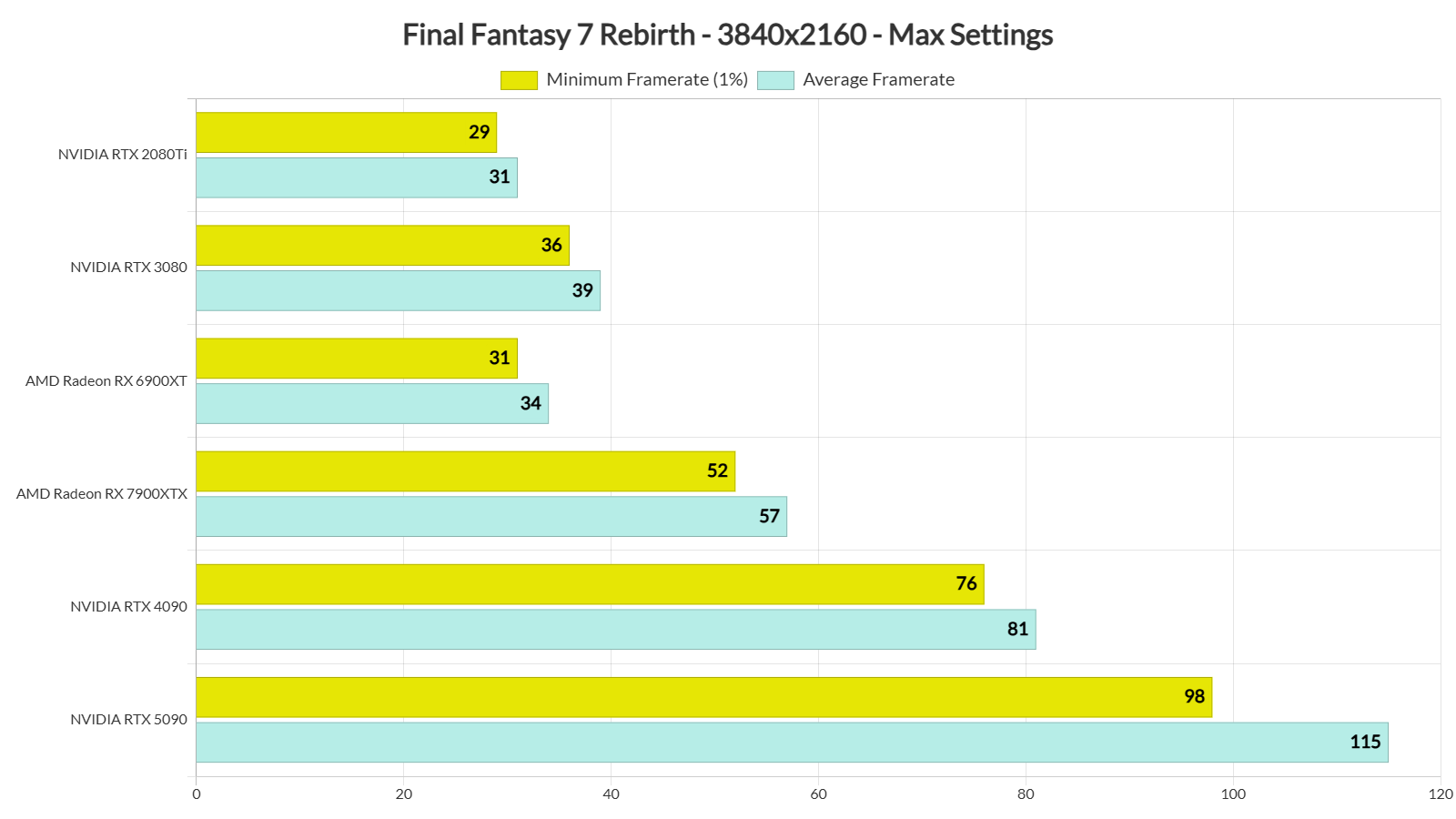
Speaking of AMD’s GPUs, they underperform in this title (even with their latest driver). The AMD Radeon RX 6900XT falls behind the RTX 3080 and only matches the performance of the RTX 2080Ti at low resolutions. At 4K, it manages to beat the RTX 2080Ti, but it’s still noticeably slower than the RTX 3080. In short, FF7 Rebirth appears to favor, and play best on, NVIDIA’s GPUs.
At 1440p/Max Settings, the only GPUs that were able to push framerates higher than 60FPS were the AMD Radeon RX 7900XTX, the NVIDIA RTX 4090 and the RTX 5090. As for Native 4K/Max Settings, the RTX 4090 and the RTX 5090 were the only GPUs that could provide a constant 60FPS gaming experience.
Graphics-wise, Final Fantasy 7 Rebirth looks great. Its main characters look almost as good as those we saw in the CG FF movie, Advent Children. Everyone looks amazing. For the most part, Square Enix has also used high-quality textures. You’ll still be able to find some low-res here and there. However, for an open-world game, FF7 Rebirth looks great. Unfortunately, though, its world and environments can feel a bit static. Players cannot interact with grass/vegetation, and there are a lot of invisible walls. On Max Settings, there are some minor pop-in issues (though you can fix them with this mod). And although SE has improved the lighting, it’s nowhere close to what we’d get with an RTGI solution.
One of the biggest complaints about FF7 Remake was its stuttering issues. Final Fantasy 7 Remake had both traversal and shader compilation stutters. As I wrote in PC Performance Analysis, I did not encounter THAT many on our PC test system. And although Rebirth has a shader compilation process when you first launch it, it STILL suffers from shader compilation stutters. So no, it’s not a stutter-free experience on PC. On our PC system, the experience was similar to the one I had with FF7 Rebirth. This means that you’ll get stutters in the first one-two hours of the game. After that, you might get some minor traversal stutters, especially when entering cities. In short, it’s not a stutter-fest and, at the same time, it’s not stutter-free. It’s fully enjoyable. At least in my opinion.
In conclusion, Final Fantasy 7 Rebirth is pretty much what I expected on PC. Square Enix has made some minor visual enhancements but most of you won’t be able to notice them. It’s a shame that there is no support for RTGI (or other ray-traced effects). I also don’t know why there is no support for AMD FSR or Intel XeSS. Plus, the game suffers from shader compilation stutters.
Don’t get me wrong. Compared to the console version, the PC version looks and plays way, way better. This is the definitive edition of FF7 Rebirth, and the best way you can play it. Despite that, the game could benefit from some additional improvements and some further polish!


John is the founder and Editor in Chief at DSOGaming. He is a PC gaming fan and highly supports the modding and indie communities. Before creating DSOGaming, John worked on numerous gaming websites. While he is a die-hard PC gamer, his gaming roots can be found on consoles. John loved – and still does – the 16-bit consoles, and considers SNES to be one of the best consoles. Still, the PC platform won him over consoles. That was mainly due to 3DFX and its iconic dedicated 3D accelerator graphics card, Voodoo 2. John has also written a higher degree thesis on the “The Evolution of PC graphics cards.”
Contact: Email