
A story surfaced this weekend, suggesting that the NVIDIA App can cripple your PC gaming performance. As such, we’ve decided to test this on our main PC gaming system. So, can you really get over 20FPS by simply uninstalling the NVIDIA App? Let’s find out.
For our tests, we used an AMD Ryzen 9 7950X3D with 32GB of DDR5 at 6000Mhz, and the NVIDIA GeForce RTX 4090. We also used Windows 10 64-bit, and the GeForce 566.14 driver. The OS we used may be crucial to the results. Moreover, we’ve disabled the second CCD on our 7950X3D.
The games we tested were Path of Exile 2, Red Dead Redemption, STALKER 2 and Indiana Jones and the Great Circle. Path of Exile 2 was running at Native 4K with Max Settings, and Red Dead Redemption was running at Native 4K, Max Settings and DLAA (I’ve also unlocked its framerate). On the other hand, both STALKER 2 and Indiana Jones were running at 4K/Max Settings with DLSS 3 Quality and Frame Generation.
So, let’s take a look at our results, shall we?
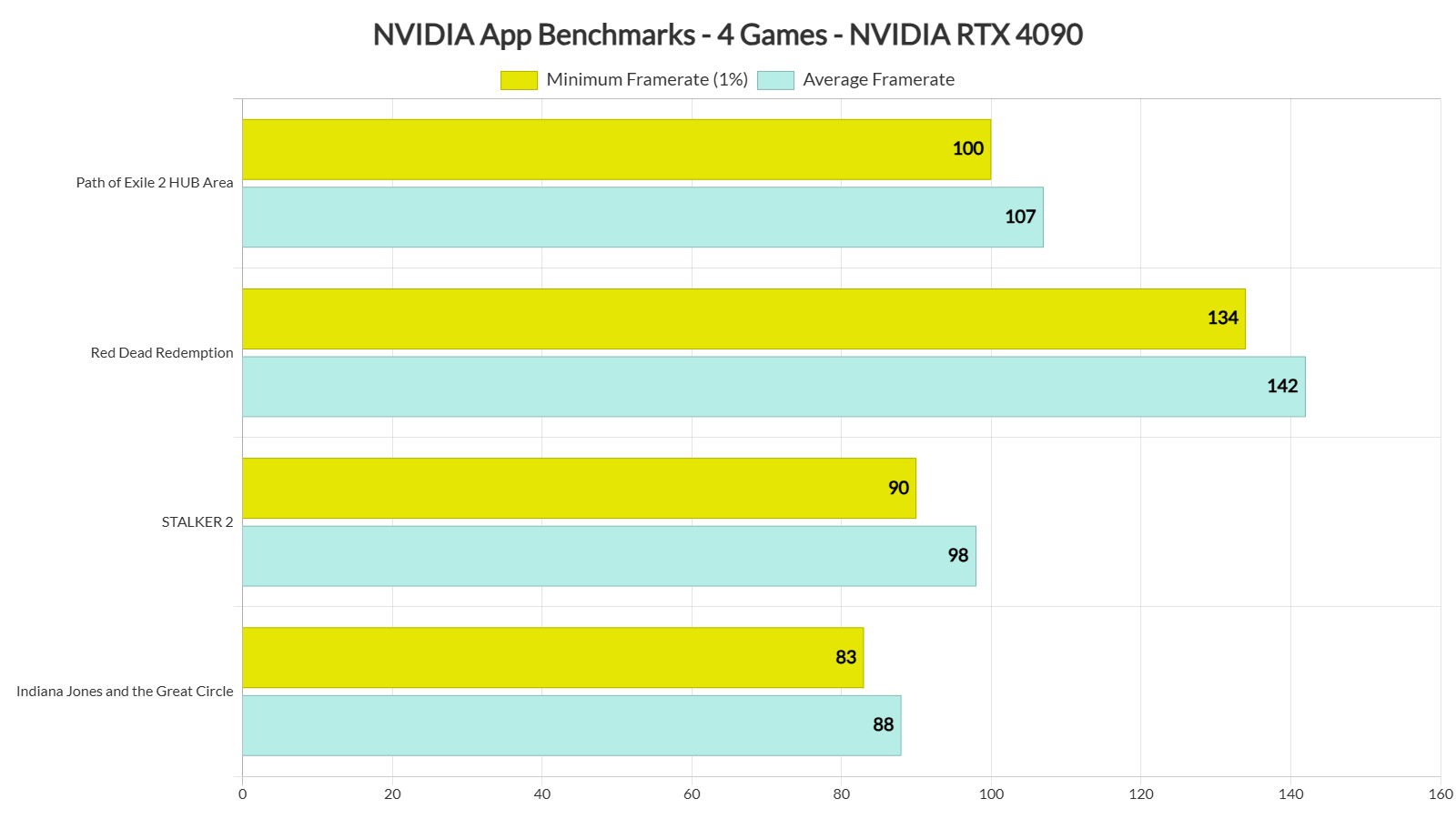
As we can see, there is a small performance hit with NVIDIA App. However, it’s nowhere close to what has been reported. On our PC system, it’s around 4-6%. And that’s mostly in CPU-bound areas. For instance, in Indiana Jones which is a GPU-bound game with Path Tracing, there isn’t any performance hit at all.
In a way, this kind of makes sense. NVIDIA App is a software running in the background at all times. So yes, it will consume some CPU cycles. It makes sense. This is why I’ve been saying you need to test and play games without any program running in the background. And believe me. Discord and Chrome (with lots of open tabs) can cripple your performance even more. Hell, even OSD programs can have a negative impact. This is nothing new.
And again, we’re talking about a 4-6% performance hit. So, no. By simply uninstalling it, you won’t gain 20FPS. You will most likely get 3-4FPS. That is unless you’ve enabled something in the NVIDIA App that can cripple your performance.
For example, NVIDIA App comes with some shaders that PC gamers can use. It can also allow you to record your desktop. So, if you’ve enabled these settings by mistake, you’ll get a lower performance with the NVIDIA App.
People have also reported worse frametimes with the NVIDIA App. We did not experience anything like that. Frametimes were the same with and without the NVIDIA App.
All in all, I suggest taking a look first at the settings of the NVIDIA App. Chances are you may have enabled something that can impact your performance. The app itself does not bring a huge performance hit. At least on our PC system.
Before closing, we should note that this could be a Win11-only issue. After all, we’ve already seen a similar CPU performance issue that plagued both Intel and AMD CPUs on Windows 11. So, I won’t be surprised if Win11 is the main culprit here. On Windows 10, we couldn’t replicate any of the reported gains.
So, should you uninstall it? Well, this is entirely up to you to decide. If you have no plans at all to use any of its features, why did you install it in the first place? If on the other hand, you want to use it, 3-4FPS will not destroy your in-game performance.
For what it’s worth, I’ve already informed NVIDIA about this. So, it will be interesting to see what the green team will do about it.
Stay tuned for more!
UPDATE:
NVIDIA has issued an official statement. As I suspected, the performance issue is related to a feature. It has nothing to do with the app itself. This is why I told you to check your settings.
“We are aware of a reported performance issue related to Game Filters and are actively looking into it. You can turn off Game Filters from the NVIDIA App Settings > Features > Overlay > Game Filters and Photo Mode, and then relaunch your game.”

John is the founder and Editor in Chief at DSOGaming. He is a PC gaming fan and highly supports the modding and indie communities. Before creating DSOGaming, John worked on numerous gaming websites. While he is a die-hard PC gamer, his gaming roots can be found on consoles. John loved – and still does – the 16-bit consoles, and considers SNES to be one of the best consoles. Still, the PC platform won him over consoles. That was mainly due to 3DFX and its iconic dedicated 3D accelerator graphics card, Voodoo 2. John has also written a higher degree thesis on the “The Evolution of PC graphics cards.”
Contact: Email


How can a bloated,unecessery application running in the background have an impact on performance? dont be silly.
Nvidia software guys aren't as reliable as you think they 😀
Oh i know,thats why first thing i do is remove anything except drivers,dont need pointless software on my pc i will never use,for everything else related to Nvidia Control panel…there is Nvidia Profiler
are?
Why not just close the app instead of uninstalling
Still affects perf even closed.
What no object permanence does to a mf…
As long as the Control Panel keeps working, I'll keep installing Nvidia drivers with NVCleanstall to avoid useless crap like this.
you know you can just install the drivers without the need for nvcleaninstall, it doesn't force you to install it…
duh but there's a lot more that nvci disables and debloats, you know?
it debloats nothing you don’t actually need anymore. people are so weird about their stupud old apps that are now obsolete after decades.
Look at the components NVCleanstall offers to install beyond the gforce experience stuff and tell me again that it doesn’t force you to anything.
seek therapy. seriously. it doesn’t force you to install anything you nutjob.
No? Like the useless Nvidia Shield Controller drivers? You don’t even know what are you talking about, kiddo.
"As we can see, there is a small performance hit with NVIDIA App. However, it’s nowhere close to what has been reported."
try on weaker hardware.
Actually, users with high-end CPUs report these huge performance differences. From what I've seen, most of them use Win11. Not that it will surprise me if it turns out to be a Win11-only issue (as there were previously some CPU issues associated with Win11).
windows 11 use MPO multi plane overlay probably nvapp have a bad implementation with ue4 / ue5 games.
I remember having noticeable performance drops in Doom Eternal when the NVIDIA app was open and I was using it's sharpening filters. I had 120-150fps at 4K with RT and my GPU usage was low. With the NVIDIA app turned off, the GPU usage was maxed out and the game was running at around 180fps.
Those sharpening filters (that no one should use in general because sharpening is garbage) have always had a sizeable fps impact through the overlay. I remember trying them out back with RDR2 through Experience and it was like a 10% hit at least, wild.
Those sharpening filter take some performance. This has been tested before.
It's worth noting that this story was first posted by a poster named Lisa Su.
I think the problem can be mitigated by using a program like process lasso and forcing low priority on nvidia processes and affinity on the efficient cores or on the last cores of the CPU.
And loose the same amount of performance because process lasso is running
Lasso is invasive power hungry bs as well.
What OS version though?
Tbh, there is no really a point in having the MV app running at all times .
A .bat file that could shutdown services would be awesome.
Tbh, there is no really a point in having the MV app running at all times .
A .bat file that could shutdown services would be awesome.
It's necessary for the in-game features to function. That being said, I think it runs all the time even if those features are disabled.
Well nothing is impossible with bad software, but can it really impact performance ? I mean with current cpu's I doubt I can feel sh*t if I had 100 garbage opened. But it is possible you never know.
every frame counts !
Well, the NVIDIA latest 2 game ready drivers should be investigated as they cause alot of issues in alot of games even the ones they are released for.
Crashing and freezing being one of them, but also stuttering.
I reverted to 561.09 recently and it basically fixed all of my stuttering and crashing in Marvel Rivals and also stopped the freezing in God of War Ragnarök.
something is very wrong here, as alot of people are having these issues.
Their driver division is straight trash now, and has been for like a year. Idk how good or bad AMD drivers are now, but Nvidia has reached a point where you can't update drivers without doing research because most recent versions have sh*t frame pacing and microstutter in many games. 561.09 is the only decent recent one, and before that it was 551.86 afaik, and 537.58 the goat.
That hilarious, and what @beck90:disqus said…!!!
I don't at this time recommend that ANYONE install the nVidia App, for the following core reasons –
– TPU keep referring to the NvApp being superior to GeforceExperience, but I like a lot of people refused to install that steaming pile of a program. a) because it required a login and b) because it will not function unless you gave it unfettered internet access.
– Data sharing opt-out and no sharing of under 13's data – ONLY if you sign in, making it a shady catch22.
– There is still no GDPR prevision in the nVidia privacy policy and you still cannot Opt-Out of required data in the settings section..
– Almost ALL of the app functions will NOT work if the app is denied OUTGOING access to the internet. This is not the case for the nVidia Control panel.
– Scanning HDD without consent – the app SHOULD be asking me where, period.
Oh and installing the latest version of NvApp breaks/corrupts the Nv ControlPanel, despite me reporting this precise issue with the very 1st beta of the NvApp – which nvidia clearly ignored.
This should be a HARD PASS, as its yet another "will only work with an internet" connection based application/program. No offence to w1zzard as I appreciate the work he does, but I would down-vote this news article if I could.
"nVidia responded that "Control Panel will continue to be a separate app as we continue to port features" but also that the App will "eventually" replace it."
– And on that day end users will simply find a way to use the old control panel, or just refuse to have the NvApp installed at all, as they currently do with Gfe atm curtisy of NvCleanInstall.
In what wey does Nvapp break the old control panel?
You cant launch it, and even reinstalling it doesn't resolve the issue.
It doesn't help that the CP isn't included with the drivers anymore either, as in you have to get it from the sh*ty M$ store. nGreedia knew exactly what are doing yet don't seem to give a sh*t about choice or what users want.
nVidia appeared to ahve fixed that issue with breaking the old CP. But its irrelevent, the NvApp still need an intenet connection for core functions and its missing a lot of functions available in the NvCp.
The new app actually does not require a login, that was one of the touted features requested by gamers who worry about every app permission. Anyway, you were never going to install to begin with so your comments are basically just keyboard warrior ramblings.
blah blah nv clean install, linux yadda yadda…
Fella, have you try and use the app like? most of its function will NOT work unless the app has internet access, imbecile.
Unfortinately for Nvidia, a 5% perf hit in a CPU bound scenario is PRECISRLY the one that MOST affects gamers. With upscaling now almost no one is GPU bound anymore, however modern games are terrible on the CPU.
i remove nvidia app stalker 2 run from 74fps to 82fps in the same save game yes it lower my fps !
and I don't use rtx hdr or the overlay which are deactivated
Nah, Nvidia app automatically adjust your customized/lower game graphic setting to setting they think "suitable" for you, which actually not the case and lead to performance impact. Like, I had 4070ti but it doesn't mean I want turn on RTX on every game yet the App will enable it regardless. Many people don't aware that their game setting being modified. Even you change it back, the next restart Nvidia will change it back. That's why FPS dropped and you just need to disable their ret*rd 'optimized' setting.
Meanwhile, here's how NVIDIA's control panel looks like on an OS used by actual professionals:
https://uploads.disquscdn.com/images/f6964a8d51176f770f21a3a01864fb81601852fed204e5b49a064e00fbbe8a4f.gif
And if you are using a Wayland compositor, NV's control panel makes sure to get out of your way, because it respects the system-wide settings:
https://uploads.disquscdn.com/images/a9a95af023c9fd1cd4e634229c2030ba092b862ec90c203d3efba3926976a5b8.png
Hope you guys are looking forward to the next-gen Windows 11 upgrade Microsoft will force down your throats in 2025! 😀
Funny how after all these years it's still missing many of the features of the NVIDIA Control Panel on Windows… Granted so is the NVIDIA app…
lol, linux gaming is still 5-10 years behind windows
Yes, it's terrible! For some time in the recent past, I used to dual-boot Win + Linux.
The Linux felt sooo far behind, almost felt like I was in the 90s or something. Kinda ridiculous that they don't redesign it!
Yes, it's terrible! For some time in the recent past, I used to dual-boot Win + Linux.
The Linux felt sooo far behind, almost felt like I was in the 90s or something. Kinda ridiculous that they don't redesign it!
Now test it with a PC the average user has, and not one of the highest end rigs money can buy.
Cyberpunk 2077 with NVIDIA App running:
https://uploads.disquscdn.com/images/1a328b6ba8acf8e67270a8138c2fcaf1dc150a1636cf9be30db28db33c811fca.png
Cyberpunk 2077 with NVIDIA App shut down (service stopped):
https://uploads.disquscdn.com/images/5bf1bcf882226ddd1cc7ec2697b1cca32d29d62f31ca1e72714bd6d770e75513.png
1 FPS difference? Popular tech reviewers would probably say that's within run-to-run variance.
For sh*ts and giggles, here's Cyberpunk 2077 with the NVIDIA App uninstalled: https://uploads.disquscdn.com/images/bd7f37f20fd4d112974a92e551683561f3c7aecc4eb98fe80ac8f2c296eaa32a.png
BUH.
DUDES. "4-6"?? percent!???
so I've been losing potentially up to six percent of all gaming performance because of this app I've been using since day one of getting this PC???
no, it's not 20%. that's true. it's not as bad as is being reported. but if you don't think -6% performance is a big loss, try it out yourself — manually bind your system -6%, play for a bit, then put it back to normal. see what an extra six percent can do for the illusion of immersion.
this is a shock. I have to say. totally unacceptable, certainly for system-intensive games.
its been shown that the nvidia driver already saps some perf and now thier god-awefull app is also doing the same, compounding the perf loss.
The issue is its causing HUGE 1% lows, so your games will be a stuttery mess.
Windows as a whole, is just one gigantic bloatware machine.
It's amazing how bloated, and just grotesque the operating system itself has gotten, never mind adding all these additional apps, launchers, and other crap to the mix.
Has become
Windows itself is actally really small, its kernel is way smaller than Linux's bloated monolithic kernel.
Sure, Windows has bloated apps that come with Windows, like OneDrive, but you can simply disable them.
Game launcher bloat is not Windows' fault, that's on Steam.
Unless you want the latest experimental drivers, you can just download new Nvidia drivers through the Windows device manager without ever downloading any Nvidia app. In fact, Windows does a good job updating drivers itself usually. Updating GPU drivers is usually unnecessary.
Much smaller
Way much smaller.
Tinier*.
John Papadopoulos INSTALL Process Lasso, Put game tested to CORES 1-8 put nvidia NV*.exe (SHIFT+mouse SELECT mark multiple) CPU AFFINITY ALWAYS to cores 9-16 and repeat the testing (NO GAME IS using more than 6 CORES anyway)
disable 16 HTs in BIOS (intel HW THREAD DIRECTOR USES CORES 1ST, HTs 2nd when all cores are FULL – idk about ryzen but it has to be simmiliar
– win task manager / CPU / CORES 0,2,4,6… HTs 1,3,5,7…) and there is some connection between WINDOWS and BIOS INTEL HW thread DIRECTOR =)
Who knows what os and other things they were using and what system info, with a op brute force system it's likely not a problem w reasonable background stuff going on but for mid range or lower or older systems this likely is not a good or useful thing to have. Most of these first party apps are there to do a lot more data farming and other things they think are great for THEM but they're rarely good for gamers etc Simpler is better so NCP still works fine and always remember to use NVcleaninstall and debloat as much as possible.
I use it, with zero issues and added fluff, for screenshots and measuring power consumption; I just don't like the other tools that can do the latter.
You "happened" to use a god tier pc which would have minimal performance hit in any scenario.
These differences could normally be up to run to run variance. I'm assuming you've accounted for this with multiple tests though.
Disabling/uninstalling this app/services would have better gains on a lower spec pc where it actually makes a difference interfering with other priorities.
I've been disabling this whenever I want my pc to idle lower (without random fan spikes doing nothing) or more performance where it uses up to 10% of CPU literally doing nothing, as I use the integrated for everything except gaming. I use a few apps to track metrics for app resource usage.
For reference I'm a broke piece of ghetto trash with a 2016 ultrabook i7 7500 16gb ram (max) 1tb sata ssd & dumpster tier Nvidia 940mx soldered card. I'd upgrade obviously if I had any money to use.
I really Dislike Nvidia, I remember all the sh*t they pulled gimping games, Plus the Apple-ization( Huge markup) of GPUs. Thinking of switching over next-gen cycle(since I dont use upscalers or Think RT is a Huge improvement)
More testing will need to be done. Possible that the performance loss only occurs with the overlay enabled. I did some SOTTR benchmarks last week with Nvidia App installed but Overlay Disabled. Got 465-467 fps. Uninstalled and ran again today, got 468 fps. So essentially 0 difference. And this is a CPU bound scenario with the game running at the lowest settings. https://uploads.disquscdn.com/images/0eb9ab5db321328c0953e8554ffeb6d19e58d3d886e96ac9af7d38fb02475b7f.jpg
All you have to do is into settings and turn off Game Filters and Photo Mode when the game is off and you'll get identical FPS as removing it altogether.
Source: Hardware Unboxed
Your performance values are not accurate in terms of real world, cause not everyone is using top of the line hardware.
People using weaker hardware, will suffer higher bottlenecks and performance penalties, especially in CPU heavy games.
You should not install nor use the NVidia App, same goes for AMD Relive, anyone claiming they have no performance hit is naive, Software doesn't run on magic.
Your performance values are not accurate in terms of real world, cause not everyone is using top of the line hardware.
People using weaker hardware, will suffer higher bottlenecks and performance penalties, especially in CPU heavy games.
You should not install nor use the NVidia App, same goes for AMD Relive, anyone claiming they have no performance hit is naive, Software doesn't run on magic.