

Avatar Frontiers of Pandora screenshots-2

Avatar: Frontiers Of Pandora – AMD FSR 3.0 & PC Performance Impressions

Ubisoft has just provided us with a PC review code for Avatar: Frontiers Of Pandora. So, in this article, we’ll take a look at the AMD FSR 3.0 implementation, and share our initial PC performance impressions.

For this article, we used an AMD Ryzen 9 7950X3D, 32GB of DDR5 at 6000Mhz, and an NVIDIA RTX 4090. We also used Windows 10 64-bit, and the GeForce 546.29 driver. Moreover, we’ve disabled the second CCD on our 7950X3D.

Ubisoft has implemented various graphics settings to tweak. And yes, the game does support ray-traced shadows and ray-traced reflections. Interestingly enough, we couldn’t find any setting for RTGI. My guess is that RTGI is enabled by default. The bad news here, though, is that you cannot adjust its quality. As such, in some dark places, you will spot some visual artifacts.

AMD FSR 3’s Super Resolution appears to be great and on par with NVIDIA DLSS 2. Below you can find a comparison between DLAA (left), DLSS 2 Ultra Quality (middle) and FSR 3.0 Ultra Quality (right). AMD FSR 3.0 is noticeably sharper than DLSS 2, something that will please a lot of gamers. Not only that but in still images, it provides similar results to DLSS 2. This is by far one of the best implementations of FSR we’ve seen to date.

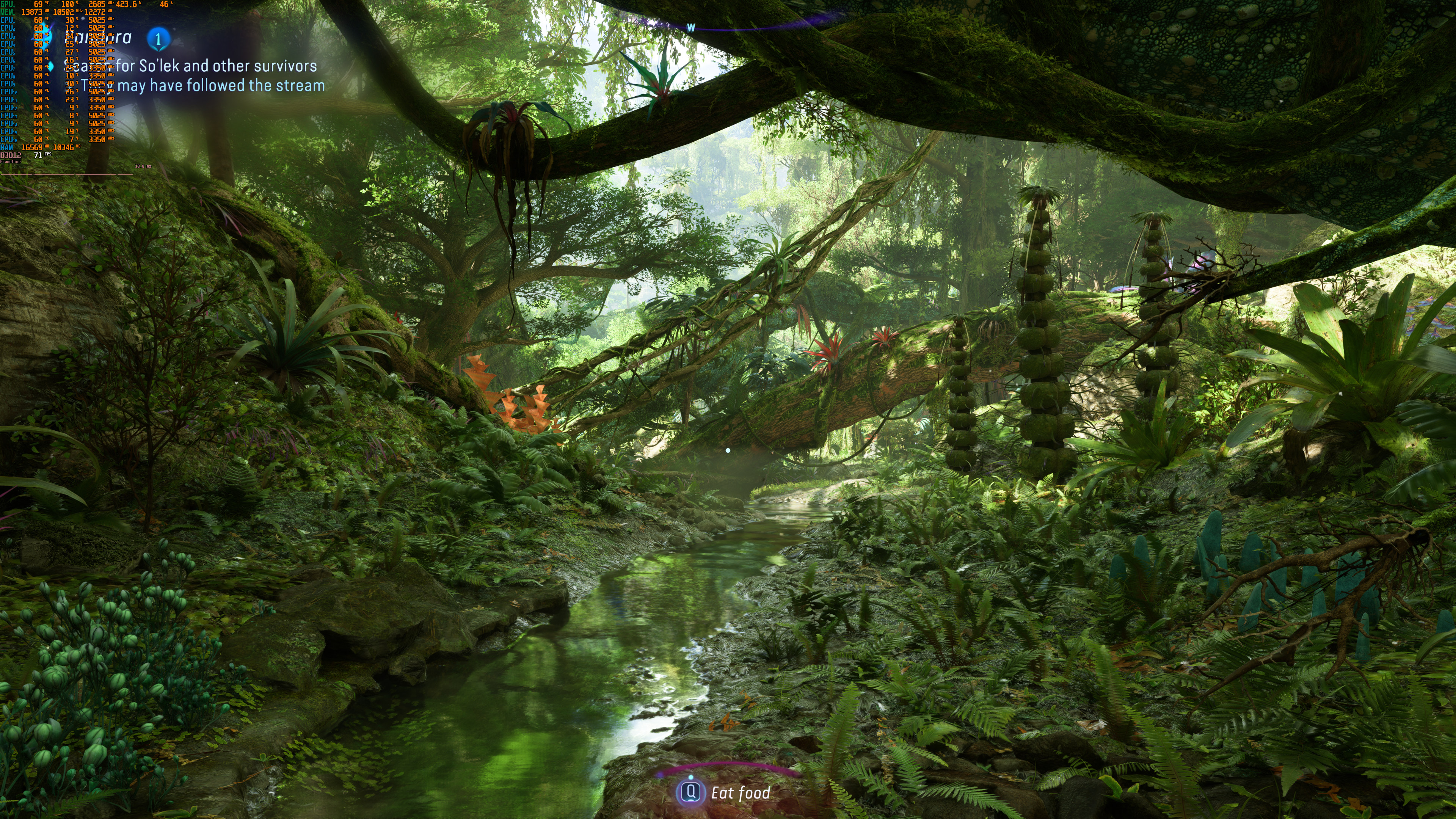
Avatar DLAAAvatar DLSS Ultra QualityAvatar FSR 3.0 Ultra Quality

Now while FSR 3 Super Resolution is great, FSR 3 Frame Generation is still not perfect. To its credit, FSR 3.0 is no longer a stuttery mess. However, there are still tearing issues when using a G-Sync monitor. We don’t really know why, but the game never felt smooth with FSR 3.0 Frame Generation. So yes, Avatar’s FSR 3.0 implementation is still not perfect.

Thankfully, Avatar offers a framerate limiter and a refresh rate option. By dropping the refresh rate to 100hz, and by setting the framerate limiter to 100fps, we were able to achieve a somehow acceptable experience. That was with a constant framerate of 100fps.

In terms of input latency, I did not experience any major issues when using FSR 3.0 Frame Generation. With a baseline framerate of 60fps, everything felt responsive. So, if you can hit 50-60fps without FSR 3.0, Frame Generation is an extra way to improve the game’s performance. Right now, the game supports Frame Generation only with FSR 3.0. In a future update, Ubisoft will add support for DLSS 3.

Lastly, at Native 4K/Max Settings, the NVIDIA RTX 4090 was able to push a minimum of 55fps and an average of 58fps in the first open-world area. With DLSS 2 Ultra Quality, we were getting 71fps. And with FSR 3 Ultra Quality, we were at 68fps. And yes, you read that right. Both DLSS 2 and FSR 3.0 have an Ultra Quality Mode.
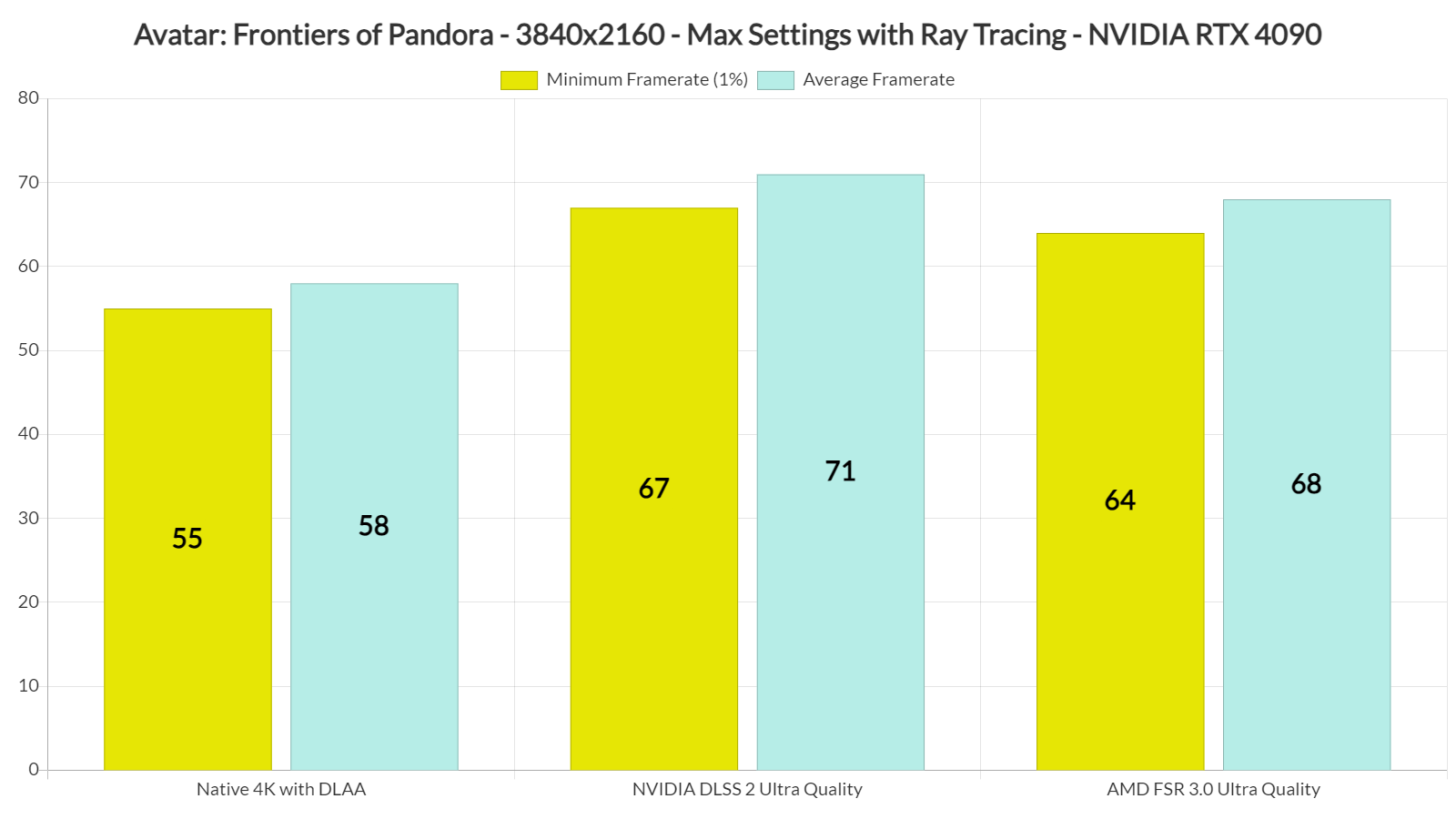
DLSS 2 vs FSR 3.0 at 4K benchmarks

Stay tuned for our PC Performance Analysis, in which we’ll benchmark more AMD and NVIDIA GPUs in various resolutions!


Avatar: Frontiers of Pandora - Open-World Benchmark - 4K/Max Settings/Ray Tracing - NVIDIA RTX 4090

31 thoughts on “Avatar: Frontiers Of Pandora – AMD FSR 3.0 & PC Performance Impressions”

  1. Do you think this’ll run fine on an 8-core CPU?

    The minimum for 1080/60 fps is a 12-core CPU. Rockpapershotgun says the game doesn’t run well on their i7-9700K (8-core) but I’ve seen a video with a 5800x3D (8-core) where it did get above 60fps.

    1. You are confusing cores with threads ….. Minimum is a 6 core 12 thread CPU. In the case of Intel you need a 6 core processor capable of hyperthreading. the i&-9700K is 8 cores 8 threads

      Consoles are all 8 core 16 thread CPUs now but one core is reserved and they have nerfed clock speeds because of package TDP limitations so an equivalent 6 core 12 thread processor (Such as the Ryzen 3600) will work fine. For the record consoles have a 3700X CCD (Core Complex) but it runs at lower voltages and clock speeds because of APU TDP package limitations so it’s not as powerful as a desktop 3700X CPU

      1. Damn, I get it now. The game needs more threads. With a 8 core 8 thread CPU I won’t even be able to get 60fps. FML.

        1. Cyberpunk scales well up to 6c12th on older CPUs (just compare i7 9700 vs i5 9600 results), but modern CPUs like the AMD 5900X can run this game at 60fps even with only 4 cores and 8 threads enabled.

          the difference between CPU cores / threads (on the same CPU architecture / generation), but 8c16th arnt .

          https://uploads.disquscdn.com/images/642eb025c7f40078efff35917f7db213a6b1572767010bd0ab36890a5e2aca40.png

          https://uploads.disquscdn.com/images/074bb2d13d30d7c4b131350b76547784b702b4fb3ba3e1eb156b6f88ea9f1aa2.jpg

          1. (just compare i7 9700 vs i5 9600 results)

            The clock and cache differ. That i7 has 33% more L3 cache than the i5. Cache has a huge influence on gaming performance.

            To do proper comparisons to figure out if more cores actually help performance, you need to shut off cores (bios or affinity) from the same CPU, so cache and clock remain constant.

            When you do that, you won’t notice a difference between 4 or 6 or 8 cores.

            It’s because of 2 reasons. Amdahl’s law, where single core performance always becomes the bottleneck, and because every task that is actually parallel, is better done on the GPU.

    2. Check out PC Games Hardware for their CPU benchmark of the game. Apparently even with a Ryzen 2600 they got over 100FPS, with 1% minimum at over 70 and 0.2% minimum FPS over 60. The Ryzen 2600 is considerably less powerful than the 9700K in gaming, so it should be fine in this game. RPS must be doing something wrong with their setup.

      1. You are exactly right. But it might just be that this game, and this game alone, just straight up needs more than 8 threads.

        I fear that if I launch the game and find out that I can’t get a steady 60fps (or worse get 30~50 fps) that I may not enjoy the game.

        Just wish Ubisoft refunds were fair in that you could get a refund with lackluster performance. Right now as soon as I press play: the refund window is over. Bogus.

        1. But it might just be that this game, and this game alone, just straight up needs more than 8 threads.

          Very unlikely!

          Also, what is your exact CPU model?

          1. I7 9700k is my CPU. It’s the same one as a 9900K only it has 8 threads instead of 16 threads. But back when I bought it barely any – if any- games benefited from hyperthreading.

      2. That 9700K is a CPU with Skylake-era heritage, which saw massive performance degradation over the years because of all its security flaw mitigations.

        Perhaps that could be a reason for the lackluster performance nowadays.

        Just to be clear, I’m not saying that 9700K is a Skylake CPU, just that the core architecture is the same.

        Only with its 11th-gen did Intel manage to ship an upgraded core architecture which had most of the security flaws from the Skylake line of CPUs fixed.

    3. Cores don’t matter for gaming really.

      A 4-core i3 12100 beats a 6-core Ryzen 5 5600, in all the latest games.

      It’s about clockspeed, IPC and cache for gaming.

      MSI afterburner and other programs have no reliable way to measure core use, you can run a perfectly linear bubble sort that can’t possibly use more than 1 core because it’s fully sequential, and you’ll see all cores in use for some reason. The only way to measure core use would be running a profiler with access to the source code.

      1. MSI afterburner and other programs have no reliable way to measure core use, you can run a perfectly linear bubble sort that can’t possibly use more than 1 core because it’s fully sequential, and you’ll see all cores in use for some reason. The only way to measure core use would be running a profiler with access to the source code.

        I can’t speak for Windows, but at least on LInux you can measure the CPU usage accurately.

        Here, take a look:

        https://uploads.disquscdn.com/images/f10201de4aabf9f94b94a92cc9bdf7f67ba642d6d0f83a80c967c5578913fd09.png

        That is on an Ivybridge CPU which I use in my in-home server.

        With only a few lightweight tasks running in the background, I can not only see the individual core usage, but even the so-called “sleep states” are displayed individually with a percentage point for each step.

      2. A 4-core i3 12100 beats a 6-core Ryzen 5 5600, in all the latest games. na this statement is bullshit, how much is intel paying you?

    1. The game displays an error window if you use MSI Afterburner when you try to enable Frame Generation. You have to close MSI Afterburner to enable FG in this game. You can also use another statistic program (like NVIDIA Performance Overlay which is compatible with FSR 3.0) to examine its performance boost.

      1. Do you have the Connect App overlay turned off? It hates Afterburner and is pretty much useless anyway. You may also find that turning off Clouds Saves helps with stability and stuttering problems

        1. This error window occurs only when enabling Frame Generation with MSI Afterburner. The game does not crash, it simply displays a message. For what it’s worth, we didn’t have any crash issues with Avatar. Oh, and there aren’t any stutters at all (at least in the first ten minutes).

      2. Surprised anyone still uses MSI Afterburner, is severely outdated and no longer supported (since MSI stopped paying to maintain the program).

        The developer focus is on RTSS, which does not crash at all when enabling FG, while using latest BETA.

      3. Surprised anyone still uses MSI Afterburner, is severely outdated and no longer supported (since MSI stopped paying to maintain the program).

        The developer focus is on RTSS, which does not crash at all when enabling FG, while using latest BETA.

    1. Nvidia sucks Chinese c*ck. AMD is better and is 99% free and open source drivers 3 years from now 100% open source when they move their firmware to it.

    1. That’s DLSS 2 Super Resolution vs FSR 3.0 Super Resolution. And yes, DLSS is slightly faster than FSR (though the image quality of FSR appears to be sharper and a bit better than DLSS in this particular game).

  2. Is rtgi quality low then and cannot be changed meaning it’s set statically then to the same as the consoles?

  3. “In a future update, Ubisoft will add support for DLSS 3.”

    Never happened. And I believe fsr 3 frame gen remains broken.

Leave a Reply

Your email address will not be published. Required fields are marked *