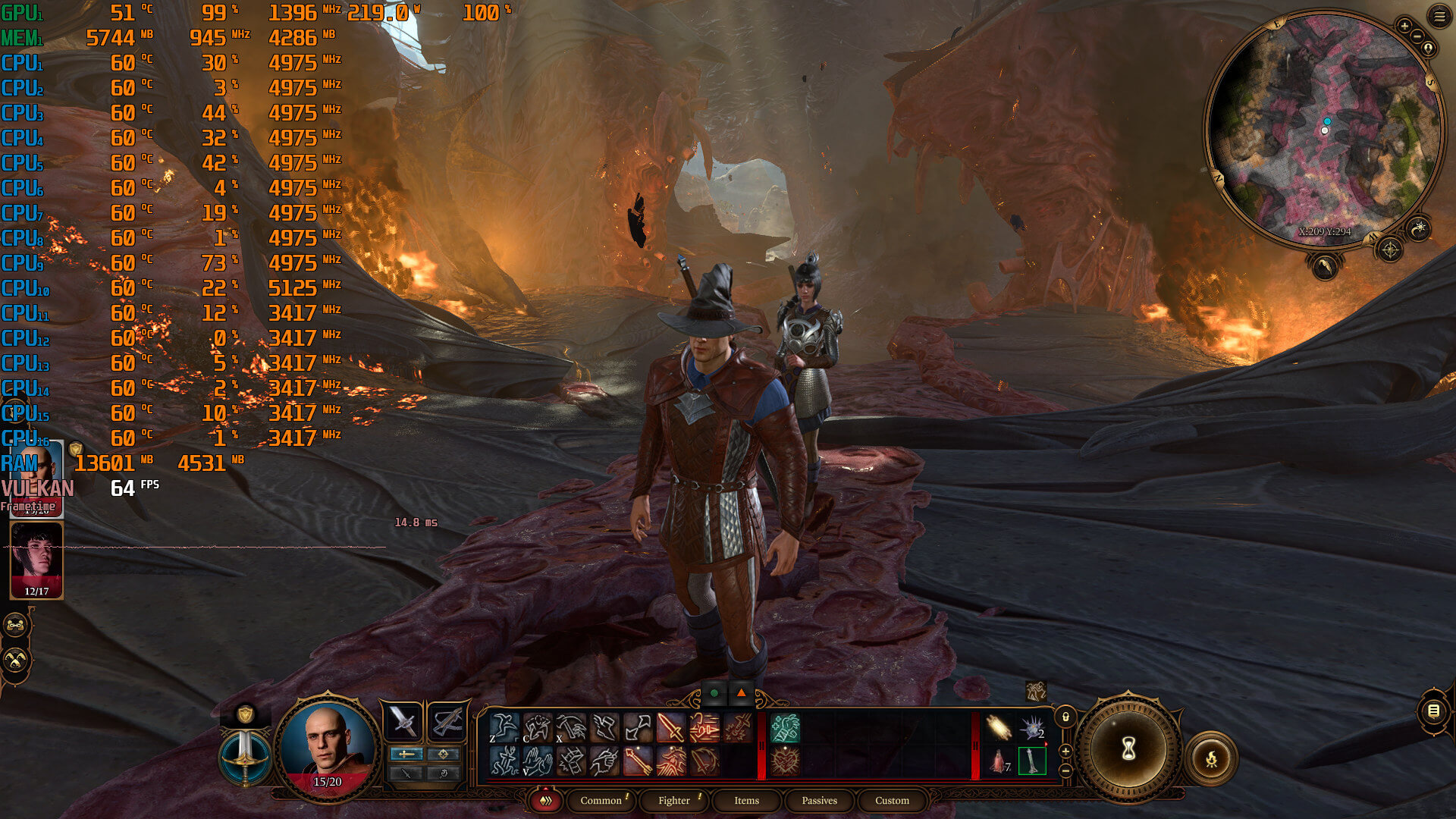
Our PC Performance Analysis for Baldur’s Gate 3 will go live later today. However, we wanted to inform you about a major performance issue that currently plagues the game on both NVIDIA’s and AMD’s hardware. During our Baldur’s Gate 3 benchmarks, we discovered some truly annoying stuttering issues in DX11.
Let’s begin with some old AMD GPUs. In the following comparison, you can see Baldur’s Gate 3 running on an AMD Radeon RX Vega 64. And, as you can see, the DX11 performance is all over the place. The game has constant stutters from the get-go. By switching to the Vulkan API, we were able to completely eliminate all of them. These stutters also appeared on our AMD Radeon RX 580, meaning that numerous older AMD GPUs suffer from this issue.
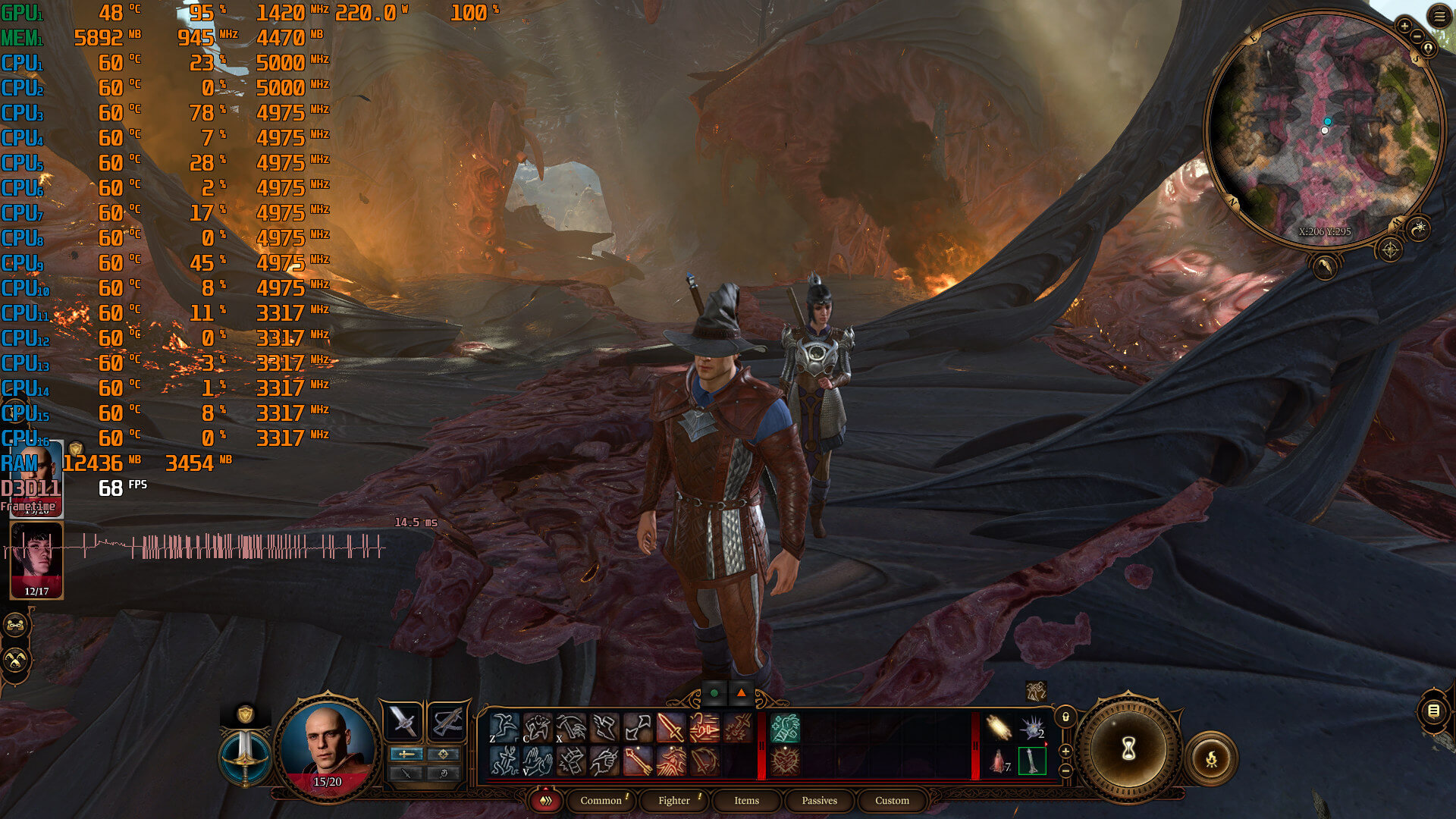
Things are a bit more complicated on both AMD’s and NVIDIA’s GPUs. At first, the game appears to be running smoothly in both DX11 and Vulkan. However, after an hour or so, Baldur’s Gate 3 gets stuttery in DX11.
We were able to replicate this numerous times on both AMD’s and NVIDIA’s hardware (as I’ve played so far around 30 hours). These Baldur’s Gate 3 stuttering issues can be easily noticed when panning the camera in towns. And believe me, it can easily become a game-breaking issue.
One way to, temporarily, address these stutters is to exit/close and re-launch the game. However, after a few minutes of playing, the game will once again start stuttering. In other words, this is a band-aid and not a permanent fix.
Now the good news here is that the Vulkan API does not suffer from these stuttering issues. By switching to Vulkan, we were able to play Baldur’s Gate 3 for over 3 hours, without any stuttering issues on the NVIDIA GeForce RTX 4090. And, since Vulkan can provide a smooth and stutter-free experience, we highly recommend using it over DX11.
Stay tuned for our PC Performance Analysis!

John is the founder and Editor in Chief at DSOGaming. He is a PC gaming fan and highly supports the modding and indie communities. Before creating DSOGaming, John worked on numerous gaming websites. While he is a die-hard PC gamer, his gaming roots can be found on consoles. John loved – and still does – the 16-bit consoles, and considers SNES to be one of the best consoles. Still, the PC platform won him over consoles. That was mainly due to 3DFX and its iconic dedicated 3D accelerator graphics card, Voodoo 2. John has also written a higher degree thesis on the “The Evolution of PC graphics cards.”
Contact: Email


For me dx11 is better. Vulkan has stuttering when changing scenes in cut scenes. I can play for hours in dx11 with no issues. I have 7900xtx with latest drivers.
Could you retest Vulkan after changing the power-plan of Windows to performance?
The thing to keep in mind with Vulkan is that it generally uses less CPU resources than DX11, therefore Windows tends to not clock the CPU high enough with the default “balanced” power-profile to provide a smooth experience all the time, depending on the CPU model.
Remember that John uses a Ryzen 7950X3D, so his CPU can easily power through most game code, even when not fully clocked.
My power plan is on performance. I have ryzen 5800x.
when johni boi watching youtube videos and after that writes without testing
If you rated this game purely on its story and gameplay without the fetish romance options, would it receive such high scores from gaymes journalists?
Yes of course. It puts Zelda ToTK to shame in terms of player agency.
This game did not get high scores because of the romance options, it’s just an amazing game. The romance options are just icing on the cake for people who enjoy that, it’s completely optional and a very small part of the game.
Game is amazing. You can ignore all the romance options.
That’s not the point …. The point they are trying to make is if they don’t like something then no one else should be allowed to like it
It’s the Right Wing version of Cancel Culture and since they’ve had a 40 year head start with Cancel Culture they are pretty good at hiding their true intentions but make no mistake their intentions are to Cancel anything and everything they don’t like or agree with
It’s been that way since Reagan and the Religious Right/Moral Majority era ……
Who cares about journos? They’re literally paid advertisers with big companies behind them.
The game is good and it’s filled with choices and little details.
You see someone/something you don’t like? You can f*king kill it.
Maybe they should make a game with more relatable setting and npc’s so as to not want to murder anyone on sight.
When a game is praised by gaming “journalists” anyway, you know it’s a woke piece of trash. I wouldn’t touch BG3 with a 10-foot-pole.
I knew something was up since years anyway. Even in early access, it was already considered the best thing in the universe. (major red flag) Game is out, and you see that literally 100% of the characters are bisexual. OK. What a surprise.
It should be rated lower based on that fetish bs. Current year thinking totally ruins the setting, and it is the hypocrite idea of “anything goes because fantasy” (as if they would allow you to roleplay the equivalent of Hitler).
/doubt
Digital Foundry (Eurogamer) did a whole technical review of the game. They did not have stutters on any hardware under DirectX, and they recommend DirectX over Vulkan. In fact I have seen every outlet recommend DirectX. Tripple buffering also works in Dx, and not in Vulkan which causes tearing. Vulkan is also linked to crashes.
I find it mind-boggling you would have stuttering with a 4090, I run this game stutter free on a 3050.
https://uploads.disquscdn.com/images/c87ff8950d231146304d0cc8cc26d6aecf50db6be169329c359cc50f484e7535.png
DF does a great job, but they’ve also made numerous mistakes in the past. As an example, the Dead Space Remake blurry issues. While the game was making the PS5 version look awful with its VRS, the PC version mainly had issues with the initial DLSS LOD bias. DF assumed that the blurry issues on PC were due to VRS and when the developers offered an option to disable it… the game had the exact same issues as before (because the main issue which was the DLSS LOD bias wasn’t addressed). You had to manually adjust the LOD bias for when using DLSS. Another example is FF XVI for which they assumed it had Ray Tracing shadows (it didn’t have). In one of the latest videos, Alex also showed how his background programs could have a negative effect on his performance (we’ve been saying this for years. So I wouldn’t be surprised if some of those programs were also causing him major stutters in games that didn’t have that many traversal stutters).
So yeah, /doubt x2 about their reporting in this particular case when we’ve thoroughly tested the game for over 30 hours with these two APIs. The DX11 stutters occur after playing the game for more than an hour, and they are re-producable. Vulkan on the other hand is stutter-free for over two-three hours of gameplay.
the list of errors is much longer, and often they are not such, given that on PS5 they must weigh a quintal to be nominable.
compilation stuttering on Stray is historic.
Only they saw it, and it’s not because of the background programs (but even in that case it would be ridiculous to test the PC with 10 programs that also interact externally active), but because in the half-exclusive PS5 it had to prevail.
They even advised against the game which was deemed destroyed by compilation ostuttering, which is unlikely in a DX-11 game like Stray.
But as I repeat, the list would be very long, and I repeat that often they are not random errors, but pre-established events…
On the other tests, the oversights are not infrequently things not seen, because, as you mention, they only go around in the initial areas.
The only problem with main stream media sites is that they are main stream media. They sometimes do reviews a bit poorly and sometimes spread misinformation whether intentional or not. There are other things to watch out for with main stream media but that isn’t the topic here.
There are gamers reporting stutters. I don’t believe that all of them just made that up for no reason. It needs to be addressed and fixed and not excused away as insignificant.
Digital Foundry runs a benchmark, closes the game, changes API, runs the same benchmark, it’s not the same as someone experiencing stutters after a few hours of gameplay, they never play for even a single hour. And their benchmark was in Act 1 which has the least populated areas of the game.
I like that they exist, but sometimes they’re full of sh*t and people take their word as gospel because they’re “reputable”.
I have the exact same issue as described in the post, crazy stutters on DX11 after some time (usually hours, not minutes), none on Vulkan (but other issues in Vulkan, such as a black square artifacts issue during cutscenes).
“How to fix stuttering in DX11, do not use DX11” Profit.
Use Vulkan, problem solved, this is 2023 get with times.
I been streaming the game the past week with maximum settings and has no stuttering whasoever, I playing with Vulkan however.
These exact stutters also happen in Vulkan, just tested it.
no way to fix them, at least for now. I don’t know if the devs are aware of these stutters, but I’ve already informed them. So hopefully a future patch will address them.
Then you have a problem on your system, most people are not suffering stuttering, including myself.
And I have the streams on Twitch to prove it, including from the people I collab with, no one is and was facing stuttering.
The stutters occur when you quickly move your mouse cursor to the items. Enable MSI Afterburner and pay attention to the frametime graph. Two completely different PC systems with completely different CPUs and GPUs (ours and PhazDelta’s) show the exact same behavior.
I’m running it on a 2070 super, have been struggling a lot with stuttering in city areas, which bugged me as digital foundry said it ran smooth on the same settings as me on a 2060 super. I switched to Vulkan after reading this article and all the stutters are completely gone. Clearly seems to vary based on set ups looking at the comments, but for me the switch to Vulkan was the way forward.
Must be. For me DX11 is running better. And for long 5h sessions.
It’s weird to use DX11 instead of DX12 along side of Vulkan
DX11 is a high level API while DX12 and Vulkan are both low level APIs and program in a similar manner
Most likely Vulkan was added to an engine that initially was coded around DX11.
Similar thing happened with Valve’s Source 2 engine, which also only supports DX11 & Vulkan.
Also note that Vulkan contains specific extensions tailor-made to translate DX9-DX11 code efficiently over to the Vulkan API, thanks to Valve’s backing of DXVK (all the lead developers are Valve employees).
Therefore, translating high-level DX code over to Vulkan is more efficient than translating that same code to DX12, as can be seen with Intel’s Windows driver, which previously carried Microsoft’s official DX9-to-DX12 translator, but saw massive gains once they switched over to using DXVK within their official Windows driver, which is entirely seperate from Intel’s Linux driver.
https://media1.giphy.com/media/me0mqrZiCbxwQ/giphy-downsized-small.mp4
The customization in this game doesn’t have a boob or butt slider. Lol
I have the same issues with an RX5600xt. Dx11 is a stuttering mess no matter the settings. Used Vulcan and although i get occasional crashes is mostly stable. Just disable in game vsync ( doesnt seem to be working for me and it indroduces stuttering even in vulcan ) and enable enhanced sync from AMD drivers
Wait till you get to Act 3 there’s horrible stuttering after playing for a few minutes and switching to Vulkan or D3D11 makes not difference.
DX11 offers a lot more frames for me, sometimes even 20 and it uses 1gb less vram