

IO Interactive has just released the latest part in its Hitman video-game series, Hitman 3. Powered by the Glacier Engine, it’s time now to benchmark it and see how it performs on the PC platform.
For this PC Performance Analysis, we used an Intel i9 9900K with 16GB of DDR4 at 3600Mhz, AMD’s Radeon RX580 and RX Vega 64, NVIDIA’s GTX 690, GTX980Ti, RTX 2080Ti and RTX 3080. We also used Windows 10 64-bit, the GeForce driver 461.09 and the Radeon Software Adrenalin 2020 Edition 21.1.1 drivers.
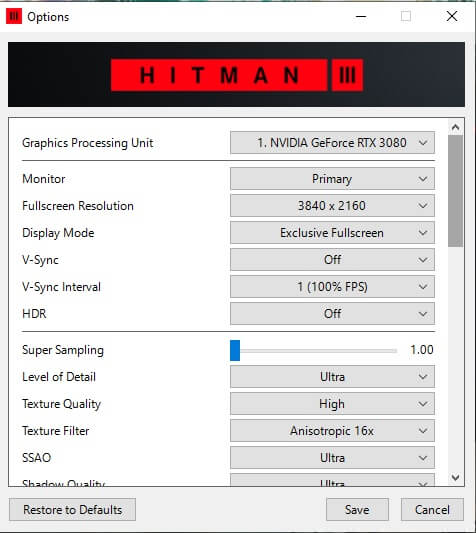
IO Interactive has added a few graphics settings to tweak. PC gamers can adjust the quality of Textures, Level of Detail, Texture Filtering, SSAO, Shadows, Mirrors Reflections and SSR. There are also options for Variable Rate Shading, Motion Blur and Simulation Quality.
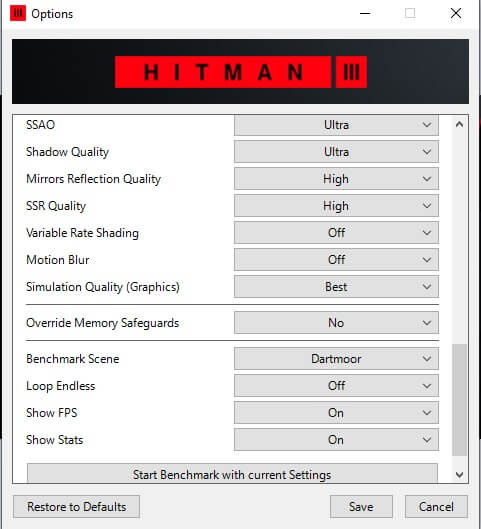
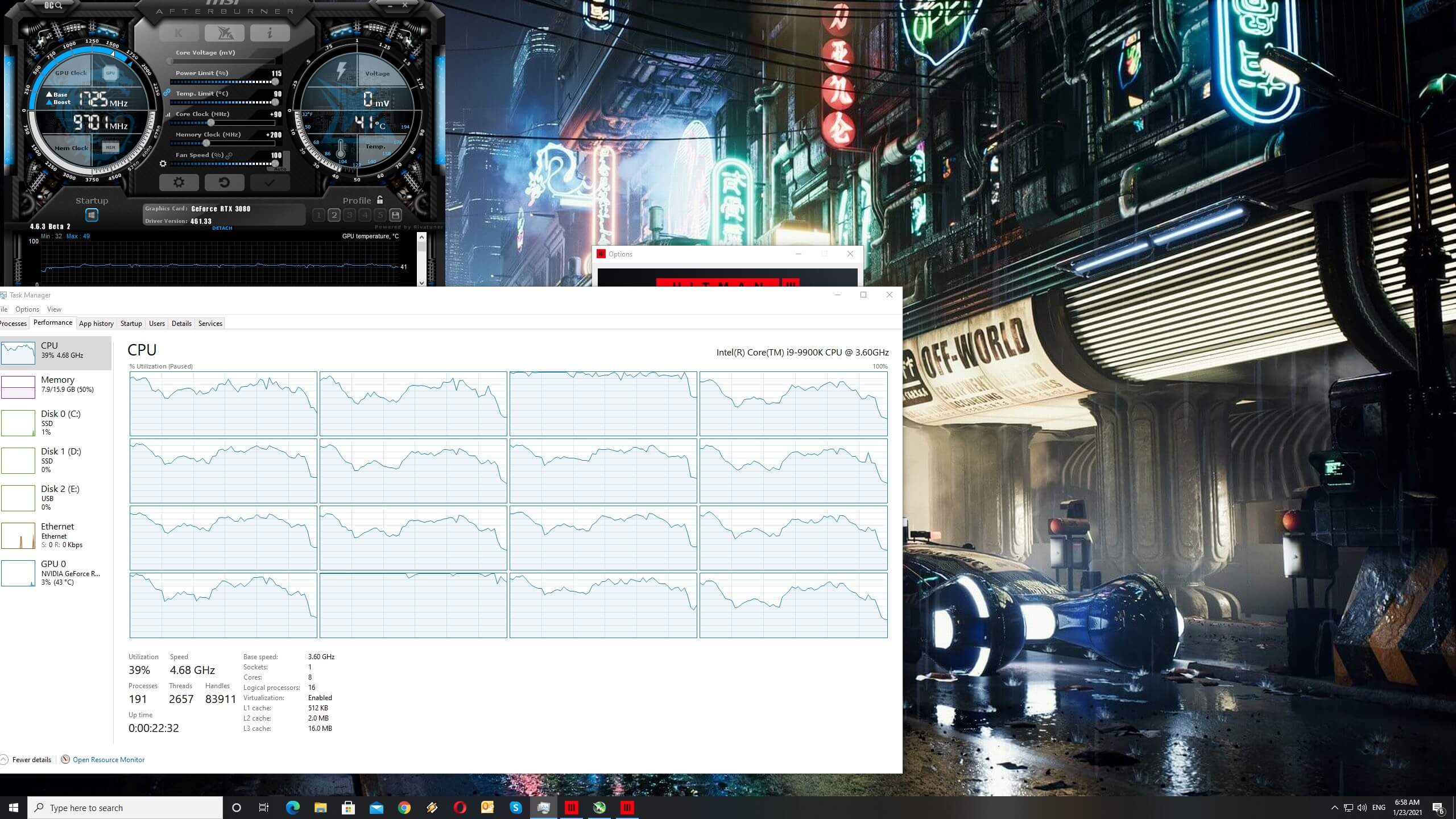
Hitman 3 comes with a built-in benchmark tool. For our GPU benchmarks, we used the Dubai scene (which is representative of the in-game performance). For our CPU benchmarks, we used the Dartmoor scene. That scene has a lot of destructible objects, and feels more like a CPU stress test.
In order to find out how the game scales on multiple CPU threads, we simulated a dual-core, a quad-core and a hexa-core CPU. Cyberpunk 2077 requires at least a quad-core CPU. Our simulated dual-core system could not run the stress test smoothly. While the average framerate is a respectable 42fps, we were getting single-digit numbers during heavy-physics scenes.
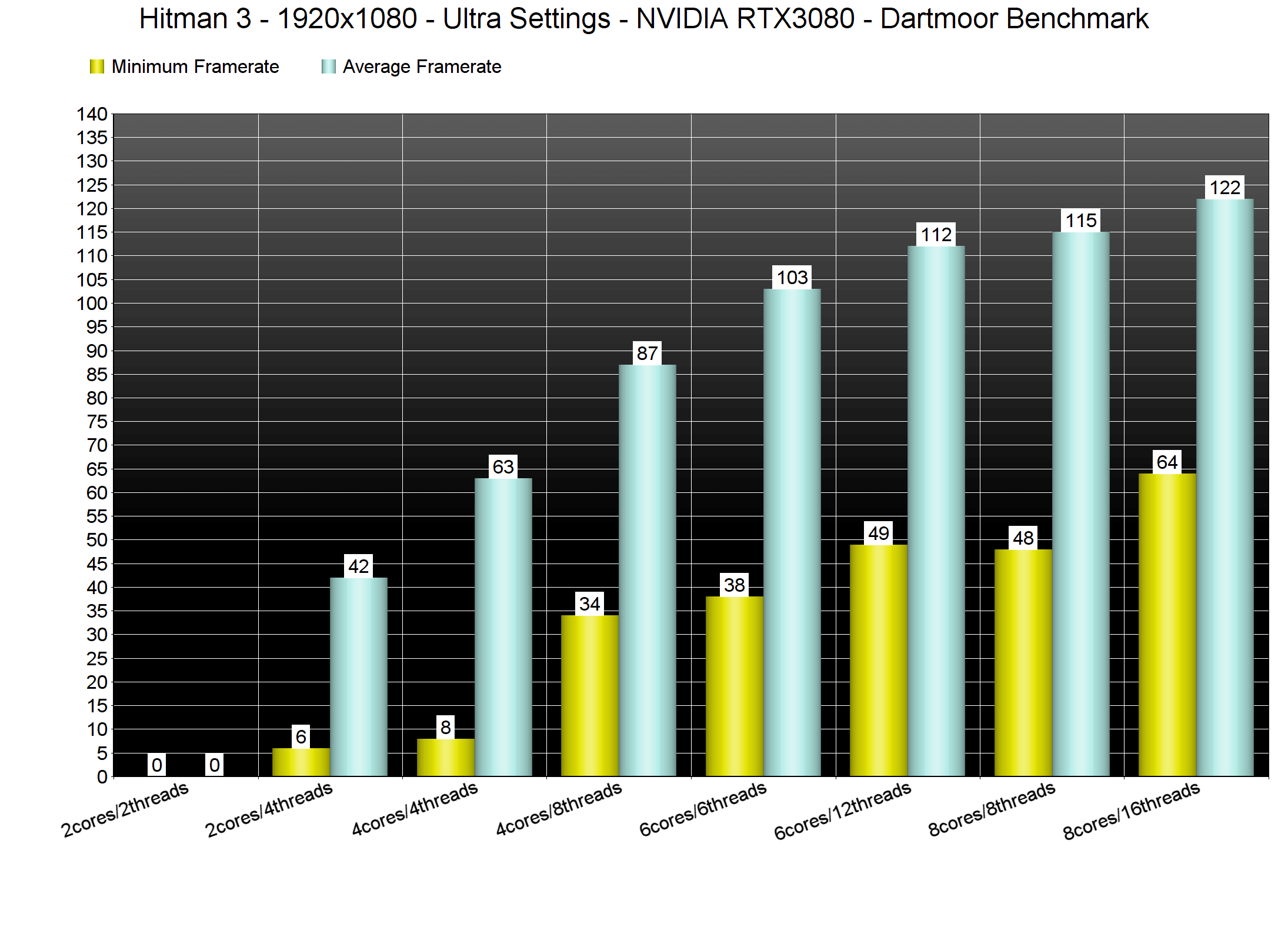
Without Hyper-Threading, our simulated quad-core system also experienced awful minimum framerates. With Hyper-Threading enabled, our simulated quad-core was able to push a minimum of 34fps and an average of 87fps.
Our Intel i7 4930K was also able to provide a smooth gaming experience. Although this particular CPU was bottlenecking our RTX3080, it pushed a minimum of 95fps and an average of 122fps at both 1080p/Ultra and 1440p/Ultra. At 4K/Ultra, the Intel i7 4930K performed similarly to the Intel i9 9900K.
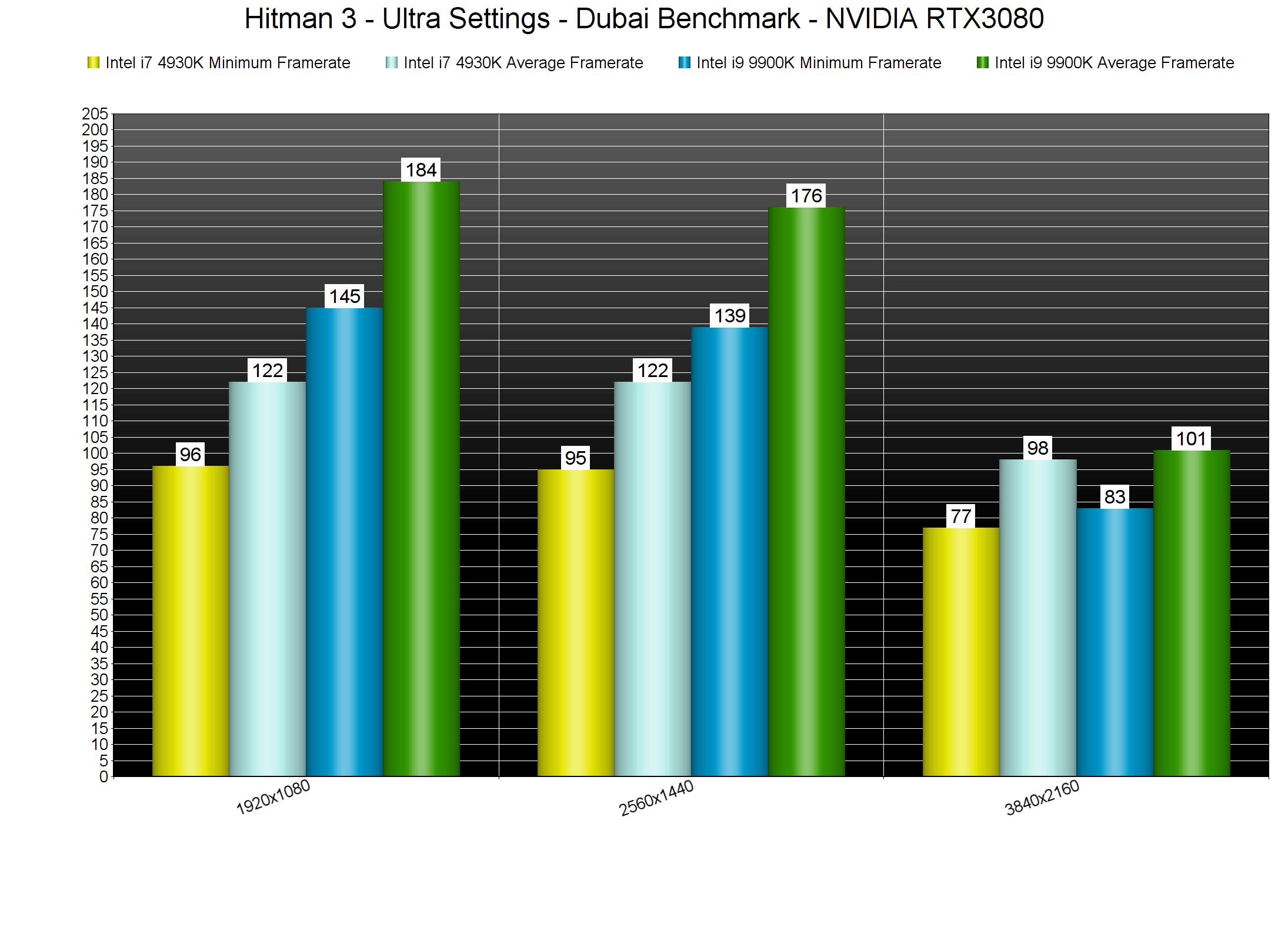
Hitman 3’s Glacier Engine appears to be scaling on more than 8 CPU cores/threads. In order to get a constant 60fps experience at 1080p/Ultra, we had to enable Hyper-Threading on our i9 9900K. Without it, we were dropping at mid 50fps at heavy-physics scenes with all of our eight CPU cores being used to their fullest.
Hitman 3 does not require a high-end GPU as most of our GPUs were able to offer a constant 60fps experience at 1080p/Ultra. It’s also worth noting that AMD’s GPUs perform exceptionally well in this particular game.
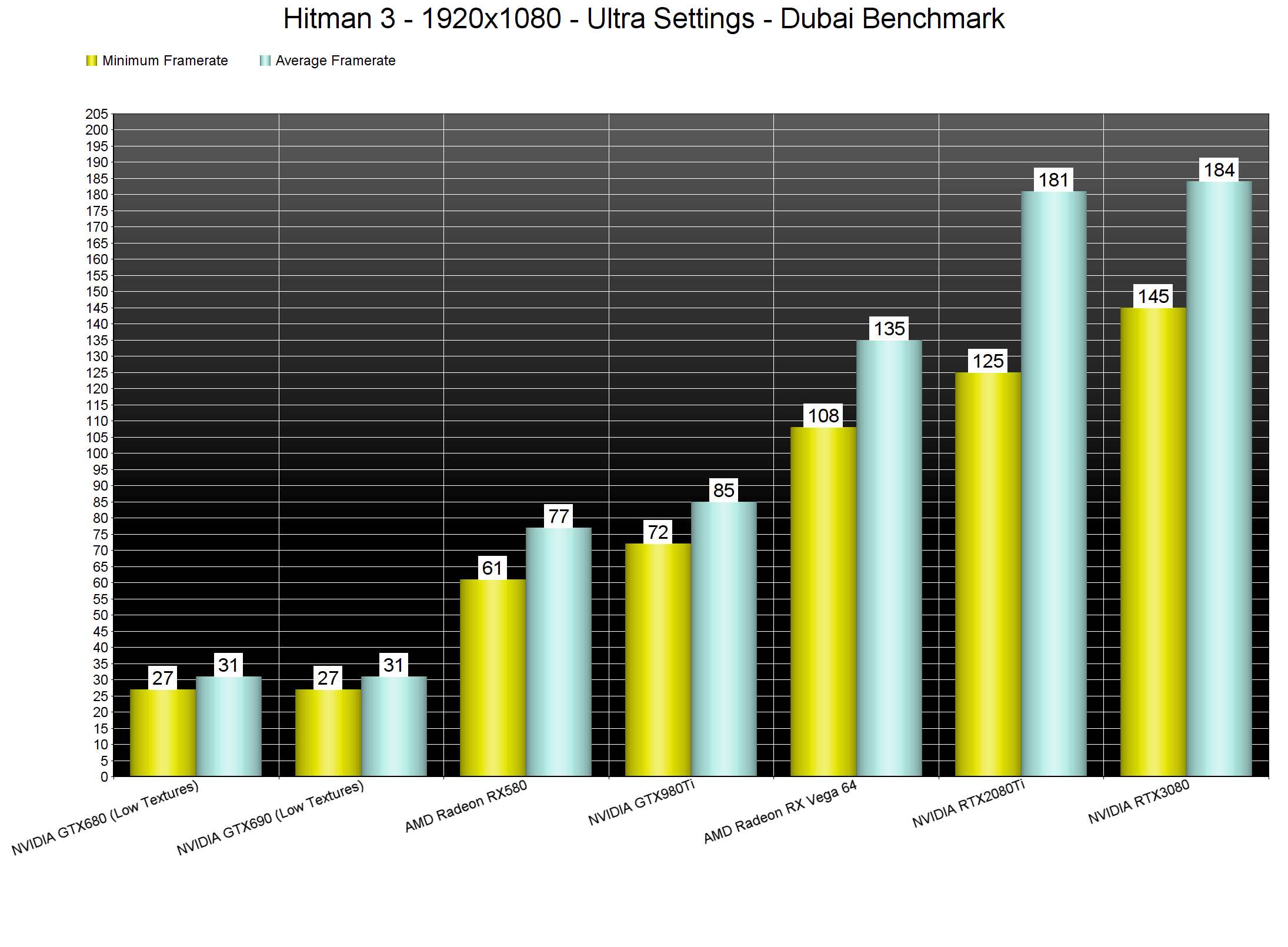
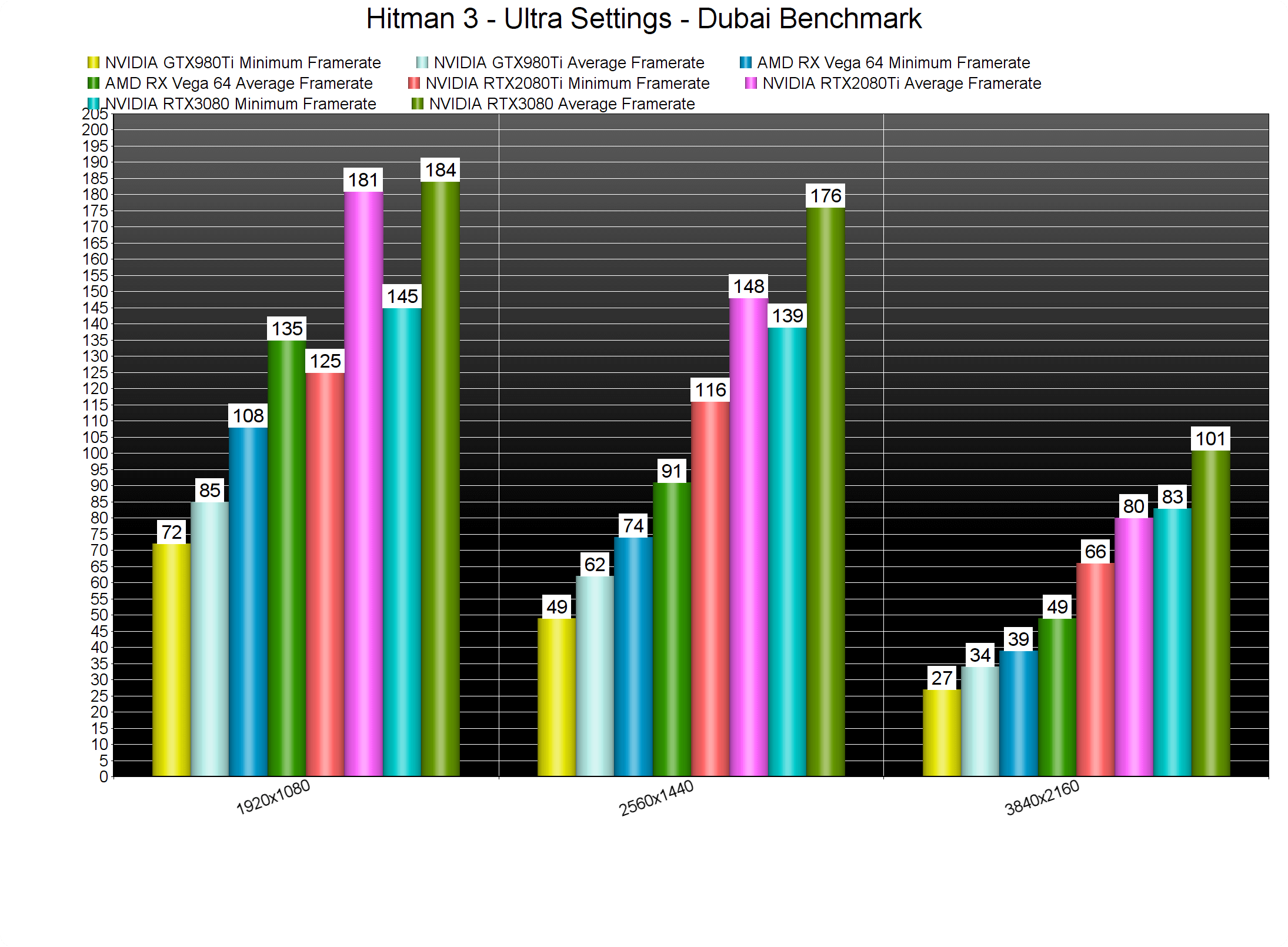
At 1440p/Ultra, our GTX980Ti was unable to offer a constant 60fps experience. On the other hand, our AMD Radeon RX Vega 64 had no trouble at all hitting 60fps. As for 4K/Ultra, both our RTX2080Ti and RTX3080 were able to offer a constant 60fps experience. For those wondering, the performance difference between our 2080Ti and 3080 appears to be around 25% in this game.
Graphics-wise, Hitman 3 looks great, and it pushes better visuals than Hitman 2. IO Interactive has implemented screen-space reflections, though I’m pretty sure that the team will replace them with ray-traced reflections in the future. In addition, the quality of most materials is exceptional. Players can interact with bushes and grass, and there are some lovely cloth physics effects. Our only gripes are with the animations (they could be smoother) and with some NPCs that could benefit from a higher polygon count. We also noticed some pop-in issues, even on Ultra settings. Other than that, though, Hitman 3 looks amazing.
In conclusion, Hitman 3 looks and runs better than Hitman 2. The game finally scales well on a lot of CPU cores/threads, and it runs smoothly on a wide range of GPUs. We also did experience any crashes or mouse smoothing issues. Hitman 3 runs incredibly well on the PC, so kudos to IO Interactive for offering such a polished product.
Hitman 3 is available on Epic Games Store and you can purchase it via our affiliate link. DSOGaming gets a small commission when you purchase the game via this affiliate link.
Enjoy!

John is the founder and Editor in Chief at DSOGaming. He is a PC gaming fan and highly supports the modding and indie communities. Before creating DSOGaming, John worked on numerous gaming websites. While he is a die-hard PC gamer, his gaming roots can be found on consoles. John loved – and still does – the 16-bit consoles, and considers SNES to be one of the best consoles. Still, the PC platform won him over consoles. That was mainly due to 3DFX and its iconic dedicated 3D accelerator graphics card, Voodoo 2. John has also written a higher degree thesis on the “The Evolution of PC graphics cards.”
Contact: Email