
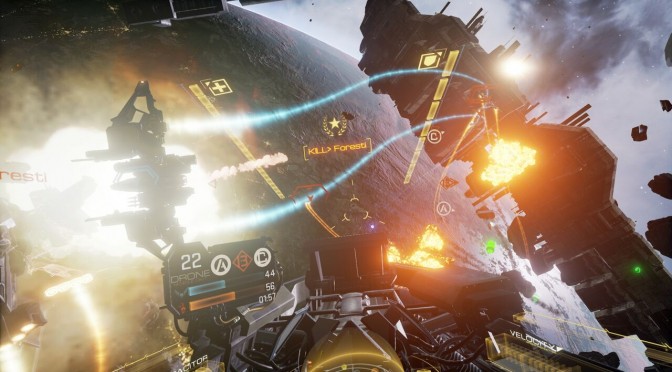
EVE: Valkyrie now features a “Ultra Graphics” mode powered by NVIDIA’s VRWorks & GameWorks techs

CCP Games has released a new update for EVE: Valkyrie that introduces a new Ultra graphics mode. CCP Games has been working with NVIDIA in order to improve the game’s visuals and this new Ultra setting is powered by NVIDIA’s VRWorks and GameWorks techniques.

This new Ultra mode adds God rays to the maps, improves cockpit lighting, increases the quality of lighting and shadowing in every area and level, improves the fidelity of reflections and shaders, and adds dynamic lights – as well as more visual effects – to projectiles.

As NVIDIA’s press release reads:

“A lighting model developed by NVIDIA and incorporated by CCP for EVE: Valkyrie uses high-quality, physically-based lighting effects from NVIDIA Volumetric Lighting to add immersive, awe-inspiring shafts of bright light (God rays) to many scenes and levels, transforming their appearance. EVE: Valkyrie also includes a new anti-aliasing technique developed by NVIDIA called Multi-Sample G-Buffer Anti-Aliasing which improves anti-aliasing by further reducing visible aliasing of geometry edges and specular highlights, giving players a superior visual experience.”

CCP Games suggested that this Ultra mode is for PC players with higher spec Nvidia cards, such as the GTX1070, GTX1080 and the GTX1080Ti. However, the team did not clarify whether this new graphics mode is available exclusively to NVIDIA’s GPUs or not.

It’s also worth noting that EVE: Valkyrie is also using NVIDIA’s Lens Matched Shading rendering technique to improve performance and quality.

This update is already available and will be auto-downloaded from Steam.

19 thoughts on “EVE: Valkyrie now features a “Ultra Graphics” mode powered by NVIDIA’s VRWorks & GameWorks techs”

  1. Ugh, hopefully Gameworks isn’t as closed as it was a couple years ago. Proprietary graphics options in games always sucks to see.

      1. And any proper developer already explained the software is still proprietary and the code that matters is still closed source.

        1. the most important thing is it is open to the public. that is what AMD been complaining with GameWorks. because in the past you need to pay licensing fee to access the source code (standard practice for middleware).

    1. Is still proprietary not exactly open source, and it still runs like crap on AMD.

      That is not the main issue though, NVidia Tech is beyond unoptimized compared to AMD alternatives.

      1. “NVidia Tech is beyond unoptimized compared to AMD alternatives”

        How you know how optimized are these AMD alternatives? 🙂

        1. Cause I don’t live under a rock and know what games use alternatives, which tend to be best ports in PC (while titles under the NVidia brand tend to have the opposite effect).

          1. Nobody from us know how and in which quality are these effects implemented. In the most of the cases, the better quality is equal to more performance hungry. Guys like you only see the level where game use AMD technologies and NV technologies. But not what they offer or if they are even comparable. And in the most cases people even don’t know what optimization means. If the game does not run to satisfied their imaginary performance, it does not mean that it’s unoptimized. If they offer better quality in graphics, it is understandable that they are more performance hungry. As I see it, AMD technologies offer standard solutions. But NVIDIA offer something more and advanced – there are no comparable alternatives to their lighting or shadow effects from AMD, which offer the same or better quality. There is only TressFX which is comparable to Hairwork, but that is all.

      2. because it is develop on nvidia hardware in mind. the same with some of tech that coming from AMD like Forward+ engine.

    1. Of course you can… Why would you think you couldn’t? Gameworks is for everything (VR and Monitors) and VRWorks is for VR… The “Lens Matched Shading” is a VR technique. All of the other things mentioned will work in VR AND on a monitor. Educate yourself my man…

  2. “This new Ultra mode adds God rays”

    LMAO. WOW look everyone, its soooo advanced. They have god rays! Welcome to 2009!

    1. The reason why these god Ray’s are more advanced is because the god Ray’s we’ve had so far are Screen Space ONLY. This means that if the player cannot see the source of the light, the God Ray’s disappear.

      Nvidia’s solution instead creates actual physical volumetric geometry that exists in the scene. meaning you can walk through them look, look away from the source that is casting them, etc.

      1. The problem of many people today is that they do not understand how graphics features work. They only see their names and think they know how they are implemented. Then they compare some name from 2009 with another name from 2017 which belong to some technology and they think, they are the same. How simple. 🙂

  3. As I know, there is no source code in the github for these Gameworks effects. There are only libraries. So it is not open sourced. Its just available in the form of compiled binaries.

  4. Officially they call it volumetric lighting. In games it is just God Rays. You can see the same “problem” with antialiasing too. In many games you have just Antialiasing switch from off to on, without explanation which AA method is used. Detto with Ambient Occlusion. I don’t see a problem with this. Visual difference is the most important. You really can’t compare NV solution for god rays with god rays from 2009 like you did in the first comment.

Leave a Reply

Your email address will not be published. Required fields are marked *