
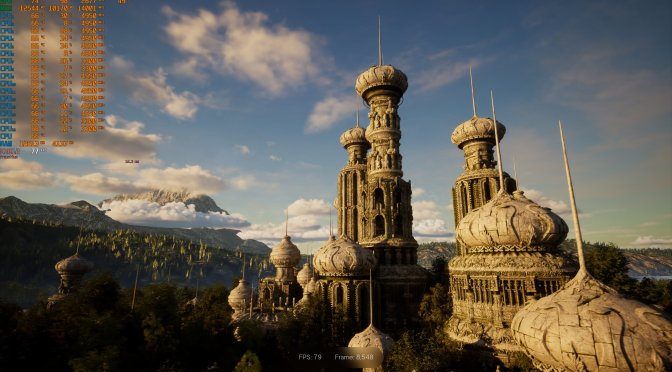
A new Unreal Engine 5.6 fan benchmark tool is coming soon to Steam. Titled NextVisuals Benchmark Forest, this benchmark tool is described as a next-gen GPU benchmark built for extreme fidelity. And, since its creator has given us access to it, it’s time to take a closer look at it.
NextVisuals Benchmark Forest features real-time lighting, ray tracing, and ultra-dense geometry. The tool aims to push modern GPUs to their limits. It comes with two modes. These are the Benchmark and Exploration Modes. The benchmark mode is the one you can use to test your GPU and get a score. The exploration mode lets you freely explore its world.
Due to its extreme settings, the frame rates achieved are not indicative of performance in typical game scenarios. Reaching 60 FPS at 1080p in this benchmark can often translate to 60 FPS at 4K in actual games using upscaling and tuned settings. A score of 10,000 is translated to 60 FPS.
Right now, the benchmark is locked at Native 1080p. It does not let you select any other resolutions. That’s a bummer, but its creator is considering adding a setting to let you change the resolution. Also, since it uses Unreal Engine 5.6, it should be relatively easy to add support for DLSS 4. So, let’s hope its final version will support them.
To test the benchmark, I used an AMD Ryzen 9 7950X3D with 32GB of DDR5 at 6000Mhz, an NVIDIA GeForce RTX 5090 Founder’s Edition, Windows 10 64-bit, and the NVIDIA GeForce 576.88 WHQL driver.
The benchmark ran with an average of 68FPS on the above system with a score of 11,376.
Below you can find a video from it. Now my biggest gripe with this benchmark is the shadow issues from which it currently suffers. You can see these shadow issues in the entirety of the benchmark run. I’ve also highlighted them in the Exploration Mode. Take a look at 2:56, for instance. This is something that the creator will need to address, as a benchmark tool should not suffer from such visual bugs/issues. I’ve also noticed a lot of pop-up issues with vegetation.
One of the biggest features of UE5.6 is Nanite support for vegetation. And although this benchmark tool uses Nanite, I don’t see this feature being used. So, that’s another thing that needs to be fixed before the benchmark tool goes live.
Overall, it’s a cool benchmark tool, but there is a catch. This will be a paid benchmark tool. And that’s another reason why it should not be plagued by any visual issues, or why it should offer more graphics settings to the user.
Enjoy and stay tuned for more!


John is the founder and Editor in Chief at DSOGaming. He is a PC gaming fan and highly supports the modding and indie communities. Before creating DSOGaming, John worked on numerous gaming websites. While he is a die-hard PC gamer, his gaming roots can be found on consoles. John loved – and still does – the 16-bit consoles, and considers SNES to be one of the best consoles. Still, the PC platform won him over consoles. That was mainly due to 3DFX and its iconic dedicated 3D accelerator graphics card, Voodoo 2. John has also written a higher degree thesis on the “The Evolution of PC graphics cards.”
Contact: Email