
Still Wakes the Deep feature

Still Wakes the Deep Benchmarks & PC Performance Analysis

Secret Mode has lifted the review embargo for The Chinese Room’s first-person narrative horror game, Still Wakes the Deep. Powered by Unreal Engine 5, it’s time to benchmark it and examine its performance on the PC.

For our benchmarks, we used an AMD Ryzen 9 7950X3D, 32GB of DDR5 at 6000Mhz, AMD’s Radeon RX580, RX Vega 64, RX 6900XT, RX 7900XTX, NVIDIA’s GTX980Ti, RTX 2080Ti, RTX 3080 and RTX 4090. We also used Windows 10 64-bit, the GeForce 555.99, and the Radeon Adrenalin Edition 24.5.1 drivers. Moreover, we’ve disabled the second CCD on our 7950X3D.

The Chinese Room has included a respectable number of graphics settings. PC gamers can adjust the quality of Lighting, Shadows, Textures, Geometry Detail, Visual Effects and Post-Processing. The game also supports NVIDIA DLSS 3, AMD FSR 3.0 and Intel XeSS. Moreover, The Chinese Room has added an FOV slider in the Accessibility options. I’m mentioning this because a) a lot of you will miss it and b) the default FOV is really low for when playing on a PC monitor.

Still Wakes the Deep PC graphics settings-1Still Wakes the Deep PC graphics settings-2 Still Wakes the Deep PC graphics settings-3Still Wakes the Deep PC graphics settings-4

Still Wakes the Deep does not feature any built-in benchmark tool. So, for our benchmarks, we used this custom scene. This should give us a pretty good idea of how the rest of the game runs.

Still Wakes the Deep - Native 4K vs DLSS 3 - NVIDIA RTX 4090 - Epic Settings - Unreal Engine 5

Before continuing, I should note some issues with AMD FSR 3.0 and NVIDIA DLSS 3. Right now, AMD FSR 3.0 Frame Generation is not working at all. On the other hand, NVIDIA DLSS 3 Super Resolution defaults to Balanced Mode. No matter what you select, DLSS 3 SR will be locked in Balanced Mode. We’ve already informed the devs about these issues, so hopefully they’ll be able to address them via a post-launch update.

Still Wakes the Deep is a GPU-bound title. Our NVIDIA RTX4090 was maxed out even at 1080p/Epic Settings. So, there was no point at all testing different CPU configurations. Most of you will be GPU-limited in this title. Despite that, we simulated a dual-core CPU (without SMT/Hyper-Threading) to see how it runs this latest UE5 game. I also lowered the resolution to 720p/Epic Settings. And, as I suspected, our simulated dual-core system had no trouble at all running the game. While it had some noticeable traversal stutters, it was able to push above 70fps at all times.

At 1080p/Epic Settings, you’ll need an NVIDIA GeForce RTX 3080 or an AMD Radeon RX6900 XT to get a constant 70fps experience. Keep in mind that Still Wakes the Deep uses Software Lumen and Nanite on Epic Settings.

Still Wakes the Deep benchmarks-1

At 1440p/Epic Settings, the only GPUs that could push framerates higher than 60fps at all times were the AMD Radeon RX 7900XTX and the NVIDIA GeForce RTX 4090. As for Native 4K/Epic Settings, there is no GPU that can offer 60fps.

Still Wakes the Deep benchmarks-2Still Wakes the Deep benchmarks-3

As I’ve said numerous times, Lumen is a form of Ray Tracing, so this shouldn’t come as a surprise. By enabling DLSS 3 Frame Generation, owners of the RTX4090 can get over 80fps at all times at 4K/Epic Settings.

It’s also worth noting that Still Wakes the Deep offers settings that can noticeably improve performance. By lowering the settings to High, we were able to get a constant 60fps at Native 4K on the NVIDIA RTX 4090. By lowering our settings to Medium and Low, we got an additional 13% and 27% performance boost, respectively.

Still Wakes the Deep benchmarks-4

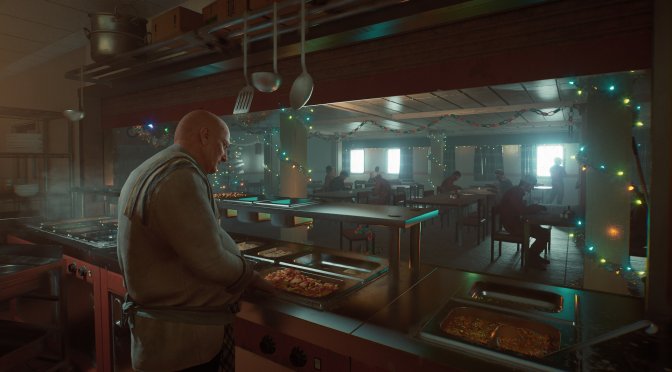
Graphics-wise, Still Wakes the Deep looks overall amazing. The game’s lighting takes full advantage of Software Lumen and it looks great. It’s pretty incredible what small studios can achieve with UE5. Just look at the screenshots and the video. The lighting and the materials look incredible.

However, there are some graphical issues. For instance, I noticed some annoying noise artifacts and occlusion issues. These issues are mostly due to Software Lumen. It would have been great if the devs allowed PC gamers to enable Hardware Lumen. Hardware as that would fix them. Alas, there is no such setting in the game. I also spotted some pop-in issues on characters. So, my guess is that the devs used Nanite for the game’s environments and objects (as those don’t suffer from any pop-ins), and not for the characters.

All in all, Still Wakes the Deep performs like most UE5 games. The game uses Software Lumen and Nanite, and it looks amazing. Not only that but the game will pre-compile its shaders the first time you launch it, meaning that you won’t be experiencing any shader compilation stutters. As I said, the game also suffers from some visual artifacts. Still, it pushes visuals that can compete with the games of other triple-A studios. And yes, Lumen is demanding and you’ll need a high-end GPU, especially for gaming at native resolutions. However, contrary to some early UE5 games, you can increase the game’s performance by lowering its in-game settings. Or you can use an upscaling tech.

Enjoy!

Still Wakes the Deep 4K screenshots-1Still Wakes the Deep 4K screenshots-2Still Wakes the Deep 4K screenshots-3 Still Wakes the Deep 4K screenshots-4Still Wakes the Deep 4K screenshots-5Still Wakes the Deep 4K screenshots-6 Still Wakes the Deep 4K screenshots-7Still Wakes the Deep 4K screenshots-8

41 thoughts on “Still Wakes the Deep Benchmarks & PC Performance Analysis”

  1. Hey John. Given EPIC has designed UE5 to be run with TSR Performance in mind (50% resolution scale), would you please also provide benchmark numbers with this option for UE5 games going forward? Thanks.

  2. Another game where the only Anti-Aliasing options are TAA and temporal upscalers… And they don't even call it Anti-Aliasing anymore, they lump it all together as "Upscaling and Super Resolution"… And of course, there's not going to be a simple "Off" option… This kind of BS makes me not want new games…

    1. UE5 has been designed from the ground up to use 50% resolution upscaling (or Performance upscaling) using TSR. Don't be so surprised.

      1. Epic Games made a forward rendered (which they call "forward shading") demo in UE5 for VR. It looked surprisingly good, pretty sure it was native resolution, and UE5 has native support for MSAA when using forward shading mode. Slap some CMAA2 on top of that to enhance the MSAA, and you have some pretty good looking visuals. There's no need for these excessively blurry games with temporal vaseline smeared all over everything and ghosting all over the place.

        Remember who invented TAA? Wasn't it an employee at NVIDIA? Same with FXAA, right? And now NVIDIA is trying to use the degradation of visual clarity that most gamers have gotten used to in order to sell their temporal upscaling garbage (DLSS), and they used their market position to force AMD and Intel to release their own forms of temporal upscaling. They aren't doing this to make gaming better, they're doing this to make their GPU's look better. Remember how upset they were when tech media outlets like Gamers Nexus were doing benchmarks at native resolution for RTX 40 series without using DLSS 3 to fake better performance?

        Game developers can technically put in the time to make sure their games run at reasonable frame rates at native resolution (the various things they do to ensure good performance are usually collectively referred to as "optimization"). Right now they are relying on temporal upscaling to avoid having to do that. This is not a good situation.

    2. Where have you been?

      TAA's been the only effective AA option for years. What would u want instead? FXAA, SMAA? Blurry shat and doesn't cover shader aliasing.
      MSAA is too expensive and doesn't work on lot of modern engines.

      Drop your amd garbage hardware and get NVIDIA and use DLAA or DLSS, both superior to TAAU, altho even TAAU is better than that piece of useless chaissa that amslow calls FSR

        1. Reduce the amount of copium you inhale. There are cheap rtx cards nowadays, you don't have to inhale this much, you can buy an rtx

          1. You might be surprised to find that most people complaining about DLSS actually have RTX graphics cards, and have tried the feature. It sucks, BTW.

      1. FXAA is blurry, but not as much as TAA. SMAA is not blurry at all. "Shading aliasing" is a deficiency of the shaders, and if the game developers would use better filtering in their shaders that didn't require TAA then you probably wouldn't see it at all.

        BTW: You know that FXAA and SMAA are posting processing Anti-Aliasing just like TAA is, right? That means they are processed on the final rendered image, and not during rendering of the geometry like MSAA is.

        Also, I don't have an AMD GPU. I had ATI GPU's back in 2002-2003 and after suffering all of the driver issues back then I swore I'd never buy ATI again. My GPU is an RTX 3070 Ti, and I've tried DLSS. It sucks. Blurry as shit, and ghosting all over the place. The ghosting with Unreal Engine TAA is worse than DLSS, FSR2, XeSS, and even UE5's TSR but they all have it. I hate ghosting and blurry visuals. They are ruining games.

        https://www.youtube.com/watch?v=w1dwrP91KyU

      2. TAA's been the only effective PERFORMANT AA option for years… there fixed it for you, the conslows dont have the horsepower to do good proper aa and render a "cimenatic" exprience at the same time. Blursoles as some call them, vasline screens for soyny included!

    3. Outdated thinking that doesn't have any relevance in today's engine world. There IS an off option, you are talking about things you have no experience off and only going off your own personal hate and assumptions against upscaling, DLSS of which today can and does render as good as, or better than native in various games.

      1. If you think DLSS is as good as native resolution, then you need to get your eyes checked. Even with the visuals blurred to sh*t by TAA DLSS is always blurrier and lower quality, even using the highest quality setting. When you disable TAA there's no contest, as these temporal upscalers and TAA can't compete with the clarity of native resolution visuals without temporal blurring and ghosting.

        BTW: Unreal Engine 5 has a forward rendering mode (they call it "forward shading") that supports MSAA. There's no need for companies to design games that require Temporal Anti-Aliasing and temporal upscalers.

          1. I have a 144Hz (overcloackable to 170Hz) IPS monitor from ASUS ROG with a 2560×1440 resolution, HDR-400 support, GSYNC, etc. The amount of ghosting from this monitor is so low, that I can usually clearly see the ghosting from TAA and all of those crappy temporal upscalers.

            BTW: CRT monitors have better motion clarity than modern 60Hz monitors. Granted they do blur detail at least somewhat, so they're not really ideal for modern games, but I hear retro gamers still really love them.

          2. My previous video card was capable of 2160p (which is often inaccurately referred to as "4K"), and my current one has no problem with it, but I prefer high refresh rate/high FPS gaming and I hate temporal upscaling so I'll stick with 1440p.

            BTW: 2160p doesn't solve any of the problems with TAA and temporal upscalers. Game visuals may seem less blurry, but they're still not as clear as with literally any other type of Anti-Aliasing. You also still have the ghosting problem that all temporal BS causes. We would all be better off without it.

          3. I also hate the blurryness of TAA, but you cannot “fight” the developers. My solution was a 4K 27″ monitor. Now games looks super sharp even with TAA. DLSS of course takes them to another level of sharpness and performance. I give you ghosting, yes you cannot avoid it with these technologies. But blurryness you can avoid

          4. They still look better without the TAA (at least as long as the shaders don't break too badly when it's turned off, but even then I'd still rather have no TAA).

          5. I don’t agree, at least for 4K. I play older games on 4K and the “extra sharpness” of no-TAA leads to very distracting shimmering. I guess the games are “too sharp” at 4K when non-temporal anti-aliazing techniques are used

          6. I found that you can mostly eliminate that "shimmering" effect with a couple of sharpening shaders in ReShade. the Meteor NVSharpen and the SHADERDECK FSR1 2x shader (reduce the sharpening amount on both since it they will oversharpen). I usually put the FSR1 shader below the NVSharpen shader in the list in ReShade, so that it gets processed last.

            Of course, you can also add some post-processing Anti-Aliasing via ReShade as well to help. SMAA and/or FXAA from the SweetFX shaders can help, although my personal favorite is usually the CMAA2 shader from Insane Shaders by Lord of Lunacy (CMAA2 is intended to pair well with MSAA and doesn't negatively effect the readability of text like SMAA and FXAA).

            Note: All of these shaders I'm talking about are available right in ReShade's installer. No need to go looking for them on the Internet. Also, none of them require the depth plugin, so they all work fine in multiplayer games that don't blacklist ReShade.

          7. 4k on small screens is definatly having that issue, way less noticable the bigger the screen. IE when the individual pixel is approaching the same size as the 1440p on a smaller screen

    4. For Unreal Engine we should be able to use the command line to get rid of it. F*ktaa on Reddit has a comprehensive guide.

    5. Hey man, it's not 1999 were we played at 800×600 and we needed antialiazing to smooth the huge jaggies.

      Now there are gorgeous 4k monitors in the market so people care about upscaling

      1. You ever play Metal: Hellsinger? I don't know about the final version, but the pre-release demo used SMAA instead of TAA, and it looked amazing. TAA is not even remotely necessary, and only appears to be today due to bad decisions by game developers.

        I like to turn off the Anti-Aliasing in games and inject CMAA2 or SMAA with ReShade, as well as some sharpening.

  3. Another UE5 game not taking advantage of RTX HW due to AMD and consoles. Theres like one that actually uses HW lumen bit of a joke really.

      1. Weak RT performance in AMD hw i.e consoles is the reason. Ubisioft are doing the same thing see avatar, new star wars game and the Japanese ar*e creed. Whilst much superior methods such as path tracing only get used when heavily Nvidia sponsored.I have a 3080 ti which gets absolutely creamed with PT but at least it gives you some reason to upgrade. If they carry on with this then I'll probably wait for the rtx 6000 as my card should easily be able to run this fake tracing.

        i mean look at avatar it runs quite happily on a 1050ti and looks absolute sh*te as soon as there is no direct sunlight. Garbage reflections. Locked to console friendly RT which is locked, garbage Shadows terrible reflections and the quality cannot be increased past that.

  4. Not only that but the game will pre-compile its shaders the first time you launch it, meaning that you won’t be experiencing any shader compilation stutters.

    Even UE5's precompilation isn't perfect and shader stuttering will occur. This was demonstrated by Digital Foundry.

  5. Game runs at 75fps for me at 5160×2160 DLAA and EPIC settings, or over 100fps at all times with Frame Gen enabled on top. Game is responsive and smooth at all times with either method.

    Not sure wtf DSO's system was on given they used a 4090, but the game is always over 60fps at native resolution (DLAA) at over 4K res (5160×2160).

    This and Hellblade 2 are superb UE5 gaming experiences, and the traversal stutters are so infrequent and only there sometimes when going between some areas of the map so no real bother.

  6. Game runs at 75fps for me at 5160×2160 DLAA and EPIC settings, or over 100fps at all times with Frame Gen enabled on top. Game is responsive and smooth at all times with either method.

    Not sure wtf DSO's system was on given they used a 4090, but the game is always over 60fps at native resolution (DLAA) at over 4K res (5160×2160).

    This and Hellblade 2 are superb UE5 gaming experiences, and the traversal stutters are so infrequent and only there sometimes when going between some areas of the map so no real bother.

Leave a Reply

Your email address will not be published. Required fields are marked *
