
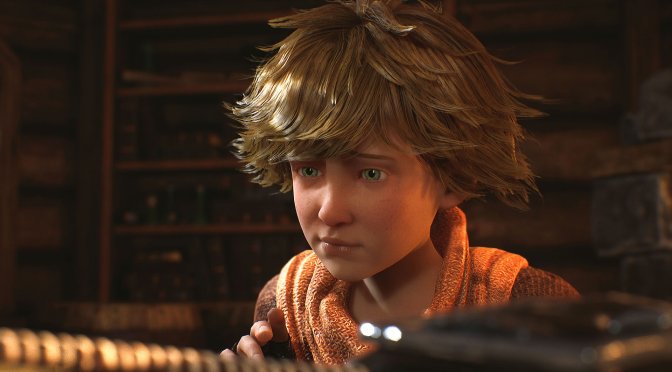
Last week, 505 Games released the official remake of Brothers: A Tale of Two Sons on PC. Powered by Unreal Engine 5, it’s time now to benchmark it and examine its performance on PC.
For our benchmarks, we used an AMD Ryzen 9 7950X3D, 32GB of DDR5 at 6000Mhz, AMD’s Radeon RX580, RX Vega 64, RX 6900XT, RX 7900XTX, NVIDIA’s GTX980Ti, RTX 2080Ti, RTX 3080 and RTX 4090. We also used Windows 10 64-bit, the GeForce 551.61, and the Radeon Adrenalin Edition 24.2.1 drivers. Moreover, we’ve disabled the second CCD on our 7950X3D.
Avantgarden Games has added a respectable amount of graphics settings to tweak. PC gamers can adjust the quality of Lighting, Shaders, Textures, Shadows and more. The game also supports NVIDIA DLSS and AMD FSR. However, there is no support for Frame Generation (for either DLSS or FSR).


The game does not feature any built-in benchmark tools. So, for our benchmarks, we tested the city area. This appeared to be one of the most demanding areas you can find in the early parts. Thus, it should give us a pretty good idea of how the rest of the game will run.

Brothers: A Tale of Two Sons Remake is mostly a GPU-bound title. At 1080p/Ultra, we were GPU bottlenecked even on our NVIDIA GeForce RTX 4090. As such, it made no sense to test different CPU combinations. So know that this game will mostly stress your GPU rather than your CPU.
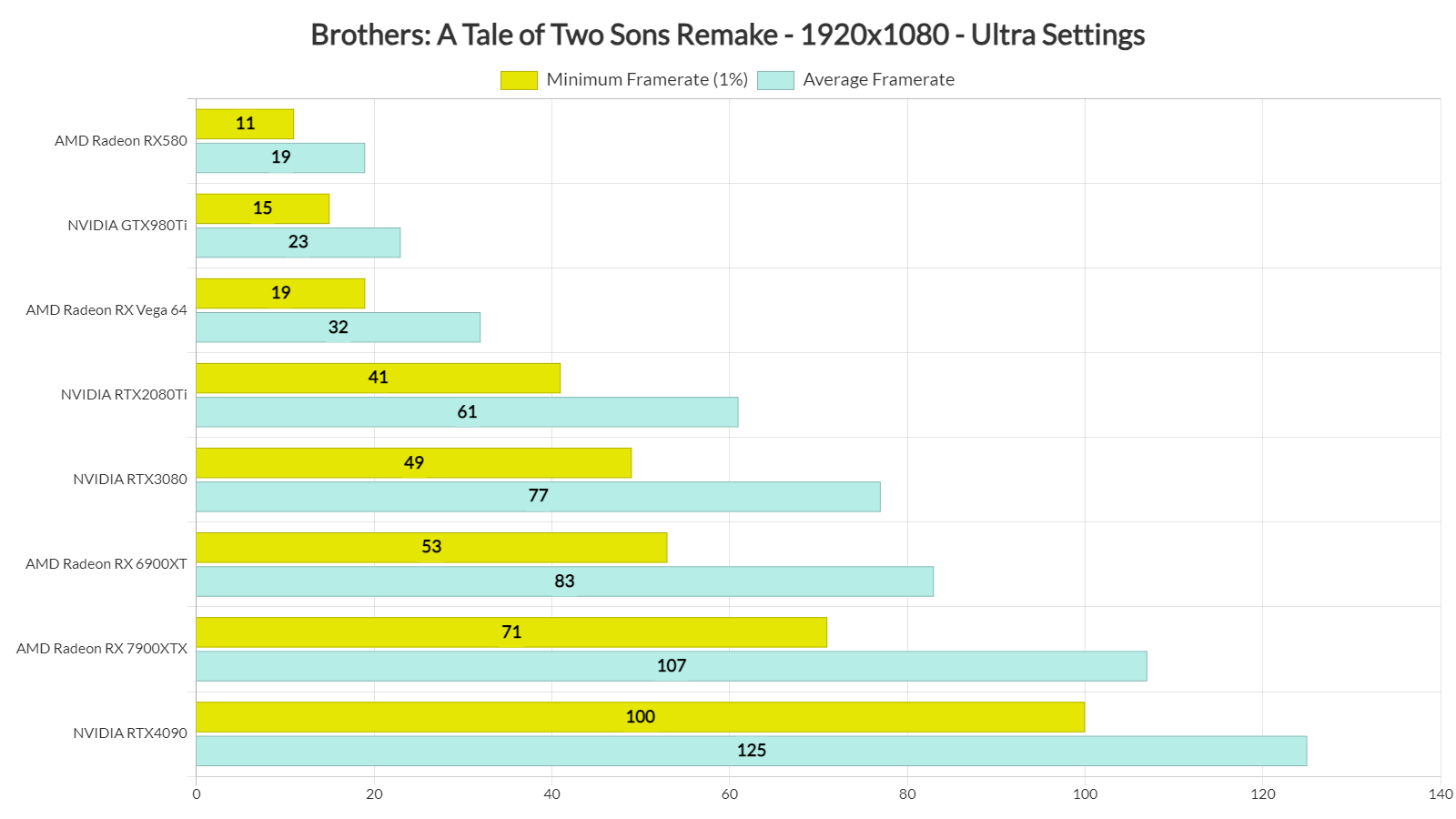
At 1080p/Ultra, you’ll need a really powerful GPU to maintain 60fps at all times. From the looks of it, there are some really demanding areas that can stress even the most powerful GPUs. The only GPUs that were able to offer 60fps at all times were the AMD Radeon RX7900 XTX and the NVIDIA RTX 4090.
At 1440p/Ultra, things get even worse. The only GPU that was able to push constant 60fps was the NVIDIA GeForce RTX 4090. And as for Native 4K, there wasn’t any GPU that could provide a constant 60fps experience.

Now the good news here is that you can improve performance by either enabling DLSS/FSR, or by reducing your settings. With DLSS Quality at 4K/Ultra, we were able to get a smooth gaming experience on the NVIDIA RTX 4090. Similarly, at Native 4K/High Settings, we were able to get a constant 60fps experience.

Graphics-wise, Brothers: A Tale of Two Sons Remake feels a bit underwhelming. Technically speaking, this remake looks way better than its original version. However, by today’s standards, there was nothing on screen that could impress me. The game’s Ultra settings are also ridiculously demanding without providing a “wow” factor. Seriously, I was expecting something more than what we got. Not only that but I can’t see anything here that couldn’t be achieved with Unreal Engine 4. So, I fail to see why Avantgarden Games chose UE5 over UE4.
Not only that but the game suffers from some stuttering issues. These aren’t shader compilation stutters, and they appear on all platforms. So no, they are not PC-specific. The PC controls also felt awful. Plus, some cut-scenes are pre-rendered and locked at 30fps. At least we didn’t encounter any crashes during our playtests, so that’s something positive I can say.
All in all, I wasn’t impressed with this remake of Brothers: A Tale of Two Sons. On Ultra settings, the game requires a ridiculously powerful GPU without offering “Next-Gen” graphics. As I said, the good news is that you can improve overall performance by using either the High settings or DLSS/FSR. Another good thing about this remake is its price. You can get it right now for only $15.99. 505 Games is not greedy and that’s another positive thing about it. Still, the overall package can feel a bit underwhelming!



John is the founder and Editor in Chief at DSOGaming. He is a PC gaming fan and highly supports the modding and indie communities. Before creating DSOGaming, John worked on numerous gaming websites. While he is a die-hard PC gamer, his gaming roots can be found on consoles. John loved – and still does – the 16-bit consoles, and considers SNES to be one of the best consoles. Still, the PC platform won him over consoles. That was mainly due to 3DFX and its iconic dedicated 3D accelerator graphics card, Voodoo 2. John has also written a higher degree thesis on the “The Evolution of PC graphics cards.”
Contact: Email