
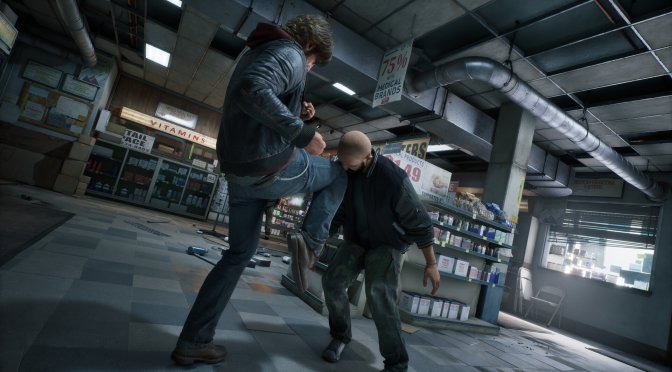
Liquid Swords has announced that the first major update for Samson will come out later today and shared its full patch notes. So, let’s see what this update will bring to the table.
This first patch promises to fix a lot of the hitches and stutters from which the game suffered. To be more precise, it will fix numerous PSO (compilation shader) stutters. It will fix some landscape RayTracingDynamicGeometry misses, as well as NaniteLumenCard & NaniteShading misses.
The patch will correctly set bIgnoreMaskMateria & bRequireRTDynamicGeometryUpdate. It will also fix PSO misses due to FStaticMeshComponentHelper::CollectPSOPrecacheDataImpl fetching materials from LOD levels depending on MinLOD even for Nanite-enabled meshes which will render with LOD 0 materials.
In short, the game should run more stable and with way fewer stutters after applying this update. I’ll be sure to test the game and include my thoughts in our upcoming PC Performance Analysis.
Samson should also be more stable and crash less frequently on your PC with this new update. For instance, the devs have fixed various audio-related crashes. They have also fixed an issue with physics destructables behaving like solid objects and not getting destroyed when playing on high framerates.
This patch will also attempt to polish some of the game’s aspects. For example, it will increase the volume for NPC vehicles. It will also improve lean-on-wall alignment, and it will prevent corpses from popping back up or being launched into the air after takedowns, hazards, or railing interactions.
Like always, Steam will download this update once it becomes available. Below, you can also find its full patch notes. Finally, our PC Performance Analysis will go live this weekend, so stay tuned for more.
Samson April 10th Patch Release Notes
Performance
Several performance fixes focusing on PSO related hitches (Fixes stuttering related issues)
Fixed some misses with Slate
Fixed landscape RayTracingDynamicGeometry misses
bIgnoreMaskMateria & bRequireRTDynamicGeometryUpdate was not set correctly from landscape PSO precache dispatch since 5.7
NaniteLumenCard & NaniteShading misses
Fixed PSO misses due to FStaticMeshComponentHelper::CollectPSOPrecacheDataImpl fetching materials from LOD levels depending on MinLOD even for Nanite-enabled meshes which will render with LOD 0 materials
Crash fixes
Crash fix for clearing UseDestructionHelp for vehicles with a timer
Fix for potential case where attempting to update a failed dispatch when losing warp governance could clear the callback lambda as it was being executed, causing a dangling this pointer and crash
Fixed various audio-related crashes, including one when closing the game
Avoid race conditions caused by writes to bIsCachedRayTracingInstanceValid and bDynamicRayTracingInstanceCachedDataDirty from parallel tasks
Force separate storage unit between ray tracing and non-ray tracing bits
Force separate storage unit between bIsCachedRayTracingInstanceValid and bDynamicRayTracingInstanceCachedDataDirty
Physics
Fixed issue with Physics destructables behaving like solid objects and not getting destroyed when playing on high framerates.
Mission
Ice Fish – NPCs spawned in the Beatdown are no longer only Level 1
Thrill of the Fight and Running on Fumes – now functional after save/continue
Suzy Red no longer gets multiplied during “Stitches for Snitches” mission completion
Hit 16 (No Return Fare) – passenger now gets into the cab at the pickup location
Dave Shultz Tailing Job – Dave now spawns close to player, avoiding near-instant fails for being too far away
Story Chapter – No Whisper Dealers – no beatdown triggers when eliminating enemies, preventing mission failure
Hot Iron – fixed issue where the fail radius for the reach dealer objective was too small
Day 3: Oonagh Welcome Home – call now comes after story mission Blood on Tap rather than Dirty Scripts
Fixed issue with the “Hot Iron” not being replayable after failing and retrying the next day.
Improved traversal and removed collision traps by White Whisper stash close to the priest’s house in Park Avenue.
Fixed the Cumberland barge wall
General Gameplay
NPC fall damage added as a failsafe for dropped NPCs
Day 3 Pickups – raised interact range to allow easier pickup if an item is dropped under a body
Let outsiders check if the driver can be pulled out of the vehicle
Fixed issues where enemies were not advancing towards you in group encounters
Fixed issues with AI running onto roads to inspect dead bodies
Fixed issue where police siren sometimes did not work
Polish
Fixed smoker alignment in Double Tap and Suzy’s
Fixed vehicle voices
Added a dedicated “remote dialogue” bucket for voice lines without a visible speaker (e.g. phone calls or police radio chatter)
Added separate dialogue buckets for police vehicles and remote dialogue
Fixed door kick spam
[Audio] New day stinger now plays before dialogue
Increased volume for NPC vehicles
Prevented corpses from popping back up or being launched into the air after takedowns, hazards, or railing interactions
Improved lean-on-wall alignment
Blocked bark gestures or one-offs during ranged combat
Fixed Vivian holding a folder in the doctor’s office instead of nothing
[Audio] Added “outside vehicle” dialogue lines to NPC non-combat efforts
Fixed several grammatical errors
Removed the facility marked on the map for no reason.
Improved French localization, adding a whole lot of strings that were missed in translation.
Combat
Fix for unreliable combat barge. If you tried to do a combat barge during the 4-second cooldown, it would just drop you out of combat stance instead.
Fixed issue with Enemies failing to pull the player out of a vehicle if misaligned even slightly.
Balanced Police escalation detection ranges to make it fair to the player.
Fixed issue with player falling through the floor, dying.
Usability
New “Controls” screen for showing game input from the pause menu
Correct text for Carpe Diem: First Job costs 0 AP.
Added Heal to combat hints
Fixed so we toggle Grab / Throw when you pick up an item in the combat hints
Fixed issues with changing the Deadzone setting not changing the way sticks respond
Fixed issues with turning off vibration in the settings.

John is the founder and Editor in Chief at DSOGaming. He is a PC gaming fan and highly supports the modding and indie communities. Before creating DSOGaming, John worked on numerous gaming websites. While he is a die-hard PC gamer, his gaming roots can be found on consoles. John loved – and still does – the 16-bit consoles, and considers SNES to be one of the best consoles. Still, the PC platform won him over consoles. That was mainly due to 3DFX and its iconic dedicated 3D accelerator graphics card, Voodoo 2. John has also written a higher degree thesis on the “The Evolution of PC graphics cards.”
Contact: Email