

UEFI, in your BIOS is a little operating system on its own, but it is sort of unprotected. Microsoft Defender Advanced Threat Protection (Microsoft Defender ATP) is extending its protection capabilities to the firmware level with a new Unified Extensible Firmware Interface (UEFI) scanner.
The Unified Extensible Firmware Interface (UEFI) is a replacement for legacy BIOS. If the chipset is configured correctly (UEFI & chipset configuration itself) and secure boot is enabled, the firmware is reasonably secure. To perform a hardware-based attack, attackers exploit a vulnerable firmware or a misconfigured machine to deploy a rootkit, which allows attackers to gain foothold on the machine.
Under normal circumstances, as long as the common types of viruses are found in time, it is relatively easy to kill, but some viruses are relatively more powerful in technical terms. For example, an advanced virus that specifically targets the system firmware is not that easy to be killed. The main reason is that the virus has been lurking and hiding inside the “system firmware”.
The most typical of these viruses is the advanced virus that is infected by UEFI firmware, and now Microsoft has begun to target and kill such advanced viruses. Microsoft has recently updated the Microsoft Defender ATP protection. This update brings a variety of different security measures to harden the system from such attacks.
This includes stubborn virus detection and the killing of the UEFI firmware. New components added by Microsoft can be scanned directly through the serial peripheral device interface to the system firmware. Microsoft said that the new UEFI firmware scanner integrates Microsoft’s rich security technology, which can provide a full range of security from chip to cloud.
For enterprise organizations that have deployed Microsoft Defender ATP, the administrator will also receive a reminder when they receive similar virus infections and conduct killing. The enterprise security team can collect and trace the virus infection process based on these alarm activities to ensure that the enterprise computers and internal networks are not threatened by security.
Microsoft said that if the hardware device itself supports security features such as a secure boot or device certification, Microsoft Defender ATP can also be seamlessly integrated. With the help of the UEFI scanner in Microsoft Defender ATP, you can now gain an in-depth understanding of firmware-level threats, and the security team can use it to detect such threats.
Hardware and firmware-level attacks have continued to rise in recent years, as modern security solutions made persistence and detection evasion on the operating system more difficult. Attackers compromise the boot flow to achieve low-level malware behavior that’s hard to detect, posing a significant risk to an organization’s security posture.
Windows Defender System Guard helps defend against firmware attacks by providing guarantees for secure boot through hardware-backed security features like hypervisor-level attestation and Secure Launch, also known as Dynamic Root of Trust (DRTM), which are enabled by default in Secured-core PCs. The new UEFI scan engine in Microsoft Defender ATP expands on these protections by making firmware scanning broadly available.
The UEFI scanner is a new component of the built-in antivirus solution on Windows 10 and gives Microsoft Defender ATP the unique ability to scan inside of the firmware filesystem and perform security assessment. It integrates insights from our partner chipset manufacturers and further expands the comprehensive endpoint protection provided by Microsoft Defender ATP.
The Serial Peripheral Interface (SPI) flash stores important information. Its structure depends on OEMs design, and commonly includes processor microcode update, Intel Management Engine (ME), and boot image, a UEFI executable. When a computer runs, processors execute the firmware code from SPI flash for a while during UEFI’s SEC phase. Instead of memory, the flash is permanently mapped to x86 reset vector (physical address 0xFFFF_FFF0). However, attackers can interfere with memory access to reset vector by software. They do this by reprogramming the BIOS control register on misconfigured devices, making it even harder for security software to determine exactly what gets executed during boot.
Once an implant is deployed, it’s hard to detect. To catch threats at this level, security solutions at the OS level relies on information from the firmware, but the chain of trust is weakened.
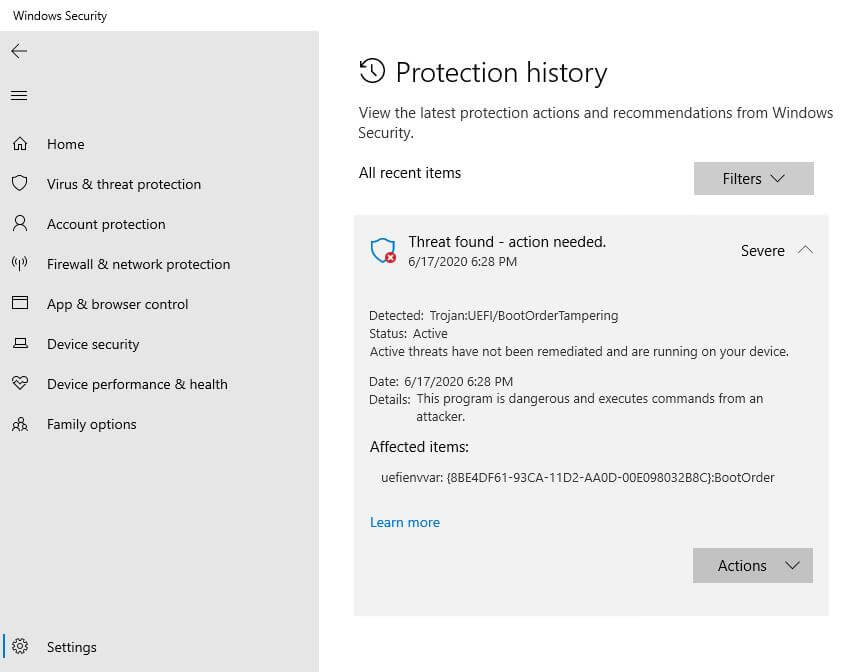
Windows Security notification showing detection of malicious content in non-volatile memory (NVRAM)
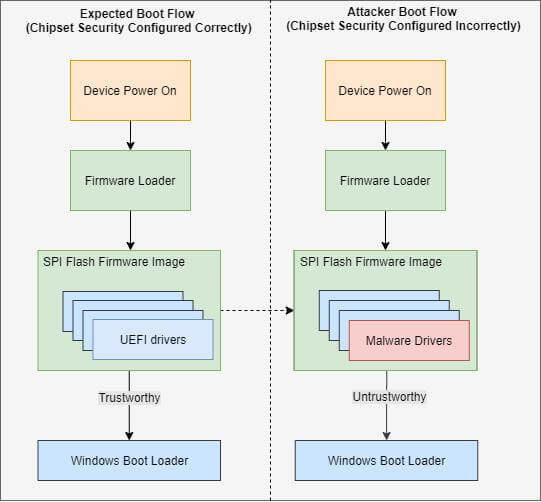 Expected boot flow vs. compromised boot flow

Hello, my name is NICK Richardson. I’m an avid PC and tech fan since the good old days of RIVA TNT2, and 3DFX interactive “Voodoo” gaming cards. I love playing mostly First-person shooters, and I’m a die-hard fan of this FPS genre, since the good ‘old Doom and Wolfenstein days.
MUSIC has always been my passion/roots, but I started gaming “casually” when I was young on Nvidia’s GeForce3 series of cards. I’m by no means an avid or a hardcore gamer though, but I just love stuff related to the PC, Games, and technology in general. I’ve been involved with many indie Metal bands worldwide, and have helped them promote their albums in record labels. I’m a very broad-minded down to earth guy. MUSIC is my inner expression, and soul.
Contact: Email