
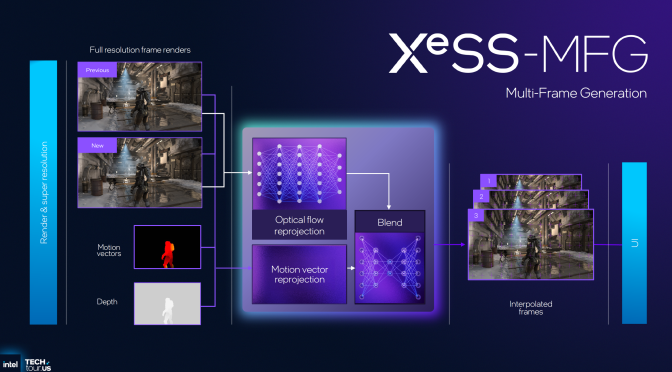
Intel XeSS 3 MFG

Intel has officially announced XeSS 3 Multi-Frame Generation

To the surprise of no one, Intel has announced the next version of XeSS, Intel XeSS 3. Intel XeSS 3 will have support for Multi-Frame Generation, which is identical to the one we’ve seen in DLSS 4.

I’ve said it before, and I’ll say it again. NVIDIA is so far ahead of pretty much everyone. When it introduced DLSS 3 Frame Gen, a lot criticized it. Then, when it introduced Multi-Frame Gen, the same people went hard on it. But look what both AMD and Intel are doing. They are copying exactly what NVIDIA did a year ago.

Intel XeSS 3 MFG will work exactly like DLSS 4 MFG. It will support 2X, 3X, and 4X modes. Intel XeSS 3 MFG will be ideal for hitting high framerates. So, you will at least need a base framerate of 45FPS.

The good news here is that Intel XeSS 3 Multi-Frame Gen will be compatible with non-Intel GPUs. Moreover, Intel XeSS 3 will be compatible with XeSS 2. Intel also plans to add an XeSS 3 MFG Override setting on its software. This will allow all Intel GPU owners to use Intel XeSS 3 MFG in the games that already support Intel XeSS 2 Frame Gen.

Those who don’t own an Intel GPU will have to rely on native XeSS 3 MFG support or on mods. This will make things a bit more complicated. Nevertheless, you will still be able to try MFG for yourself. I can also guarantee that most people who criticize it haven’t even tried it — just like when players complained about DLSS 3 Frame Gen.

I’ve been extensively covering DLSS 4 Multi-Frame Gen these past months. So, I’m curious to see how Intel XeSS 3 MFG will fare against it. We’ve seen games in which the DLSS 4 MFG implementation was kind of bad. We’ve also seen games in which the DLSS 4 MFG implementation was amazing. This means that results can wildly vary based on different games.

Intel will debut XeSS 3 with the Panther Lake platform and Xe3 graphics GPUs in 2026. This will give NVIDIA a one-year head start. Oh, and you can also expect AMD to add a similar feature with FSR 5.0!

Intel XeSS 3 MFGIntel XeSS 3 MFG-2

25 thoughts on “Intel has officially announced XeSS 3 Multi-Frame Generation”

  1. " But look what both AMD and Intel are doing. They are copying exactly what NVIDIA did a year ago."

    " We’ve seen games in which the DLSS 4 MFG implementation was kind of bad."

    this is what the problem is. We rather they didnt focus on those things and just made hardware cheaper if they cant make it more powerful, just like we dont care about the 128 bit bus, we would rather 192 bit bus and more memory which is what intel did, while amd copied nvidia with 128 bit bus and less vram.

    1. They can't make the hardware cheaper which is why they're relying on software tricks like this.
      It isn't just Intel having issues with shrinking process nodes it's TSMC (and everyone else) as well.
      And no I don't like DLSS/FSR, I hate this slop too.

      1. Exactly …. Currently 4nm nodes are about as small as they can shrink to for high power applications. 3 nm is great for mobile low power devices but so far can't hit more than around 150 W TDP before the heat density becomes too great and the chips burn up. Blackwell was originally planned for 3nm but Nvidia/TSMC couldn't make it work at 250W much less the 400W+ needed for the high end consumer GPUs and especially server class GPUs.

          1. In the case of VRAM I agree it's mostly greed and I don't really buy the "oh we're just doing it because some people play nothing but e-sports" excuse they use either.

  2. "So, you will at least need a base framerate of 45FPS."

    That is after the peformance hit these multi frame features give you, right?

    1. Actually you need a base framerate of at least 60 FPS. 45 FPS just feels bad and that has been true for the last 10 years which is why every shoots for a minimum of 60 FPS. On my 4070 TI with frame generation when the FPS drops below 120 FPS I can definitely feel the difference and end up turning it off and just playing at the 65-70 FPS native which just feels better

      1. There's always noticeable artifacts when using any kind of framegen. I can easily notice objects through characters or trails well over 70fps on many games. It feels weird. I find 30fps with Nvidia Inspector & with motion blur way better than glitchy framegen anyday.
        People thought motion blur was bad…, fast forward now and we have framegen, multi-framegen. Maybe in a year or two Ulti-multi-framegen & people will rejoice.

      2. If you need 60fps then frame gen is worthless. most people using FG are getting well under 60 and need it to get them to 60 or above.

        1. It's worthless to go to 60, but if you have the baseline above 60 already, it's useful to push it to match a high refresh rate monitor in not so fast paced games.

        2. It's worthless to go to 60, but if you have the baseline above 60 already, it's useful to push it to match a high refresh rate monitor in not so fast paced games.

  3. The good news here is that Intel XeSS 3 Multi-Frame Gen will be compatible with non-Intel GPUs.

    Nope.

    XeSS 3 MFG is only for Intel Arc GPUs. Doesn't work on other vendors' GPUs.

    XeSS 3 MFG supports all Arc GPUs with built-in XMX hardware units, including the Arc A-series, Core Ultra 200/V (Xe2) lineup, and future Arc B-series (Xe3) products.

    Older Xe1/ Xe+ architecture GPUs will also get support later, such as in the Arrow Lake Core Ultra 200H lineup.

    So it won't work on cards from AMD and Nvidia, since they also lack dedicated XMX cores, or AI engines.

      1. Yes, Intel has no plans to bring this new MFG tech to work on GPUs from AMD and/or Nvidia.

        Not at least without having any fallback layer.

        Intel's decision to keep MFG on its own hardware seems likely to promote its own GPUs, and to ensure the performance of its new feature is optimized for its specific hardware architecture.

        All because the XeSS 3 MFG feature relies on dedicated XMX hardware found in Intel's Arc and Core Ultra processors, unlike the base XeSS upscaling tech.

        XeSS-MFG uses an optical flow network built on motion vectors and depth buffers, interpolating three additional frames for up to 4× frame output.

        Don't know about the OptiScaler tool though, since I have never used it myself.

        PCGamer's Nick also confirmed this from Intel earlier, and got the same response, "XeSS-MFG is only for Intel Arc GPUs'."

        https://www.pcgamer.com/hardware/graphics-cards/intel-announces-xess-3-with-multi-frame-generation-putting-it-ahead-of-amd-in-the-ai-powered-graphics-performance-race/

        ….

  4. So Hardware unboxed have said repeatedly that you need a base frame-rate of 100 for FG to be of any use. This is because any anything lower than this, and the input latency/lag on your mouse/kb will be bad (@45FPS is 200+ milliseconds, almost a quarter of a second…) as to make a game horrendous to play.

    MFG does not suddenly mean that more powerful GPUs are unnecessary or that lower-end parts can magically eclipse higher-end ones. I have a 4080 and recently tested Dying light:The Beast, with upscaling I was getting above 100fps, just 2x FG was so bad as make the game feel like it was running at half that.

    Remember FG/MFG is NOT a performance booster, its a frame smoother – and even then, only if its done with any kind of competence. And if you have a VRAM limited card 8GB or less forget FG or RT, a lot of games are maxing out the frame buffer with just the raster textures, so there is NO room for anything else.

  5. So Hardware unboxed have said repeatedly that you need a base frame-rate of 100 for FG to be of any use. This is because any anything lower than this, and the input latency/lag on your mouse/kb will be bad (@45FPS is 200+ milliseconds, almost a quarter of a second…) as to make a game horrendous to play.

    MFG does not suddenly mean that more powerful GPUs are unnecessary or that lower-end parts can magically eclipse higher-end ones. I have a 4080 and recently tested Dying light:The Beast, with upscaling I was getting above 100fps, just 2x FG was so bad as make the game feel like it was running at half that.

    Remember FG/MFG is NOT a performance booster, its a frame smoother – and even then, only if its done with any kind of competence. And if you have a VRAM limited card 8GB or less forget FG or RT, a lot of games are maxing out the frame buffer with just the raster textures, so there is NO room for anything else.

  6. Features like DLSS, XeSS and FSR along with frame gen allow you to keep old hardware much longer. I would have had to replace my 3060 ti a long time ago without them. Instead im playing games like Monster Hunter Wilds at 110+ fps with good visuals.

  7. First and foremost, it's good news that the 3rd competitor in the space is catching up in the race.

    After that, you can go into all the other discussions about its improper use to replace optimization and all that.

Leave a Reply

Your email address will not be published. Required fields are marked *
