
Lossless Scaling feature

We’ve tried Lossless Scaling 3.0 with Multi Frame Generation

THS has released a brand new version of the Lossless Scaling program. Lossless Scaling 3.0 introduces a new version of the Lossless Scaling Frame Generation. LSFG 3 is built on a new, efficient architecture that introduces significant improvements in quality, performance, and latency. It also has support for Multi Frame tech, similar to what NVIDIA introduced with DLSS 4. As such, we’ve decided to test it in a number of games, and share our thoughts.

For our tests, we used an AMD Ryzen 9 7950X3D with 32GB of DDR5 at 6000Mhz, and the NVIDIA GeForce RTX 4090. We also used Windows 10 64-bit, and the GeForce 566.14 driver. I know there is a new driver for the game. Moreover, we’ve disabled the second CCD on our 7950X3D.

The games we’ve benchmarked with Lossless Scaling 3.0 were Indiana Jones and the Great Circle, Hellblade 2, STALKER 2, Silent Hill 2 Remake and Cyberpunk 2077. All of them were maxed out (yes, with Path Tracing in the games that supported it) at 4K. We also used DLSS 2 Super Resolution Quality so that we could have a base framerate above 40FPS.

Lossless Scaling 3.0 supports Multi Frame Gen. As such, you can use Frame Generation two or three times. In concept, this is similar to what NVIDIA is doing with DLSS 4. So, let’s start with some benchmark numbers.

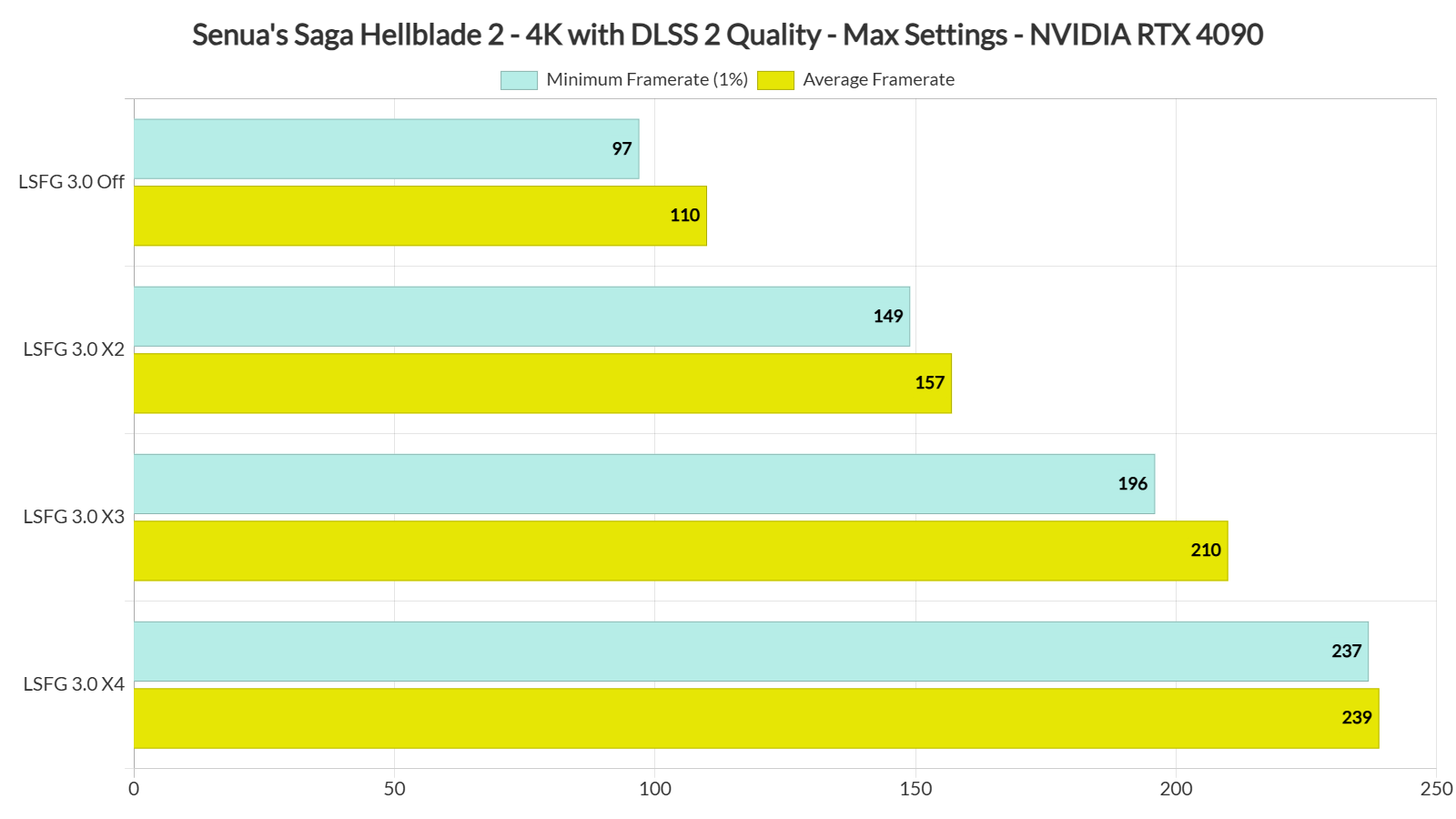
With LSFG 3.0 X4, the most demanding games on PC were running with over 125FPS. So yes, the tech works and it does bring framerate improvements. However, there are some issues we have to discuss.

LSFG 3.0 benchmarks-6

LSFG 3.0 benchmarks-5

Let’s start with Black Myth: Wukong and Hellblade 2. These third-person games had MAJOR visual artifacts and latency issues with LSFG 3.0 X3 or X4. While camera movement was smoother, they weren’t as responsive as they were with DLSS 3 Frame Generation. So, you should definitely avoid using Lossless Scaling with them. Black Myth: Wukong, in particular, feels awful with LSFG 3.0 X4. At least in my opinion.
LSFG 3.0 benchmarks-1

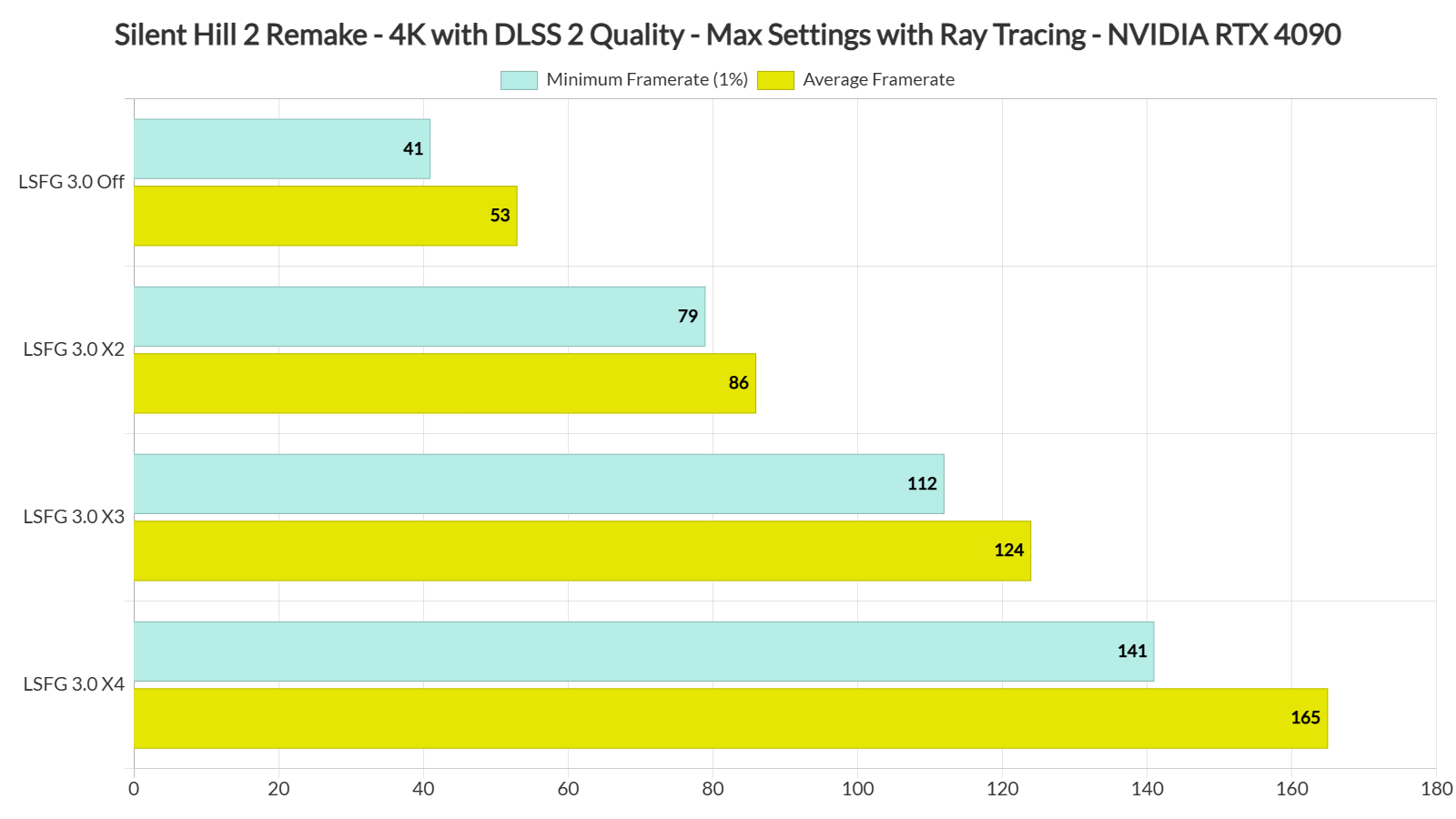
Then we have Silent Hill 2. Silent Hill 2 suffered from both visual artifacts and frame pacing issues. This is something that really surprised me. In almost all the games I tested, LSFG 3.0 X4 introduces noticeable frame pacing/stuttering issues. In SH2 Remake they are quite noticeable, and completely eliminate the whole purpose of LSFG (which is to get a smoother camera movement). And again, DLSS 3 FG is superior to LSFG 3.0.

LSFG 3.0 benchmarks-2

Indiana Jones and the Great Circle also suffers from noticeable frame pacing issues. However, it’s one of the few games that looks so smooth when using LSFG 3.0 X4. Running it at over 130FPS makes camera movement feel so smooth (well, that is when it does not stutter). Plus, this game was noticeably laggier with LSFG 3.0 X4. Indiana Jones suffered the most in our tests when it came to the additional input latency delay that LSFG can add to games. Thankfully, this isn’t a fast-paced action game. So, it would have been perfectly playable, even with that additional input delay. However, it is not due to frame pacing issues (which are not THAT noticeable when using LSFG 3.0 X2 but why should you use it when DLSS 3 FG is also available).
LSFG 3.0 benchmarks-4

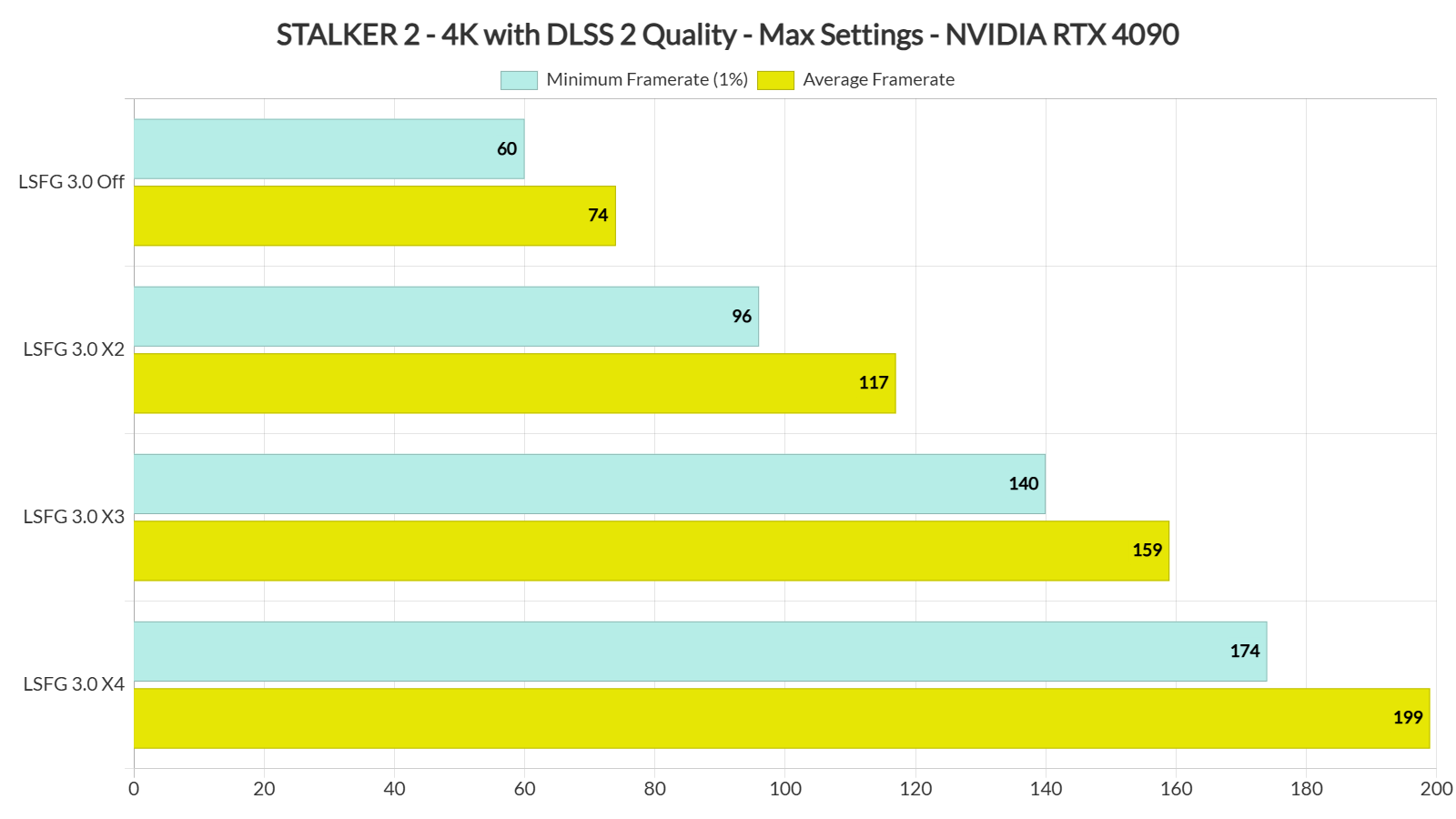
As for STALKER 2, it suffers from both visual artifacts and frame pacing issues. See a pattern here? Yep, all of the games we’ve tested had worse frametimes when using LSFG 3.0 X4. That’s a bummer as those frame pacing issues prevent you from taking advantage of LSFG 3.0 X3 or X4. Now contrary to the other titles, STALKER 2 was playable with LSFG 3.0 X4, despite the aforementioned issues.

LSFG 3.0 benchmarks-3

Finally, the game that benefits the most from LSFG 3.0 X4 is Cyberpunk 2077. Yes, there are some visual artifacts and frame pacing issues. However, they are not as annoying as they were in all the previous games. I was able to drive vehicles and headshot my enemies with ease when using LSFG 3.0 X4. So, this is the best showcase for LSFG 3.0, at least in its current state.

Before closing, I want to make it crystal clear that LSFG 3.0 is better than LSFG 2.3. THS has managed to improve its quality. With its X2 Mode, you’ll get fewer artifacts than before. So, for games that lack official DLSS 3 support, it’s a great alternative. I was a big fan of LSFG 2.3 and I highly recommend LSFG 3.0 to pretty much everyone. Again, this recommendation is only for its X2 Mode.

All in all, Lossless Scaling 3.0 is a really cool concept. It can also give us a glimpse at what we might get on the RTX 50 series GPUs once DLSS 4 becomes available. It’s also a nice free Frame Generation tool for games that don’t support DLSS 3 FG or FSR 3.0 FG. Moreover, both its X3 and X4 modes introduce annoying frame pacing issues. While they are cool, they are not as polished as the X2 Mode. Thus, the best mode right now is LSFG 3.0 X2. However, it’s NOWHERE CLOSE to the quality of DLSS 3 or FSR 3.0. And, if you hate DLSS 3, you’ll hate LSFG 3.0 even more.

Enjoy!

87 thoughts on “We’ve tried Lossless Scaling 3.0 with Multi Frame Generation”

  1. This software doesn't introduce frame pacing issues on its own, it does the opposite. This happens when your gpu load is maxed out or close to being maxed out.
    If you push your hardware to its limits, this software becomes useless.
    By the way you can multiply your frame rate by 20 times not just 3x or 4x.

    1. It has nothing to do with the GPU load. The RTX 4090 was maxed out in all games even without LSFG 3.0. By your logic, there should be frame pacing issues without LSFG 3.0 since the GPU load was at 100%. There weren’t any so you are completely wrong here.

        1. LSFG already fights for the GPU resources at 2X Mode (yet there aren't any frame pacing issues). The problem here is frame delivery. It's not optimized for 3X or 4X (or for even more like say 20X). That's why there are frame pacing issues.

        2. LSFG already fights for the GPU resources at 2X Mode (yet there aren't any frame pacing issues). The problem here is frame delivery. It's not optimized for 3X or 4X (or for even more like say 20X). That's why there are frame pacing issues.

        3. LSFG already fights for the GPU resources at 2X Mode (yet there aren't any frame pacing issues). The problem here is frame delivery. It's not optimized for 3X or 4X (or for even more like say 20X). That's why there are frame pacing issues.

          1. I don't have any frame pacing issues, I'm locking my fps to 40fps with rivatuner when using 3x mode to 120fps.

          2. Then you simply don't see them. With a 40FPS lock in Silent Hill 2 Remake I get constant 160FPS with LSFG 3.0 X4. MSI Afterburner shows a flat line for frametimes but when I quickly move the camera, I see "stutters" due to wrong frame delivery.

            The only way to avoid those "stutters" is by very slowly moving the camera. That's not good. And before someone says "Then don't move the camera with quick moves", that's the same bullsh!t AMD tried to pass with AFMF (don't move the camera quick so that AFMF does not disable itself). That's not how FG should work. And if DLSS 4 has a similar issue, you can bet your a*s I'll be critical about it.

            Bottom line is that there is definitely a frame delivery issue when using X3 or X4. Again, X2 works fine, even without a framerate lock. So I hope THS will do something about it.

          3. I just tried LSFG 3.0 with KCD 1.

            -39fps lock with afterburner
            -LSFG 3.0 3x mode
            -capture mode set to DXGI from LS
            -G-sync support toggled to on from LS
            -G Sync and V sync on from Nvidia drivers

            Zero frame pacing issues, but moderate amount of interpolation artefacts, 3x and 4x mode are better suited for monitors that have higher refresh rate than 120hz.

          4. Not necessarily related to your tests, but just so you know, Alex Battaglia from DF said you could sometimes have bad frame pacing when using frame limiters other then Special K's. It's a trial and error situation as always with pc gaming! : d

            Do you think you can test Nvidia Reflex implementation from RivaTurner and Special K to see if and how it helps with Lossless Scaling's Frame Gen input lag? Thanks in advance! : )

          5. That's weird why are you getting stutters ? For me as long as it's a steady base frame its always a smooth experience even when driving the mouse around like crazy. what's your CPU?

          6. Well if you're going to be critical can you at least be factual, lossless scaling is not a free tool lol

          7. John, I just looked at your tests, and the numbers don't add up.
            Your frame rate with FG on should be exactly locked to double, triple, quadruple, etc.
            I'm 100 percent sure you're not using it the way its developer intended.
            Make sure the scaling type is off and your GPU usage is not above +85-90 percent.
            You can also try lowering your Res scale in the software (it doesn't affect in-game res).
            EDIT:
            You MUST lock your base frame rate.

          8. "EDIT:
            You MUST lock your base frame rate."

            Say it one more time to the people in the backseat. they don't read instructions and manuals then come complaining and giving false evaluations.

          9. John, your GPU usage without LSFG (just the game by itself) needs to be low in order to take full advantage of LSFG. You're causing the frame pacing issues by trying to run the games with extremely high settings causing high GPU usage. You really need to redo your testing with lower GPU usage from the games.

            Don't use path tracing. Hell, don't even use ray tracing. Do a benchmark in a game where you had issues and try it with the game at 50% GPU usage, and see if it's any better.

            Remember, LSFG is processed in the GPU. You need to leave enough GPU headroom for it to do its thing.

      1. Then lower your setting, test it on lower resolution, do the test again and prove me wrong.
        To be clear, I don't have a dog in this race, what I'm saying is that I've had the same problem and that's how I got rid of it.

    2. True, I actually got smoother visuals with 30 FPS interpolated to 60 FPS with this program than real 60 FPS at lower resolution and settings but still high system usage, which was pretty surprising.

    3. This software is useless regardless of what noobs like you say. Will ALWAYS introduce latency & artifacts. Lossless scaling is comparable to frame interpolation scripts from 15+ years ago.

          1. You sound like you’re mad your two dads spoon each other in turns every night cfcucks or whatever your dumb name was.
            Nice new post banned account cuck

  2. Like dagoat said, you shouldn't use lsfg with 99% gpu usage or it'll work like trash, last time I remember it uses around 20 – 25% of the gpu at 2x (on a 3070 at least) and 500mb vram. Also, you should cap the frame rate at 1/2, 1/3 or whatever the max hz of your monitor is, instead of using a variable frame rate for it to work properly

    1. I tested it in Serious Sam 4. Monitor is 240 Hz, I locked framerate to 60 FPS and used X4 mode. The movement was smooth, yes, but image suffered from plethora of errors, where parts of image was "running off". This still makes it unplayable.

      1. I think even in an optimal scenario X4 frame generation is just asking too much (either input lag-wise or artifact-wise).

          1. The latest version 3.0 works really great at 2x mode, i mainly use it with emulators on games which are locked at 30fps and they work perfectly fine on conversion from 30 to 60fps

      2. The max I tried was 3x mode on wave race 64 because that game runs at 20fps, and it was fine, but that's not a first person or fast paced game, so it may vary from game to game

    2. this right here why this program is a scam, because it makes the game laggier, there is just no point to it.

      1. IIRC the dev recommends use it only in games where you have CPU bottleneck and not high gpu usage. I'm not trying to defend it, but at least for emulators, like pj64, it's nice to play locked 30fps games at 60+, like duke zero hour for instance, first person or fast paced games its really not that good

        1. Yep, the fact that it works on basically all programs (yep, Im not called them 'apps'), perfect for emulatorto reach 120FPS And utilizes that high refersh rate monitor to their potential

          1. It's perfect for emulation, since they tend do have a more baked in framerate limit or are more CPU than GPU limited

          2. It goes really well with duckstation for instance, since that emulator has an option to reduce input lag, but you need a good PC to go over 1 – 2 frames runahead

          3. yes i use lossless scaling with emulators, it works really great in PCSX2, Duckstation and PPSSPP emulator however most people don't know that in all emulators u have to disable duplicate frames or rendering of duplicate frames for Lossless scaling framegen to work correctly

          4. You can use with duplicate frames, but you need to change the API to WGC, but I think that mode has a bit more input lag compared to DXGI, so disabling duplicate frames is better when you have the option. What is really a must for it to work, is for the emulator to have a borderless fullscreen mode, or you need to play in a normal window mode

          5. Duplicate frames add micro stuttering for me in PCSX2 so i keep it disabled even if game is natively 60fps. In retroarch almost all emulators work in borderless windowed mode, in standalone PCSX2 which is preferred over Retroarch buggy PS2 core, u have to select Exclusive fullscreen to disallowed in Vulkan, D3D11 and OpenGl. d3d12 always runs in borderless windowed mode in all emulators

    3. Lossless scaling is trash, it's funny you're trying to defend it. It's especially funny that you defend a trash app that uses open source code & does not comply with licenses.

      1. Everything starts trash buddy, look at yourself, a human being in development talking sh*t in the internet.

  3. I don't know what you all smoking? I've been using Lossless Scaling for more than 2 years. and it is phenomenal. you just need to play around with settings till you get it working. I have 3090 and I'm using it in every single game except for multiplier shooters. and no I didn't buy it. you can look around and download it for free.

    seriously all the comments are negative like WTF. if I wasn't using it I would have believed you and moved on. but this is not the truth. this software is godsend. it feels hella smooth you just need to have a decent base framerate. Again, you don't have to buy it just look around for it. final conclusion. this website is not reliable and trash

    1. "Tell me you are an idiot without telling me you are an idiot"

      From the article you didn't even bother reading.

      "Before closing, I want to make it crystal clear that LSFG 3.0 is better than LSFG 2.3. THS has managed to improve its quality. With its X2 Mode, you’ll get fewer artifacts than before. So, for games that lack official DLSS 3 support, it’s a great alternative. I was a big fan of LSFG 2.3 and I highly recommend LSFG 3.0 to pretty much everyone. Again, this recommendation is only for its X2 Mode."

      1. " "Tell me you are an idiot without telling me you are an idiot" "

        What goes around comes around.

        "Let’s start with Black Myth: Wukong and Hellblade 2. These third-person games had MAJOR visual artifacts and latency issues with LSFG 3.0 X3 or X4. While camera movement was smoother, they weren’t as responsive as they were with DLSS 3 Frame Generation. So, you should definitely avoid using Lossless Scaling with them. Black Myth: Wukong, in particular, feels awful with LSFG 3.0 X4. At least in my opinion."

        if you lower the settings to maintain a good base frame rate you will still have a good experience. the more Xs you add the more GPU resources it will consume thus lower your base frame rate further. And REMEBER the base frame rate is calculated AFTER you activate LSFG not before.

        and if the game has already some artifacts the LSFG will make you see it even more. so garbage in garbage out.

        one last thing, "tell me you are a narcissist without telling me you are a narcissist.", not all people have 4000 series to utilize the built-in FG. and even though I'm able to use FG mods for 3000 series I'm still using LSFG over it.

  4. Tried LSFG 2.9 on Outcast : A New Beginning, as that game has some serious frame rate and pacing issues.
    And honestly for me at least, I was blown away with the doubling of the frames, when the base frame rate was locked at 30.
    The main character would slightly phase in and out when I spun the camera wildly, but that would not be something that I would do during regular play.
    The stutter issue happens when the base frame rate drops below what has been set in game or thru RTSS.
    But for 99% off the time, I got a very smooth gameplay experience…..so apart from the small issues(for me at least), this SW is a god sent.
    With Jusant, my gpu temp(3060ti) would sky rocket to 90°C at 1080p/high and there would be frame rate dips in the high 50's.
    Using LSFG, I locked the base frame rate to 30 and used the X2 mode to get an almost stable 60fps….and gpu temps dropping to high 60's.
    Freaking love this SW.

    1. JUsant, the most plain looking game ,graphic wise, yet hard to run … Devs need to amped up their ante on utilizing UE5 specifically for their game, not just using default options

      1. Agree…there is nothing in the game that should demand this level of pc resources.
        I love the art style but the performance is just crazy.

    1. Yeap, it benefits from both the latency, performance and image improvements. LSFG 3.0 2X fixes most of the artifacts you may have seen in third-person games (artifacts around the main character when moving the camera).

  5. I used DLSS FG x2 and then lossless scaling x4 on top of that and it worked 😂 DLSS FGx2 improved my fps from 60fps to 108fps. Then lossless scaling has lowered my base fps from 108 to 65fps, but generated 261fps. To my surprise artefacts weren't that bad, but the input lag surerly was ;).

  6. I bought this sha1t due to hype and it's kinda junk, you also can't record with the NVIDIA App if you use it, which totally kills it for me.

    It can also give us a glimpse at what we might get on the RTX 50 series

    Nah, but it's probably indicative of whatever slowMD will push now that they're in full panick mode due to the 5070.

    When NVIDIA do something they do it right, MFG will be glorious!

  7. Thanks for doing these kinds of tests John. I was thinking of returning to Hellblade 2 this year as well and the experimentation is always fun to check out especially with a possible 80x or 160x frame generation later this year. Would you ever try out AFMF 2 or the Xe-FG along side these kinds of tests in the future?

    1. I believe I tried AFMF2 and it was a bit better than AFMF 1 (though it wasn’t particularly impressive so I didn’t write an article about it). As for Xe-FG, I’ll definitely cover it (the same way I cover FSR 3.0 FG) in every game that will support it.

  8. This software can work pretty well. You just have to set things up properly and have enough performance headroom for it. Remember both upscaling and frame generation have their own CPU (mostly upscaling) and GPU (both upscaling and frame generation) cost, so if your system usage is already nearly or completely maxed out even before using this, then it won't help, and might in fact make things worse.

    I tried 900p 30 FPS to 1080p 60 FPS upscaling (LS1 algorithm, 0 sharpening, performance mode) and frame generation (X2 mode, 100 resolution scale, performance mode) in Fallout 4, and despite being a shooter it felt surprisingly playable and looked pretty decent, even with it being a worst case scenario (sub-1080p internal resolution and sub-60 FPS base frame rate…), and while playing in first person mode too. The image looked softer than native but still acceptable and motion artifacts were quite small considering the internal frame rate. The frame rate was capped to 30 FPS with RivaTuner Statistics Server, async frame rate limiter with passive waiting disabled (so active waiting for maximum frame time consistency).

    Keep in mind that was combined with "BufferCount" set to 0 in the High FPS Physics Fix mod for the game and Nvidia Low Latency Mode set to Ultra in the Nvidia Control Panel (to make sure the game wouldn't buffer any frames on the CPU and keep input lag as low as possible, which works incredibly well in this particular game, making even 60 FPS V-Sync or 30 FPS frame cap feel playable).

  9. Sorry to say that you did your testing incorrectly here. FG should never be used on games where the base fps is below 60 fps. This is specified in the user instructions written by the software author. It will always lead to artifacts and latency issues, especially if you are framegening from ~30 fps.

  10. Frame Generation, and "AI assistance", is like buying a Ford Escort, stripping the body, dropping a Ferarri F50 kit on it, and pretending you are driving a Ferrari F50.

    It's amazing, the slop people will eat up if you attach the term "AI" to it. I guess that's why they push this trash so hard, for the plentiful morons of the world to lap up.

    1. Yet Nvidia keep selling them as their 50xx exclusive and many people in awe with it, while THS, LSFG devs, did X3 and X4 since couple of months ago. Nvidia selling software basically nowadays

  11. Hi John,

    Thank you for taking the time to check it out!

    Since LSFG is an external frame generator, I recommend locking the game's framerate to your monitor's refresh rate or slightly below it, divided by the selected multiplier value (e.g., 60 FPS when using a 4x multiplier on a 240Hz monitor).

    Ensure that the GPU has sufficient power to generate all the required frames. Integrated frame generation operates within a single rendering loop, which reduces the base frame rate in such case. Here, it can result in dropped frames and a broken framepacing as a result.

    This should resolve any framepacing issues you encountered.

    Best regards,
    THS

    1. Hey THS,

      Thanks for the tip. Sadly, with a 240Hz monitor and even with a 40FPS lock (which is 1/6 of the PC monitor), I get frame pacing/stutters when moving the camera quickly in Silent Hill 2 Remake with LSFG 3.0 X4 (which translates to 160FPS which is way lower than my monitor’s refresh rate). So it shouldn’t have any issues. These “stutters” are not present with LSFG 3.0 X2 BTW.

      It feels like there are some frame delivery issues when using X3 and X4. Because if you slowly move the camera, you won’t get those “image stutters”. They happen when you normally move the camera to look around (at mid-high mouse movements).

      1. Unfortunately, I wasn’t able to reproduce this issue. I thought it might be game stutters or something else, but to my surprise, the game with LS in 4x mode runs as smooth as butter. I recorded a video for you. Of course, there are plenty of artifacts since the FPS is too low for this mode, but I didn’t notice any framepacing issues:

        https://drive.google.com/file/d/1yj1Wu36ifWPcf_G55FkE35bijOrXGwO5/view?usp=drive_link

        All I did was set a 36 FPS lock in NVCP, select LSFG 3 in 4x mode, and use LS1 for scaling. Everything else is set to default (G-Sync is enabled).

        Could this be an issue with RTSS? Could you try again using NVCP?

        In any case, I invite you to join us on our Discord channel if you’re interested. Whatever the problem is, we’ll figure it out.

      2. I recorded a video for you, but I couldn't post the link because it's still stuck in pending status (maybe you can find it in the pending posts?).

        Long story short, I couldn’t replicate the issue. Every FPS I locked at (36, 40, 48) ran smoothly without any framepacing problems on either X3 or X4 on a 144Hz display. I used NVCP instead of RTSS to lock the FPS, could that make a difference? Would you be willing to give it another try?

        There must be a reason for the issue, but with software like this, it’s not always easy to pinpoint. I’d like to invite you to join our LS Discord server. If you decide to join, please add me, and we can investigate the issue together to ensure it runs as smoothly as possible.

          1. Thank you for the example.

            In this case, it occurs because the GPU is fully loaded (issues typically begin at 90–95% utilization).

            There’s no doubt DLSS is much easier to set up. All you have to do is enable it. Since it’s an integrated solution, the rendering of real frames and generated frames happens within the same rendering loop. This means the next real frame won’t start rendering until all generated frames are completed. As a result, regardless of GPU load, framepacing remains unaffected because the game’s frametime simply adjusts. This is undoubtedly a significant advantage of an integrated solution.

            The situation with LS is different. LS is a separate process with its own rendering loop and framerate. The game’s frametime is fixed, and LS cannot affect it in any way. For LS to work perfectly, it needs to generate all the frames it’s supposed to. Skipping even one frame results in framepacing issues.

            When the GPU is fully loaded, the driver will naturally prioritize rendering the game because it perceives the game process as visible to the user (since the game window remains active). LS, being an inactive overlay over the game window, doesn’t get the necessary resources to render all its frames, leading to problems. If the game’s framerate isn’t locked or is locked too high, this further results in chaotic frametimes within the game itself. It’s like a battle between two processes for resources, where everyone loses.

            That’s why I mentioned it’s important to lock the game’s frame rate and ensure the GPU has enough resources to generate all required frames.
            Here’s a simple rule when using LS to make sure everything works as it should:
            Enable LS’s frame counter. If the input framerate matches the game’s framerate and the output framerate equals the input multiplied by the selected multiplier, everything should work properly. However, if LS skips capturing frames or generates fewer frames than it should, you’ll run into framepacing issues.

            Unfortunately, this is how it works for now. I would really like to make LS work with a single click like DLSS, but either it’s impossible, or I don’t yet have the skills to achieve it.

          2. Awesome, thanks to the detailed post man. Funny thing is that Cyberpunk 2077 with Path Tracing runs without frame pacing issues with LSFG 3.0 X4 with an unlocked framerate (but it has numerous artifacts). That's why I hope to see some improvements regarding this in future versions.

            As I've said repeatedly, LSFG 3.0 is a great free FG tool. It can make wonders in some games that do not support DLSS 3 FG or FSR 3.0 FG. X2 Mode in particular appears to be in a better state than all the other modes as it has veeeeeeeeeeeeeery minor artifacts that most players won't be able to notice.

            So, looking forward to newer versions of the tool 🙂

          3. Artifacts are happening because you are framegening from too low a base framerate. Your graph for CP2077 shows 40-odd fps base, which is going to give issues. 60 fps base gives some artifacts, 72 fps base is nearly indetectable for me.

          4. I also that Indiana Jones does not work well with LSFG, even though I have had great success elsewhere. The reason seems to be that the framepacing in Indy is rather poor even when capped at lowly 60 fps.

          5. I'm playing indiana jones on my 170Hz screen using LSFG 4x and in-game frame limiter set to 43fps.

            Frame pacing is good like that, as long as the computer manages to render 43fps: the moment it hits lower fps, the stuttering begins.

            (specs: maxxed out gfx settings rendering at 3440×1440 borderless, rtx4090 + amd 7950x)

      3. I have the same issues. I tested lossless scaling with the latest update but it still feels like very poor alternative to DLSS FG. They have reduced artefacts and input lag (compared to LSFG2), but I still get judder and bad frame pacing with uncaptured fps. Only when my caped fps (base fps) is stable I get smooth motion without judder, but the problem is that "lossless scaling" FG tanks so much performance that it's not easy to get locked 60fps. I had 140fps in cyberpunk before starting lossless scaling, but even when I limited performance to 60fps and used 2x FG scaling I still had sub 60fps dips (and judder, bad frame pacing) despite low GPU usage. I had to lower my performance down to 40fps to eliminate any dips and only then I finally get smooth 80fps (generated fps) without judder.

        What's the point in lowering framerate 3x times to get x2 FG scaling to work properly? I dont have any of these problems with DLSS FG on my RTX4080S. When using DLSS FG, I can barely tell the difference between real fps and generated fps (input lag and artefacts are extremely low), but the lossless scaling issues are impossible to ignore.

  12. Sorry to say that you did your testing incorrectly here. Firstly, the framerate of the game should be capped at 1/2, 1/3, or 1/4 of the max refresh rate of your monitor, whilst also leaving sufficient GPU usage to enable the FG aspect. Secondly, FG should not really be used on games where the base fps is below 60 fps. This is specified in the user instructions written by the software author. FGing low fps will always lead to artifacts and latency issues. I find capped 72 fps to 144 fps beautiful. Exerpt from the text with the new release "Base framerate: A minimum of 30 FPS is required (40 FPS or higher is preferred, with 60 FPS being ideal) at 1080p.
    For best overall experience, locking the game framerate is recommended. This helps to avoid 100% GPU load (reducing its impact on latency) and ensures smoother framepacing.
    For higher resolution use at higher than recommended framerates or use the "Resolution Scale" option to downscale input to 1080p:
    For 1440p, set it to 75%.
    For 4K, set it to 50%.

    Higher multipliers (e.g., X5 or above) are best suited for high refresh rate setups, such as:

    48 FPS × X5 for 240Hz.
    60 FPS × X6 for 360Hz.
    60 FPS × X8 for 480Hz."

  13. i dont use any of this crap. f*k dlss f*k lossless scaling, f*k fsr and if you cant run ray tracing natively without this scaling gimmickry its not ready for prime time.

    this is how i game no v sync, no anisotropic filter, no anti aliasing i have freesync and i dont even use it. i dont use frame generation or anti lag or reflex any of this gimmick crap.

    i want maximum framerate with maximum graphics at native resolutions!

  14. LSFG is ideal for emulator in my opininon. Test it with Gears Of War 3 in Xenia with 60 FPS patch turned on bring it to another level when LSFG X2 activated

  15. A great use is getting FPS-locked games to higher framerates. 30-FPS-games such as Dead Rising 3 to 60 or even 120 FPS, some 60-locked games to 120 as well

  16. Lossless scaling is trash. Say you have a 120hz display & are only getting 90fps in game, you use Lossless Scaling to get to 120fps, well you just gave up 30 real frames in return for 60 fake frames. Those 30 real frames with some type of variable refresh rate will always be superior to 60 fake frames. The only people pushing Lossless Scaling are casual gamers that really do not have much experience with games & know nothing about frame interpolation. AMD gpus did hardware based frame interpolation for videos for years until RDNA released & their FMV was superior to anything Lossless Scaling will ever have. Lossless Scaling is no better at frame interpolation than scummy Smooth Video Project.

  17. The comments are hilarious. 'Noooo dont use it it's craaap noooo fake frames'

    LS is great if you know when to use it. But the elitists who have less experience with games than me want to avoid ever using this kind of tech and they want you to group think with them.

  18. this software is worse than FSR 1.0 Vaseline edition. And all the anti NVIDIA crowd are cheering for it. oof. keep seething poors

Leave a Reply

Your email address will not be published. Required fields are marked *