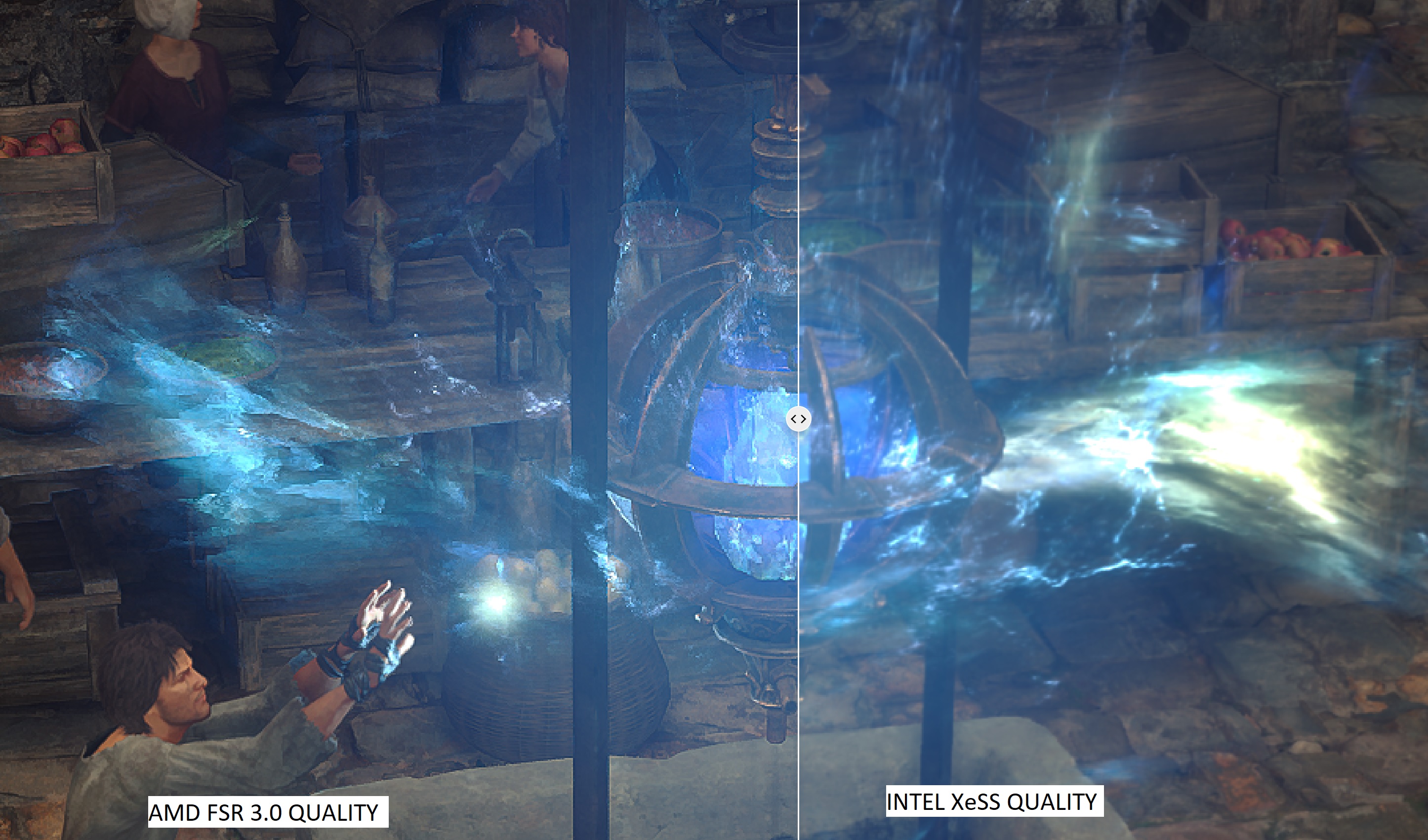
Square Enix has just released Final Fantasy 16 on PC. Now as I’ve said, even though the game does not have any Ray Tracing effects, it’s quite demanding at 4K/Max Settings. The good news is that FF XVI supports NVIDIA DLSS 3, AMD FSR 3.0 and Intel XeSS. As such, we’ve decided to benchmark and compare them.
For these first benchmarks, we used an AMD Ryzen 9 7950X3D, 32GB of DDR5 at 6000Mhz, and NVIDIA’s RTX 4090. We also used Windows 10 64-bit, and the GeForce 561.09 driver. Moreover, we’ve disabled the second CCD on our 7950X3D.
Final Fantasy XVI does not have a built-in benchmark tool. So, for our tests, we used the first Titan fight and the garden/palace area. These areas appear to be among the most demanding locations. As such, these are the areas we’ll also use for our upcoming PC Performance Analysis.
Let’s start with some comparison screenshots. Native 4K is one the left, NVIDIA DLSS 3 Quality is in the middle, and AMD FSR 3.0 is on the right.
At first glance, NVIDIA DLSS 3 Quality appears to be slightly blurrier than Native 4K. However, DLSS 3 Quality offers way better anti-aliasing. Take a look at how much smoother the window looks in the following comparison. Or how much better the tent ropes look. Thanks to its superior AA, DLSS 3 Quality looks, overall, better than Native 4K.
In this game, AMD FSR 3.0 suffers from major artifacts. While we did not notice major ghosting, almost all of the particles are a complete mess. Look how pixelated and “low-res” the whole scene looks with FSR 3.0 in the following comparison. Intel XeSS does not suffer from this issue. As you can see in the second comparison, Intel XeSS handles better the game’s particles.
So, if you have an RTX GPU, you should stick with NVIDIA DLSS 3 as its implementation is great. If you don’t have an RTX GPU but you can maintain 60fps with Super Resolution, you should use Intel XeSS over AMD FSR 3.0. AMD FSR 3.0 with Frame Generation should be your last option.
Performance-wise, all upscaling techniques perform the same. This is a surprise as in numerous games, NVIDIA DLSS 3 can be slower than AMD FSR 3.0. That’s not the case in this title though.
With DLSS 3 Quality Super Resolution, our NVIDIA RTX 4090 could reach frame rates above 70fps. Then, when we used Frame Generation, we got over 100fps all the time.
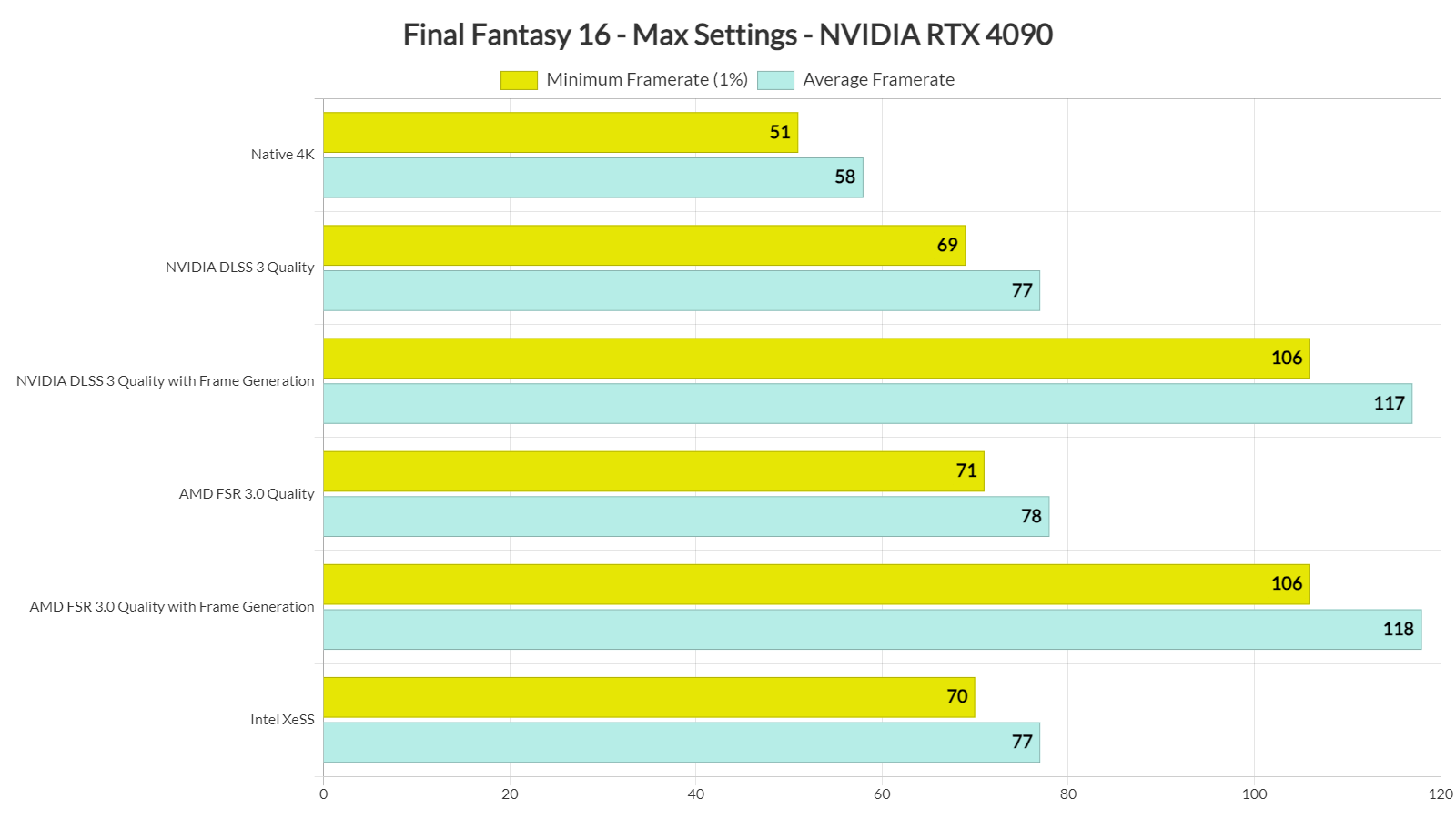
In my opinion, the best way to play FF XVI on an NVIDIA RTX 4090 is with DLAA and DLSS 3 Frame Generation. With this combo, you’ll get framerates higher than 80fps at all times. And, thanks to DLAA, you’ll get a great image.
Our PC Performance Analysis will go live later this week. So, stay tuned for more!


John is the founder and Editor in Chief at DSOGaming. He is a PC gaming fan and highly supports the modding and indie communities. Before creating DSOGaming, John worked on numerous gaming websites. While he is a die-hard PC gamer, his gaming roots can be found on consoles. John loved – and still does – the 16-bit consoles, and considers SNES to be one of the best consoles. Still, the PC platform won him over consoles. That was mainly due to 3DFX and its iconic dedicated 3D accelerator graphics card, Voodoo 2. John has also written a higher degree thesis on the “The Evolution of PC graphics cards.”
Contact: Email


Just not a fan of fake frames. I've tried DLSS in more than a few games, and it almost always sticks out like a sore thumb.
I mean, hey, props to those who can use it and not see anything wrong with it. I wish I could too. 🤷♂️
Another 1080p andy
can i enable dlss with taa ?. i tried dlss with fxaa from nvdia control panel and compared the results i mean dlaa with and without fxaa . and it was better with fxaa but blurry. so taa can solve it and the result would be great .
It wasn't better with control panel fxaa because 1) that doesn't work at all in lost cases 2) fxaa is sh*t in general and doesn't do anything other than blur without any context-sensitive aa that TAA does.
Another option is to try out DLSS Enabler, which translates DLSS 3 to FSR 3.1, including frame-generation.
As I had already mentioned, that gave me a noticeably better experience than the built-in FSR 3 implementation on the Steam Deck.
Could be especially interesting for people with older NVIDIA GPUs lacking support for DLSS 3.
John, could you give this a shot on say a 3090 and share your impression?
I'd be interested to hear your thoughts.
Thanks!
Fake frames =
-> extra input lag
-> degrades image quality
-> higher energy use
-> added lag for background apps due to frame buffer load
-> 0 benefit
Dumbest GPU invention ever. Just the added input lag should be enough to discount frame interpolation, but it has countless other downsides.
Motion smoothing was flat out rejected by TV buyers as horrible. Because it simply degrades the image quality.
Fake frames on games are worse. Not only does it degrade image quality, it adds input lag. Low input lag is one of the most important metrics to have a responsive and engaging game experience.
Depends on the type of game. Wireless controller for example is around 60ms~ latency. An extra 16ms~ for frame gen isn't bad. Especially since as the technology pushes ahead, for that same 16ms~ cost, you can get several times more frames. It will still require a high base frame rate. But pushing from a base of 80fps and maxing out a 240Hz display is well worth it.
It's not ideal for mouse and keyboard first person shooters at lower frame rates. But for anything else, especially controller games, it can be quite good.
Also from personal experience using frame gen actually results in lower power consumption.
I doubt he has even played a game with DLSS FG. He is probably using an AMD card or an older RTX card without DLSS FG support.
I agree in the scenarios he is talking about (i.e. 60 or lower frame gen'd to 90 or so). That feels downright awful and it surprises me sites like this one recommend it.
However in my experience frame gen is good for taking an already high framerate (like 100 or so let's say) and letting it fill out your 144hz monitor or whatever. With that much information to work from there are very few visual issues if any, and the baseline input lag is so good already adding a tiny bit doesn't impact me. YMMV.
A supremely r3tarded yap session with 0 substance.
Motion smoothing on TVs has sadly not been rejected since plenty of fools who are equally as uniformed and clueless as you use it and are impressed by how it makes videos look 🤮.
Then, we have clueless people who also reject all new PC tech with disgust, some because they are esports wannabe sweats who play on ultra low and value input lag above everything else, and partly because they refuse to ugrade their hardware so they never even tried the tech in ideal conditions int the first place.
Nvidia's frame gen is a much superior version of TV interpolation used in medium where it is actually needed (gaming), and not in one where it's gonna look sh**ty no matter what (movies and shows).
Go play Jedi Survivor and tell me that 50-60 with a CPU bottleneck feel better than 80-100 with FG. It also literally only causes visual degradation when it's awfully implemented and REDUCES energy consumption doesn't increase it. Again, you'd know all of this if you weren't running a 1060 in 2024.
You… You can't use frame gen in movies and TV shows what are you even saying?
That's not always the case. Some games are even more responsive with DLSS FG because it enables reflex. For example, in "Black Myth Wukong" I had 48ms input lag with FG and 60ms without FG. 48ms is a perfectly responsive experience, for comparison PS5 games running at 60fps have around 80-100ms. It's impossible to notice DLSS FG input lag, at least on the gamepad, and games like the Final Fantasy should be played on the gamepad anyway.
DLSS FG artifacts are almost unnoticeable during normal gameplay (I only saw artifacts once while scrolling text in Alan Wake 2), but I can easily notice much better motion clarity (on sample and hold displays, higher fps improve motion clarity).
I found DLSS FG very useful because it makes sub 60fps dips unnoticeable. Some games may run at 80fps most of the time but may dip to around 45-55fps on some rare occasions (Alan Wake 2 with PT for example). Normally I would lower some settings to get over 60fps all the time, but thanks to DLSS FG I always get a perfectly smooth and sharp motion quality.
I tried running Alan Wake2 with real 80-100fps and generated 80-100fps and my experience was the same. DLSS FG is an amazing feature, and I always use it, because it works extremely well.
Hard disagree on the DLSS picture looking better than the native one, the aliasing is very minor and the crisper image much better IMO. I've been the odd man out on that for years now though so whatevs.
I also don't agree 50 "real" fps frame gen'd to 80 is a good experience, as it's worse input lag than 60fps always was, and when you're used to 90+ "real" frames that feels awful. Got more people on my side on that one at least.
You got more people who never even tried good frame gen on your side, not AMD's sh*t without reflex. How native 90 feels is irrelevant when you can't reach native 90, and FG 90 is a hell of a lot better than native 50 (which looks like dogsh*t).
Aliasing has also always been the worst element of PQ and is what ruins lower resolutions. It's always much more visible in motion as opposed to pictures so it probably is as bad as mentioned.
Not sure what you mean by not being able to hit 90 genuine frames. That’s possible in this in most areas and of course it’s possible in many, many other games. Thus I know what 90 (and 140, and 200) feels and looks like so I can compare.
Frame gen is a cool tech for adding extra smoothness to something that already has a lot of frames to begin with, but at lower framerates the latency is bad and the image flaws more pronounced as the AI or whatever has less to go on. Same thing with DLSS, where 1440p to 4k can look almost as good as DLAA but as you go lower it looks more and more processed.
I think this is all rather objective analysis. Where your “good enough” is will depend on the person. For me I want at least 90 genuine frames, not 50.
Agreed, "DLSS quality" in this particular frame is not as sharp as native, but DLSS improves performance so much that you can use DLSR without performance penalty and get a far superior image even compared to native.
Hy John, your Frametime graph looks awesome in this game. I have a ryzen 3700x and my graph shows quite a bit frametime spikes. Man, now I need a new CPU. I actually wanted to buy PS5 Pro to play ff16 a second time with better graphics, but for that price I will now upgrade my PC. However, I was suprised, how well it runs with my rtx 3080 tbh.
No pics of your preferred way of playing? I would hope the quality is absolutely stunning compared to DLSS QUALITY if your gonna make that FPS tradeoff.
First sentence "does not have raytracing" uhm… Did you actually ever look at the game or just Google some results and orerent they are yours? At launch the demo had raytracing you couldn't even turn off (which caused the poor performance) it literally only have raytracing for some things. Final full release let's you turns it off now but… Yeah.