
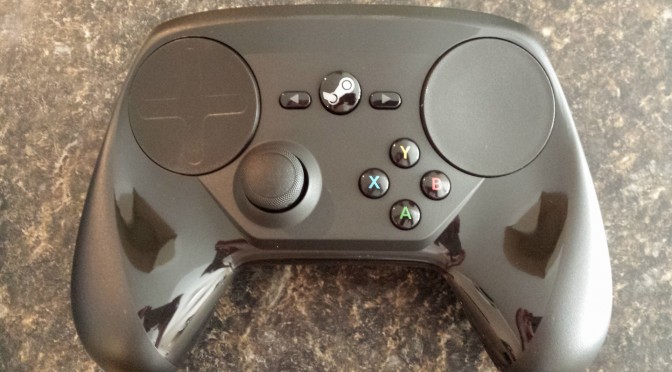
Although regrettably we were not able to get our hards on an actual Steam Machine we did happen to get our very own Steam Controller and Steam Link.
Now as far as performance goes your mileage will vary based on what kid of hardware you have available to you. In a best case scenario your link and desktop will be hardwired. Most people however do not have their house wired for Ethernet like some of us and thus rely on wireless connections in order to connect their many devices to the web.
Let’s start with Design:
Now I will preface this by saying that I’m not really going to go in depth with the layout of Big Picture Mode as this has been available to all of us for some time now and the Steam Link just mirrors your desktop.
Steam Controller

I have to say this design felt a little bit odd at first when sitting in the hand, but that likely comes from years of using controllers that were either flat or their hand grips angled down instead of up, and these feelings pass with time.
Although the controller’s layout is visually appealing the A, B, X and Y buttons may require you to stretch your thumbs a little in order to reach all of the buttons if you’re like me and have large palms but with short fingers. My girlfriend had issues reaching the buttons entirely without shifting her hands on the controller. This poses an issue for the controller’s adaptability within the market because this controller won’t just be used by adults with fully developed hands like my girlfriend and I. Children will likely have a hard time handling the Steam Controller and reaching its buttons. I found though, for the most part the B, and Y buttons were easy to hit so instead I left A and X unused replacing them with the paddles on the back.
The rest of the controller was laid out very intuitively and the controller itself had a decent amount of weight which felt good in the hand, while not cumbersome even after 4 – 6+ hour gaming sessions.
Steam Link

Now this part isn’t as important for a device that is meant to be hidden away and integrated into the rest of ones entertainment center, but should still be discussed anyway.
I have to say Valve checked all of my boxes when it comes to device design and layout.
- The device is small, roughly the size of an empty bi-fold wallet.
- It is unimposing, the steam link is solid black with no bright LEDs
- It has enough ports to go around, 3 USB, 100Mb Ethernet, 1 HDMI and a power connector.
The Steam Link integrates very well with my entertainment center staying out of sight. The only lights you will see on it are the status lights around the Ethernet port.
Let’s get in to Performance:
Steam Controller

The more I use this piece of hardware, the more I fall in love with it. Although it does not replace a conventional controller or even the mouse and keyboard it is a perfect marriage for couch gaming. You can pretty much customize every single aspect of the controller from what action each button does to the level of haptic feedback. Steam even provides some basic templates to work off of as well as the ability to use layouts created by the community. I actually created a layout designed for VR in Half-Life 2 that heavily utilizes the Steam Controllers motion capabilities.
Yes that is right, motion capabilities. This is a feature that is highly overlooked on the Steam Controller, but will play a very valuable role in VR in the near future. Unlike the original Wii’s controller that relied on IR signals to determine location the Steam Controller has a digital gyroscope that alerts orientation allowing for precise motion controls.
Now one aspect that I was unable to fully test was the maximum range of the device as my home is not large enough for me to extend that range without going outside. Even at roughly 15 meters away from the receiver I was still able to able to play Left 4 Dead 2 without any noticeable input lag.
And now for the most important part; how do the touchpads measure up against a mouse and keyboard or regular twin stick gamepad? Well it depends on what you are playing. Although both touchpads are very precise I found it too difficult to be accurate in FPS titles; At low sensitivities I move too slowly to react to enemies close by and at higher sensitivities I am not precise enough to hit enemies at a distance. With more casual non twitch shooters like Postal 2 this is fine as you aren’t hitting many enemies at a distance anyway, but I did not fair well in CS:GO.
Steam Link

Now in my home my network is a bit unconventional so I had to make some changes in order to match more real world examples.
PC and Link Ethernet
As one would expect when connecting both devices via Ethernet assuming your PC isn’t from the dark ages of PC gaming, provides the best results. I was able to stream at this rate without any stuttering what-so-ever it was as if I was playing directly on my PC. There isn’t much to say about this one as it is the best case scenario.
PC and Link Commercial AC WiFi 5Ghz
Now I did test with one device hardwired and the other wireless and vise versa and all results yielded the same. The tests were conducted on a commercial grade AC WiFi Access Point. I did not notice any performance hits what so ever coming off of Ethernet but these are commercial grade access points so it is to be expected. Now I would love to provide real numbers to compare but I was unable to get those types of statistics from the Steam Link without it being hardwired.
Now I did consider testing Commercial N WiFi, but seeing as most of you wont have commercial grade APs I found it pointless.
PC and Link Consumer Grade AC WiFi 5Ghz
Now just like with the previous tests I did test it with my PC being hardwired with the Link being wireless and vice versa but noticed no performance differences. This performance test appeared to be nearly identical to the Commercial Grade test only occasionally there was a stutter which unfortunately dropped me into a pit of spikes in Rouge Legacy on one occasion.
PC N Wifi 5Ghz, Link Ethernet
Now getting into N WiFi speeds is where we really see performance take a hit as N WiFi speeds are roughly a 3rd of AC speeds with AC capping at 1.3Gbps as opposed to N’s cap of 450 Mbps. At this configuration I experience frequent but not unplayable stuttering but it definitely isn’t ideal.
This also wasn’t a true N WiFi test as it was still done on AC hardware but with a soft limit of 450 Mbps so this is really a best case scenario for this type of connection.
PC N WiFi, Link AC WiFi 5Ghz
Once again this is simulated by limiting the speed of my desktop from my router to 450 Mbps. From the Ethernet to AC I saw more frequent stuttering which while still playable becomes frustrating over time and often resulted me getting pounced by a Hunter or grabber by a smoker in Left 4 Dead 2.
PC N WiFi, Link N WiFi 5Ghz
This test was conducted limiting both devices to a max of 450 Mbps. This is important because if you have a router that supports only up to N WiFi speeds it is likely that you will not get this level of performance. Even with the best case scenario for N WiFi it was not enough to even make it playable over Wireless at 1080p but is bearable at 720p
Hardware Used
Commercial AP – Ubiquiti Networks UniFi AC Enterprise WiFi System
Switch – NETGEAR ProSafe JGS524NA
Consumer Router – Asus RT-AC68R
PC Specs
- CPU – Intel 4790K (No overclock)
- Mobo – MSI Z97-G45
- GPU – Nvidia GeForce GTX 780ti 3GB
- RAM – 32GB Corsair Dominator Platinum 2400 MHz
- Wireless Card – ASUS PCE-AC68
- OS – Arch Linux 4.3
- Resolution – 2560 x 1440 (tests conducted at 1920 x 1080)
Performance Overview
If I wanted to do a true Steam Hardware test I could have installed Steam OS and ran the tests, but I figured my already existing Linux Distribution would do just fine. Overall if you are wanting to play at 1920 x 1080 and really get the full experience you will need an Ethernet connection or an AC WiFi capable wireless router and a PC with AC WiFi (Link supports AC WiFi native).
Keep in mind that performance will degrade the further you get from your wireless source but that remained very minimal for me until I dropped below 50% signal strength on my commercial router.
All in all the performance of the Steam Link is very impressive, even at 1080p on pretty graphics intensive games I could play them with very rare stuttering over AC WiFi although occasionally there would be a noticeable audio lag, but this may be an early bug with the Steam Link.
Products Overview
All in all the Steam Controller and Steam Link are the perfect companions for all of your couch gaming needs. I look forward to future updates that Valve provides to better optimize and improve the experience. If you desire a solid couch gaming experience and don’t want to run an extra long HDMI cable to your TV I cannot recommend this hardware enough. The only complaint I have is I wish the Steam Link had the ability to at least surf the web independent from your desktop but that is a minor detail.
If you are interested in seeing additional photos of the hardware, packaging and what is included I have provided the entire album.
Also let us know in the comments below what YOU think of the new Steam Hardware.

Matt Followell is another contributing author here at DSOGaming. A long time fan of PC Gaming and a huge supporter of the open source and homebrew movement. You’ll see him interacting with the community from time to time going by the user-name of Radapples.
Contact: Email