
Silent Hill f True Epic Settings-2

Silent Hill f Looks Incredible With Its Hidden “True Epic” Settings

Last week, Konami released its new Silent Hill game, Silent Hill f. Silent Hill f is powered by Unreal Engine 5. But unlike some other UE5 games, it doesn’t look mind-blowing. While testing it, I noticed the devs cut some corners with the graphics. And I was right. There are some hidden “True Epic” settings you can unlock that make the game look much better.

First of all, Silent Hill f does not let you turn on Hardware Lumen or the real Epic graphics settings from its in-game menu. To use them, you have to edit an INI file. And no, this isn’t a placebo effect. If you make these changes, you will really unlock its higher-quality graphics.

For instance, here is an image I immediately took from the game without these “True Epic” settings. You can clearly see how flat these plants look. They lack proper shadows and AO. Honestly, they look bad. Once you unlock the “True Epic” settings, though, these plants receive all the proper shadows. They no longer feel flat or bland, and they perfectly fit the environment.

SHf bad vegetation

From what I’ve seen, Hardware Lumen only affects the reflections. It does not bring any improvements to GI, shadows, and AO. So, if you are happy with the default reflections, you can skip this one. On the other hand, the higher quality values for all the other settings (like GI, shadows, and AO) make a huge difference.

Naturally, these hidden settings come at a performance cost. On my NVIDIA RTX 5090, I was no longer able to game with 60FPS at Native 4K. To get framerates over 60FPS at all times with these “True Epic” settings, I had to use DLSS Quality.

So, how can you unlock these hidden “True Epic” settings, you ask? Just create an Engine.ini file in your “AppData\Local\SHf\Saved\Config\Windows” folder, and copy-paste the following code. Once done, make sure to make this a “Read Only” file.

[SystemSettings]

r.Lumen.HardwareRayTracing=1 r.Lumen.Reflections.HardwareRayTracing=1 r.Lumen.ScreenProbeGather.HardwareRayTracing=1 r.LumenScene.DirectLighting.HardwareRayTracing=1 r.ContactShadows.OverrideLengthInWS=1 r.ContactShadows.OverrideLength=25 r.ContactShadows.OverrideShadowCastingIntensity=1 r.ContactShadows.OverrideNonShadowCastingIntensity=1 r.SkylightIntensityMultiplier=0.65 r.ShadowQuality=5 r.Shadow.Virtual.ForceOnlyVirtualShadowMaps=0 r.Shadow.Virtual.ResolutionLodBiasLocal=-2.0 r.Shadow.Virtual.ResolutionLodBiasLocalMoving=-2.0 r.Shadow.Virtual.ResolutionLodBiasDirectional=-1.0 r.Shadow.Virtual.smrt.samplesperraylocal=2 r.Shadow.Virtual.smrt.samplesperrayhair=2 r.Shadow.Virtual.smrt.samplesperraydirectional=2 r.Shadow.Virtual.smrt.texelditherscalelocal=4 r.Shadow.Virtual.SMRT.TexelDitherScaleDirectional=6 r.Shadow.Virtual.ScreenRayLength=0.02 r.Shadow.InsetDownscaleFactor=0 r.Shadow.PerObjectDirectionalDepthBias=0.5 r.Shadow.PerObjectDirectionalSlopeDepthBias=3 r.Shadow.PerObjectSpotLightDepthBias=0.5 r.Shadow.PerObjectSpotLightSlopeDepthBias=3 r.Shadow.ShadowMaxSlopeScaleDepthBias=3 r.Shadow.SpotLightDepthBias=0.5 r.lumen.tracemeshsdfs=1 r.Lumen.TraceMeshSDFs.TraceDistance=240 r.Lumen.ScreenTracingSource=1 r.Lumen.DiffuseIndirect.SurfaceBias=8 r.LumenScene.DirectLighting.UpdateFactor=8 r.LumenScene.Radiosity.UpdateFactor=4 r.LumenScene.Radiosity.MaxRayIntensity=99 r.Lumen.ScreenProbeGather.TraceMeshSDFs=0 r.Lumen.ScreenProbeGather.DownsampleFactor=12 r.Lumen.ScreenProbeGather.MaxRayIntensity=1 r.Lumen.ScreenProbeGather.MaxRoughnessToEvaluateRoughSpecular=2 r.Lumen.ScreenProbeGather.MaxRoughnessToEvaluateRoughSpecularForFoliage=1 r.Lumen.ScreenProbeGather.ScreenTraces.HZBTraversal.SkipHairHits=0 r.Lumen.ScreenProbeGather.ScreenTraces.HZBTraversal.SkipFoliageHits=0 r.Lumen.ScreenProbeGather.ScreenTraces.HZBTraversal.FullResDepth=1 r.Lumen.ScreenProbeGather.ScreenTraces.HZBTraversal.MaxIterations=30 r.Lumen.ScreenProbeGather.ScreenTraces.HZBTraversal.RelativeDepthThickness=0.2 r.Lumen.ScreenProbeGather.ShortRangeAO.ScreenSpace.SlopeCompareToleranceScale=4.0 r.Lumen.ScreenProbeGather.ShortRangeAO.ScreenSpace.FoliageOcclusionStrength=1.0 r.Lumen.ScreenProbeGather.ShortRangeAO.MaxMultibounceAlbedo=0.8 r.Lumen.ScreenProbeGather.ShortRangeAO.ApplyDuringIntegration=0 r.Lumen.ScreenProbeGather.RadianceCache.ProbeResolution=64 r.Lumen.ScreenProbeGather.RoughSpecularSamplingMode=1 r.Lumen.ScreenProbeGather.DiffuseIntegralMethod=0 r.Lumen.ScreenProbeGather.Temporal.MaxFramesAccumulated=4 r.Lumen.Reflections.RadianceCache=1 r.Lumen.Reflections.GGXSamplingBias=0.7 r.Lumen.Reflections.HierarchicalScreenTraces.MaxIterations=96 r.Lumen.Reflections.SmoothBias=0.76 r.Lumen.Reflections.MaxRoughnessToTrace=0.63 r.Lumen.Reflections.Temporal.MaxFramesAccumulated=0 r.Lumen.Reflections.DownsampleFactor=0 r.Lumen.Reflections.HiResSurface=1 r.Lumen.Reflections.SampleSceneColorAtHit=1 r.Lumen.Reflections.SpecularScale=0.8 r.Lumen.TranslucencyVolume.MaxRayIntensity=0.62 r.Lumen.TranslucencyReflections.FrontLayer.Enable=1 r.Lumen.TranslucencyReflections.FrontLayer.Allow=1 r.SSR.Quality=4 r.SSR.MaxRoughness=1 r.SSR.Stencil=1 r.VolumetricFog.GridPixelSize=7 r.VolumetricFog.GridSizeZ=192 r.VolumetricFog.UpsampleJitterMultiplier=0.55 r.VolumetricCloud.EnableLocalLightsSampling=1 r.VolumetricRenderTarget.Mode=3 r.SSS.Scale=3.5 r.SSS.SampleSet=2 r.SSS.Quality=1 r.SSS.HalfRes=0 r.SSS.Filter=1 r.Water.SingleLayerWater.SupportCloudShadow=1 r.ParallelShadowsNonWholeScene=1

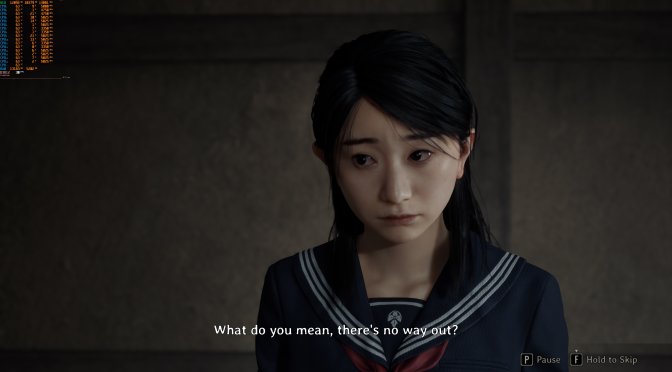
Here are some screenshots I took with these True Epic settings. Just look at them. Silent Hill f looks amazing this way. My guess is that the devs hid these settings so players wouldn’t use them and then complain about bad performance. Sadly, many gamers today do exactly that. This feels just like the old Crysis days, when people complained about the game’s Max Settings being too demanding instead of enjoying how great it looked. And if you’re thinking, “But Crysis was different,” it really wasn’t. The backlash was so strong that Crytek had to rename the settings in Crysis Warhead.

In case you’re wondering, no. These Max Settings will not have any negative effect in the game’s atmosphere. In the video, it might look like the fog is reduced, but that’s not true (you can see this in my screenshots). The only downside is performance. Other than that, there’s nothing bad or wrong about using them.

Speaking of Silent Hill f, I also tried the DLSS 4 Multi-Frame Gen Mod. And, I strongly suggest avoiding it. Right now, this mod brings MAJOR stuttering issues to the game. For the time being, if you want to use Frame Gen, I suggest using OptiScaler, or enabling Smooth Motion/AFMF from your control panel.

Kudos to MxBenchmarkPC for sharing these settings!

Silent Hill f True Epic Settings-1Silent Hill f True Epic Settings-2Silent Hill f True Epic Settings-3 Silent Hill f True Epic Settings-4Silent Hill f True Epic Settings-5Silent Hill f True Epic Settings-6 Silent Hill f True Epic Settings-7Silent Hill f True Epic Settings-8

SILENT HILL f Hardware RT Lumen + True Epic Settings - Pushing Unreal Engine 5 Visuals to the Limit!

45 thoughts on “Silent Hill f Looks Incredible With Its Hidden “True Epic” Settings”

  1. cmon john how u say hardware lumen doesnt affect shadows ao gi?its so obvious it improves much more than just reflections.and i think enabling hardware lumen is enough .other ini tweaks makes the game so dark and kinda ugly .

  2. So I did an experiment, I took some Silent Hill f screens (including these) alongside RE9, RE4 remake & Arkham knight. I wanted to see which one the casual player prefers who doesn't have any technical knowledge & purely by the artistic style and look. So, I prepared a slideshow on my simple led 4k tv & shown it to my little cousin brothers who are 14, 16 and 20 & asked them to select the one they'd prefer as best graphics. Guess what, I was surprised which one they thought was the best looking. They thought Arkham Knight was the Best of them all with RE4 remake as second and they said RE9 & Silent Hill f was quite dull looking. I mean RE4 and RE9 looks pretty same & still they thought 9 was looking boring ?? So there you have it. I think over the years we've gotten too much into technical stuff that we are now unable to judge purely on the art of games.

    1. You're surprised that a pair of teenage boys were more interested in Batman than some Japanese girl covered in blood? But yeah on a pure technical level when people talk about 'better graphics' often times it's hard for most people to split art style from technical excellence. Crysis 2&3 are technically superior games to Crysis 1, but most people prefer Crysis 1 because the jungle environments look so much nicer than a bunch of brick buildings covered in tessellation.

      1. Yeah kind of. I'm not saying that graphics have not evolved. It's just that sometimes we need a fresh perspective on what looks good in general. That feedback is crucial in any multimedia direction

        1. I kinda get what you mean, I think a lot of the geometric detail of these new UE5 games is very impressive but the worlds they're build in are bland. They look like those architectural renderings but if somebody had just set the time of day to midnight.

          1. Yeah, there's no interaction with the environment. With the horsepower of current gen hardwares getting 30~50 fps native in rendering a linear slow walking game feels like playing a stress test tech demo instead of full videogame. I bet GTA VI is gonna look and feel grand in both graphics & gameplay and put UE5 to being the lamest engine of all time

    2. RE4 is more action oriented while RE9 leans more slow paced. There's likely a bias towards manly action games, not that i mind.

      1. I like RE series by heart and RE9 is no exception. It looks incredible no doubt and I'm sure it will perform better too. But the test I did was purely for visual aesthetic as to what youngsters prefer when they see graphics of today's games.

    3. Nice one! Though I presume the results were predictable. You can try again with older games like GTA IV, or something more contemporary like Quantum Break or Star Wars Battlefront, which in my opinion are still leagues ahead of most of today’s games from a technical point of view. How have you been?
      Have you managed to finally finish Red Dead Redemption? 🙂

      1. Hey, welcome back & thanks for suggestion. Thing is they don't visit often and mostly play on handhelds so they were suitable candidates for this. Will do again. It's very interesting for me & they enjoy it as well. And Yeah, I played RDR quite a lot. Still yet to finish it, as I do side stuff and exploring much. Then there is work & RE9 news all over and I'm distracted again lol. There's too many games and little time to play them all.

        1. Thanks for welcoming me back. I was busy loving someone, but we broke up, and now life sucks again, so I returned to gaming to ease my pain. Yeah, I know what you mean about having little time. I'm doing my best to balance things as well. It's hard.

          Yeah, don't rush with Red Dead. Games are meant to be enjoyed, not just checked off a list. I'm glad you're enjoying yourself. Now that I'm back to gaming, could you please recommend some good story-driven single-player games? Unfortunately, my GTX 1060 can't handle most of the new titles. I'm into Rockstar and Remedy games, just so you have a better idea of what I like.

          I have an old list of games recommended by you on this site games like Dark Sector, Bionic Commando, Terminator Salvation, and Wanted but I need more alternatives. I remember I didn't like Dark Sector back in the day, and the reviews for Salvation were awful. I'm going to try them again just to be 100% sure, but yes, any suggestions would be appreciated.

          1. Sad to hear that. Hope you get through it. Thing is I never been into any relationship, kind of a nerd work fella, spending time & money over a girl is too expensive for me. So maybe I'm not the best one to advise, but Men have hard life you know. We need to be tough. I'm sure you'll get better.
            For games, I think maybe you've already played them but I'm suggesting the ones I played recently which you can try :
            Saboteur
            Sleeping Dogs
            Doom Eternal
            Gears 4
            Scarface
            Castlevania Lord of shadow
            (via PCSX2) Urban Reign, Gow1 and Gow2

            These are the ones I really enjoyed playing again. So hopefully you have a good time as well.

    1. Thats the result of gamers complaining about performance on every single game release. Need to hide away those most demanding settings. Gamers are not gamers anymore. Gamers are simply consumers.

    1. Not incompetent, but forced not to downplay consoles. We had this with many games before and sometimes some developer spills the tea. It is not wanted to show weaker consoles next to a more advanced pc release

      1. What stopped them revealing the options in the menu? Sony does trailers of their games showcasing PC advantages over consoles, and their ports sell well despite featuring no pesky Denuvo.
        That PC master race mentality has to go, when we get shitier versions of games on average.

        1. I agree that this must go. But to answer your question: Sony does this if there is a later, new pc release. But they would never do that with a simultaneous pc + console release

        2. What stopped them revealing the options in the menu?

          Clowns that turn every setting to max and still expect 120 FPS with 1% lows of 90, then turn around and call them incompetent when the game doesn't run like that.
          Same thing happened with that recent Avatar game but the devs were actually the ones to reveal the semi-hidden true max settings.

          1. Are those clowns live in the same apartment as you? Why do you care about their opinion so much, if in the end you get less? Stop lowering your standards.
            Also, that Avatar game was dogshit.

          2. I don't care about their opinions but the devs tend to care when it shows up in user reviews for their game which can harm sales, you asked why and I told you why.

        3. Sony has never done that with day one releases. It's only for games that get the PC version 6 months to a year or so later to help show they didn't do just a basic port and actually took advantage of the PC platform. The original article writer already explained why these weren't in options. Some dingus with a 2080 would be mad it doesn't run max settings at 4k or w.e. too many cry babies with no real knowledge of PC hardware, end up buying pre built or used PCs for decent price with alright hardware thinking because it ran fortnite and warzone they're PC has top tier hardware. I have an rtx 3080 and medium graphics settings look like Max when I got the card so I laugh when people try to play outside their hardware bounds.

          1. Are those dinguses live in the same apartment as you? Why do you care about their opinion so much, if in the end you get less? Stop lowering your standards.
            Also, that 3080 is half a decay old now, you might miss out on new toys.

          2. If you're going to try and be rude and ignorant at least use an AI so you sound above the age of 5 like my "half a decay" old 3080 lmfao and what new toys? You do realize the last 2 generations were crap filled AI slop right? Without frame Gen, current gen is basically 30 series still.

  3. Yuk.. would delete my computer before i played this asian filth.. wish steam had real blockers.. already have all indie scrub devs blocked and works pretty well.. have no interest paying $25 for a game that would run on my 80s commodore64… now to get rid of everything the chins and japs make.. surprised the little girl isn't being rammdd by some middle age creature with tentacles..

  4. You can use DLSS Balanced/Performance for even greater performance and still retain amazing image quality, no need to run UE5 games in "native", UE5 is also designed to be used with an upscaler, DLSS4 is as good as it gets with Preset K, make sure you are actually running preset K because the game does NOT use it by default and uses Preset E which is visually inferior even at DLSS Quality. There are several ways to check this so use whatever method you prefer. I prefer DLSS Swapper.

    Here is what it looks and runs like on my 4090, I can lock the game to 60fps at all times with true epic and HWRT Lumen, or it runs at above that unlocked using DLSS.

    https://youtu.be/GkfxRaNSZ3M

    1. People still stubbornly refusing to use upscaling or frame gen is weird, it's just punishing yourself for no good reason

Leave a Reply

Your email address will not be published. Required fields are marked *
