
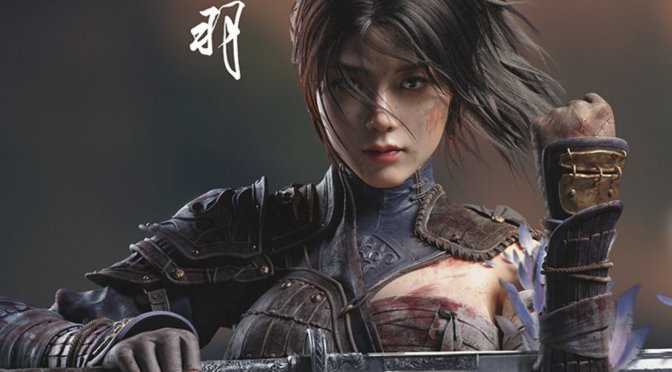
505 Games has lifted the review embargo for WUCHANG: Fallen Feathers. This is a game that a lot of Souls fans are currently looking forward to. And, since the publisher has provided us with a review code, we’ve decided to benchmark it and see how it runs on the PC.
For our benchmarks, I used an AMD Ryzen 9 7950X3D, 32GB of DDR5 at 6000Mhz, AMD’s Radeon RX 6900XT, RX 7900XTX, RX 9070XT, as well as NVIDIA’s RTX 2080Ti, RTX 3080, RTX 4090, RTX 5080, and RTX 5090. I also used Windows 10 64-bit, the GeForce 577.00, and the Radeon Adrenalin Edition 25.6.3 drivers.
Leenzee has added a respectable number of graphics settings to tweak. PC gamers can adjust the quality of Shadows, Effects, Textures, Vegetation, and more. The game also supports NVIDIA DLSS 4 with Multi-Frame Gen. Sadly, though, there is no support for AMD FSR 3.0 or Intel XeSS. That’s a big yellow flag in my books. So, if you don’t own an NVIDIA RTX GPU, you’ll have to rely on UE5’s TSR. And that’s it.


WUCHANG: Fallen Feathers does not have a built-in benchmark tool. So, for our tests, we used the first open-world area. This should give us a pretty good idea of how the rest of the game runs.

At 1080p/Max Settings, you’ll need at least an AMD RX 7900XTX to game with over 60FPS. The NVIDIA RTX 3080 and the AMD Radeon RX 6900XT were nowhere close to a 60FPS experience.

At 1440p/Max Settings, the only GPUs that were able to run WUCHANG smoothly were the NVIDIA RTX 4090 and the RTX 5090. The NVIDIA RTX 5080, AMD Radeon RX 7900XTX, and RX 9070XT were below 60FPS at all times. So, good luck running this game without an upscaling tech.

As for Native 4K/Max Settings, there wasn’t any GPU that could offer a 60FPS experience. The NVIDIA RTX 5090 was pushing a minimum of 47FPS and an average of 54FPS. It’s quite obvious that you’ll need an upscaler to achieve playable framerates in this title.

Now, the bad news is that there is no support for AMD FSR 3.0 or Intel XeSS 2.0. And, as you’ve seen, this game desperately needs them. So, again, I don’t know why Leenzee has not included them. It’s inexcusable.
As I said, the game does support NVIDIA DLSS 4 with Multi-Frame Gen. So, here are some 4K and 8K benchmarks with it.
With DLSS 4 Quality you can achieve constant 60FPS on the NVIDIA RTX 5090. However, this is one of the few games in which DLSS 4 Quality is noticeably worse than DLAA. All of the game’s shadows look more aliased with DLSS 4 Q than with DLAA. This is the first time I’ve seen something like that.

Ultimately, the best way to experience WUCHANG on the NVIDIA RTX 5090 would be at 4K with DLAA and MFG X4. Sadly, though, the DLSS 4 Frame Gen implementation is messed up in this game. Each and every time there is an in-game event, the game will automatically disable Frame Gen.

For example, if some characters start talking in the distance while you’re exploring, the game will turn off Frame Generation. Once they stop talking, it turns it back on. But turning Frame Gen off and on like this causes the game to stutter. You can see this problem in our video at the 5:33 mark. The frame rate drops from 110FPS at 8K down to 42FPS when the characters start talking. Because of this, the game is completely unplayable with Frame Gen turned on. We’ve already told NVIDIA and Leenzee about it, so hopefully they will fix it in a future update.
But what about changing the graphics settings to boost performance? Sadly, things aren’t great here either. The game mostly runs on High settings, and only Shadows can be set to Extreme. This means that using High, Ultra, or Extreme gives almost the same performance. When we dropped the settings to Medium, we got a smooth 60FPS on an NVIDIA RTX 5090 at 4K. But the graphics didn’t look as good. On Low settings, we got over 84FPS, but the game looked even worse.

It’s also important to know that the in-game graphics preset changes the TSR setting by itself. So, if you want to play at full native resolution, you should avoid using these presets. Even the “Extreme” preset doesn’t set TSR to 100%.
For those wondering, yes. WUCHANG: Fallen Feathers also suffers from some traversal stutters. They are not as bad as those in Oblivion Remastered. Still, most of you will notice them. Thankfully, the game does not have any shader compilation stutters. Once you launch it, it will pre-compile its shaders. So, that’s at least good news. The game uses UE 5.1.1.0, so it does not benefit from the improvements that Epic introduced in UE 5.5 or UE 5.6.
Graphics-wise, WUCHANG: Fallen Feathers looks great. Thanks to its Lumen GI, the game world looks amazing. Leenzee has also used a lot of high-resolution textures (though I did spot some low-res ones). There are some shadow pop-ins, but they are not THAT aggressive or annoying. Overall, this is a great-looking game that shows what small teams can achieve with Unreal Engine 5. In other words, it punches above its weight.
All in all, WUCHANG: Fallen Feathers is a really demanding title on PC, and it could benefit from some additional performance optimizations. For gaming at native resolutions, you’ll simply need the best of the best. As such, it’s a bummer the game does not support AMD FSR 3.0 or Intel XeSS 2.0. On the NVIDIA RTX side, DLSS 4 does a great job, but Frame Gen is bugged at the moment. Owners of high-end GPUs will be able to brute-force their way. However, those with mid-tier GPUs will have trouble running it without resorting to TSR or DLSS.
Enjoy!



John is the founder and Editor in Chief at DSOGaming. He is a PC gaming fan and highly supports the modding and indie communities. Before creating DSOGaming, John worked on numerous gaming websites. While he is a die-hard PC gamer, his gaming roots can be found on consoles. John loved – and still does – the 16-bit consoles, and considers SNES to be one of the best consoles. Still, the PC platform won him over consoles. That was mainly due to 3DFX and its iconic dedicated 3D accelerator graphics card, Voodoo 2. John has also written a higher degree thesis on the “The Evolution of PC graphics cards.”
Contact: Email