
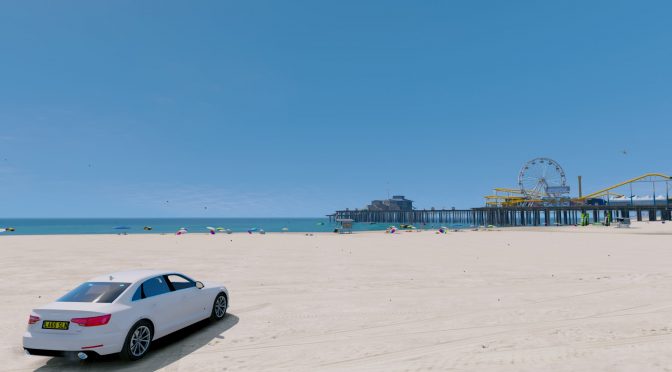
GTA V fans, here is something for you today. Our reader ‘Nova10’ has shared with us some mods that transform GTA V into one of the best looking open-world games to date.
Naturally, and even though these are graphics mods, we strongly suggest using them only while playing the game in offline/single-player mode. Do not attempt using them in GTA Online as you may get banned.
The mods that improve GTA V’s visuals are: “Make Visuals Great Again” and “L.A. Roads” (make sure to also download its latest patch).
The first mod increases the ambience of all lighting, makes rain, clouds, shadows, the sun, coronas, the weather, and the timecyle more realistic.
On the other hand, the second mod replaces all roads,walkway,ground parking,sewer,barrier walls and more with textures based to Google Earth L.A.
Have fun!


John is the founder and Editor in Chief at DSOGaming. He is a PC gaming fan and highly supports the modding and indie communities. Before creating DSOGaming, John worked on numerous gaming websites. While he is a die-hard PC gamer, his gaming roots can be found on consoles. John loved – and still does – the 16-bit consoles, and considers SNES to be one of the best consoles. Still, the PC platform won him over consoles. That was mainly due to 3DFX and its iconic dedicated 3D accelerator graphics card, Voodoo 2. John has also written a higher degree thesis on the “The Evolution of PC graphics cards.”
Contact: Email
“Make visuals great again”
I hate it, but I love it too.
Don’t tell me you don’t?
Anyway, it is more about the silly internet nature.
I love to hate it or I hate to love it.
Oh, give me a break.
FYI Not everyone is an illegal mexican rapist, so not everyone hate him.
Oh, I didn’t realize that only those have reasons to hate that pos.
I’m so f*cking sorry.
ME2 is free on Origin On the House. AND stop fighting, never brings any good. 🙂
Grabbed it a few weeks ago due to an error on Origin. xD
NOW HAVE AT YOU!
Dump DoF and motion blur and this mod looks really nice. I didn’t even bother with the Reshade/ENB; I’ll make one myself if I want to tweak anything.
What car mod are they using? It looks awesome! 🙂
I think they are using the Authentic Car Pack, its like 5 gigs but it replaces all the cars with their real life counterparts.
I ended up grabbing a Mega Car Pack with around 310 cars. It was around 4 gigs. No taxi bug like good ol GTA IV.
looks like a cheap simulator.
If this mod was running for POTUS, I’d vote for it.
Need to disclose the potential performance impact in these graphical mods. Usually it’s best to improve graphics without breaking the peformance but that’s just me.
Yeah, sucks to have a maxed out game only to have to turn down the extended scaling options to keep it at 60 fps. Not as though everything renders that well in the distance anyway.
Nice video completely ruined by the motion blur
it’s more cinematic this way xD
All games should be more cinematic.
Why does motionblur even exist in games?
And what´s up with FXAA?
Don´t even get me startet on chromatic aberration.
I´d rather play with .5fps than with my entire screen being a blurry mess.
Oh no wait I forgot. These effects REDUCE performance. smh
Seriously tho, I really don´t understand the appeal of motionblur or chromatic aberration. And why use FXAA when you can use SMAA
Camera + Object blur can give a really nice effect depending on the game. Metro 2033 it was pretty nice. I usually turn MB off, CA is always off and rather take FXAA over heavy jaggies. I’ve seen some FXAA that is clean and others that leave a blurry mess. If FXAA is the only option I’ll bump up sharpness slightly or Reshade to sharpen if no in game option.
Looks nice, and like it would actually run on contemporary hardware unlike those GTA4ENBs that probably still don’t run well on anything. It’s still amazing that GTA 5 was built around the limitations of the Xbox 360 and PS3. I don’t think of it as a worthwhile game, but as an achievement in software engineering it’s stunning.
Skyrim and GTA 4 ENB’s can get quite heavy and kill frames. But with the right tweaking you can get them looking as good and keep up the frames. I was able to hit close to 60 fps, with the various texture mods, tons of real cars (with no taxi bug) with a heavily tweaked ENB. ICE ENB kills performance with all the extra effects he added. I mixed and matched and got it looking fairly real with good FPS.
????????????????????……
Christos will review shadow tactics blades of shogun. He’s had the game for a while now. However, and as always, we won’t, EVER, pressure him or the other writers (so that he finishes his review in X days). We don’t have any deadlines. Rest assured that a review is coming though
Re: “utter disgusting garbage article”,
In your opinion.
Eh, indie games are very hit and miss imo, most of them are crap.
It sucks, but clicks keep sites like DSOG going and articles about a game like GTAV that’s sold a bajillion copies will attract eyeballs. I’ve never heard of a single game you referred to and I doubt I’d click on articles about any of them.
HOWEVER, maybe DSOG can hire someone to write articles entirely about more obscure but high quality titles. More content is always a good thing.
you didn’t know any of the titles I wrote? that is my point… there are quite too many under the radar (from media) games, games that actually play best on pc that many pc gamers don’t know about, especially those that came from newer generation of gamers, one or two generations of gamers that never experienced great pc games from 80s-90s.
even if such good indie games are only one – three dozens from thousands titles released in a year, they are still great games that need more publications from sites like this, it is sad that companies like rockstar who literally spat on pc gamers are the ones that keep getting attention.
and also I just remembered, dsogaming doesn’t even have walkthrough, guides sections and such.
I’d like to see coverage of lesser-known games, but I understand that sites like DSOG gotta pay the bills or they disappear entirely.
Logic blown…
Guys, it’s cost literally nothing to research and write articles about those lesser known games, even copy paste is a thing.
Secondly more articles = more clicks, I’m saying this harsh words : I don’t believe the fools like someone above who said he won’t click on articles about those lesser known games I mentioned, just some creative and inviting headlines are needed to make people/gamers to click, again it cost nothing to do so.
I seriously hope dsogaming staffs are not as stupid as what you guys seem to think.
They just might be, but you have to understand that a glut of articles about games no one cares about doesn’t equal clicks. Most people will just gloss over those to find articles about games they do care about. You can’t force people to care about obscure indie titles in the same way you can’t get them to buy them.
Finally got around to modding GTA and picked up these mods. Def looks good in game, need to remove the motion blur. Maxed out with no advanced scalling and 2xMSAA/2xMSAA Reflections, I can keep the frames usually above 60 on a 1080, but got some dips into the 40’s.
did you take much of a performance hit from what you were getting before you installed the mod?
I did. Not exactly sure how much, but previously I could max out the distance scaling options and get around the same frame rate, few drops to the 40’s in certain scenes. 10 – 20 fps at the max I am guessing???
Funny thing is I had looked at quite a few benchmarks and couldn’t figure out why my FPS were quite a bit lower when compared to other 1080’s. Turns out all the benches don’t bother turning on extending scaling. Not much of a maxed out benchmark to me. 🙂